Gadgets - Enable or Disable

How to Enable or Disable Gadgets in Windows 7 and Vista


   Information
This will show you how to enable or disable all currently running gadgets, and from being able to add new desktop gadgets for specific or all users in Vista and Windows 7.

You must be logged in as an administrator to be able to do the steps in this tutorial.

   Warning
For you to be able to use and add gadgets to your desktop, you must:
  • Have gadgets enabled below.
  • Show Desktop Items needs to be checked in order to see the gadgets.
EXAMPLE: "Desktop gadgets are managed by your system administrator."
NOTE: When gadgets is disabled, this will be the message all users will get when they try to add a gadget.
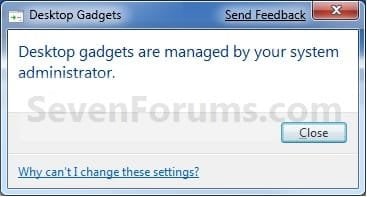
Message.jpg


OPTION ONE

Using a REG File Download


1. To Enable Gadgets for Current User
A) Click on the Download button below to download the file below.
Enable_Gadgets.reg

Download


B) If not already, make sure that you have Windows Gadget Platform checked in Windows Features.

C) Go to step 3.
2. To Disable Gadgets for Only Current User
A) Click on the Download button below to download the file below.
Disable_Gadgets.reg

Download


3. Click on Save, and save the .reg file to the desktop.

4. Right click on the downloaded .reg file and click on Merge.

5. Click on Run, Yes, Yes, and OK when prompted.

6. Log off and log on, or restart the computer to completely apply.
NOTE: Gadgets that are currently running may not be disabled until you do this step.

7. When done, you can delete the downloaded .reg files on the desktop if you like.


OPTION TWO

Through the Local Group Policy Editor


1. Open the all users, specific users or groups, or all users except administrators Local Group Policy Editor for how you want this policy applied.

2. In the left pane, click on to expand User Configuration, Administrative Templates, Windows Components, and Desktop Gadgets. (See screenshot below)
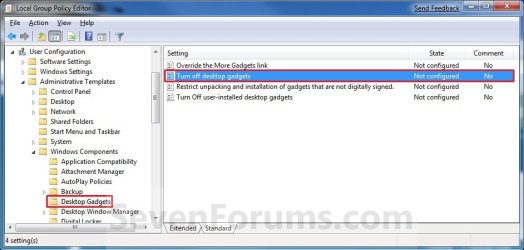
Group_Policy.jpg
3. In the right pane, right click on Turn off desktop gadgets and click on Edit. (See screenshot above)

4. To Enable Gadgets
A) Select (dot) either Not Configured or Disabled. (See screenshot below step 6)

B) If not already, make sure that you have Windows Gadget Platform checked in Windows Features.

C) Go to step 6.
5. To Disable Gadgets
A) Select (dot) Enabled. (See screenshot below step 6)
6. Click on OK. (See screenshot below)
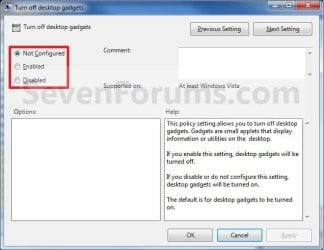
Properties.jpg
7. Close the Local Group Policy Editor window.

8. Log off and log on, or restart the computer to completely apply.
NOTE: Gadgets that are currently running may not be disabled until you do this step.
That's it,
Shawn


Attachments

Last edited:
Sorry, buy you're going to have to get your teacher or administrator to be able to enable this since you do not have and cannot get administrator access.
 

My Computer

Computer type
PC/Desktop
Computer Manufacturer/Model Number
Self built custom
OS
64-bit Windows 11 Pro for Workstations
CPU
Intel i7-8700K OC'd to 5 GHz
Motherboard
ASUS ROG Maximus XI Formula Z390
Memory
64 GB (4x16GB) G.SKILL TridentZ RGB DDR4 3600 MHz
Graphics Card(s)
ASUS ROG-STRIX-GTX1080TI-O11G-GAMING
Sound Card
Integrated
Monitor(s) Displays
2 x Samsung Odyssey G7 27"
Screen Resolution
2560x1440
Hard Drives
1TB Samsung 990 PRO M.2,
4TB Samsung 990 PRO PRO M.2,
TerraMaster F8 SSD Plus NAS
PSU
Seasonic Prime Titanium 850W
Case
Thermaltake Core P3
Cooling
Corsair Hydro H115i
Keyboard
Logitech wireless K800
Mouse
Logitech MX Master 4
Internet Speed
2 Gb/s Download and 100 Mb/s Upload
Antivirus
Malwarebyte Anti-Malware Premium
Browser
Google Chrome
Other Info
Logitech Z625 speaker system,
Logitech BRIO 4K Pro webcam,
HP Color LaserJet Pro MFP M477fdn,
APC SMART-UPS RT 1000 XL - SURT1000XLI,
Galaxy S23 Plus phone
Shawn,
Thank you for the excellent tutorial. It not only helped me to eliminate the threat exposure, but, also, minimally increased by download speed.
 

My Computer

Computer type
PC/Desktop
Computer Manufacturer/Model Number
Dell XPS 420
OS
Windows 10, Home Clean Install
CPU
Intel Core2 processsor Q8200(2.33Ghz 1333FSB) Quad Core Tech
Motherboard
Dell
Memory
6 gb
Graphics Card(s)
ATI Radeon 256MB HD3650
Sound Card
Intergrated 7.1 Channel Audio
Monitor(s) Displays
Dell SP2009W 20"
Hard Drives
640 GB Serial ATA Hard drive
Cooling
Fan
Keyboard
Dell USB Keyboard
Mouse
Dell Premium Optical USB
Internet Speed
DSL 2.85
You're most welcome Rich. Thank you. :)
 

My Computer

Computer type
PC/Desktop
Computer Manufacturer/Model Number
Self built custom
OS
64-bit Windows 11 Pro for Workstations
CPU
Intel i7-8700K OC'd to 5 GHz
Motherboard
ASUS ROG Maximus XI Formula Z390
Memory
64 GB (4x16GB) G.SKILL TridentZ RGB DDR4 3600 MHz
Graphics Card(s)
ASUS ROG-STRIX-GTX1080TI-O11G-GAMING
Sound Card
Integrated
Monitor(s) Displays
2 x Samsung Odyssey G7 27"
Screen Resolution
2560x1440
Hard Drives
1TB Samsung 990 PRO M.2,
4TB Samsung 990 PRO PRO M.2,
TerraMaster F8 SSD Plus NAS
PSU
Seasonic Prime Titanium 850W
Case
Thermaltake Core P3
Cooling
Corsair Hydro H115i
Keyboard
Logitech wireless K800
Mouse
Logitech MX Master 4
Internet Speed
2 Gb/s Download and 100 Mb/s Upload
Antivirus
Malwarebyte Anti-Malware Premium
Browser
Google Chrome
Other Info
Logitech Z625 speaker system,
Logitech BRIO 4K Pro webcam,
HP Color LaserJet Pro MFP M477fdn,
APC SMART-UPS RT 1000 XL - SURT1000XLI,
Galaxy S23 Plus phone

My Computer

Computer Manufacturer/Model Number
Dell 15R Laptop
OS
Windows 7 Home Premium
CPU
Intel Core i5
Memory
6 GB
Hello CB,

Yeah, it does the same thing as in the tutorial, but through a Fix it instead of manually. :)
 

My Computer

Computer type
PC/Desktop
Computer Manufacturer/Model Number
Self built custom
OS
64-bit Windows 11 Pro for Workstations
CPU
Intel i7-8700K OC'd to 5 GHz
Motherboard
ASUS ROG Maximus XI Formula Z390
Memory
64 GB (4x16GB) G.SKILL TridentZ RGB DDR4 3600 MHz
Graphics Card(s)
ASUS ROG-STRIX-GTX1080TI-O11G-GAMING
Sound Card
Integrated
Monitor(s) Displays
2 x Samsung Odyssey G7 27"
Screen Resolution
2560x1440
Hard Drives
1TB Samsung 990 PRO M.2,
4TB Samsung 990 PRO PRO M.2,
TerraMaster F8 SSD Plus NAS
PSU
Seasonic Prime Titanium 850W
Case
Thermaltake Core P3
Cooling
Corsair Hydro H115i
Keyboard
Logitech wireless K800
Mouse
Logitech MX Master 4
Internet Speed
2 Gb/s Download and 100 Mb/s Upload
Antivirus
Malwarebyte Anti-Malware Premium
Browser
Google Chrome
Other Info
Logitech Z625 speaker system,
Logitech BRIO 4K Pro webcam,
HP Color LaserJet Pro MFP M477fdn,
APC SMART-UPS RT 1000 XL - SURT1000XLI,
Galaxy S23 Plus phone
Fix it. Many thanks

I had a strange problem with desktop gadgets that started a couple of days ago. They would not load on start up or restart. Under "view" all the proper boxes were ticked, but the gadgets would not load. I did find that if I unticked "show gadgets" then re-ticked show gadgets, they showed up as normal and stayed that way until a restart. Every single time I restarted the computer they were gone and I had to go through the same routine.

I checked many sources looking for an answer for this and nothing worked until I found your .reg file. Many thanks for your work, and fixing the problem.

I'm still wondering why it happened in the first place though. Any ideas?
 

My Computer

Computer type
PC/Desktop
OS
Windows 7 Professional 64bit
CPU
E6750
Graphics Card(s)
8600 GTS
Antivirus
Avast Free Edition
Browser
Chrome
Update

This problem is weirder than I thought. The .reg file works after ONE restart, then it goes back to the same old thing. If I do the .reg file again, it works, but again only for one restart. Any ideas on this.
 

My Computer

Computer type
PC/Desktop
OS
Windows 7 Professional 64bit
CPU
E6750
Graphics Card(s)
8600 GTS
Antivirus
Avast Free Edition
Browser
Chrome
Hello Redmerc, and welcome to Seven Forums.

Double check your group policy settings in both the User Configuration and Computer Configuration locations to see if it may still be set in them, and getting reapplied after each restart.

In addition, use the Find and Find Next feature in regedit to search for any and all TurnOffSidebar DWORD entries in your registry. If any are found, then delete them.

Hope this helps, :)
Shawn
 

My Computer

Computer type
PC/Desktop
Computer Manufacturer/Model Number
Self built custom
OS
64-bit Windows 11 Pro for Workstations
CPU
Intel i7-8700K OC'd to 5 GHz
Motherboard
ASUS ROG Maximus XI Formula Z390
Memory
64 GB (4x16GB) G.SKILL TridentZ RGB DDR4 3600 MHz
Graphics Card(s)
ASUS ROG-STRIX-GTX1080TI-O11G-GAMING
Sound Card
Integrated
Monitor(s) Displays
2 x Samsung Odyssey G7 27"
Screen Resolution
2560x1440
Hard Drives
1TB Samsung 990 PRO M.2,
4TB Samsung 990 PRO PRO M.2,
TerraMaster F8 SSD Plus NAS
PSU
Seasonic Prime Titanium 850W
Case
Thermaltake Core P3
Cooling
Corsair Hydro H115i
Keyboard
Logitech wireless K800
Mouse
Logitech MX Master 4
Internet Speed
2 Gb/s Download and 100 Mb/s Upload
Antivirus
Malwarebyte Anti-Malware Premium
Browser
Google Chrome
Other Info
Logitech Z625 speaker system,
Logitech BRIO 4K Pro webcam,
HP Color LaserJet Pro MFP M477fdn,
APC SMART-UPS RT 1000 XL - SURT1000XLI,
Galaxy S23 Plus phone
I had checked the registry before, but I did it again, and no such entries were found.
In the group policy settings: I can find and access both User and Computer configuration, but I do not know what to look for. Almost everything does say "not configured".

If you could tell me what I need to check, in those setting, I will do so.

Thanks for your fast reply.


Hello Redmerc, and welcome to Seven Forums.

Double check your group policy settings in both the User Configuration and Computer Configuration locations to see if it may still be set in them, and getting reapplied after each restart.

In addition, use the Find and Find Next feature in regedit to search for any and all TurnOffSidebar DWORD entries in your registry. If any are found, then delete them.

Hope this helps, :)
Shawn
 

My Computer

Computer type
PC/Desktop
OS
Windows 7 Professional 64bit
CPU
E6750
Graphics Card(s)
8600 GTS
Antivirus
Avast Free Edition
Browser
Chrome
In group policy, you would go to both locations (User & Computer) in OPTION TWO of the tutorial to make sure that they are both set to "Not Configured". They would be by default unless previously changed.
 

My Computer

Computer type
PC/Desktop
Computer Manufacturer/Model Number
Self built custom
OS
64-bit Windows 11 Pro for Workstations
CPU
Intel i7-8700K OC'd to 5 GHz
Motherboard
ASUS ROG Maximus XI Formula Z390
Memory
64 GB (4x16GB) G.SKILL TridentZ RGB DDR4 3600 MHz
Graphics Card(s)
ASUS ROG-STRIX-GTX1080TI-O11G-GAMING
Sound Card
Integrated
Monitor(s) Displays
2 x Samsung Odyssey G7 27"
Screen Resolution
2560x1440
Hard Drives
1TB Samsung 990 PRO M.2,
4TB Samsung 990 PRO PRO M.2,
TerraMaster F8 SSD Plus NAS
PSU
Seasonic Prime Titanium 850W
Case
Thermaltake Core P3
Cooling
Corsair Hydro H115i
Keyboard
Logitech wireless K800
Mouse
Logitech MX Master 4
Internet Speed
2 Gb/s Download and 100 Mb/s Upload
Antivirus
Malwarebyte Anti-Malware Premium
Browser
Google Chrome
Other Info
Logitech Z625 speaker system,
Logitech BRIO 4K Pro webcam,
HP Color LaserJet Pro MFP M477fdn,
APC SMART-UPS RT 1000 XL - SURT1000XLI,
Galaxy S23 Plus phone
OK, I just checked them and they are Not Configured, just as they are supposed to be. Would you suggest disable turn off windows gadgets, or leave it alone?


In group policy, you would go to both locations (User & Computer) in OPTION TWO of the tutorial to make sure that they are both set to "Not Configured". They would be by default unless previously changed.
 

My Computer

Computer type
PC/Desktop
OS
Windows 7 Professional 64bit
CPU
E6750
Graphics Card(s)
8600 GTS
Antivirus
Avast Free Edition
Browser
Chrome
Personally, I would not use gadgets anymore since they could pose a security breach risk.
 

My Computer

Computer type
PC/Desktop
Computer Manufacturer/Model Number
Self built custom
OS
64-bit Windows 11 Pro for Workstations
CPU
Intel i7-8700K OC'd to 5 GHz
Motherboard
ASUS ROG Maximus XI Formula Z390
Memory
64 GB (4x16GB) G.SKILL TridentZ RGB DDR4 3600 MHz
Graphics Card(s)
ASUS ROG-STRIX-GTX1080TI-O11G-GAMING
Sound Card
Integrated
Monitor(s) Displays
2 x Samsung Odyssey G7 27"
Screen Resolution
2560x1440
Hard Drives
1TB Samsung 990 PRO M.2,
4TB Samsung 990 PRO PRO M.2,
TerraMaster F8 SSD Plus NAS
PSU
Seasonic Prime Titanium 850W
Case
Thermaltake Core P3
Cooling
Corsair Hydro H115i
Keyboard
Logitech wireless K800
Mouse
Logitech MX Master 4
Internet Speed
2 Gb/s Download and 100 Mb/s Upload
Antivirus
Malwarebyte Anti-Malware Premium
Browser
Google Chrome
Other Info
Logitech Z625 speaker system,
Logitech BRIO 4K Pro webcam,
HP Color LaserJet Pro MFP M477fdn,
APC SMART-UPS RT 1000 XL - SURT1000XLI,
Galaxy S23 Plus phone
Well, that may be, but I want them to work, and they should be working. Something just went wrong with Windows and I won't give up until I find the fix or re-install the whole thing. The real issue is, this should not be happening.

Thanks for your help though.


Personally, I would not use gadgets anymore since they could pose a security breach risk.
 

My Computer

Computer type
PC/Desktop
OS
Windows 7 Professional 64bit
CPU
E6750
Graphics Card(s)
8600 GTS
Antivirus
Avast Free Edition
Browser
Chrome
That's fine. I was just giving you my opinion you asked about.

Since this started a few days back, you could do a system restore using a restore point (if available) dated before this started to hopefully undo the unknown cause and fix this for you. :)
 

My Computer

Computer type
PC/Desktop
Computer Manufacturer/Model Number
Self built custom
OS
64-bit Windows 11 Pro for Workstations
CPU
Intel i7-8700K OC'd to 5 GHz
Motherboard
ASUS ROG Maximus XI Formula Z390
Memory
64 GB (4x16GB) G.SKILL TridentZ RGB DDR4 3600 MHz
Graphics Card(s)
ASUS ROG-STRIX-GTX1080TI-O11G-GAMING
Sound Card
Integrated
Monitor(s) Displays
2 x Samsung Odyssey G7 27"
Screen Resolution
2560x1440
Hard Drives
1TB Samsung 990 PRO M.2,
4TB Samsung 990 PRO PRO M.2,
TerraMaster F8 SSD Plus NAS
PSU
Seasonic Prime Titanium 850W
Case
Thermaltake Core P3
Cooling
Corsair Hydro H115i
Keyboard
Logitech wireless K800
Mouse
Logitech MX Master 4
Internet Speed
2 Gb/s Download and 100 Mb/s Upload
Antivirus
Malwarebyte Anti-Malware Premium
Browser
Google Chrome
Other Info
Logitech Z625 speaker system,
Logitech BRIO 4K Pro webcam,
HP Color LaserJet Pro MFP M477fdn,
APC SMART-UPS RT 1000 XL - SURT1000XLI,
Galaxy S23 Plus phone
Just wanted to thank you for trying, which was the reason that I joined the forums actually. However, I did solve my problem. In the past few days there were more than a few Windows updates and IE 10. I didn't want to go through that again, just to the same problem come back. I also had a program update to Avast free VS. On a hunch, I uninstalled it, and everything is fine. I've done repeated restarts and it's still fine. So, Avast was the problem, not Windows.

I made the switch to AVG Free and I have no problems at all with the gadgets. Things are as they should be. I thought you might like to know.

And, thanks again.


That's fine. I was just giving you my opinion you asked about.

Since this started a few days back, you could do a system restore using a restore point (if available) dated before this started to hopefully undo the unknown cause and fix this for you. :)
 

My Computer

Computer type
PC/Desktop
OS
Windows 7 Professional 64bit
CPU
E6750
Graphics Card(s)
8600 GTS
Antivirus
Avast Free Edition
Browser
Chrome
Redmerc,

I'm happy to hear that you got it sorted. Thank you for posting back with your findings. :)
 

My Computer

Computer type
PC/Desktop
Computer Manufacturer/Model Number
Self built custom
OS
64-bit Windows 11 Pro for Workstations
CPU
Intel i7-8700K OC'd to 5 GHz
Motherboard
ASUS ROG Maximus XI Formula Z390
Memory
64 GB (4x16GB) G.SKILL TridentZ RGB DDR4 3600 MHz
Graphics Card(s)
ASUS ROG-STRIX-GTX1080TI-O11G-GAMING
Sound Card
Integrated
Monitor(s) Displays
2 x Samsung Odyssey G7 27"
Screen Resolution
2560x1440
Hard Drives
1TB Samsung 990 PRO M.2,
4TB Samsung 990 PRO PRO M.2,
TerraMaster F8 SSD Plus NAS
PSU
Seasonic Prime Titanium 850W
Case
Thermaltake Core P3
Cooling
Corsair Hydro H115i
Keyboard
Logitech wireless K800
Mouse
Logitech MX Master 4
Internet Speed
2 Gb/s Download and 100 Mb/s Upload
Antivirus
Malwarebyte Anti-Malware Premium
Browser
Google Chrome
Other Info
Logitech Z625 speaker system,
Logitech BRIO 4K Pro webcam,
HP Color LaserJet Pro MFP M477fdn,
APC SMART-UPS RT 1000 XL - SURT1000XLI,
Galaxy S23 Plus phone
Option 1 Worked Great

I tried Option 1 and it worked perfectly for me. Thank you! :D
 

My Computer

OS
Windows 7 Home Premium 64bit
Personally, I would not use gadgets anymore since they could pose a security breach risk.

Well Brink if you're not using gadgets anymore guess I'll remove them too. Bummer :(, kinda like the weather & CPU gadgets but certainly not worth the risk. Upgraded to IE11 & looks like that is even less gadget friendly. @ least IE11 auto pops the Outlook pswd, wouldn't that be a security risk too? :confused:

thanks
 

My Computer

Computer type
PC/Desktop
Computer Manufacturer/Model Number
Dell XPS 435MT
OS
Windows 7 Ultimate x64
CPU
Intel Core i7-950
Motherboard
Dell 0R849J
Memory
Elpida DDR3 12 Gb 1066
Graphics Card(s)
EVGA nVidia GeForce GTX 760 2GB GDDR5
Sound Card
Syba PCI-e VIA VT1723 Envy24DT
Monitor(s) Displays
Dell 3007WFP-HC, Nixeus Vue 30
Screen Resolution
1920 x 1200
Hard Drives
Crucial M500 240GB
1TB Seagate Barracuda
PSU
Corsair CX500M
Keyboard
Logitech MX 5500 combo
Mouse
Logitech MX 5500
Internet Speed
300Mbps
Antivirus
MSE
Browser
IE11 & Chrome
Other Info
MBAM Premium
Hello newpgm, :)

Yeah, it's all moving to apps from the Windows Store in Windows 8/8.1 now. Gadgets have been dropped like a hot potato.

The AutoComplete of the Outlook password would be more of a security risk if someone else has access to your computer and account.
 

My Computer

Computer type
PC/Desktop
Computer Manufacturer/Model Number
Self built custom
OS
64-bit Windows 11 Pro for Workstations
CPU
Intel i7-8700K OC'd to 5 GHz
Motherboard
ASUS ROG Maximus XI Formula Z390
Memory
64 GB (4x16GB) G.SKILL TridentZ RGB DDR4 3600 MHz
Graphics Card(s)
ASUS ROG-STRIX-GTX1080TI-O11G-GAMING
Sound Card
Integrated
Monitor(s) Displays
2 x Samsung Odyssey G7 27"
Screen Resolution
2560x1440
Hard Drives
1TB Samsung 990 PRO M.2,
4TB Samsung 990 PRO PRO M.2,
TerraMaster F8 SSD Plus NAS
PSU
Seasonic Prime Titanium 850W
Case
Thermaltake Core P3
Cooling
Corsair Hydro H115i
Keyboard
Logitech wireless K800
Mouse
Logitech MX Master 4
Internet Speed
2 Gb/s Download and 100 Mb/s Upload
Antivirus
Malwarebyte Anti-Malware Premium
Browser
Google Chrome
Other Info
Logitech Z625 speaker system,
Logitech BRIO 4K Pro webcam,
HP Color LaserJet Pro MFP M477fdn,
APC SMART-UPS RT 1000 XL - SURT1000XLI,
Galaxy S23 Plus phone
That's for sure! Once 8 was out things got very different in a hurry!

Gadgets have been discontinued


Gadgets are no longer available on our website because the Windows Sidebar platform in Windows 7 and Windows Vista has serious vulnerabilities. Microsoft has retired the feature in newer releases of Windows. Gadgets could be exploited to harm your computer, access your computer's files, show you objectionable content, or change their behavior at any time. An attacker could even use a gadget to take complete control of your PC. If you're concerned about the safety of gadgets you’ve downloaded, find out more about gadgets and steps you can take to protect your PC.


Apps do more, and are more secure

2ea2e161-b620-49a9-85cd-50b2fac76b6c_4.jpg


Gadgets aren't available anymore. Instead, Windows 10 now comes with lots of apps that do many of the same things and much more. You can get more apps from the Windows Store for everything from games to calendars. Some apps are better versions of the gadgets you love, and many of them are free.
Find out more about apps for Windows
That's what you run smack into at the former downloads page at the Windows site. Gadgets have been discontinued - Microsoft Windows


Solution? Yes there is one! Intended for Windows 8 you may be surprised that one 3rd party element came up with a working option suitable for 7 as well!


When having a folder full of gadgets but could only get the original defaults to work and not able to add any more from the folder I ran into first the "7 sidebar" gadget by chance not when just looking for how to get things working on 7 again but actually tried this out on W10 lately. 7 Sidebar Gadget - Vista-Sidebar for Windows 7


That replaces the need to copy files over from any Vista installation with the replacement gadget form of sidebar seen there. Then when continuing on to see what would work on the newer versions I came across the 8GadgetPack intended for 8, 8.1, and 10 but works like a champ on 7 for anyone having problems adding or wanting additiional gadgets. 8GadgetPack - Gadgets for Windows 8 / 8.1 / 10


Once installed you simply right click on the desktop and select the Windows gadgets option as always but instantly find four screens full of gadgets which still includes the default gadgets that came with 7. The 8GadgetPack also has it's own sidebar that was used here.
 

Attachments

  • Sidebar and Other Gadgets 7-8-8_1-10.jpg
    Sidebar and Other Gadgets 7-8-8_1-10.jpg
    94.9 KB · Views: 469

My Computers

System One System Two

  • Computer type
    PC/Desktop
    Computer Manufacturer/Model Number
    Custom builds = 2
    OS
    W7 Ultimate x64/W10 Pro x64/W11 Pro Triple Boot - Main PC W7 Remote PC Micro ATX W7 Pro x64/W11 Pro
    CPU
    AMD Phenom II X4 975 Deneb 3.6ghz - 965 2nd remote pc
    Motherboard
    Gigabyte GA-790XTA-UD4-Gigabyte GA-880GM-D2H remote pc
    Memory
    Kingston Hyper X DDR3 1600 1.5v 16gb - Hyper X Fury 8gb 2nd
    Graphics Card(s)
    MSI HD Radeon 5750 1gb - MSI HD Radeon 6450 on mini tower
    Sound Card
    Creative Labs X-Fi Xtreme Audio P - Realtek onooard 2nd case
    Monitor(s) Displays
    ASUS VW199T-P 19" HP 2082a Main-HP 2082a 20" remote pc
    Screen Resolution
    Asus 1440x900 - HP 1600x900
    Hard Drives
    WD Black 1TB HD per OS W7, W10, and pending W11 presently on 500gb OS Drive - Pending Triple 1TB HDs for Spanned Storage/backup volume
    Single 2TB external USB enclosure, single 1TB System 7 Host/Boot drive, Pending 8TB external HD for system image b
    PSU
    Corsair 750TX - primary / Corsair CX600 - second
    Case
    Antec 900-2 - SSD compatible / NZXT Vulcan mini tower
    Cooling
    Zalman CNPS9900A
    Keyboard
    AZIO L70 Backlit Letters Gaming - ONN Cordless/USB
    Mouse
    MSI DS200 Programmable, Logitech Cordless
    Internet Speed
    30mbps upgrade - primary hard wired - mini tower usb WiFi
    Antivirus
    GFI VIPRE Internet Security 2014 on W7 2016 beta on W10,
    Browser
    Cyberfox, WaterFox 64bit FF variants, FireFox x64, Pale Moon
    Other Info
    Accomdata fan cooled usb 2.0 PIDE/Sata II, III external enclosure.
    Sambient usb/eSata PATA/Sata II, III external enclosure.
  • Computer type
    PC/Desktop
    System Manufacturer/Model Number
    CUSTOM ASSEMBLY
    OS
    W7 Pro x64/W11 Pro
    CPU
    AMD Deneb 3.6ghz - 965
    Motherboard
    Gigabyte GA-880GM-D2H remote pc
    Memory
    Kingston Hyper X Fury 8gb
    Graphics Card(s)
    MSI HD Radeon 6450 DVI Output
    Sound Card
    Realtek onooard Creative or Other separate PENDING
    Monitor(s) Displays
    VIZIO 32" LCD TV Separate LCD Pending
    Screen Resolution
    1600x1080
    Hard Drives
    WD 500GB OS Host/Boot WD Green 1TB Storage/Backup
    PSU
    Corsair 600W - THERMALTAKE 600W spare case
    Case
    NZXT Vulcan mini tower
    Cooling
    Twin 120mm Top Fans - 240mm Side Cover
    Keyboard
    ONN Cordless/USB Logitech Cordless
    Mouse
    ONN USB/Cordless - Logitech Cordless
    Internet Speed
    DSL 5G
    Browser
    MS Edge, FireFox, WaterFox x64, FireFox Nightly
    Other Info
    OS Testing-Remote Access to Main TeamViewer
Back
Top