
Game Icon's Vanishing Act

seekermeister

Old School
Guru
Gold Member
VIP
Local time
5:25 AM
Messages
6,618
Location
Indian Territory
There has been a couple of times that I found that renaming the desktop icons for some programs (all that I remember were games), that the icons would disappear, and I had to send new ones from the program's folder to desktop for them to stay.

However this last time with F.E.A.R. after rebooting, the original icons reappeared, which was a little eerie with all of those eyes on the desktop. The reason that I had to reinstall the game, was that the NoCD exe that I had been using for more than a year, had disappeared from the program's folder. Even more strange was the fact that when I moved the NoCD exe into the new install, it disappeared within a couple of seconds, and since I moved it there, instead of copy/pasting it, I no longer have the patch available, since I could not find it any longer on the internet.

However, my question is not about finding the patch, but to find a reason for the disapearances in the first place...any ideas?
 

My Computer My Computer

Computer Manufacturer/Model Number
DIY
OS
W7x64 Pro, SuSe 12.1/** W7 x64 Pro, XP MCE
CPU
Phenom II 1090T w/Noctua NH-D14 /**4400+ X2 w/CM Hyper TX 3
Motherboard
ASRock 890FX Deluxe 4/**A8N-SLI
Memory
2 x 2GB Patriot PGS34g1600LLKA/**4x1GB Corsair VS
Graphics Card(s)
EVGA GTX460 SC/**EVGA 8800GTS
Sound Card
Asus Xonar D2X/**Xonar D1
Monitor(s) Displays
Acer X233H, Dell E152FPc /**LG M237-WD
Screen Resolution
1920x1080 & 1024x768/**1980x1080
Hard Drives
WDC 2TB, 1.5TB, 1TB, 500GB,Seagate 500GB , Maxtor 80GB /**500GB Seagate & WDC 1TB Black
PSU
CM RS600 w/ APC BX1000G/**Antec 500 TP w/ APC BX1000
Case
HAF922/**Antec 1040IIB
Cooling
3x200mm, 1x140 and 1x120mm/**5x80mm fans
Keyboard
Logitech Media USB/**Saitek Eclipse
Mouse
Cordless Trackman Wheel/**Ditto
Internet Speed
3.3Mbps
Other Info
SB 560 5.1 w/ Sennheiser RS140/**Creative T20 speakers, Dvico FusionHDTV7 Gold RT, Cisco E3000, HP 5510V AIO, Linksys E3000, Belkin F5U237 hub and **F5D8055 adapter
(** = 2nd rig)
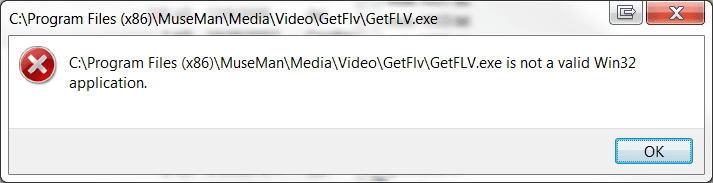
It has happened again, but this time not with a game. I tried to launch GetFLV, and a window appeared, saying that it was not a valid Win32 app. I checked in the program's directory and the .exe for the program had disappeared. I then uninstalled it, and downloaded a newer version to install, but upon completion of the installation, when it asked whether to launch the program, I selected yes, and got a similar error. Again, when I checked in the program's directory, there was no .exe for the program.

Something nefarious is going on, but none of my AV or malware apps have squawked about anything. Any Ideas would be appreciated.
 

My Computer My Computer

Computer Manufacturer/Model Number
DIY
OS
W7x64 Pro, SuSe 12.1/** W7 x64 Pro, XP MCE
CPU
Phenom II 1090T w/Noctua NH-D14 /**4400+ X2 w/CM Hyper TX 3
Motherboard
ASRock 890FX Deluxe 4/**A8N-SLI
Memory
2 x 2GB Patriot PGS34g1600LLKA/**4x1GB Corsair VS
Graphics Card(s)
EVGA GTX460 SC/**EVGA 8800GTS
Sound Card
Asus Xonar D2X/**Xonar D1
Monitor(s) Displays
Acer X233H, Dell E152FPc /**LG M237-WD
Screen Resolution
1920x1080 & 1024x768/**1980x1080
Hard Drives
WDC 2TB, 1.5TB, 1TB, 500GB,Seagate 500GB , Maxtor 80GB /**500GB Seagate & WDC 1TB Black
PSU
CM RS600 w/ APC BX1000G/**Antec 500 TP w/ APC BX1000
Case
HAF922/**Antec 1040IIB
Cooling
3x200mm, 1x140 and 1x120mm/**5x80mm fans
Keyboard
Logitech Media USB/**Saitek Eclipse
Mouse
Cordless Trackman Wheel/**Ditto
Internet Speed
3.3Mbps
Other Info
SB 560 5.1 w/ Sennheiser RS140/**Creative T20 speakers, Dvico FusionHDTV7 Gold RT, Cisco E3000, HP 5510V AIO, Linksys E3000, Belkin F5U237 hub and **F5D8055 adapter
(** = 2nd rig)
Wow that's strange, I've never seen anything like that.

Try System File Checker, sfc /scannow on the Command Prompt.

Or if possible, do a system restore to a point long before the .exe files of your programs started disappearing for no reason but that would not reveal you the cause of this mysterious problem.
 

My Computer My Computer

Computer Manufacturer/Model Number
Custom Built
OS
Windows 7 Ultimate 32 Bit, Windows Developer Preview, Linux Mint 9 Gnome 32 Bit
CPU
Intel Pentium Dual CPU E2180@2GHz
Motherboard
Elitegroup 671T-M3
Graphics Card(s)
NVIDIA GeForce 7200 GS
Monitor(s) Displays
AOC TFT1560 15" LCD Monitor
Screen Resolution
1024x768
Keyboard
Logitech USB Keyboard

My Computer My Computer

Computer Manufacturer/Model Number
Custom Built
OS
Windows 7 Ultimate 32 Bit, Windows Developer Preview, Linux Mint 9 Gnome 32 Bit
CPU
Intel Pentium Dual CPU E2180@2GHz
Motherboard
Elitegroup 671T-M3
Graphics Card(s)
NVIDIA GeForce 7200 GS
Monitor(s) Displays
AOC TFT1560 15" LCD Monitor
Screen Resolution
1024x768
Keyboard
Logitech USB Keyboard
I tried a System Restore, but unfortunately, the oldest restore point that I had only went back to the date that I reinstalled F.E.A.R. (5-5-11). As expected, the game exe was still missing, but the exe for GetFlv was where it should have been. However, when I attempted to launch it, it disappeared with the same Windows error as before. I then restored from an image (4-30-11), which I knew predated the problem, but I found the game folder totally empty, except for a shortcut that was inoperative. When I went to GetFLV's folder, it was a repeat of what happened before.

Even if this problem was caused by some kind of malware, hacking or OS error, I fail to understand how it would effect the OS after imaging. I did a very quick scan of the Google returns, and so far, haven't found a solution in them, but I will keep looking. I would consider doing a clean install of the OS, but considering what occurred with the image, I doubt that the install would fare any better, and I would lose a lot of time in the process.

I would like to know the origin of the error message, because it might suggest a solution, but the only thing that I can think of possibly related is DEP, but I do not recall it making files disappear. For what it is worth, I have included a screenshot of the error message"
 

Attachments

  • GetFLV.png
    GetFLV.png
    12.1 KB · Views: 1
Last edited:

My Computer My Computer

Computer Manufacturer/Model Number
DIY
OS
W7x64 Pro, SuSe 12.1/** W7 x64 Pro, XP MCE
CPU
Phenom II 1090T w/Noctua NH-D14 /**4400+ X2 w/CM Hyper TX 3
Motherboard
ASRock 890FX Deluxe 4/**A8N-SLI
Memory
2 x 2GB Patriot PGS34g1600LLKA/**4x1GB Corsair VS
Graphics Card(s)
EVGA GTX460 SC/**EVGA 8800GTS
Sound Card
Asus Xonar D2X/**Xonar D1
Monitor(s) Displays
Acer X233H, Dell E152FPc /**LG M237-WD
Screen Resolution
1920x1080 & 1024x768/**1980x1080
Hard Drives
WDC 2TB, 1.5TB, 1TB, 500GB,Seagate 500GB , Maxtor 80GB /**500GB Seagate & WDC 1TB Black
PSU
CM RS600 w/ APC BX1000G/**Antec 500 TP w/ APC BX1000
Case
HAF922/**Antec 1040IIB
Cooling
3x200mm, 1x140 and 1x120mm/**5x80mm fans
Keyboard
Logitech Media USB/**Saitek Eclipse
Mouse
Cordless Trackman Wheel/**Ditto
Internet Speed
3.3Mbps
Other Info
SB 560 5.1 w/ Sennheiser RS140/**Creative T20 speakers, Dvico FusionHDTV7 Gold RT, Cisco E3000, HP 5510V AIO, Linksys E3000, Belkin F5U237 hub and **F5D8055 adapter
(** = 2nd rig)
I decided to go back to an even earlier backup image (3-30-11), and it appears that this time the problem was resolved...at least F.E.A.R. plays normally. I tried using GetFLV, and it does initiate okay, but I got no audio from it, so I installed an update version and the audio is still mute. I then tested online audio with Opera, and it also produces no sound. Neither app is muted, and the volume is up on both, but there is no green indicator to show that any audio is being produced. Audio is normal for system sounds and games, so why would online audio differ?
 

My Computer My Computer

Computer Manufacturer/Model Number
DIY
OS
W7x64 Pro, SuSe 12.1/** W7 x64 Pro, XP MCE
CPU
Phenom II 1090T w/Noctua NH-D14 /**4400+ X2 w/CM Hyper TX 3
Motherboard
ASRock 890FX Deluxe 4/**A8N-SLI
Memory
2 x 2GB Patriot PGS34g1600LLKA/**4x1GB Corsair VS
Graphics Card(s)
EVGA GTX460 SC/**EVGA 8800GTS
Sound Card
Asus Xonar D2X/**Xonar D1
Monitor(s) Displays
Acer X233H, Dell E152FPc /**LG M237-WD
Screen Resolution
1920x1080 & 1024x768/**1980x1080
Hard Drives
WDC 2TB, 1.5TB, 1TB, 500GB,Seagate 500GB , Maxtor 80GB /**500GB Seagate & WDC 1TB Black
PSU
CM RS600 w/ APC BX1000G/**Antec 500 TP w/ APC BX1000
Case
HAF922/**Antec 1040IIB
Cooling
3x200mm, 1x140 and 1x120mm/**5x80mm fans
Keyboard
Logitech Media USB/**Saitek Eclipse
Mouse
Cordless Trackman Wheel/**Ditto
Internet Speed
3.3Mbps
Other Info
SB 560 5.1 w/ Sennheiser RS140/**Creative T20 speakers, Dvico FusionHDTV7 Gold RT, Cisco E3000, HP 5510V AIO, Linksys E3000, Belkin F5U237 hub and **F5D8055 adapter
(** = 2nd rig)
The problem with dealing with a complex problem, is that the simple solutions too often evade me. As it turned out, the audio was muted on the Hulu website. Now I've got the app, audio and video, but for some reason I can't download anything.
 

My Computer My Computer

Computer Manufacturer/Model Number
DIY
OS
W7x64 Pro, SuSe 12.1/** W7 x64 Pro, XP MCE
CPU
Phenom II 1090T w/Noctua NH-D14 /**4400+ X2 w/CM Hyper TX 3
Motherboard
ASRock 890FX Deluxe 4/**A8N-SLI
Memory
2 x 2GB Patriot PGS34g1600LLKA/**4x1GB Corsair VS
Graphics Card(s)
EVGA GTX460 SC/**EVGA 8800GTS
Sound Card
Asus Xonar D2X/**Xonar D1
Monitor(s) Displays
Acer X233H, Dell E152FPc /**LG M237-WD
Screen Resolution
1920x1080 & 1024x768/**1980x1080
Hard Drives
WDC 2TB, 1.5TB, 1TB, 500GB,Seagate 500GB , Maxtor 80GB /**500GB Seagate & WDC 1TB Black
PSU
CM RS600 w/ APC BX1000G/**Antec 500 TP w/ APC BX1000
Case
HAF922/**Antec 1040IIB
Cooling
3x200mm, 1x140 and 1x120mm/**5x80mm fans
Keyboard
Logitech Media USB/**Saitek Eclipse
Mouse
Cordless Trackman Wheel/**Ditto
Internet Speed
3.3Mbps
Other Info
SB 560 5.1 w/ Sennheiser RS140/**Creative T20 speakers, Dvico FusionHDTV7 Gold RT, Cisco E3000, HP 5510V AIO, Linksys E3000, Belkin F5U237 hub and **F5D8055 adapter
(** = 2nd rig)
Your problems just won't end lol. I do think a clean install would do better than restoring from an image backup which could already have the cause of these problems but only in a latent stage.

And have you even tried sfc /scannow at least once when you still have this problem?
 

My Computer My Computer

Computer Manufacturer/Model Number
Custom Built
OS
Windows 7 Ultimate 32 Bit, Windows Developer Preview, Linux Mint 9 Gnome 32 Bit
CPU
Intel Pentium Dual CPU E2180@2GHz
Motherboard
Elitegroup 671T-M3
Graphics Card(s)
NVIDIA GeForce 7200 GS
Monitor(s) Displays
AOC TFT1560 15" LCD Monitor
Screen Resolution
1024x768
Keyboard
Logitech USB Keyboard
I've had this happen very frequently. It's been my experience that when there are more than 1 installation without a reboot in-between, bizarre changes happen soon, like desktop icons for games looking as-if the game isn't installed. I also noticed it with perfectly fine, as-in can't-live-without programs, like Malwarebyte's Anti-Malware, pinned to Start Menu or, even, in it's Start Menu Folder location. I, too, have done System Restore, and other like things. In the end, (btw, I do sfc /scannow daily, as I install/uninstall software rapidly,) it boils down to how big of a load you feed your computer and how many breaks you give in-between to process the changes. Tweaking your EventViewer to log and audit certain things helped me SOME. In particular, keeping a close eye on the Windows\Application log (in EventViewer, frequently refreshing,) while trying to sort-out stuff like that as I tried to replicate the problems sometimes boiled-down to services that were set to non-default values, such as ones that are seemingly unimportant but have more of an impact than one might think. (ui0detect.exe / interactive services detection, program compatibility assistant, even!...) Rebuilding the WMI library (terminology?) in one instance helped get the ball rolling, as the 2nd step was to increase the size of my font cache. The corresponding service, always* to be running, wouldn't allow me to replicate the maddening icon issue! But... then it went and happend again and again.

I hope this input helps in some way.
 

My Computer My Computer

Computer Manufacturer/Model Number
System
OS
Operating System
CPU
Intel Core 2 Quad Q6600 @ 2.4GHz / Core i7 Q740 @ 1.73GHz
Motherboard
A
Memory
A
Graphics Card(s)
A
Sound Card
A
Monitor(s) Displays
S
Screen Resolution
s
Hard Drives
A
PSU
A
Case
A
Cooling
A
Keyboard
A
Mouse
A
Internet Speed
A
Other Info
A
I will keep what you have said in mind, but it seems that you are referring to the problem just with icons, not .exes that disappear. I know that I started this thread mostly focusing on icons, but it evolved into a bigger problem than that. At this point, I have no idea of what caused the problem, only that restoring to an image cured it. It would be nice to be able to pinpoint the problem, just to insure that it doesn't happen again.
 

My Computer My Computer

Computer Manufacturer/Model Number
DIY
OS
W7x64 Pro, SuSe 12.1/** W7 x64 Pro, XP MCE
CPU
Phenom II 1090T w/Noctua NH-D14 /**4400+ X2 w/CM Hyper TX 3
Motherboard
ASRock 890FX Deluxe 4/**A8N-SLI
Memory
2 x 2GB Patriot PGS34g1600LLKA/**4x1GB Corsair VS
Graphics Card(s)
EVGA GTX460 SC/**EVGA 8800GTS
Sound Card
Asus Xonar D2X/**Xonar D1
Monitor(s) Displays
Acer X233H, Dell E152FPc /**LG M237-WD
Screen Resolution
1920x1080 & 1024x768/**1980x1080
Hard Drives
WDC 2TB, 1.5TB, 1TB, 500GB,Seagate 500GB , Maxtor 80GB /**500GB Seagate & WDC 1TB Black
PSU
CM RS600 w/ APC BX1000G/**Antec 500 TP w/ APC BX1000
Case
HAF922/**Antec 1040IIB
Cooling
3x200mm, 1x140 and 1x120mm/**5x80mm fans
Keyboard
Logitech Media USB/**Saitek Eclipse
Mouse
Cordless Trackman Wheel/**Ditto
Internet Speed
3.3Mbps
Other Info
SB 560 5.1 w/ Sennheiser RS140/**Creative T20 speakers, Dvico FusionHDTV7 Gold RT, Cisco E3000, HP 5510V AIO, Linksys E3000, Belkin F5U237 hub and **F5D8055 adapter
(** = 2nd rig)
Your problems just won't end lol. I do think a clean install would do better than restoring from an image backup which could already have the cause of these problems but only in a latent stage.

And have you even tried sfc /scannow at least once when you still have this problem?
The problem may not have been entirely erased, but I tend to be hopeful about this, because I do not want to do a clean install, until I upgrade my motherboard, CPU and RAM, and that may be part of the reason that I haven't yet upgraded.
 

My Computer My Computer

Computer Manufacturer/Model Number
DIY
OS
W7x64 Pro, SuSe 12.1/** W7 x64 Pro, XP MCE
CPU
Phenom II 1090T w/Noctua NH-D14 /**4400+ X2 w/CM Hyper TX 3
Motherboard
ASRock 890FX Deluxe 4/**A8N-SLI
Memory
2 x 2GB Patriot PGS34g1600LLKA/**4x1GB Corsair VS
Graphics Card(s)
EVGA GTX460 SC/**EVGA 8800GTS
Sound Card
Asus Xonar D2X/**Xonar D1
Monitor(s) Displays
Acer X233H, Dell E152FPc /**LG M237-WD
Screen Resolution
1920x1080 & 1024x768/**1980x1080
Hard Drives
WDC 2TB, 1.5TB, 1TB, 500GB,Seagate 500GB , Maxtor 80GB /**500GB Seagate & WDC 1TB Black
PSU
CM RS600 w/ APC BX1000G/**Antec 500 TP w/ APC BX1000
Case
HAF922/**Antec 1040IIB
Cooling
3x200mm, 1x140 and 1x120mm/**5x80mm fans
Keyboard
Logitech Media USB/**Saitek Eclipse
Mouse
Cordless Trackman Wheel/**Ditto
Internet Speed
3.3Mbps
Other Info
SB 560 5.1 w/ Sennheiser RS140/**Creative T20 speakers, Dvico FusionHDTV7 Gold RT, Cisco E3000, HP 5510V AIO, Linksys E3000, Belkin F5U237 hub and **F5D8055 adapter
(** = 2nd rig)
You're right... I was speaking a bit much from experience in re: iconization issues. When it comes to executables, I'm at a loss. However, I've had it happen a lot. I'm going to stay subscribed, hoping this goes somewhere. BSOD Squad dude Richc46 or Brink would be great sources for this one. It's one of those issues that isn't all over the board but, when it happens, it never gets resolution. Sorry I couldn't have been of more help.
 

My Computer My Computer

Computer Manufacturer/Model Number
System
OS
Operating System
CPU
Intel Core 2 Quad Q6600 @ 2.4GHz / Core i7 Q740 @ 1.73GHz
Motherboard
A
Memory
A
Graphics Card(s)
A
Sound Card
A
Monitor(s) Displays
S
Screen Resolution
s
Hard Drives
A
PSU
A
Case
A
Cooling
A
Keyboard
A
Mouse
A
Internet Speed
A
Other Info
A
Back
Top