
Solved Game installs but won't start. Worked before though

mreppert2418

New member
Local time
4:42 PM
Messages
19
Hi all,

I've been itching to play an old game (MVP Baseball 2004). I know, I know, but nostalgia rules here. I installed it and played it last year (I think, maybe 2 years ago), and everything worked fine (I'm sure one of the random HP/win 7 updates is to blame).

I reformatted since then and recently tried to install it with no luck. Well, it installs, but when I try to play it, I click "Play", the button and the screen it's on disappears, and then nothing. I've tried various executables, and another option tells me I don't have the proper administrative privileges (I'm an administrator). I installed that "take ownership" thing a while back (not sure if that helps).

And, before you hate, the MVP series is really the best for gameplay IMO. Newer games have better graphics, but the actual baseball seems a bit off. Please help, I've got pouch of chewing tobacco, a bag of seeds and some gatorade waiting for me to get started!

Things I've tried:
  • Reinstallation of game 2x
  • Made a new user account (Also administrator)
  • Tried running as an admin with multiple different compatibility settings

Things I'm contemplating:
  • Dual-boot with windows XP (just for the game, but wonder how it'll affect my win7 game controller). But, to be honest, I'm worried I'll F up my win7. I can handle driver installs, so if you have any ideas how I can get that done the easiest, please let me know.
  • Sledgehammer

If you've got any advice, including whether or not I should just do the XP dual-boot, I'm interested. I'm decent at working with PCs/ software, but nowhere near the level of you guys.

Cheers,
:banghead:
Matt

PS/ FYI: system specs just added
 

My Computer My Computer

At a glance

windows 7 64bitIntel(R) Core(TM) i5 CPU M 460 @ 2.53GHzNanya 4.00 GB SODIMM + Samsung 2.00 GB SODIMM(1) Intel(R) HD Graphics (2) ATI Mobility Rad...
Computer type
Laptop
Computer Manufacturer/Model Number
HP DV7T-4100 Laptop
OS
windows 7 64bit
CPU
Intel(R) Core(TM) i5 CPU M 460 @ 2.53GHz
Motherboard
Hewlett-Packard 144B - Bios ver F.29
Memory
Nanya 4.00 GB SODIMM + Samsung 2.00 GB SODIMM
Graphics Card(s)
(1) Intel(R) HD Graphics (2) ATI Mobility Radeon HD 5650
Sound Card
(1) ATI High Definition Audio Device (2) IDT High Definiti
Monitor(s) Displays
Stock laptop screen
Screen Resolution
1600x900
Hard Drives
(1) TOSHIBA MK3256GSY (2) TOSHIBA MK3256GSY
Some other notes

Hi all,

I figured I'd post a few other interesting notes:

Some programs refuse to start (like this one), so I doubt it's program specific. I wonder if that's why people read my super-interesting dilemma, but didn't have any input(?). Anyway, I'll try to open a program, see a brief command prompt window (too fast to read, and the timing is different each time, so screenshots have failed thus far, but then it disappears with no program activity. Nothing shows up in the task manager either.

Also, any input on the dual boot idea? Is that something I can handle with ease, or are there issues I need to worry about (aside from drivers). I'm worried the win7 option may be affected.

Also, would that xp install affect a win7 "joypad". I assume there's a driver, but then again, I assume software that worked in the past should work in the present!

Thanks for any input.
 

My Computer My Computer

At a glance

windows 7 64bitIntel(R) Core(TM) i5 CPU M 460 @ 2.53GHzNanya 4.00 GB SODIMM + Samsung 2.00 GB SODIMM(1) Intel(R) HD Graphics (2) ATI Mobility Rad...
Computer type
Laptop
Computer Manufacturer/Model Number
HP DV7T-4100 Laptop
OS
windows 7 64bit
CPU
Intel(R) Core(TM) i5 CPU M 460 @ 2.53GHz
Motherboard
Hewlett-Packard 144B - Bios ver F.29
Memory
Nanya 4.00 GB SODIMM + Samsung 2.00 GB SODIMM
Graphics Card(s)
(1) Intel(R) HD Graphics (2) ATI Mobility Radeon HD 5650
Sound Card
(1) ATI High Definition Audio Device (2) IDT High Definiti
Monitor(s) Displays
Stock laptop screen
Screen Resolution
1600x900
Hard Drives
(1) TOSHIBA MK3256GSY (2) TOSHIBA MK3256GSY
The problem is not the game. It's a new incompatibility between Win 7 and the copy protection for the software that you are trying to load.

Last year, Microsoft removed support for SECDRV, a copy protection scheme used on older software, thus rendering this software unloadable. It affects mostly games. However, there is a way around it.

See post #4 in this thread for the workaround:

http://www.sevenforums.com/gaming/389244-fifa-14-doesnt-work-after-windows-reinstall.html
 

My Computer My Computer

At a glance

Win 7 Pro x64/Win 10 Pro x64 dual bootAMD FX 8350 Vishera @ 420016 GB Mushkin Blackline DDR3-2400 @ 1866 (9-1...XFX Radeon R9 280 Double D Black Edition
Computer type
PC/Desktop
Computer Manufacturer/Model Number
Mellon Labs (custom build)
OS
Win 7 Pro x64/Win 10 Pro x64 dual boot
CPU
AMD FX 8350 Vishera @ 4200
Motherboard
ASUS M5A97 R2.0
Memory
16 GB Mushkin Blackline DDR3-2400 @ 1866 (9-10-10-10-31)
Graphics Card(s)
XFX Radeon R9 280 Double D Black Edition
Sound Card
Realtek HD Audio on MB. Sounds great.
Monitor(s) Displays
Acer 24", Acer 22"
Screen Resolution
3840 x 1080
Hard Drives
1 x Mushkin Chronos 120 GB SSD (Win 10)
1 x Samsung 850 EVO 250 GB SSD (Win 7)
1 x WD 1TB SATA Blue
1 x WD 1TB SATA Green
PSU
Corsair TX-750
Case
CoolerMaster HAF 912+
Cooling
Coolermaster Seidon 240M Liquid AIO. 6 case fans
Keyboard
Logitech G710+
Mouse
Logitech G500s
Internet Speed
Much better since I got fiber, but still way overpriced.
Antivirus
MSE, Malware Bytes for scanning
Browser
Firefox
Other Info
Corsair VOID USB headphones.

A Mellon Labs X-1 - LCD Smartie driven system status display.

Brought to you by the letter E
Tried and failed, did I miss something?

Hey Mellon,

Thanks for the reply. I tried the secdrv command with the space added, but got the following messages:

"[SC] OpenService Failed 5:

Access is denied."

and, so I tried the second command anyway:

"[SC] StartService Failed 1058:

The service cannot be started, either because it is disabled or because it has no enabled device associated with it."

My "account" has administrator privelages, so I'm a bit confused here.

EDIT*** I also tried accessing the elevated command prompt, to no avail. When I right-click and then select take ownership (no run as admin option), it flashes up, and then disappears. I saw a post a while back about a file for an elevated prompt. I'll look into that. I'm not sure if that's going in the wrong direction, but I don't know what else to try!
 
Last edited:

My Computer My Computer

At a glance

windows 7 64bitIntel(R) Core(TM) i5 CPU M 460 @ 2.53GHzNanya 4.00 GB SODIMM + Samsung 2.00 GB SODIMM(1) Intel(R) HD Graphics (2) ATI Mobility Rad...
Computer type
Laptop
Computer Manufacturer/Model Number
HP DV7T-4100 Laptop
OS
windows 7 64bit
CPU
Intel(R) Core(TM) i5 CPU M 460 @ 2.53GHz
Motherboard
Hewlett-Packard 144B - Bios ver F.29
Memory
Nanya 4.00 GB SODIMM + Samsung 2.00 GB SODIMM
Graphics Card(s)
(1) Intel(R) HD Graphics (2) ATI Mobility Radeon HD 5650
Sound Card
(1) ATI High Definition Audio Device (2) IDT High Definiti
Monitor(s) Displays
Stock laptop screen
Screen Resolution
1600x900
Hard Drives
(1) TOSHIBA MK3256GSY (2) TOSHIBA MK3256GSY
When you ran the commands did you use a normal CMD window or one with administrative rights?

I think that even though you are logged in as an administrator you'll need to select administrative rights for programs etc.
 

My Computer My Computer

At a glance

Windows 7 Home Premiumi5-3570k16 GB DDR3 G Skill SniperGIGABYTE GeForce GTX 970 GV-N970WF3OC-4GD
Computer type
PC/Desktop
Computer Manufacturer/Model Number
Custom build
OS
Windows 7 Home Premium
CPU
i5-3570k
Motherboard
ASUS Sabertooth z77
Memory
16 GB DDR3 G Skill Sniper
Graphics Card(s)
GIGABYTE GeForce GTX 970 GV-N970WF3OC-4GD
Monitor(s) Displays
ASUS ROG PG278Q
Screen Resolution
2560x1440@60Hz/120Hz/144Hz
Hard Drives
56GB KINGSTON SVP200S37A60G
512GB Crucial MX100
1863GB Seagate ST2000DM001-1CH164
2795GB Seagate ST3000DM001-9YN166
PSU
Corsair GS800
Case
Storm Trooper Stryker White
Keyboard
Logitech G910 Orion Spark
Mouse
Logitech G502
Antivirus
MSE
Browser
Firefox/Chrome
Other Info
Logitech G633
Logitech Mouse Matt
Hi Boris,

I tried the elevated command prompt, but it appears and disappears in less than a second (sort of a flash). So, I tried making a shortcut to "%windir%\System32\cmd.exe" (and substituting my path of course), but the same thing happens. In the non-elevated prompt, with an administrator account, I get the error codes stated above in my edit. I assume this goes a bit deeper, eh?

I should note, I added that take ownership thing a while back, and now I don't have run as admin options in right-click windows. I assume that sort of replaces it, but I swear the problems have only occurred after that modification.

***EDIT START***
I also should note, the "flash", where a screen pops up and goes away, has been happening for some time. Other programs have done the same, but then will randomly work later. But, I can't figure out how to stop that elevated prompt from disappearing.
***EDIT END***

Thanks again!
 
Last edited:

My Computer My Computer

At a glance

windows 7 64bitIntel(R) Core(TM) i5 CPU M 460 @ 2.53GHzNanya 4.00 GB SODIMM + Samsung 2.00 GB SODIMM(1) Intel(R) HD Graphics (2) ATI Mobility Rad...
Computer type
Laptop
Computer Manufacturer/Model Number
HP DV7T-4100 Laptop
OS
windows 7 64bit
CPU
Intel(R) Core(TM) i5 CPU M 460 @ 2.53GHz
Motherboard
Hewlett-Packard 144B - Bios ver F.29
Memory
Nanya 4.00 GB SODIMM + Samsung 2.00 GB SODIMM
Graphics Card(s)
(1) Intel(R) HD Graphics (2) ATI Mobility Radeon HD 5650
Sound Card
(1) ATI High Definition Audio Device (2) IDT High Definiti
Monitor(s) Displays
Stock laptop screen
Screen Resolution
1600x900
Hard Drives
(1) TOSHIBA MK3256GSY (2) TOSHIBA MK3256GSY
The elevated command window will disappear when the batch file has completed, IIRC. After you've run the first batch file, try the game. Does it start?
 

My Computer My Computer

At a glance

Win 7 Pro x64/Win 10 Pro x64 dual bootAMD FX 8350 Vishera @ 420016 GB Mushkin Blackline DDR3-2400 @ 1866 (9-1...XFX Radeon R9 280 Double D Black Edition
Computer type
PC/Desktop
Computer Manufacturer/Model Number
Mellon Labs (custom build)
OS
Win 7 Pro x64/Win 10 Pro x64 dual boot
CPU
AMD FX 8350 Vishera @ 4200
Motherboard
ASUS M5A97 R2.0
Memory
16 GB Mushkin Blackline DDR3-2400 @ 1866 (9-10-10-10-31)
Graphics Card(s)
XFX Radeon R9 280 Double D Black Edition
Sound Card
Realtek HD Audio on MB. Sounds great.
Monitor(s) Displays
Acer 24", Acer 22"
Screen Resolution
3840 x 1080
Hard Drives
1 x Mushkin Chronos 120 GB SSD (Win 10)
1 x Samsung 850 EVO 250 GB SSD (Win 7)
1 x WD 1TB SATA Blue
1 x WD 1TB SATA Green
PSU
Corsair TX-750
Case
CoolerMaster HAF 912+
Cooling
Coolermaster Seidon 240M Liquid AIO. 6 case fans
Keyboard
Logitech G710+
Mouse
Logitech G500s
Internet Speed
Much better since I got fiber, but still way overpriced.
Antivirus
MSE, Malware Bytes for scanning
Browser
Firefox
Other Info
Corsair VOID USB headphones.

A Mellon Labs X-1 - LCD Smartie driven system status display.

Brought to you by the letter E
I'm sorry; I should've clarified: The elevated command window disappears before I can type anything into it. It literally flashes up, doesn't hand around long enough for me to be able to read any text, and the goes away just as quickly. So, I can't really do anything with it.

I made batch files for those commands, and get the same result:

"[SC] OpenService Failed 5:

Access is denied."

and, so I tried the second command anyway:

"[SC] StartService Failed 1058:

The service cannot be started, either because it is disabled or because it has no enabled device associated with it."

After that, I tried to run the game. I assume by now you know that didn't work! But, here's what did happen in case it helps. I tried the shortcut on the game cd-rom (lol, I actually used one of those/ not even a dvd back then). I was asked if I wanted to play; YES. The UAC window popped up, and I clicked whatever meant "yes, do this". Then, it disappeared and nothing happened. Nothing in task manager changed either.

Is there a way to force the batch file to use an elevated prompt? Or, do I have something corrupt? I assume a registry edit wouldn't be wise if I have to keep switching it back and forth? What about services? Could I use that to make the changes?
 

My Computer My Computer

At a glance

windows 7 64bitIntel(R) Core(TM) i5 CPU M 460 @ 2.53GHzNanya 4.00 GB SODIMM + Samsung 2.00 GB SODIMM(1) Intel(R) HD Graphics (2) ATI Mobility Rad...
Computer type
Laptop
Computer Manufacturer/Model Number
HP DV7T-4100 Laptop
OS
windows 7 64bit
CPU
Intel(R) Core(TM) i5 CPU M 460 @ 2.53GHz
Motherboard
Hewlett-Packard 144B - Bios ver F.29
Memory
Nanya 4.00 GB SODIMM + Samsung 2.00 GB SODIMM
Graphics Card(s)
(1) Intel(R) HD Graphics (2) ATI Mobility Radeon HD 5650
Sound Card
(1) ATI High Definition Audio Device (2) IDT High Definiti
Monitor(s) Displays
Stock laptop screen
Screen Resolution
1600x900
Hard Drives
(1) TOSHIBA MK3256GSY (2) TOSHIBA MK3256GSY
I also should note that windows explorer has stopped working a bunch recently. I've just pushed through it b/c I didn't have any time to fix it (or deal with any hurdles during the fix). Now, I have some time, so I'm willing to dig deeper. I'm sorry for not mentioning it before, because I feel like this is a larger problem than just a game not working!
 

My Computer My Computer

At a glance

windows 7 64bitIntel(R) Core(TM) i5 CPU M 460 @ 2.53GHzNanya 4.00 GB SODIMM + Samsung 2.00 GB SODIMM(1) Intel(R) HD Graphics (2) ATI Mobility Rad...
Computer type
Laptop
Computer Manufacturer/Model Number
HP DV7T-4100 Laptop
OS
windows 7 64bit
CPU
Intel(R) Core(TM) i5 CPU M 460 @ 2.53GHz
Motherboard
Hewlett-Packard 144B - Bios ver F.29
Memory
Nanya 4.00 GB SODIMM + Samsung 2.00 GB SODIMM
Graphics Card(s)
(1) Intel(R) HD Graphics (2) ATI Mobility Radeon HD 5650
Sound Card
(1) ATI High Definition Audio Device (2) IDT High Definiti
Monitor(s) Displays
Stock laptop screen
Screen Resolution
1600x900
Hard Drives
(1) TOSHIBA MK3256GSY (2) TOSHIBA MK3256GSY
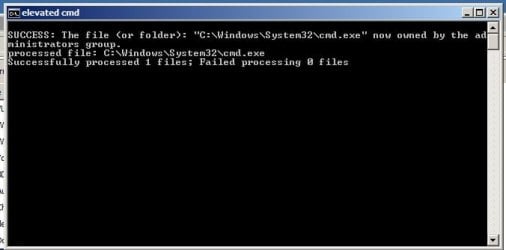
I attached a screenshot of what happens when running an elevated command prompt. I spent a few minutes getting that screenshot because it pops up and disappears (it maybe stays for a 1/10th of a second) before I can do anything.

Is there a way to modify the shortcut to keep it up? I tried the /k thing.
 

Attachments

  • Untitled.jpg
    Untitled.jpg
    17.3 KB · Views: 13

My Computer My Computer

At a glance

windows 7 64bitIntel(R) Core(TM) i5 CPU M 460 @ 2.53GHzNanya 4.00 GB SODIMM + Samsung 2.00 GB SODIMM(1) Intel(R) HD Graphics (2) ATI Mobility Rad...
Computer type
Laptop
Computer Manufacturer/Model Number
HP DV7T-4100 Laptop
OS
windows 7 64bit
CPU
Intel(R) Core(TM) i5 CPU M 460 @ 2.53GHz
Motherboard
Hewlett-Packard 144B - Bios ver F.29
Memory
Nanya 4.00 GB SODIMM + Samsung 2.00 GB SODIMM
Graphics Card(s)
(1) Intel(R) HD Graphics (2) ATI Mobility Radeon HD 5650
Sound Card
(1) ATI High Definition Audio Device (2) IDT High Definiti
Monitor(s) Displays
Stock laptop screen
Screen Resolution
1600x900
Hard Drives
(1) TOSHIBA MK3256GSY (2) TOSHIBA MK3256GSY
Try copying the commands into a text editor and saving as a .bat extension and save to your desktop. Label the first one "Start" and the second one "Stop" if you wish. Make sure that you make two batch files, one with the first set of commands, and one with the second.

Then, right click on each batch file, one at a time, and choose "Properties". When the Properties window pops up, go to the "Compatibility" tab and tick "Run as Administrator". Click apply and close the window. Then try running the first batch file from the desktop. If all is well, the batch file will run without an error and then you can start the game. When you're done playing the game, run the second batch file and that will reset things back to normal.
 

My Computer My Computer

At a glance

Win 7 Pro x64/Win 10 Pro x64 dual bootAMD FX 8350 Vishera @ 420016 GB Mushkin Blackline DDR3-2400 @ 1866 (9-1...XFX Radeon R9 280 Double D Black Edition
Computer type
PC/Desktop
Computer Manufacturer/Model Number
Mellon Labs (custom build)
OS
Win 7 Pro x64/Win 10 Pro x64 dual boot
CPU
AMD FX 8350 Vishera @ 4200
Motherboard
ASUS M5A97 R2.0
Memory
16 GB Mushkin Blackline DDR3-2400 @ 1866 (9-10-10-10-31)
Graphics Card(s)
XFX Radeon R9 280 Double D Black Edition
Sound Card
Realtek HD Audio on MB. Sounds great.
Monitor(s) Displays
Acer 24", Acer 22"
Screen Resolution
3840 x 1080
Hard Drives
1 x Mushkin Chronos 120 GB SSD (Win 10)
1 x Samsung 850 EVO 250 GB SSD (Win 7)
1 x WD 1TB SATA Blue
1 x WD 1TB SATA Green
PSU
Corsair TX-750
Case
CoolerMaster HAF 912+
Cooling
Coolermaster Seidon 240M Liquid AIO. 6 case fans
Keyboard
Logitech G710+
Mouse
Logitech G500s
Internet Speed
Much better since I got fiber, but still way overpriced.
Antivirus
MSE, Malware Bytes for scanning
Browser
Firefox
Other Info
Corsair VOID USB headphones.

A Mellon Labs X-1 - LCD Smartie driven system status display.

Brought to you by the letter E
Ok, here's my "open" batch file text:

[

start cmd.exe /k "sc config secdrv start= demand"
start cmd.exe /k "sc start secdrv"

]

The first command goes through!
The second... does not. Same error: Failed 1058: service can't be started b/c it's disabled/ or has no enabled device associated with it (my words).

Am I missing something?
 

My Computer My Computer

At a glance

windows 7 64bitIntel(R) Core(TM) i5 CPU M 460 @ 2.53GHzNanya 4.00 GB SODIMM + Samsung 2.00 GB SODIMM(1) Intel(R) HD Graphics (2) ATI Mobility Rad...
Computer type
Laptop
Computer Manufacturer/Model Number
HP DV7T-4100 Laptop
OS
windows 7 64bit
CPU
Intel(R) Core(TM) i5 CPU M 460 @ 2.53GHz
Motherboard
Hewlett-Packard 144B - Bios ver F.29
Memory
Nanya 4.00 GB SODIMM + Samsung 2.00 GB SODIMM
Graphics Card(s)
(1) Intel(R) HD Graphics (2) ATI Mobility Radeon HD 5650
Sound Card
(1) ATI High Definition Audio Device (2) IDT High Definiti
Monitor(s) Displays
Stock laptop screen
Screen Resolution
1600x900
Hard Drives
(1) TOSHIBA MK3256GSY (2) TOSHIBA MK3256GSY
So, evidently failed means worked! I got the idea to try starting the game even with the fail code and I'm in. I'm not sure how, but it seemed to work. And, for whatever reason, I can run these batch files as an administrator (maybe that's why you went this route?). That seemed to do the trick. I'll run it a few more times and report back if something goes wrong. Until then, thanks Mellon and Boris!
 

My Computer My Computer

At a glance

windows 7 64bitIntel(R) Core(TM) i5 CPU M 460 @ 2.53GHzNanya 4.00 GB SODIMM + Samsung 2.00 GB SODIMM(1) Intel(R) HD Graphics (2) ATI Mobility Rad...
Computer type
Laptop
Computer Manufacturer/Model Number
HP DV7T-4100 Laptop
OS
windows 7 64bit
CPU
Intel(R) Core(TM) i5 CPU M 460 @ 2.53GHz
Motherboard
Hewlett-Packard 144B - Bios ver F.29
Memory
Nanya 4.00 GB SODIMM + Samsung 2.00 GB SODIMM
Graphics Card(s)
(1) Intel(R) HD Graphics (2) ATI Mobility Radeon HD 5650
Sound Card
(1) ATI High Definition Audio Device (2) IDT High Definiti
Monitor(s) Displays
Stock laptop screen
Screen Resolution
1600x900
Hard Drives
(1) TOSHIBA MK3256GSY (2) TOSHIBA MK3256GSY
Glad you got it working. :)
 

My Computer My Computer

At a glance

Win 7 Pro x64/Win 10 Pro x64 dual bootAMD FX 8350 Vishera @ 420016 GB Mushkin Blackline DDR3-2400 @ 1866 (9-1...XFX Radeon R9 280 Double D Black Edition
Computer type
PC/Desktop
Computer Manufacturer/Model Number
Mellon Labs (custom build)
OS
Win 7 Pro x64/Win 10 Pro x64 dual boot
CPU
AMD FX 8350 Vishera @ 4200
Motherboard
ASUS M5A97 R2.0
Memory
16 GB Mushkin Blackline DDR3-2400 @ 1866 (9-10-10-10-31)
Graphics Card(s)
XFX Radeon R9 280 Double D Black Edition
Sound Card
Realtek HD Audio on MB. Sounds great.
Monitor(s) Displays
Acer 24", Acer 22"
Screen Resolution
3840 x 1080
Hard Drives
1 x Mushkin Chronos 120 GB SSD (Win 10)
1 x Samsung 850 EVO 250 GB SSD (Win 7)
1 x WD 1TB SATA Blue
1 x WD 1TB SATA Green
PSU
Corsair TX-750
Case
CoolerMaster HAF 912+
Cooling
Coolermaster Seidon 240M Liquid AIO. 6 case fans
Keyboard
Logitech G710+
Mouse
Logitech G500s
Internet Speed
Much better since I got fiber, but still way overpriced.
Antivirus
MSE, Malware Bytes for scanning
Browser
Firefox
Other Info
Corsair VOID USB headphones.

A Mellon Labs X-1 - LCD Smartie driven system status display.

Brought to you by the letter E
Back
Top