Games crashing to desktop without errors

Jahobi

New member
Local time
1:17 AM
Messages
2
I built this computer a couple months ago and everything went fine and I've had no problems. Then one night I went to go turn on my lamp and bumped some milk straight into the rig like an idiot. The computer was on standby and I cut power immediately and opened the case and dried it out. Next morning it boots fine, and I've had absolutely no issues, except that when I try running more intensive games, (Metro: Last Light, Archeage) the game will randomly freeze and then crash to desktop with no error messages very frequently.

Other games, such as League of Legends and Killing Floor, run fine and don't ever crash. I really don't have much computer knowledge when it comes to this sort of thing so I'm completely lost.I ran memtest with no errors, though when I ran 3D Mark it crashed as it got into the more intense tests with my frames dropping to around 20fps, and I tried running Prime 95 which also stopped running quickly. Any help is appreciated, thanks!
 

My Computer

Computer type
PC/Desktop
Computer Manufacturer/Model Number
Custom
OS
Windows Home Premium x64
CPU
Intel i7-3770K
Motherboard
ASUS P8Z77
Memory
G. Skill Ripjaws 8 gb
Graphics Card(s)
AMD Radeon R9 280x
Hard Drives
Seagate Barracuda 1tb,
Samsung SSD 840 Pro Series
PSU
Corsair HX 650w
Case
Rosewill Challenger
Antivirus
Avast
Browser
Firefox
Fire is the devil's best friend and liquids do that to computers or electrical items so... this is what I would do. No, I am not saying it will fix the issue but it won't hurt either.

Unplug everything from the rig, open both sides and make sure you use an air blower through it, making sure you don't point directly to it but more so like you are spray painting a wall. Unseat the video card and do the same to it and to the slot where it was seated. Ditto with the sticks of RAM and any other PCI/PCIe hardware you have connected to the motherboard. If you want to go the extra mile, unhook the CPU, blow it, add new paste and re seat back on but I think this would not be necessary unless you dropped a gallon of milk.

Say your prayers and restart the PC.

Just for good measure, I would uninstall and do a fresh install of the Video and Audio drivers... Again, it wouldn't hurt.
 

My Computer

Computer type
PC/Desktop
Computer Manufacturer/Model Number
Custom Built... Intel/Nvidia/ASRock
OS
Windows 7 x64 (Ultimate)
CPU
Intel i5-4670K
Motherboard
ASRock Z87 Extreme 6
Memory
8GBs Ripjaws 2133Mhz
Graphics Card(s)
Asus GTX660 (2GBs)
Sound Card
Onboard Realtek HD
Monitor(s) Displays
Acer AL2216W
Screen Resolution
1680 x 1050
Hard Drives
Samsung 840 SSD 120GBs
Samsung 750GB 32MB cache
1.5 TB
PSU
PC Cooling 750w Silencer
Case
Thermaltake Spedo Advance
Cooling
Std Cooler
Keyboard
Logitech G15
Mouse
Logitech G9
Internet Speed
Comcast 20Mbit
Antivirus
Avast
Browser
Firefox
If it had been water it wouldn't have been so bad as it would evaporate eventually, but milk is going to leave some gunk behind. When you take your rig apart as suggested by AstaLaVista take a good look at the areas closest to where the milk went in and see if there's any residue or sticky areas. If there is you could really do with using a light solvent cleaner on a small hard brush to clean it away as it can eat away at any soldered joints.
 

My Computer

Computer type
PC/Desktop
Computer Manufacturer/Model Number
Custom Build
OS
W7 Pro x64 SP1 | W10 Pro IP x64 | W8.1 Pro x64 VM | Linux Mint VM
CPU
i7-4790k @ 4GHz (4.4GHz Boost)
Motherboard
ASUS Sabertooth Z87 (BIOS Rev 2004)
Memory
16GB DDR3 Kingston HyperX Fury @ 1600MHz CL 9-9-9-27
Graphics Card(s)
EVGA GTX 980 Classified
Sound Card
Realtek Onboard
Monitor(s) Displays
Samsung S27D390
Screen Resolution
1920 x 1080
Hard Drives
240GB Intel 520 Series SSD |
Samsung 850 EVO 120GB SSD |
2TB WD Caviar Black |
2TB WD Caviar Green
PSU
Corsair HX850-80 Gold Modular
Case
Cooler Master Silencio 650
Cooling
Corsair H80i w/2 x Corsair SP120 | 2 x 120mm Noctua NF-S12B
Keyboard
Microsoft Sidewinder X4
Mouse
Gigabyte M6900 optical
Internet Speed
152mb
Antivirus
F-Secure
Browser
Firefox 38.0
Other Info
Backup Rig: Win 7 Pro 64-bit | AMD A10-5800k | ASUS F2A85-V Pro | 8GB Samsung DDR3 @1600MHz | 120GB Toshiba SDD | 2TB Seagate HDD | Cooler Master Silencio 550
How hot is your GPU getting? You mentioned 3D Mark crashes on the more intensive tests. It sounds like it could be heat related. Are the fans spinning on the graphics card(s)? There are several tools, like GPU-Z that will show hot it's getting. You may have to pull the card and clean it out. Also, is your computer reporting the correct amount of RAM? (Desktop --> Computer --> Properties). If it isn't, you may have to pull out, clean and re-seat the RAM sticks.
 

My Computer

Computer type
PC/Desktop
Computer Manufacturer/Model Number
Custom Build
OS
Windows 7 Ultimate 64 bit
CPU
i7 3.07 Ghz Quad core
Motherboard
Asus P6T Deluxe V2
Memory
12 Gigs Triple-channel Ram, PC10666 DDR3
Graphics Card(s)
2 ATI 5870's in Crossfire mode
Hard Drives
2 Internal SATA
2 External USB
Antivirus
Spybot Search and Destroy and Microsoft Security Essentials
Browser
Firefox + NoScript + AdBlock Plus + Ghostery
Replied to the Wrong post... sorry!
 
Last edited:

My Computer

Computer type
PC/Desktop
Computer Manufacturer/Model Number
Custom Built... Intel/Nvidia/ASRock
OS
Windows 7 x64 (Ultimate)
CPU
Intel i5-4670K
Motherboard
ASRock Z87 Extreme 6
Memory
8GBs Ripjaws 2133Mhz
Graphics Card(s)
Asus GTX660 (2GBs)
Sound Card
Onboard Realtek HD
Monitor(s) Displays
Acer AL2216W
Screen Resolution
1680 x 1050
Hard Drives
Samsung 840 SSD 120GBs
Samsung 750GB 32MB cache
1.5 TB
PSU
PC Cooling 750w Silencer
Case
Thermaltake Spedo Advance
Cooling
Std Cooler
Keyboard
Logitech G15
Mouse
Logitech G9
Internet Speed
Comcast 20Mbit
Antivirus
Avast
Browser
Firefox
So I ran 3D Mark again on the Skydiver test. Previously, the CloudGate test had crashed on the physics portion when my frames dropped to around 20fps. However, on this test my frames remained in the triple digits and crashed anyway. Here is the error message I get:
ea36373279fb87817dc2441240a1f24e.png
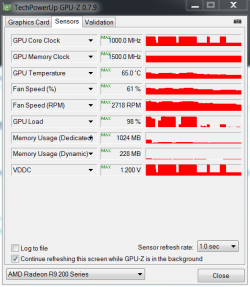
I also ran GPU-Z in the background and here is the max readouts I get from that:
2dc5ceae877f716688a4a02f5a338c1e.png
I already previously reseated the graphics card and RAM and it displays the correct amount. I will try re-installing drivers and cleaning it out with air.

Edit: I clearly should also note that the day after the incident my screen did turn into a mess of horizontal pinkish lines and did not resolve until I restarted the PC. While playing games recently I have also noticed parts of the screen will seem to glitch out for a split second as well. About 2 days ago my PC bluescreened on top of that. Sounds like video card?
 

My Computer

Computer type
PC/Desktop
Computer Manufacturer/Model Number
Custom
OS
Windows Home Premium x64
CPU
Intel i7-3770K
Motherboard
ASUS P8Z77
Memory
G. Skill Ripjaws 8 gb
Graphics Card(s)
AMD Radeon R9 280x
Hard Drives
Seagate Barracuda 1tb,
Samsung SSD 840 Pro Series
PSU
Corsair HX 650w
Case
Rosewill Challenger
Antivirus
Avast
Browser
Firefox

My Computer

Computer type
PC/Desktop
Computer Manufacturer/Model Number
Custom Build
OS
W7 Pro x64 SP1 | W10 Pro IP x64 | W8.1 Pro x64 VM | Linux Mint VM
CPU
i7-4790k @ 4GHz (4.4GHz Boost)
Motherboard
ASUS Sabertooth Z87 (BIOS Rev 2004)
Memory
16GB DDR3 Kingston HyperX Fury @ 1600MHz CL 9-9-9-27
Graphics Card(s)
EVGA GTX 980 Classified
Sound Card
Realtek Onboard
Monitor(s) Displays
Samsung S27D390
Screen Resolution
1920 x 1080
Hard Drives
240GB Intel 520 Series SSD |
Samsung 850 EVO 120GB SSD |
2TB WD Caviar Black |
2TB WD Caviar Green
PSU
Corsair HX850-80 Gold Modular
Case
Cooler Master Silencio 650
Cooling
Corsair H80i w/2 x Corsair SP120 | 2 x 120mm Noctua NF-S12B
Keyboard
Microsoft Sidewinder X4
Mouse
Gigabyte M6900 optical
Internet Speed
152mb
Antivirus
F-Secure
Browser
Firefox 38.0
Other Info
Backup Rig: Win 7 Pro 64-bit | AMD A10-5800k | ASUS F2A85-V Pro | 8GB Samsung DDR3 @1600MHz | 120GB Toshiba SDD | 2TB Seagate HDD | Cooler Master Silencio 550
Back
Top