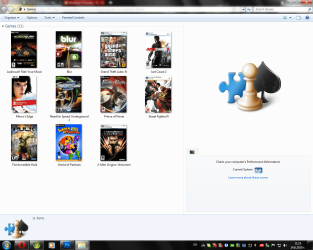
Games Explorer - Edit

Games Explorer - Edit with Game Explorer Builder

   Warning
TO AVOID ANY ERRORS, PLEASE CONSIDER UPDATING YOUR MICROSOFT .NET FRAMEWORK FROM HERE!

   Note
I am not the developer of this application, all credit for it goes to the original application author. For more information about the license, view "license.txt" in the Beta 2 ZIP file. All rights reserved :)

Step 0:
If you haven't done so yet, please read the HUGE warning above.
Step 1:
Download the Vista Game Explorer Builder Beta 2 and UnZip to a folder of choice (default "Program Files" for 32-bit users and "Program Files (x86)" for 64-bit users).
Step 2:
NOTE: This is done to pervent any unneeded errors to show up.
Right Click the executable (.exe) file, select "Properties" and go to the "Compatibility" tab. From there, tick the checkbox named "Run this program in compatibility mode for:" and from the Drop-Down menu select "Windows Vista" (with no service packs). Lastly, tick the "Run As Administrator" checkbox, hit apply, and you're ready to start editing. Screenshot:
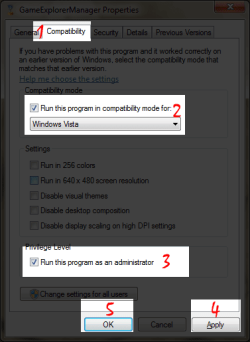
Compatibility.png
Step 3:
Run the app. Start with a Right Click> Add Game > New Resource. Begin by choosing an export location for the GDFResource.dll file for the game.
   Warning
In order for this to work you need to have a seperate GDFResource.dll file for every seperate game. (Note: To prevent screw-ups, just place every seperate GDFRecource.dll file in the directory folder of the game (Program Files or Program files x86)

Then you can start filling in game information such as BoxArt, Icon, Description, Developer, Publisher and more. You can even set up minimal and recommended system rating for the game!Once you're done and you've hit OK, you'll be given a new window. In it's first section (Shortcuts) create a new record (with the new button at the upper left) then in "Name" type in "Play" (without the brackets!!!) and in "Shortcut" fill in the full location of the game executable file. (Example: C:\Program Files (x86)\MyGame\game.exe) (See a screenshot below). After hitting OK you will have successfully added the game location.
Step 4 (Optional):
In the "Support Links" section of the "Install Game Resource" window you can add the Developer and Publisher websites as links. Simply add a new record to the second section, then fill in the name, such as "Visit Developer Website" and in URL you will have to fill in the desired URL (needs to be full URL, with "http://" in front of it).
   Tip
You can also use this feature to have a direct link to a game forum of your liking or something else associated with the game. For example as a name you'll add "Game Forum" and then fill the forum URL below! Screenshot:

Game Resource.png
Step 5:
Once you're done with the linking you can select whether you want this game only for you or for all users (using the checkbox below) and then you can click "Install". If everything went alright, the game should be added to the list of games and when you close the editor it should be available in the Games Explorer too. Enjoy playing!
Tutorial by:
~[DW96]~

 
Last edited by a moderator:
THANK you !!!!
 

My Computer

Computer Manufacturer/Model Number
AlienWare®
OS
Genuine Windows® 7 Ultimate, 64bit, English
CPU
Overclocked Intel® Core™ i7 980x Extreme 4.0GHz, 12MB Cache
Motherboard
ASUS P5N-E SLI
Memory
12GB DDR3 1600MHz (3x 4GB) Tri Channel Memory
Graphics Card(s)
Dual 2GB GDDR5 ATI Radeon™ HD 5970 CrossfireX™ Enabled
Sound Card
Creative Sound Blaster X-Fi Titanium
Monitor(s) Displays
23.0” Alienware AW2310 OptX™ Full HD Gaming Monitor, 3D capa
Screen Resolution
Full HD 1080p 1600x900
Hard Drives
Primary---600GB RAID 1+0 (4x 300GB SATA-II, 10k RPM, 16MB Cache HDDs)

Secondary---2TB RAID 1 (2x2TB SATA-II, 7,200 RPM, 32MB Cache HDDs)
PSU
220v Euroforce Powersupply
Case
ALX Space Black - Anodized Aluminum Chassis
Cooling
ALX Titanium®
Keyboard
Logitech G18 LCD Gaming Keyboard
Mouse
Logitech G9 High Precision Gaming Mouse
Internet Speed
FioS T1
THANK you !!!!
No problem. Just a little note here - if anyone is having problems running the program from a shortcut, I suggest just running from the EXE itself, for some reason the program has random crashes sometimes if ran through a shortcut... :sarc:
 

My Computer

Computer type
PC/Desktop
Computer Manufacturer/Model Number
Multirama PC Expert [Bulgaria]
OS
Windows 7 Home Premium [64-Bit]
CPU
Intel Core 2 Quad CPU Q8200 @ 2.33 GHz
Motherboard
GIGABYTE GA-G31M-S2C
Memory
4094 MB DDR2
Graphics Card(s)
SAPPHIRE Radeon HD 6970 (2 GB VRAM)
Sound Card
Realtek ALC883 @ Intel 82801GB ICH7 - High Definition Audio
Monitor(s) Displays
Samsung SyncMaster BX2235 [21.5" LCD with LED Backlight]
Screen Resolution
1920x1080
Hard Drives
Hitachi HDT721075SLA360 - 750 GB
PSU
Cooler Master GX750 - 750W
Case
Multirama (Black / 2010 Revision)
Cooling
Stock + Cooler Master
Keyboard
Logitech G510 (Gaming Keyboard)
Mouse
Razer Lachesis (4000 DPI, Blue Version)
Internet Speed
Vivacom Optical [100 Mbps]
Browser
Chrome [Windows]
Thx dw96, cool app, so much nicer than my tutorial...
 

My Computer

Computer type
PC/Desktop
OS
Windows 7 Ultimate x64
CPU
Intel Core i5-2500K @4.5Ghz
Motherboard
Asus Maximus V GENE
Memory
x2 Kingston KHX1600C9D3/4G
Graphics Card(s)
NVIDIA GeForce GTS 250 - 1024MB
Sound Card
SupremeFX III built-in 8-Channel High Definition Audio
Monitor(s) Displays
Samsung Syncmaster P2270
Screen Resolution
1920x1080
Hard Drives
x1 Seagate Barracuda ST3160811AS
x2 Seagate Barracuda ST380817AS
PSU
Corsair TX750
Case
Cooler Master HAF 922 Side Window Model
Cooling
Stock Intel Cooler + Tuniq TX2
Keyboard
Dell SK-8135
Mouse
Logitech G5
Internet Speed
2 Mbps
Other Info
x2 Xbox 360 Wireless Controller for Windows
Logitech Z-5550
Sennheiser HD555
Thx dw96, cool app, so much nicer than my tutorial...
No probs, I guess the only problem here would be that it's a little confusing to work with this thing, but you get used to it. Look how shiny and neat my Games look:
Games Explorer.png

The advantages of editing Games Explorer by yourself are that you can add High Quality JPEGs as box art, unlike the ones windows puts trying to detect the game and grab info online. Most of my box arts are over 1000x600.
 

My Computer

Computer type
PC/Desktop
Computer Manufacturer/Model Number
Multirama PC Expert [Bulgaria]
OS
Windows 7 Home Premium [64-Bit]
CPU
Intel Core 2 Quad CPU Q8200 @ 2.33 GHz
Motherboard
GIGABYTE GA-G31M-S2C
Memory
4094 MB DDR2
Graphics Card(s)
SAPPHIRE Radeon HD 6970 (2 GB VRAM)
Sound Card
Realtek ALC883 @ Intel 82801GB ICH7 - High Definition Audio
Monitor(s) Displays
Samsung SyncMaster BX2235 [21.5" LCD with LED Backlight]
Screen Resolution
1920x1080
Hard Drives
Hitachi HDT721075SLA360 - 750 GB
PSU
Cooler Master GX750 - 750W
Case
Multirama (Black / 2010 Revision)
Cooling
Stock + Cooler Master
Keyboard
Logitech G510 (Gaming Keyboard)
Mouse
Razer Lachesis (4000 DPI, Blue Version)
Internet Speed
Vivacom Optical [100 Mbps]
Browser
Chrome [Windows]
Vista Game Explorer Editor

can someone upload this vista game explorer builder for me?
because the website to download is not available.
please I need this program.
someone?
 

My Computer

OS
Win7 Ultimate x64
Well its workin' now...
 
Last edited:

My Computer

Computer type
PC/Desktop
OS
Windows 7 Ultimate x64
CPU
Intel Core i5-2500K @4.5Ghz
Motherboard
Asus Maximus V GENE
Memory
x2 Kingston KHX1600C9D3/4G
Graphics Card(s)
NVIDIA GeForce GTS 250 - 1024MB
Sound Card
SupremeFX III built-in 8-Channel High Definition Audio
Monitor(s) Displays
Samsung Syncmaster P2270
Screen Resolution
1920x1080
Hard Drives
x1 Seagate Barracuda ST3160811AS
x2 Seagate Barracuda ST380817AS
PSU
Corsair TX750
Case
Cooler Master HAF 922 Side Window Model
Cooling
Stock Intel Cooler + Tuniq TX2
Keyboard
Dell SK-8135
Mouse
Logitech G5
Internet Speed
2 Mbps
Other Info
x2 Xbox 360 Wireless Controller for Windows
Logitech Z-5550
Sennheiser HD555
when I try this it just tells me it has stopped working and W7 is searching for a solution.

I have set everything per instructions.

W7 64
beta 2 dnld
in program files folder
vista - no SP
admin
run EXE
 

My Computer

OS
windows 7

My Computer

Computer type
PC/Desktop
Computer Manufacturer/Model Number
Multirama PC Expert [Bulgaria]
OS
Windows 7 Home Premium [64-Bit]
CPU
Intel Core 2 Quad CPU Q8200 @ 2.33 GHz
Motherboard
GIGABYTE GA-G31M-S2C
Memory
4094 MB DDR2
Graphics Card(s)
SAPPHIRE Radeon HD 6970 (2 GB VRAM)
Sound Card
Realtek ALC883 @ Intel 82801GB ICH7 - High Definition Audio
Monitor(s) Displays
Samsung SyncMaster BX2235 [21.5" LCD with LED Backlight]
Screen Resolution
1920x1080
Hard Drives
Hitachi HDT721075SLA360 - 750 GB
PSU
Cooler Master GX750 - 750W
Case
Multirama (Black / 2010 Revision)
Cooling
Stock + Cooler Master
Keyboard
Logitech G510 (Gaming Keyboard)
Mouse
Razer Lachesis (4000 DPI, Blue Version)
Internet Speed
Vivacom Optical [100 Mbps]
Browser
Chrome [Windows]
that doesn't work either. another idea? please!


[Window Title]
GameExplorerManager

[Main Instruction]
GameExplorerManager has stopped working

Contents

Windows is checking for a solution to the problem...

[Cancel]
 

My Computer

OS
windows 7
I guess the difference with this method compared to the tutorial posted by rjck is that with this application/program you can't put rating("M" Mature, "T" Teens,...etc) on the game.

Am i right or is there a way?

Edit:

Thanks a lot for this by the way.
 
Last edited:

My Computer

OS
Windows 7 Ultimate x64
CPU
Intel Core2Quad Q8200
Motherboard
XFX nForce 750i SLI
Memory
2x2GB OCZ SLI Edition
Graphics Card(s)
XFX GeForce 9800GT
Monitor(s) Displays
Chimei 22"
Hard Drives
320GB Seagate Baracuda
PSU
HEC Cougar Series 700W
Case
Cooler Master USP 100
Cooling
[cpu]Deep Cool Ice Blade Pro & [VC]Deep Cool V4000
that doesn't work either. another idea? please!

Really? It has worked perfectly fine for every Windows 7 machine I've tried.
Did you follow all the steps one by one?
Did you run the app as an Administrator?
Did you read the HUGE warning about the NET Framework above???

EDIT:
I also forgot to mention that due to a Windows 7 Update which is pretty fresh, you may no longer need to turn on the Windows Vista compatibility for the application. Turn it off and see if you get any results.
 

My Computer

Computer type
PC/Desktop
Computer Manufacturer/Model Number
Multirama PC Expert [Bulgaria]
OS
Windows 7 Home Premium [64-Bit]
CPU
Intel Core 2 Quad CPU Q8200 @ 2.33 GHz
Motherboard
GIGABYTE GA-G31M-S2C
Memory
4094 MB DDR2
Graphics Card(s)
SAPPHIRE Radeon HD 6970 (2 GB VRAM)
Sound Card
Realtek ALC883 @ Intel 82801GB ICH7 - High Definition Audio
Monitor(s) Displays
Samsung SyncMaster BX2235 [21.5" LCD with LED Backlight]
Screen Resolution
1920x1080
Hard Drives
Hitachi HDT721075SLA360 - 750 GB
PSU
Cooler Master GX750 - 750W
Case
Multirama (Black / 2010 Revision)
Cooling
Stock + Cooler Master
Keyboard
Logitech G510 (Gaming Keyboard)
Mouse
Razer Lachesis (4000 DPI, Blue Version)
Internet Speed
Vivacom Optical [100 Mbps]
Browser
Chrome [Windows]
I guess the difference with this method compared to the tutorial posted by rjck is that with this application/program you can't put rating("M" Mature, "T" Teens,...etc) on the game.
Am i right or is there a way?
Edit:
Thanks a lot for this by the way.

Hey there,
No, there is no way to use ESRB rating in your games, but at least you can add custom Hi-Res Box Art and Ratings (The WEI System Rating Minimum and Recommended).

Edit:
I think both methods have their ups and downs, feel free to choose one of 'em. ;)
 

My Computer

Computer type
PC/Desktop
Computer Manufacturer/Model Number
Multirama PC Expert [Bulgaria]
OS
Windows 7 Home Premium [64-Bit]
CPU
Intel Core 2 Quad CPU Q8200 @ 2.33 GHz
Motherboard
GIGABYTE GA-G31M-S2C
Memory
4094 MB DDR2
Graphics Card(s)
SAPPHIRE Radeon HD 6970 (2 GB VRAM)
Sound Card
Realtek ALC883 @ Intel 82801GB ICH7 - High Definition Audio
Monitor(s) Displays
Samsung SyncMaster BX2235 [21.5" LCD with LED Backlight]
Screen Resolution
1920x1080
Hard Drives
Hitachi HDT721075SLA360 - 750 GB
PSU
Cooler Master GX750 - 750W
Case
Multirama (Black / 2010 Revision)
Cooling
Stock + Cooler Master
Keyboard
Logitech G510 (Gaming Keyboard)
Mouse
Razer Lachesis (4000 DPI, Blue Version)
Internet Speed
Vivacom Optical [100 Mbps]
Browser
Chrome [Windows]
Problem

I cant download this programm... i think the server is down... can anyone uplod it in rapidshare,meagupload ect. please i need it!:cry:

Thanks:)
Nando
 

My Computer

OS
Windows 7 Ultimate 32bit
I cant download this programm... i think the server is down... can anyone uplod it in rapidshare,meagupload ect. please i need it!:cry:

Thanks:)
Nando

Hey there Nando!
Wow, bummer, looks like the server really is down... :cry:

Anyway I zipped it up for you. No 100% chance it will work this way but unzip it and keep your fingers crossed:
View attachment GameExplorerBuilder.zip
 

My Computer

Computer type
PC/Desktop
Computer Manufacturer/Model Number
Multirama PC Expert [Bulgaria]
OS
Windows 7 Home Premium [64-Bit]
CPU
Intel Core 2 Quad CPU Q8200 @ 2.33 GHz
Motherboard
GIGABYTE GA-G31M-S2C
Memory
4094 MB DDR2
Graphics Card(s)
SAPPHIRE Radeon HD 6970 (2 GB VRAM)
Sound Card
Realtek ALC883 @ Intel 82801GB ICH7 - High Definition Audio
Monitor(s) Displays
Samsung SyncMaster BX2235 [21.5" LCD with LED Backlight]
Screen Resolution
1920x1080
Hard Drives
Hitachi HDT721075SLA360 - 750 GB
PSU
Cooler Master GX750 - 750W
Case
Multirama (Black / 2010 Revision)
Cooling
Stock + Cooler Master
Keyboard
Logitech G510 (Gaming Keyboard)
Mouse
Razer Lachesis (4000 DPI, Blue Version)
Internet Speed
Vivacom Optical [100 Mbps]
Browser
Chrome [Windows]
Thanks for the guide. This method just feels more realiable and stable than the VGEE one.
 

My Computer

OS
Windows 98 SE
I have been trying to get this to work on Windows 7 x64 and I've had no luck. I updated my .Net Framework from the link in the first post, I tried running in compatibility mode and without and nothing. At first, I tried running it with out updating to the .Net Framework Extended which the link provided (I already had .Net Framework Client Profile installed) and nothing happened. After downloading the .Net provided, I'm getting an error stating:

The program can't start because CC3250.DLL is missing...

Any way I could fix this? I have tried this program, VGEE, GEM 1.0B6 and Game Browser Manager 1.1.3. I also tried registering the DLL file by manually downloading it online and then registering it through an elevated command line. GEM seemed to be the closest to work because it actually made the shortcuts and I was able to add details with ease, but the shortcuts would not run in the Windows 7 Games Explorer folder. :(
 
Last edited:

My Computer

OS
Windows 7 Ultimate x64
Thanks, DW96, for uploading the .zip! I think I can speak for everyone and say, we appreciate it!

EDIT: program keeps looking for EAX.dll, saying not found. I'm pretty sure EAX is Creative Labs, isn't it? I don't have a Creative sound card, just use onboard Intel audio.
 
Last edited:

My Computer

Computer Manufacturer/Model Number
Gateway GT5268E
OS
Windows 7 Professional 64bit SP1
CPU
Intel Core2 Duo E7500
Motherboard
OEM
Memory
4GB 800MHz
Graphics Card(s)
Nvidia Geforce 8600GTS
Sound Card
Onboard HD Audio with S/PDIF optical output
Monitor(s) Displays
Vizio M220VA (22" LCD TV)
Screen Resolution
1920*1080
Hard Drives
250GB SATA
1TB SATA
1TB USB
1TB USB
PSU
285 watts
Case
OEM
Cooling
OEM
Keyboard
OEM
Mouse
Logitech M-BZ96C
Internet Speed
Depends on amount of ISP throttling at any given moment.
Other Info
APC XS1300 (shows my computer's average power draw is 145-155w); same UPS for second PC, but average power draw is only around 65-80w.

Second PC: HP SR5110NX, Win7 Pro 64, AMD Athon 3800+, 4GB 533MHz RAM, Onboard graphics, 17" CRT display @1280*1024, 200w PSU, 250GB boot hdd, 640GB USB HDD.

My Computer

Computer Manufacturer/Model Number
Lenovo Ideapad Y550 (4186)
OS
Windows 7 Ultimate x64 SP1 / Ubuntu 12.04.3 x64
CPU
Intel Core 2 Duo 2.20 Ghz
Motherboard
LENOVO KIWB1 (U2E1)
Memory
4.0GB Dual-Channel DDR3 @ 398MHz
Graphics Card(s)
NVIDIA GeForce GT 240M 1GB
Sound Card
Realtek High Definition Audio
Monitor(s) Displays
15 inch (1366x768@60Hz)
Screen Resolution
1366*768
Hard Drives
320GB Hitachi HITACHI HTS545032B9A300 (SATA)
Keyboard
Build In
Mouse
Touchpad
Internet Speed
30 KBps (Dial up)
Back
Top