Games Explorer Folder - Add Games To

How to Add Games to Games Explorer Folder in Vista, Windows 7, and Windows 8


"So you add a game into Games Explorer Folder and realize that the game has no
cover, no rating, no info... Well, this tutorial will show you
how to add all that missing information."​


First things First.
  • Adding a shortcut into Game Explorer Folder (GEF):

  • Copy the main executable, then right click and select paste shortcut.

  • Or Just Drag n Drop a shortcut of the game.
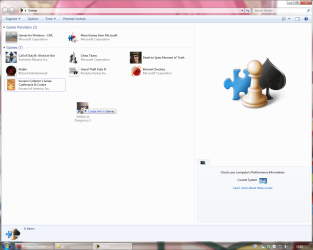
gft1.png
Use a shortcut, never use the main executable.

  • Using the Registry Editor (REd):

  • Hit the Start Orb and type regedit in the search box, an UAC prompt will ask you to authorize access by clicking Continue.

  • The Files you will need:

Download


  • Inside is the GameUXLegacyGDFs.txt file, Just save it for later use.

The Tutorial:


This tutorial subdivides in Semi-Automatic for games already in the database which the GEF doesn't recognize automatically and manual for the ones not included in the database.​

   Note
Always remember to close GEF every time you need to edit the values in the REd, otherwise the game shortcut will be deleted.


Let's Begin...


  • Semi-Automatic
Microsoft has added various old games to be recognized automatically by the GEF using a file called GameUXLegacyGDFs.dll but some of them need a little extra work to show-up.

Step 1: Add a shortcut into the GEF and then close it.

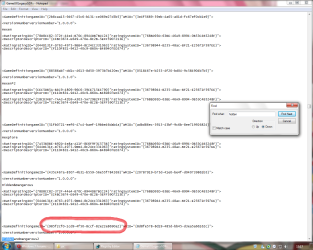
Step 2: Extract and then open the file GameUXLegacyGDFs.txt from the downloadable file.​

  • Hit Ctrl+F to bring the search option in Notepad.
  • Type just a part of the game's name.
It is very important to search only a part of the name otherwise you will cannot find any game. (e.g. if i want to find Hidden & Dangerous 2, i just type hidden in the search box).

  • Hit "Find Next" button 'till you find the game your looking for.
If you cannot find the game please refer to Manual part of this tutorial.
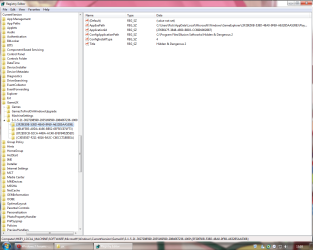
Step 3: Open the REd and navigate to this location.
HKEY_LOCAL_MACHINE\SOFTWARE\Microsoft\Windows\CurrentVersion\GameUX
gft3.png
The KEY name might be different from yours.

Step 4: Once you find the KEY that belongs to your game, edit as follow:

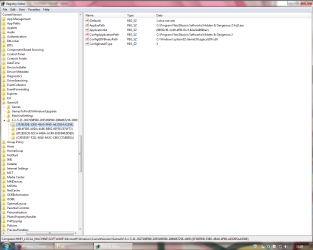
  • In AppExePath put the location of your game executable.
(e.g. C:\Program Files\Illusion Softworks\Hidden & Dangerous 2\hd2.exe).

  • In ApplicationId put the xxx value you found in *GameDefinitiongameID="xxx", on the GameUXLegacyGDFs.txt file.
gft4.png
Add just the value between commas.

  • In ConfigInstallType replace the value to 3.
  • Delete the Title String.
  • Add a new String (Right-click>New>String Value) and name it ConfigGDFBinaryPath, then in the value data space put C:\Windows\system32\GameUXLegacyGDFs.dll
gft6.png
It should be look like this.
Step 5: Close the REd and open GEF, wait 'till windows updates the game info.
gft7.png

  • Manual
If you can't find the game your looking for in GameUXLegacyGDFs.txt, you still can use another already in the file and edit its values.
Step 1: Go to All Game Guide to search your game.
gft9.png
Save the cover image for later use.
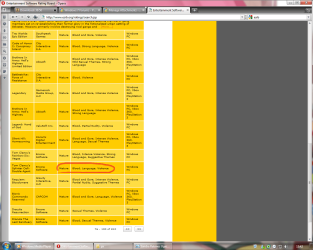
Step 2: Now go to Entertainment Software Rating Board and find a game with similar rating.
gft10.png
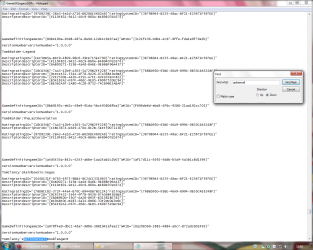
Step 3: Now lets find out if its listed on the GameUXLegacyGDFs.txt file, if not keep searching on the ESRB page.
gft11.png
Step 4: Open the REd and navigate to this location.
HKEY_LOCAL_MACHINE\SOFTWARE\Microsoft\Windows\CurrentVersion\GameUX

gft3.png

The KEY name might be different from yours.


Step 5: Once you find the KEY that belongs to your game, edit as follow:


  • In AppExePath put the location of your game executable.
(e.g. C:\Program Files\Illusion Softworks\Hidden & Dangerous 2\hd2.exe).

  • In ApplicationId put the xxx value you found in *GameDefinitiongameID="xxx", on the GameUXLegacyGDFs.txt file.
gft4.png
Add just the value between commas.

  • In ConfigInstallType replace the value to 3.
  • Delete the Title String.
  • Add a new String (Right-click>New>String Value) and name it ConfigGDFBinaryPath, then in the value data space put C:\Windows\system32\GameUXLegacyGDFs.dll
gft6.png
It should be look like this.
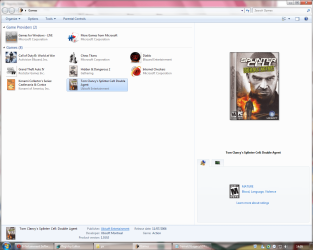
Step 6: Open GEF and wait to update the info.
gft12.png
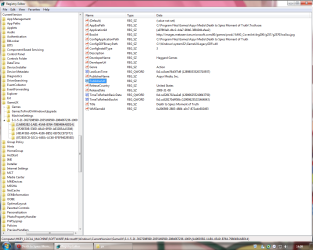
Step 7: Update the REd by hitting the F5 key and replace the info as necessary.
gft13.png
This is just the basic info only, you can fill the blank spaces if you like.
Step 8: Now copy and paste this values and put them like so:

  • in TimeToRefreshBasicData: b357951d59359b57 (Hexadecimal)
  • in TimeToRefreshBoxArt: 855c358859359b57 (Hexadecimal)
The given values should stop reverting the game to its defaults every once in awhile.
Step 9: Now navigate to this location and paste the image your game will use as a cover.
C:\Users\%username%\AppData\Local\Microsoft\Windows\GameExplorer\GamesBoxArt
The AppData folder is hidden by default you can learn how to unhide it in this tutorial.
Step 10: Change the name of the image with the one we're replacing.


  • If you wanna use another type of image you need to edit the last part of the BoxArt String to the kind of file you wanna use.
(e.g. ...//images.../g21004lorom.jpg) JPG/PNG/BMP.

  • Or if you want to use an icon instead, just edit:
AppExePath put the location of the icon.
BoxArt leave it blank.

gft14.png

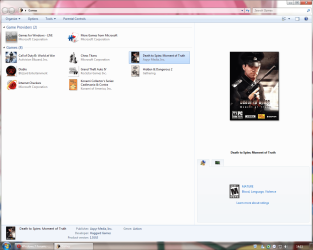
Step 11: Now open the GEF and your game should display with the new info on it.
gft15.png
BTW, if you think is too much work for you, just take a look at this tutorial Games Explorer - Edit all credits to Darkness Warrior '96.


That's all for now...
Rjck.


Attachments

Last edited by a moderator:

My Computer

Computer type
PC/Desktop
OS
Windows 7 Ultimate x64
CPU
Intel Core i5-2500K @4.5Ghz
Motherboard
Asus Maximus V GENE
Memory
x2 Kingston KHX1600C9D3/4G
Graphics Card(s)
NVIDIA GeForce GTS 250 - 1024MB
Sound Card
SupremeFX III built-in 8-Channel High Definition Audio
Monitor(s) Displays
Samsung Syncmaster P2270
Screen Resolution
1920x1080
Hard Drives
x1 Seagate Barracuda ST3160811AS
x2 Seagate Barracuda ST380817AS
PSU
Corsair TX750
Case
Cooler Master HAF 922 Side Window Model
Cooling
Stock Intel Cooler + Tuniq TX2
Keyboard
Dell SK-8135
Mouse
Logitech G5
Internet Speed
2 Mbps
Other Info
x2 Xbox 360 Wireless Controller for Windows
Logitech Z-5550
Sennheiser HD555
Hello, friends, and Happy New Year.
First of all, thanks for the great tuto, Rjck. It´s really appreciated.

Now, my problem: I don´t have sucess to classify Call of Duty 4: Modern Warfare (yes, the first one).
It´s not in the list, so I try the method 2, and achieve a good result in everything, except the ESBR Rating.
Yes, it´s a minor issue, but I want it completely tuned here, so, if someone could give me a help here, it will be very appreciated. ^^

Thanks in advance, and I´m sorry for the bad english - it´s not my native language. :)

Thanx Archmage and welcome to the forums.
For COD4 you can try this:
ApplicationId= {bf535668-4027-44ae-b6a5-2e97cf44207e}.

Here's how it looks.

View attachment 44571

Let me know if that what u wanted.
Happy holidays for you too.

P.S.: your bad english its better than mine definitively. :D

Hey Rjck...I tried that ApplicationID for COD 4 and it didn't work. It updated the shortcut as Area 51. I follow the directions for the manual method. Thanks for the tutorial and kudos.
 

My Computer

OS
Windows 7 Ultimate 64 bit
Hey Rjck...I tried that ApplicationID for COD 4 and it didn't work. It updated the shortcut as Area 51. I follow the directions for the manual method. Thanks for the tutorial and kudos.

Ur right, this ApplicationId= {bf535668-4027-44ae-b6a5-2e97cf44207e}. belongs to FEAR .EP, but it has the same ESRB rating as COD4, btw welcome to the forums ;)
 

My Computer

Computer type
PC/Desktop
OS
Windows 7 Ultimate x64
CPU
Intel Core i5-2500K @4.5Ghz
Motherboard
Asus Maximus V GENE
Memory
x2 Kingston KHX1600C9D3/4G
Graphics Card(s)
NVIDIA GeForce GTS 250 - 1024MB
Sound Card
SupremeFX III built-in 8-Channel High Definition Audio
Monitor(s) Displays
Samsung Syncmaster P2270
Screen Resolution
1920x1080
Hard Drives
x1 Seagate Barracuda ST3160811AS
x2 Seagate Barracuda ST380817AS
PSU
Corsair TX750
Case
Cooler Master HAF 922 Side Window Model
Cooling
Stock Intel Cooler + Tuniq TX2
Keyboard
Dell SK-8135
Mouse
Logitech G5
Internet Speed
2 Mbps
Other Info
x2 Xbox 360 Wireless Controller for Windows
Logitech Z-5550
Sennheiser HD555
Hey Rjck...I tried that ApplicationID for COD 4 and it didn't work. It updated the shortcut as Area 51. I follow the directions for the manual method. Thanks for the tutorial and kudos.

Ur right, this ApplicationId= {bf535668-4027-44ae-b6a5-2e97cf44207e}. belongs to FEAR .EP, but it has the same ESRB rating as COD4, btw welcome to the forums ;)

Thanks. Is there anyway to obtain the proper ApplicationId for the game?
 

My Computer

OS
Windows 7 Ultimate 64 bit
nope, sorry... thats why u need to edit the registry like it says in the tutorial.
in other words...
1. find a game with same rating. (or close to it)
2. replace the info for your game.
3.enjoy.
 

My Computer

Computer type
PC/Desktop
OS
Windows 7 Ultimate x64
CPU
Intel Core i5-2500K @4.5Ghz
Motherboard
Asus Maximus V GENE
Memory
x2 Kingston KHX1600C9D3/4G
Graphics Card(s)
NVIDIA GeForce GTS 250 - 1024MB
Sound Card
SupremeFX III built-in 8-Channel High Definition Audio
Monitor(s) Displays
Samsung Syncmaster P2270
Screen Resolution
1920x1080
Hard Drives
x1 Seagate Barracuda ST3160811AS
x2 Seagate Barracuda ST380817AS
PSU
Corsair TX750
Case
Cooler Master HAF 922 Side Window Model
Cooling
Stock Intel Cooler + Tuniq TX2
Keyboard
Dell SK-8135
Mouse
Logitech G5
Internet Speed
2 Mbps
Other Info
x2 Xbox 360 Wireless Controller for Windows
Logitech Z-5550
Sennheiser HD555
Can anyone give me the App Id for Metro 2033 and Just Cause 2?
EDIT: Also for sniper ghost?
 
Last edited:

My Computer

Computer Manufacturer/Model Number
Custom Built
OS
Windows 7 Professional x64
CPU
Intel Core i7 2600k - 3.4 GHz
Motherboard
Asus Maximus IV Z68 - Extreme
Memory
4x4 Ripjaws X79 Series 2133 MHz (9-11-10-28)
Graphics Card(s)
1x eVGA GTX 580 - 3GB Classified
Sound Card
Realtek ALC 889 HD Audio
Monitor(s) Displays
Full HD Philips TV 32"
Screen Resolution
1920x1080
Hard Drives
1x Crucial m4 SSD 512 GB
PSU
800W Coolermaster Silentpro Gold
Case
Sentey - Renegade GS-6200
Cooling
Stock
Keyboard
Logitech K800 Wireless
Mouse
Logitech Performance MX Laser
Internet Speed
10MB Internet Connection
Can anyone give me the App Id for Metro 2033 and Just Cause 2?
EDIT: Also for sniper ghost?

For adding a game that has a GDF of its own, first find the GDF dll in the game path. Then open it with 7 zip (I think the next step requires the beta version or something) double click .rsrc and browse until you find an XML which you need to open with notepad. It will contain the information read by the registry. Simply go back to the registry and replace GDFBinaryPath with the path of that dll, change install type to 2 and change the ID to the one you found in the dll.

The rest is automatic.
 

My Computer

Computer Manufacturer/Model Number
My Own
OS
Windows 7 Ultimate 64-Bit
CPU
AMD Phenom II X4 955 BE OC to 3.62Ghz
Motherboard
Gigabyte MA770T-UD3
Memory
G-Skill NT 4GB
Graphics Card(s)
Sapphire Radeon HD 4670
Monitor(s) Displays
Dell 20' and some 16' inch Generic
Screen Resolution
1680x1050
Hard Drives
250GB ?
500GB Western Digital
PSU
Seasonic M12 II Bronze 520W
Case
NZXT Guardian 921
Cooling
Xigmatek S1283 Red Scorpion
Keyboard
Dell
Mouse
Dell
Internet Speed
6000Mbps
Can anyone give me the App Id for Metro 2033 and Just Cause 2?
EDIT: Also for sniper ghost?

For adding a game that has a GDF of its own, first find the GDF dll in the game path. Then open it with 7 zip (I think the next step requires the beta version or something) double click .rsrc and browse until you find an XML which you need to open with notepad. It will contain the information read by the registry. Simply go back to the registry and replace GDFBinaryPath with the path of that dll, change install type to 2 and change the ID to the one you found in the dll.

The rest is automatic.

Oh thanks a lot!
However, i used an other tool:
VGEE VIsta Games Explorer Editor
It now works with windows 7, and you can add your games with ease!
Neowin.net - Vista Game Explorer Editor(VGEE) 2.14 Beta
 

My Computer

Computer Manufacturer/Model Number
Custom Built
OS
Windows 7 Professional x64
CPU
Intel Core i7 2600k - 3.4 GHz
Motherboard
Asus Maximus IV Z68 - Extreme
Memory
4x4 Ripjaws X79 Series 2133 MHz (9-11-10-28)
Graphics Card(s)
1x eVGA GTX 580 - 3GB Classified
Sound Card
Realtek ALC 889 HD Audio
Monitor(s) Displays
Full HD Philips TV 32"
Screen Resolution
1920x1080
Hard Drives
1x Crucial m4 SSD 512 GB
PSU
800W Coolermaster Silentpro Gold
Case
Sentey - Renegade GS-6200
Cooling
Stock
Keyboard
Logitech K800 Wireless
Mouse
Logitech Performance MX Laser
Internet Speed
10MB Internet Connection
Why wont the Forum let me download the file? When i click the "Download" link and log in it tells me

azrael9110, you do not have permission to access this page. This could be due to one of several reasons:

  1. Your user account may not have sufficient privileges to access this page. Are you trying to edit someone else's post, access administrative features or some other privileged system?
  2. If you are trying to post, the administrator may have disabled your account, or it may be awaiting activation.
I already responded to the activation e-mail and i dont know what to do
 

My Computer

OS
Windows 7
Hi.
I'm having a problem.
Sometimes some icons don't load correctly.
There is a pic showing Alien Swarm without an icon (in this example there was no need to customize GEF).

Any help to fix it?

Thanks!
 

Attachments

  • noicon.jpg
    noicon.jpg
    125.6 KB · Views: 697

My Computer

OS
Windows 7 X64
Hi.
I'm having a problem.
Sometimes some icons don't load correctly.
There is a pic showing Alien Swarm without an icon (in this example there was no need to customize GEF).

Any help to fix it?

Thanks!

Sorry Daniel for late response, it seems if u include a game just drag-in the shortcut after awhile the icon gets corrupted (if the game icon is elsewhere), just follow the tutorial and add your own image or if u known where the game icon is located and wanna set it to your GEF shortcut just edit:

AppExePath (put the icon location e.g.: C:\Program Files\My Game\Game.ico)
GameBoxArt (Delete the content of this entry)

everything else do as the tut says... Good Luck.
 

My Computer

Computer type
PC/Desktop
OS
Windows 7 Ultimate x64
CPU
Intel Core i5-2500K @4.5Ghz
Motherboard
Asus Maximus V GENE
Memory
x2 Kingston KHX1600C9D3/4G
Graphics Card(s)
NVIDIA GeForce GTS 250 - 1024MB
Sound Card
SupremeFX III built-in 8-Channel High Definition Audio
Monitor(s) Displays
Samsung Syncmaster P2270
Screen Resolution
1920x1080
Hard Drives
x1 Seagate Barracuda ST3160811AS
x2 Seagate Barracuda ST380817AS
PSU
Corsair TX750
Case
Cooler Master HAF 922 Side Window Model
Cooling
Stock Intel Cooler + Tuniq TX2
Keyboard
Dell SK-8135
Mouse
Logitech G5
Internet Speed
2 Mbps
Other Info
x2 Xbox 360 Wireless Controller for Windows
Logitech Z-5550
Sennheiser HD555
Vey nice
Thanks So Much
 

My Computer

OS
Windows 7 Ultimate x64
CPU
AMD Phenom II X4 810 Processor 2.60 GHz
Motherboard
GA-MA790FXT-UD5P
Memory
2*2GB Bus1333
Graphics Card(s)
ATI Radeon HD4800 Series
Monitor(s) Displays
Samsung SyncMaster 2033
Hard Drives
WesternDigital 1TB
Seagate 1TB
Samsung 1.5TB
Case
Green Tuniq
Cooling
Green
Thanks for this!

I tried the tut of dw96 first before these, his method is much simplier but i can't seem to find a way to add rating("M" Mature, "T" Teens,... etc). While your method can.

Thanks a lot!
 

My Computer

OS
Windows 7 Ultimate x64
CPU
Intel Core2Quad Q8200
Motherboard
XFX nForce 750i SLI
Memory
2x2GB OCZ SLI Edition
Graphics Card(s)
XFX GeForce 9800GT
Monitor(s) Displays
Chimei 22"
Hard Drives
320GB Seagate Baracuda
PSU
HEC Cougar Series 700W
Case
Cooler Master USP 100
Cooling
[cpu]Deep Cool Ice Blade Pro & [VC]Deep Cool V4000
Great tutorial, I got it to display everything the way I want it to for the one game I've done, however...
The game I added in (Kane And Lynch 2, doubt it matters) doesn't actually allow me to run it from Game Explorer. What I mean is, when I open it through the GEF shortcut, it brings up a black screen like it's about to launch, and then gives me the message that it has stopped working, with the option of closing the program or searching online for a solution. Yet if I actually go to the games directory and run the original file titled kl2.exe, it works fine.
Any ideas, cause I'm assuming I did something wrong, and don't want this to occur with every game I add in.
 

My Computer

Computer Manufacturer/Model Number
MSI/MS-7309
OS
Windows 7 Ultimate x64
Graphics Card(s)
Radeon HD 4830
Other Info
Don't know enough about computers to fill in the rest, if any important info is missing, feel free to message me on where or how to find the details.
Great tutorial, I got it to display everything the way I want it to for the one game I've done, however...
The game I added in (Kane And Lynch 2, doubt it matters) doesn't actually allow me to run it from Game Explorer. What I mean is, when I open it through the GEF shortcut, it brings up a black screen like it's about to launch, and then gives me the message that it has stopped working, with the option of closing the program or searching online for a solution. Yet if I actually go to the games directory and run the original file titled kl2.exe, it works fine.
Any ideas, cause I'm assuming I did something wrong, and don't want this to occur with every game I add in.

Opi8,

I have had something similar happen to one of my games.
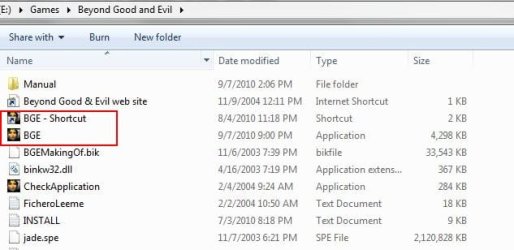
In my case, the game was Beyond Good and Evil. It just wouldn't run properly if I used its main .exe as a copy paste shortcut, as most others do.
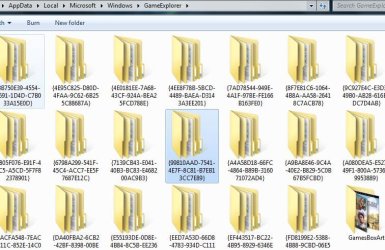
What I done to fix this game, was go to the main directory of the Game and instead of "Copying" the .exe and 'Pasting" it in to Game Explorer to create the Shortcut,

Right Click the .exe in the main folder and Choose 'Create Shortcut"
Then Copy that Shortcut you just created into that Games Folder Directory,

((Not the Games Explorer but, the same folder where the original 'Play' icon is. By Default , C\Users\user name\Microsoft\Windows\GameExplorer))
As you may already know, if you go into the BoxArt folder, and find the game in question, it name (number) will be the number of the folder to look for in the GameExplorer folder.


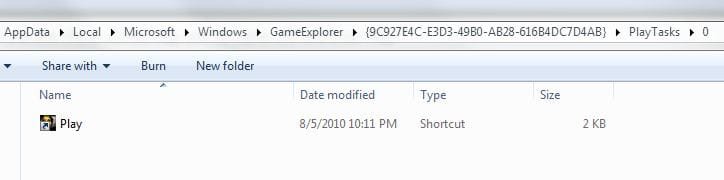
Delete the one there named Play (usually a Folder named 0)and re-name the shortcut you just pasted 'Play"

Sometimes, for some reason, creating a 'shortcut" of the .exe helps. not sure why.
Hope this helps.
 

My Computer

Computer Manufacturer/Model Number
Custom (Self Build)
OS
Windows 7 Home Premium 64bit
CPU
Intel Core i7 2700k
Motherboard
eVGA P67 SLI
Memory
8GB Mushkin Redline Ridgebacks @1866
Graphics Card(s)
EVGA GTX570 SC
Sound Card
XiFi Titanium HD
Monitor(s) Displays
LG W2453V
Screen Resolution
1920x1080
Hard Drives
Intel 320 80GB -- Intel X25-V 40GB --WD Black 1TB x2 -- WD Blue 640GB
PSU
Seasonic x750
Case
Corsair 600T SE White
Cooling
eVGA Superclocked CPU Cooler
Keyboard
Saitek Cyborg
Antivirus
Kaspersky
Browser
IE
Other Info
LG BD/DVD
Right Click the .exe in the main folder and Choose 'Create Shortcut"
Then Copy that Shortcut you just created into the Games Folder Directory,
((Not the Games Explorer but, the same folder where the original 'Play' icon is.))

Delete the one there named Play and re-name the shortcut 'Play"

Sometimes, for some reason, creating a 'shortcut" of the .exe helps.

so are you saying I should go to my Kane and lynch 2 directory, and create a shortcut of kl2.exe, and then delete the original kl2.exe and rename the shortcut to kl2.exe?
 

My Computer

Computer Manufacturer/Model Number
MSI/MS-7309
OS
Windows 7 Ultimate x64
Graphics Card(s)
Radeon HD 4830
Other Info
Don't know enough about computers to fill in the rest, if any important info is missing, feel free to message me on where or how to find the details.
Right Click the .exe in the main folder and Choose 'Create Shortcut"
Then Copy that Shortcut you just created into the Games Folder Directory,
((Not the Games Explorer but, the same folder where the original 'Play' icon is.))

Delete the one there named Play and re-name the shortcut 'Play"

Sometimes, for some reason, creating a 'shortcut" of the .exe helps.

so are you saying I should go to my Kane and lynch 2 directory, and create a shortcut of kl2.exe, and then delete the original kl2.exe and rename the shortcut to kl2.exe?

No. Do not delete the kl2.exe.

In the Kayne and Lycnh Directory right click the kl2.exe and choose create shortcut.
You'll have a shortcut likely named kl2.exe - shortcut

Then, right click the shortcut and Choose Copy.

Then go to the Games Explorer Directory (Where it stores the Box art and such), and find the Kayne and Lynch Folder.
In that folder, you will see other folders. Play tasks --> 0
Inside the 0 folder will be a shortcut named "Play"
delete it.
Paste the Shortcut of the kl2.exe and rename it "Play"
 

Attachments

  • Capture1.JPG
    Capture1.JPG
    92.9 KB · Views: 206
  • Capture.JPG
    Capture.JPG
    55.6 KB · Views: 797
  • Capture2.JPG
    Capture2.JPG
    25 KB · Views: 652

My Computer

Computer Manufacturer/Model Number
Custom (Self Build)
OS
Windows 7 Home Premium 64bit
CPU
Intel Core i7 2700k
Motherboard
eVGA P67 SLI
Memory
8GB Mushkin Redline Ridgebacks @1866
Graphics Card(s)
EVGA GTX570 SC
Sound Card
XiFi Titanium HD
Monitor(s) Displays
LG W2453V
Screen Resolution
1920x1080
Hard Drives
Intel 320 80GB -- Intel X25-V 40GB --WD Black 1TB x2 -- WD Blue 640GB
PSU
Seasonic x750
Case
Corsair 600T SE White
Cooling
eVGA Superclocked CPU Cooler
Keyboard
Saitek Cyborg
Antivirus
Kaspersky
Browser
IE
Other Info
LG BD/DVD
Then go to the Games Explorer Directory (Where it stores the Box art and such), and find the Kayne and Lynch Folder.
In that folder, you will see other folders. Play tasks --> 0
Inside the 0 folder will be a shortcut named "Play"
delete it.
Paste the Shortcut of the kl2.exe and rename it "Play"

That's why I was having trouble, those folders don't appear for me. I remember seeing somewhere that it's possible to make them appear, but I never read how (didn't concern me at the time). Would you happen to know?
 

My Computer

Computer Manufacturer/Model Number
MSI/MS-7309
OS
Windows 7 Ultimate x64
Graphics Card(s)
Radeon HD 4830
Other Info
Don't know enough about computers to fill in the rest, if any important info is missing, feel free to message me on where or how to find the details.
Back
Top