Games Explorer Folder - Delete a Game

How to Delete a Game in Games Explorer Folder in Vista, Windows 7, and Windows 8

   Information
This tutorial will show you how to delete a game that is displayed in the Games explorer folder in Vista, Windows 7, and Windows 8.

This can be handy if you had uninstalled the game, but it is still displayed in the Games folder.

   Note
The Games folder is central repository for games on your computer that also offers game updates, statistics, news feeds, WEI requirements, and more.

For more information about the Games Explorer folder, see: Games Explorer - Microsoft Windows

   Tip
You will need to have the default game checked in Windows Features before it will be displayed in the Games folder. By default they are checked. You can also uncheck one of the default games to remove it from the Games explorer folder. This does not apply to installed 3rd party games.
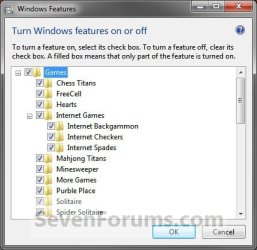
Windows_Features.jpg


EXAMPLE: Games explorer folder
NOTE: You can open the Games folder by clicking on the Games button on the dark right side of the Start Menu, typing shell:games in the Start Menu search box and pressing enter, or navigating to the hidden C:\ProgramData\Microsoft\Windows\Start Menu\Programs\Games folder.
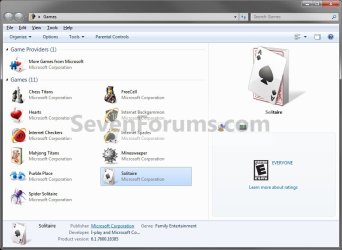
Default_Games_Explorer.jpg

Here's How:
1. Press the Windows + R keys to open the Run dialog, type regedit.exe, and press Enter.

2. If prompted by UAC, then click/tap on Yes (Windows 7/8) or Continue (Vista).

3. Under the Games Registry Key
A) In regedit, navigate to the location below: (see screenshot below)
HKEY_LOCAL_MACHINE\SOFTWARE\Microsoft\Windows\CurrentVersion\GameUX\Games
Reg1.jpg
B) In the left pane under the Games key, select each long number subkey and look in the right pane for the AppExePath name data to see if that is the name of the game (ex: Solitaire) you want to delete. (see screenshot above)
   Warning
You should create a backup of this long number subkey to be able to restore it later if you ever wanted to. Once you delete it in step 3C below it will be permanently gone.


To create a backup:
  • In the left pane, right click on the long number subkey for the correct game name and click on Export.
  • Name the .reg file backup something to make it easy to remember what this is for.
  • Save the .reg file somewhere safe to have it later if needed.
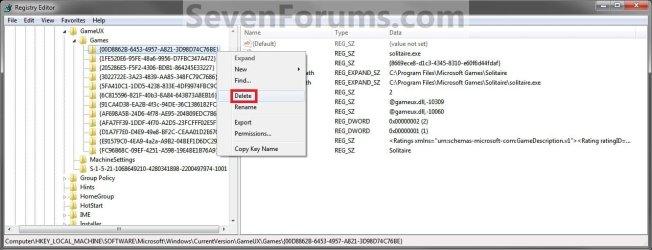
C) In the left pane, right click on the long number subkey for the correct game name and click on Delete. (See screenshot below)
Reg2.jpg
D) Click on Yes to confirm. (See screenshot below)
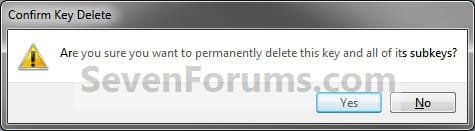
Confirm.jpg
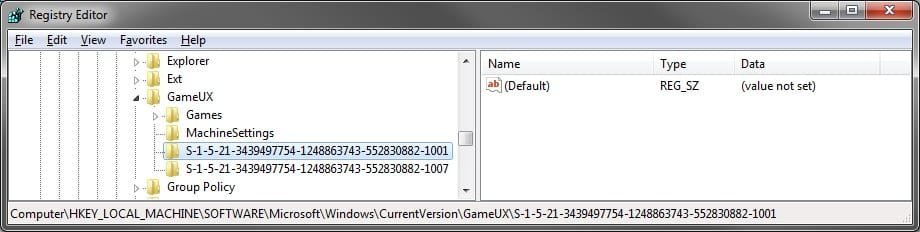
4. Under the S-1-5-21.... SID Registry Keys
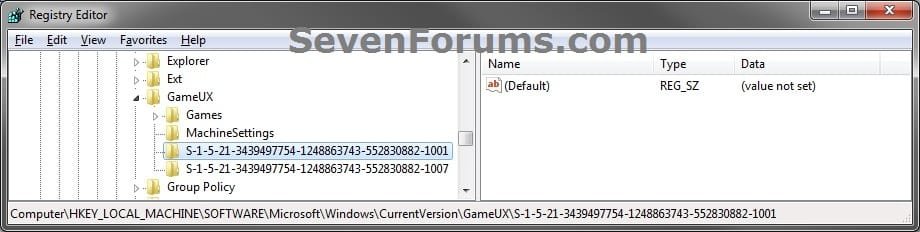
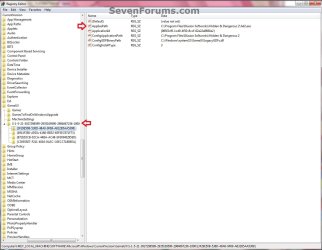
A) In regedit, go to the location below: (see screenshots below)
NOTE: Each S-1-5-21 key listed is a user account.

Code:
HKEY_LOCAL_MACHINE\SOFTWARE\Microsoft\Windows\CurrentVersion\GameUX\[B][COLOR=red](long S-1-5-21-#####...)[/COLOR][/B]
GameUX.jpg

GameUX2.jpg
B) In the left pane under each listed S-1-5-21 key, select each long number subkey and look in the right pane for the AppExePath name data to see if that is the name of the game (ex: Hidden & Dangerous 2) you want to delete. (see screenshot above)
   Warning
You should create a backup of this long number subkey to be able to restore it later if you ever wanted to. Once you delete it in step 4C below it will be permanently gone.


To create a backup:
  • In the left pane, right click on the long number subkey for the correct game name and click on Export.
  • Name the .reg file backup something to make it easy to remember what this is for.
  • Save the .reg file somewhere safe to have it later if needed.

C) In the left pane, right click on the long number subkey for the correct game name and click on Delete.

D) Click on Yes to confirm. (See screenshot below)
Confirm.jpg
5. Close regedit.

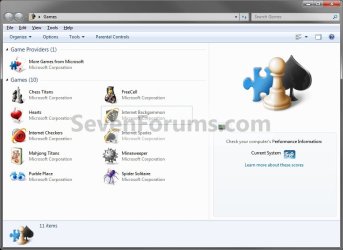
6. Close and reopen the Games explorer folder. The game (ex: Solitaire) has been deleted. (See screenshot below)
Removed.jpg
That's it,
Shawn


Last edited:
Thanks that did the trick, I had the same game listed 62 times, under 'unspecified', no idea how it happened, now after deleting all but one entry and hitting F5 on the listing, it's 1.
I am a bit miffed at MS for no easy deletion whatsoever for those icons.
 

My Computer

Computer type
PC/Desktop
Computer Manufacturer/Model Number
Self Built Custom
OS
Windows 7 Ultimate Retail Box (64-bit installed) + Service Pack 1
CPU
AMD FX-8350 CPU v1.15 (or 1.0F) BIOS was required!
Motherboard
MSI 890FXA-GD70
Memory
8G CAS-7 G-Skill DDR3 @1333 (2 fours) [mobo nonOC max rec'd]
Graphics Card(s)
Radeon HD 7950 [3 gigs of GDDR5] MSI Twin Frozr model
Sound Card
Realtek High Definition Audio (onboard mobo, ALC-889 chip)
Monitor(s) Displays
2 WS LED Monitors: One LG One Viewsonic
Screen Resolution
1920 by 1080
Hard Drives
SSD for OS: Samsung 840 Pro
SSD for VM and utilities: Adata SX900
7200 RPM SATA HDs for the rest: Hitachi and Seagate
PSU
Corsair TX850 - 850W max, in service since August 2010.
Case
Thermaltake Armor A90
Cooling
Thermaltake Spin Q CPU Cooler, in service since August 2010
Keyboard
Logitech G11
Mouse
Logitech M310 Wireless
Internet Speed
100 Megabit broadband supposedly upgraded from 50 (Cable)
Antivirus
Bitdefender Internet Security 2014 suite
Browser
Pale Moon 64-bit main, also IceDragon, Opera, and Maxthon.
Other Info
CompTIA A+ certified (220-800 series) in July 2013.
You're welcome Faladu,

Yeah it would be nice to have a delete option as well as the hide option when right clicking on them. :)
 

My Computer

Computer type
PC/Desktop
Computer Manufacturer/Model Number
Self built custom
OS
64-bit Windows 11 Pro for Workstations
CPU
Intel i7-8700K OC'd to 5 GHz
Motherboard
ASUS ROG Maximus XI Formula Z390
Memory
64 GB (4x16GB) G.SKILL TridentZ RGB DDR4 3600 MHz
Graphics Card(s)
ASUS ROG-STRIX-GTX1080TI-O11G-GAMING
Sound Card
Integrated
Monitor(s) Displays
2 x Samsung Odyssey G7 27"
Screen Resolution
2560x1440
Hard Drives
1TB Samsung 990 PRO M.2,
4TB Samsung 990 PRO PRO M.2,
TerraMaster F8 SSD Plus NAS
PSU
Seasonic Prime Titanium 850W
Case
Thermaltake Core P3
Cooling
Corsair Hydro H115i
Keyboard
Logitech wireless K800
Mouse
Logitech MX Master 4
Internet Speed
2 Gb/s Download and 100 Mb/s Upload
Antivirus
Malwarebyte Anti-Malware Premium
Browser
Google Chrome
Other Info
Logitech Z625 speaker system,
Logitech BRIO 4K Pro webcam,
HP Color LaserJet Pro MFP M477fdn,
APC SMART-UPS RT 1000 XL - SURT1000XLI,
Galaxy S23 Plus phone
I am having quite a bit of difficulty now. So, I did what this guide had asked, and gone so far as to even remove the portions of the GameUx/Games (out of frustration) since I could not even find the correct key that went with the program. Problem is this, the shortcut was actually a link to a Website which launches the game. So now, the file that is in the Games is a shortcut to firefox (which doesnt even open).

The Games portion is completely empty except for one reg item. So I have tried clicking on the item, going to organize, cliocking on delete and it doesnt do anything, the hide is not even there. And if I try clicking on delete in the File, it makes the "cant do" sound. I am not sure what else I can do, I am very frustrated over this.
 

My Computer

OS
Win 7
Hello XioNilrem, and welcome to Seven Forums.

I'm not certain as to what you are wanting to do now. If you wish to undo what you did, you should be able to do a system restore using a restore point dated before you made these changes in the registry to do so.

Hope this helps,
Shawn
 

My Computer

Computer type
PC/Desktop
Computer Manufacturer/Model Number
Self built custom
OS
64-bit Windows 11 Pro for Workstations
CPU
Intel i7-8700K OC'd to 5 GHz
Motherboard
ASUS ROG Maximus XI Formula Z390
Memory
64 GB (4x16GB) G.SKILL TridentZ RGB DDR4 3600 MHz
Graphics Card(s)
ASUS ROG-STRIX-GTX1080TI-O11G-GAMING
Sound Card
Integrated
Monitor(s) Displays
2 x Samsung Odyssey G7 27"
Screen Resolution
2560x1440
Hard Drives
1TB Samsung 990 PRO M.2,
4TB Samsung 990 PRO PRO M.2,
TerraMaster F8 SSD Plus NAS
PSU
Seasonic Prime Titanium 850W
Case
Thermaltake Core P3
Cooling
Corsair Hydro H115i
Keyboard
Logitech wireless K800
Mouse
Logitech MX Master 4
Internet Speed
2 Gb/s Download and 100 Mb/s Upload
Antivirus
Malwarebyte Anti-Malware Premium
Browser
Google Chrome
Other Info
Logitech Z625 speaker system,
Logitech BRIO 4K Pro webcam,
HP Color LaserJet Pro MFP M477fdn,
APC SMART-UPS RT 1000 XL - SURT1000XLI,
Galaxy S23 Plus phone
Sorry I wasn't clear and thanks for the welcome. What I am aiming to do is to remove a shortcut that is in the "games" setup. Not the one where you go to start, all programs, and then games. I mean the one on the right hand side above "Computer. It lists all my games and it also lists a shortcut to a firefox file.

http://img444.imageshack.us/img444/6072/gamed.jpg

That is an image of what I mean. You will see the file named archlord, well I cannot remove it, I cant delete it or anything. I tried looking in the regedit but it does not appear. So, that is what I am trying to figure out, how can I remove it if delete doesnt work, hide isnt shown, and it is not even shown in regedit.
 

My Computer

OS
Win 7
You might see if uninstalling Firefox can remove it, then reinstall afterwards making sure to uncheck anything that you do not want to install with it during it's installation.
 

My Computer

Computer type
PC/Desktop
Computer Manufacturer/Model Number
Self built custom
OS
64-bit Windows 11 Pro for Workstations
CPU
Intel i7-8700K OC'd to 5 GHz
Motherboard
ASUS ROG Maximus XI Formula Z390
Memory
64 GB (4x16GB) G.SKILL TridentZ RGB DDR4 3600 MHz
Graphics Card(s)
ASUS ROG-STRIX-GTX1080TI-O11G-GAMING
Sound Card
Integrated
Monitor(s) Displays
2 x Samsung Odyssey G7 27"
Screen Resolution
2560x1440
Hard Drives
1TB Samsung 990 PRO M.2,
4TB Samsung 990 PRO PRO M.2,
TerraMaster F8 SSD Plus NAS
PSU
Seasonic Prime Titanium 850W
Case
Thermaltake Core P3
Cooling
Corsair Hydro H115i
Keyboard
Logitech wireless K800
Mouse
Logitech MX Master 4
Internet Speed
2 Gb/s Download and 100 Mb/s Upload
Antivirus
Malwarebyte Anti-Malware Premium
Browser
Google Chrome
Other Info
Logitech Z625 speaker system,
Logitech BRIO 4K Pro webcam,
HP Color LaserJet Pro MFP M477fdn,
APC SMART-UPS RT 1000 XL - SURT1000XLI,
Galaxy S23 Plus phone
Sorry, that did not work. It ended up switching the program from firefox to explorer. And I am guessing, even if I removed all browsers, it would still be there but with a "search for program" sort of file type. Hmm, I may have to do system restore if nothing else works argh, which I dotn wanna do since I dont know what I will lose.
 

My Computer

OS
Win 7
You might see if using the Find and Find Next feature in regedit for Archlord may be able to find it in the registry at another location. Before doing this, I would recommend that you create a restore point incase you may need to do a system restore if a mistake is made.
 

My Computer

Computer type
PC/Desktop
Computer Manufacturer/Model Number
Self built custom
OS
64-bit Windows 11 Pro for Workstations
CPU
Intel i7-8700K OC'd to 5 GHz
Motherboard
ASUS ROG Maximus XI Formula Z390
Memory
64 GB (4x16GB) G.SKILL TridentZ RGB DDR4 3600 MHz
Graphics Card(s)
ASUS ROG-STRIX-GTX1080TI-O11G-GAMING
Sound Card
Integrated
Monitor(s) Displays
2 x Samsung Odyssey G7 27"
Screen Resolution
2560x1440
Hard Drives
1TB Samsung 990 PRO M.2,
4TB Samsung 990 PRO PRO M.2,
TerraMaster F8 SSD Plus NAS
PSU
Seasonic Prime Titanium 850W
Case
Thermaltake Core P3
Cooling
Corsair Hydro H115i
Keyboard
Logitech wireless K800
Mouse
Logitech MX Master 4
Internet Speed
2 Gb/s Download and 100 Mb/s Upload
Antivirus
Malwarebyte Anti-Malware Premium
Browser
Google Chrome
Other Info
Logitech Z625 speaker system,
Logitech BRIO 4K Pro webcam,
HP Color LaserJet Pro MFP M477fdn,
APC SMART-UPS RT 1000 XL - SURT1000XLI,
Galaxy S23 Plus phone
Delayed response, sorry. But yeah, I tried the find and deleted what I could and it did not work. So I ran out of ideas and ended up simply doing a system restore (which was only 3 days so not a huge deal).
 

My Computer

OS
Win 7
I have a problem with my games explorer..

Hi. I have a problem with those 4 shortcuts in GameExplorer Folder (see GEproblem attachment). I can't delete them from my GameExplorer Folder. I tried with :

- C:\Users\Your Name\AppData\Roaming\Microsoft\Windows\Start Menu\Programs\Games, but from the folder i can't delete them, because they are not there.
- C:\Users\Your Name\AppData\Local\Microsoft\Windows\GameExplorer and then those 4 shortcus were moved to UNSPECIFIED section (see the Unspecified attachment) and also i can't remove them.

I accidentally threw the shortcuts into the games folder and now I cannot delete them in any way. I am not allowed to right click them or do anything to them.
Is there any way to remove these?

Thanks a lot for the help.
 

Attachments

  • GEproblem.JPG
    GEproblem.JPG
    172.1 KB · Views: 904
  • UNSPECIFIED.JPG
    UNSPECIFIED.JPG
    144.6 KB · Views: 808

My Computer

OS
Windows7
Hello Lucas, and welcome to Seven Forums.

Have you already tried deleting them in the registry location, if there?
 

My Computer

Computer type
PC/Desktop
Computer Manufacturer/Model Number
Self built custom
OS
64-bit Windows 11 Pro for Workstations
CPU
Intel i7-8700K OC'd to 5 GHz
Motherboard
ASUS ROG Maximus XI Formula Z390
Memory
64 GB (4x16GB) G.SKILL TridentZ RGB DDR4 3600 MHz
Graphics Card(s)
ASUS ROG-STRIX-GTX1080TI-O11G-GAMING
Sound Card
Integrated
Monitor(s) Displays
2 x Samsung Odyssey G7 27"
Screen Resolution
2560x1440
Hard Drives
1TB Samsung 990 PRO M.2,
4TB Samsung 990 PRO PRO M.2,
TerraMaster F8 SSD Plus NAS
PSU
Seasonic Prime Titanium 850W
Case
Thermaltake Core P3
Cooling
Corsair Hydro H115i
Keyboard
Logitech wireless K800
Mouse
Logitech MX Master 4
Internet Speed
2 Gb/s Download and 100 Mb/s Upload
Antivirus
Malwarebyte Anti-Malware Premium
Browser
Google Chrome
Other Info
Logitech Z625 speaker system,
Logitech BRIO 4K Pro webcam,
HP Color LaserJet Pro MFP M477fdn,
APC SMART-UPS RT 1000 XL - SURT1000XLI,
Galaxy S23 Plus phone
Old thread, same issue as lucas7

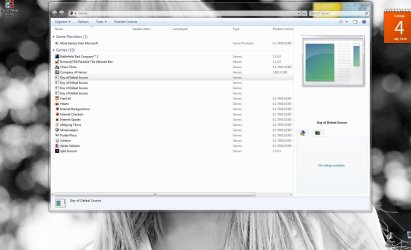
Hey Brink, I have the same issue as lucas7 with not being able to delete a game shortcut.

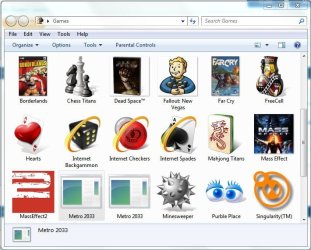
Here's the deal. I installed Metro 2033 last night and noticed it didn't create a shortcut in my Games Explorer so I figured i'd copy and paste a shortcut form the game there. Well I get this.....

Metro blank shortcut.JPG

Bad ideal..... Now no matter what I do I can't delete those, and clicking on them does nothing! They're simply dead links that can't be deleted :mad:

Incidentally this is a Steam game install, but so is Fallout New Vegas and as you can see... New Vegas has a functional shortcut that was created during the game installation. Point being they're both steam games.

Anyway has anyone figured out a way to delete these dead links/shortcuts?

Thanks
 

My Computer

Computer type
PC/Desktop
Computer Manufacturer/Model Number
Custom built by me.
OS
Windows 10 Pro
CPU
Intel Core i7-4770K (3.5Ghz)
Motherboard
Gigabyte G1 Sniper 5 (F10 Bios)
Memory
32 gig Corsair Dominator Platinum (4x8Gig)
Graphics Card(s)
Sapphire Tri-X R9 Fury
Sound Card
Soundblaster ZXR
Monitor(s) Displays
NEC PA242W 24" LCD Monitor
Screen Resolution
1920 x 1200
Hard Drives
Primary - Samsung 850 Pro (512gig), Samsung 840 Pro (256gig), 2TB WD Caviar Black.
PSU
EVGA Supernova 1000 G2
Case
Cooler Master HAF X
Cooling
Corsair H100i with Corsair Air Series SP120 Quiet Fans
Keyboard
Logitech Wireless Wave
Mouse
Logitech Performance MX
Internet Speed
High Speed Cable
Antivirus
Norton Security
Browser
IE11
Other Info
Memory Timings - 1866MHz @ 9-9-9-27-1T @ 1.5 volts
Hello Drew,

Is it listed in the registry location in the tutorial, or in the hidden folder location below?

C:\ProgramData\Microsoft\Windows\Start Menu\Programs\Games
 

My Computer

Computer type
PC/Desktop
Computer Manufacturer/Model Number
Self built custom
OS
64-bit Windows 11 Pro for Workstations
CPU
Intel i7-8700K OC'd to 5 GHz
Motherboard
ASUS ROG Maximus XI Formula Z390
Memory
64 GB (4x16GB) G.SKILL TridentZ RGB DDR4 3600 MHz
Graphics Card(s)
ASUS ROG-STRIX-GTX1080TI-O11G-GAMING
Sound Card
Integrated
Monitor(s) Displays
2 x Samsung Odyssey G7 27"
Screen Resolution
2560x1440
Hard Drives
1TB Samsung 990 PRO M.2,
4TB Samsung 990 PRO PRO M.2,
TerraMaster F8 SSD Plus NAS
PSU
Seasonic Prime Titanium 850W
Case
Thermaltake Core P3
Cooling
Corsair Hydro H115i
Keyboard
Logitech wireless K800
Mouse
Logitech MX Master 4
Internet Speed
2 Gb/s Download and 100 Mb/s Upload
Antivirus
Malwarebyte Anti-Malware Premium
Browser
Google Chrome
Other Info
Logitech Z625 speaker system,
Logitech BRIO 4K Pro webcam,
HP Color LaserJet Pro MFP M477fdn,
APC SMART-UPS RT 1000 XL - SURT1000XLI,
Galaxy S23 Plus phone
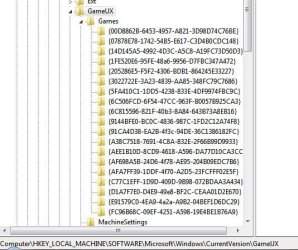
Hi Brink, no it's not listed in either location, and I already looked in the registry. In fact here.....

HKEY_LOCAL_MACHINE.JPG

It's just weird that I can't do anyting with it. It's just sitting there, dead.
 

My Computer

Computer type
PC/Desktop
Computer Manufacturer/Model Number
Custom built by me.
OS
Windows 10 Pro
CPU
Intel Core i7-4770K (3.5Ghz)
Motherboard
Gigabyte G1 Sniper 5 (F10 Bios)
Memory
32 gig Corsair Dominator Platinum (4x8Gig)
Graphics Card(s)
Sapphire Tri-X R9 Fury
Sound Card
Soundblaster ZXR
Monitor(s) Displays
NEC PA242W 24" LCD Monitor
Screen Resolution
1920 x 1200
Hard Drives
Primary - Samsung 850 Pro (512gig), Samsung 840 Pro (256gig), 2TB WD Caviar Black.
PSU
EVGA Supernova 1000 G2
Case
Cooler Master HAF X
Cooling
Corsair H100i with Corsair Air Series SP120 Quiet Fans
Keyboard
Logitech Wireless Wave
Mouse
Logitech Performance MX
Internet Speed
High Speed Cable
Antivirus
Norton Security
Browser
IE11
Other Info
Memory Timings - 1866MHz @ 9-9-9-27-1T @ 1.5 volts
I found it. Duh.... did a search for Metro 2033 in the registry and it found it under another section of the GameUX string, under S-1-5-21-4117717313.... which looks like one of those generic user profiles that Windows throws in.

Anyway deleting a couple of strings in there got rid of both the links. And it didn't even affect the desktop shortcut that the game created during installation. So all is good now.

Thanks :)
 

My Computer

Computer type
PC/Desktop
Computer Manufacturer/Model Number
Custom built by me.
OS
Windows 10 Pro
CPU
Intel Core i7-4770K (3.5Ghz)
Motherboard
Gigabyte G1 Sniper 5 (F10 Bios)
Memory
32 gig Corsair Dominator Platinum (4x8Gig)
Graphics Card(s)
Sapphire Tri-X R9 Fury
Sound Card
Soundblaster ZXR
Monitor(s) Displays
NEC PA242W 24" LCD Monitor
Screen Resolution
1920 x 1200
Hard Drives
Primary - Samsung 850 Pro (512gig), Samsung 840 Pro (256gig), 2TB WD Caviar Black.
PSU
EVGA Supernova 1000 G2
Case
Cooler Master HAF X
Cooling
Corsair H100i with Corsair Air Series SP120 Quiet Fans
Keyboard
Logitech Wireless Wave
Mouse
Logitech Performance MX
Internet Speed
High Speed Cable
Antivirus
Norton Security
Browser
IE11
Other Info
Memory Timings - 1866MHz @ 9-9-9-27-1T @ 1.5 volts
Drew,

Ok, check in this registry location below as well to see if the games may be listed the same way as in the tutorial under the (long S-1-5-21-#####...) key in the left pane instead.

HKEY_LOCAL_MACHINE\SOFTWARE\Microsoft\Windows\CurrentVersion\GameUX\(long S-1-5-21-#####...)

GameUX.jpg

EDIT:
LOL, I was just posting for this. ;)
 

My Computer

Computer type
PC/Desktop
Computer Manufacturer/Model Number
Self built custom
OS
64-bit Windows 11 Pro for Workstations
CPU
Intel i7-8700K OC'd to 5 GHz
Motherboard
ASUS ROG Maximus XI Formula Z390
Memory
64 GB (4x16GB) G.SKILL TridentZ RGB DDR4 3600 MHz
Graphics Card(s)
ASUS ROG-STRIX-GTX1080TI-O11G-GAMING
Sound Card
Integrated
Monitor(s) Displays
2 x Samsung Odyssey G7 27"
Screen Resolution
2560x1440
Hard Drives
1TB Samsung 990 PRO M.2,
4TB Samsung 990 PRO PRO M.2,
TerraMaster F8 SSD Plus NAS
PSU
Seasonic Prime Titanium 850W
Case
Thermaltake Core P3
Cooling
Corsair Hydro H115i
Keyboard
Logitech wireless K800
Mouse
Logitech MX Master 4
Internet Speed
2 Gb/s Download and 100 Mb/s Upload
Antivirus
Malwarebyte Anti-Malware Premium
Browser
Google Chrome
Other Info
Logitech Z625 speaker system,
Logitech BRIO 4K Pro webcam,
HP Color LaserJet Pro MFP M477fdn,
APC SMART-UPS RT 1000 XL - SURT1000XLI,
Galaxy S23 Plus phone
What was that about great minds :D

Anyway thanks for the help.
 

My Computer

Computer type
PC/Desktop
Computer Manufacturer/Model Number
Custom built by me.
OS
Windows 10 Pro
CPU
Intel Core i7-4770K (3.5Ghz)
Motherboard
Gigabyte G1 Sniper 5 (F10 Bios)
Memory
32 gig Corsair Dominator Platinum (4x8Gig)
Graphics Card(s)
Sapphire Tri-X R9 Fury
Sound Card
Soundblaster ZXR
Monitor(s) Displays
NEC PA242W 24" LCD Monitor
Screen Resolution
1920 x 1200
Hard Drives
Primary - Samsung 850 Pro (512gig), Samsung 840 Pro (256gig), 2TB WD Caviar Black.
PSU
EVGA Supernova 1000 G2
Case
Cooler Master HAF X
Cooling
Corsair H100i with Corsair Air Series SP120 Quiet Fans
Keyboard
Logitech Wireless Wave
Mouse
Logitech Performance MX
Internet Speed
High Speed Cable
Antivirus
Norton Security
Browser
IE11
Other Info
Memory Timings - 1866MHz @ 9-9-9-27-1T @ 1.5 volts
You're most welcome Drew. I'm glad that you got it sorted. :)
 

My Computer

Computer type
PC/Desktop
Computer Manufacturer/Model Number
Self built custom
OS
64-bit Windows 11 Pro for Workstations
CPU
Intel i7-8700K OC'd to 5 GHz
Motherboard
ASUS ROG Maximus XI Formula Z390
Memory
64 GB (4x16GB) G.SKILL TridentZ RGB DDR4 3600 MHz
Graphics Card(s)
ASUS ROG-STRIX-GTX1080TI-O11G-GAMING
Sound Card
Integrated
Monitor(s) Displays
2 x Samsung Odyssey G7 27"
Screen Resolution
2560x1440
Hard Drives
1TB Samsung 990 PRO M.2,
4TB Samsung 990 PRO PRO M.2,
TerraMaster F8 SSD Plus NAS
PSU
Seasonic Prime Titanium 850W
Case
Thermaltake Core P3
Cooling
Corsair Hydro H115i
Keyboard
Logitech wireless K800
Mouse
Logitech MX Master 4
Internet Speed
2 Gb/s Download and 100 Mb/s Upload
Antivirus
Malwarebyte Anti-Malware Premium
Browser
Google Chrome
Other Info
Logitech Z625 speaker system,
Logitech BRIO 4K Pro webcam,
HP Color LaserJet Pro MFP M477fdn,
APC SMART-UPS RT 1000 XL - SURT1000XLI,
Galaxy S23 Plus phone
Thanks

Another brilliant solution from SevenForums, worked perfectly! :cool:

Thanks.

P.S. The "games" i was trying to remove from the Games Explorer window were also Internet Shortcuts (IE) to an online game. I think that, although the system allows you to "Create a shortcut here" Internet shortcuts are incompatible with Games Explorer. They do not show the correct icon neither do they do anything - clicking on them does absolutely nothing. Windows should not let you copy them there, or should at least give you a warning message...

Thanks again,

Adam.
 

My Computer

Computer Manufacturer/Model Number
Samsung RF712
OS
Windows 7 Ultimate 64-bit SP1
CPU
Intel Core i7-2630QM @ 2.0Ghz (Auto-overclocks to 2.9Ghz)
Motherboard
Intel Sandy Bridge/HM65 based Samsung Electronics Co., Ltd.
Memory
6GB of PC3-10700 (667 Mhz) DDR3 (1:5 9, 9, 9, 24, 34, 1T)
Graphics Card(s)
ATI (AMD) Radeon HD 6650M, 2GB, 600/900 Mhz, PCI-E 2.0x16
Sound Card
Realtek High Definition Audio / AMD High Definition Audio
Monitor(s) Displays
17.3" 3D 1080p Full HD SuperBright Plus LED (400nit)
Screen Resolution
1920x1080
Hard Drives
Hitachi HTS725050A9A 500 GB
External Seagate FreeAgent Go 320 GB
PSU
External Chicony Power Technology Co, Ltd. - 19V 4.74A
Case
Aluminium Laptop
Cooling
Two cooling-fans and two extractor vents (CPU and GPU)
Keyboard
Backlit, full
Mouse
Pinch & Zoom Touchpad and a Bluetooth Laser Mouse (1600cpi)
Internet Speed
20Mb Down, 2.4Mb up
Back
Top