
Games Library - Create

How to Create a "Games" Library with Correct Icon in Windows 7 and Windows 8

   Information
This will show you how to create a Games library in Windows 7 and Windows 8 that has the correct Games folder icon on a glass plate for it's library icon.


EXAMPLE: Games Library with Correct Icon
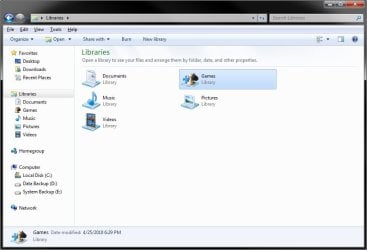
Games_Library.jpg
Here's How:
1. To Download the Games Library Icon
A) Click/tap on the Download button below to download the Games_Library.zip file that contains the correct Games library icon.

Download


B) Save the ZIP file to your desktop.

C) Double click/tap on the ZIP file to open it, then extract (drag and frop) the Downloads_Library.ico file to the location that you want to keep it at.
WARNING: The icon file will need to remain at this location while it is being used (step 3) for the Games library. If you move it, then the icon will no longer be displayed for the Games library.

D) Right click or press and hold on the Downloads_Library.ico file, and click/tap on Properties, General tab, on the Unblock button, and on OK. (see screenshot below)
NOTE: If you do not have a Unblock button under the General tab, then the shortcut is already unblocked and you can continue on to step 2.
2. To Create the Games Library
A) In Windows Explorer, navigate to your the hidden system folder path below. (see screenshot below)

Code:
C:\ProgramData\Microsoft\Windows\Start Menu\Programs

B) Create a new library with the Games folder. (see screenshot below)
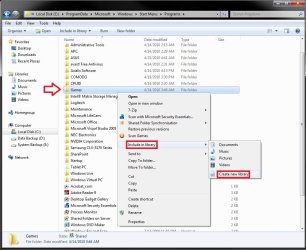
Step1.jpg
3. Do step 4 or 5 below depending on if you are in Windows 7 or Windows 8.

3. To Change the Games Library Icon in Windows 7
A) Change the Games library icon to use the Games_Library.ico icon file at the location you have saved it to in step 1. (See screenshots below)

   Note
For example, I saved my icon from step 1 to C:\Users\(user-name)\My Documents, so I would add the line below (right screenshot below) while changing the icon at step 5 at that link.

<iconReference>"C:\Users\User-Name\Documents\Games_Library.ico"</iconReference>

You would substitute the path in red to the full path of where you saved the Games_Library.ico file instead in step 1.
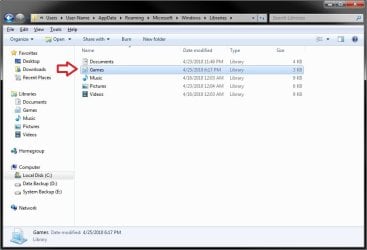
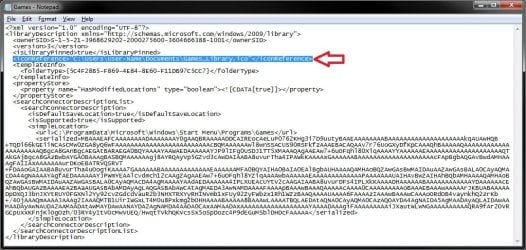

Step2.jpg

Step3.jpg
5. To Change the Downloads Library Icon in Windows 8
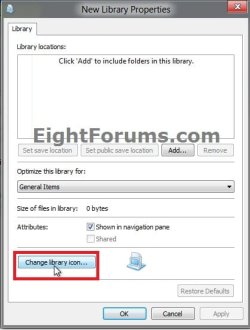
A) Using OPTION ONE in the tutorial below, change the new library's icon using the Games_Library.ico icon file at the location you have saved it to in step 1. (see screenshot below)
How to Change a Library Icon in Windows 8
Change_New-Library_Icon.jpg
6. You will now notice that the Games library icon has changed.
NOTE: See example screenshot at the top of the tutorial.
That's it,
Shawn


Attachments

Last edited:
Good tutorial.
 

My Computer

Computer Manufacturer/Model Number
Dell Inspiron 1440
OS
Windows 7 Home Premium 64-bit
CPU
Pentium(R) Dual-Core CPU T4200 @ 2.00GHz (2 CPUs), ~2.0 GHz
Memory
4 GB
Graphics Card(s)
Mobile Intel(R) 4 Series Express Chipset Family
Monitor(s) Displays
Generic PnP Monitor
Screen Resolution
1366 x 768 (60Hz)
Keyboard
Dell Integrated Laptop Keyboard
Mouse
Microsoft Wireless Notebook Optical Mouse 3000
Internet Speed
1.4 Mbps....
Thank you Jason. I'm glad that you like it. :)
 

My Computer

Computer type
PC/Desktop
Computer Manufacturer/Model Number
Self built custom
OS
64-bit Windows 11 Pro for Workstations
CPU
Intel i7-8700K OC'd to 5 GHz
Motherboard
ASUS ROG Maximus XI Formula Z390
Memory
64 GB (4x16GB) G.SKILL TridentZ RGB DDR4 3600 MHz
Graphics Card(s)
ASUS ROG-STRIX-GTX1080TI-O11G-GAMING
Sound Card
Integrated
Monitor(s) Displays
2 x Samsung Odyssey G7 27"
Screen Resolution
2560x1440
Hard Drives
1TB Samsung 990 PRO M.2,
4TB Samsung 990 PRO PRO M.2,
TerraMaster F8 SSD Plus NAS
PSU
Seasonic Prime Titanium 850W
Case
Thermaltake Core P3
Cooling
Corsair Hydro H115i
Keyboard
Logitech wireless K800
Mouse
Logitech MX Master 4
Internet Speed
2 Gb/s Download and 100 Mb/s Upload
Antivirus
Malwarebyte Anti-Malware Premium
Browser
Google Chrome
Other Info
Logitech Z625 speaker system,
Logitech BRIO 4K Pro webcam,
HP Color LaserJet Pro MFP M477fdn,
APC SMART-UPS RT 1000 XL - SURT1000XLI,
Galaxy S23 Plus phone
Hi Brink, How are the icons created so that they show with the alpha glass plate in the Window Pane but show just the icon in the Navigation Pane? Is there a tutorial somewhere for this? Cheers.
 

My Computer

Computer Manufacturer/Model Number
Acer Aspire 5741
OS
windows 7 Home Premium
CPU
Intel Core i5 @ 2.27GHz 32nm Technology
Motherboard
Acer Aspire 5741 (CPU)
Memory
DDR3 4.0GB
Graphics Card(s)
Intel(R) Graphics Media Accelerator HD
Sound Card
Realtek High Definition Audio Intel(R) Display Audio
Monitor(s) Displays
Generic PnP Monitor on Intel Graphics Media Accelerator HD
Screen Resolution
1366x768
Hard Drives
Seagate 2.5" SATA 500GB
Keyboard
Synaptics PS/2 Port TouchPad
Mouse
Microsoft Comfort Mouse 4500 (IntelliPoint)
Hello Kiwichick,

It's part of when the icon is created and packaged as a 256x256 pixel Vista style icon. The small icons used in the navigation pane are the smaller pixel sizes that are packaged in the icon. The link below can help show you more on how to create these icons.

Vista Icons - Introducing Vista Icons - How to create Vista Icons

Hope this helps some,
Shawn
 

My Computer

Computer type
PC/Desktop
Computer Manufacturer/Model Number
Self built custom
OS
64-bit Windows 11 Pro for Workstations
CPU
Intel i7-8700K OC'd to 5 GHz
Motherboard
ASUS ROG Maximus XI Formula Z390
Memory
64 GB (4x16GB) G.SKILL TridentZ RGB DDR4 3600 MHz
Graphics Card(s)
ASUS ROG-STRIX-GTX1080TI-O11G-GAMING
Sound Card
Integrated
Monitor(s) Displays
2 x Samsung Odyssey G7 27"
Screen Resolution
2560x1440
Hard Drives
1TB Samsung 990 PRO M.2,
4TB Samsung 990 PRO PRO M.2,
TerraMaster F8 SSD Plus NAS
PSU
Seasonic Prime Titanium 850W
Case
Thermaltake Core P3
Cooling
Corsair Hydro H115i
Keyboard
Logitech wireless K800
Mouse
Logitech MX Master 4
Internet Speed
2 Gb/s Download and 100 Mb/s Upload
Antivirus
Malwarebyte Anti-Malware Premium
Browser
Google Chrome
Other Info
Logitech Z625 speaker system,
Logitech BRIO 4K Pro webcam,
HP Color LaserJet Pro MFP M477fdn,
APC SMART-UPS RT 1000 XL - SURT1000XLI,
Galaxy S23 Plus phone
Thanks Brink, will check it out.
 

My Computer

Computer Manufacturer/Model Number
Acer Aspire 5741
OS
windows 7 Home Premium
CPU
Intel Core i5 @ 2.27GHz 32nm Technology
Motherboard
Acer Aspire 5741 (CPU)
Memory
DDR3 4.0GB
Graphics Card(s)
Intel(R) Graphics Media Accelerator HD
Sound Card
Realtek High Definition Audio Intel(R) Display Audio
Monitor(s) Displays
Generic PnP Monitor on Intel Graphics Media Accelerator HD
Screen Resolution
1366x768
Hard Drives
Seagate 2.5" SATA 500GB
Keyboard
Synaptics PS/2 Port TouchPad
Mouse
Microsoft Comfort Mouse 4500 (IntelliPoint)
You're welcome. :)
 

My Computer

Computer type
PC/Desktop
Computer Manufacturer/Model Number
Self built custom
OS
64-bit Windows 11 Pro for Workstations
CPU
Intel i7-8700K OC'd to 5 GHz
Motherboard
ASUS ROG Maximus XI Formula Z390
Memory
64 GB (4x16GB) G.SKILL TridentZ RGB DDR4 3600 MHz
Graphics Card(s)
ASUS ROG-STRIX-GTX1080TI-O11G-GAMING
Sound Card
Integrated
Monitor(s) Displays
2 x Samsung Odyssey G7 27"
Screen Resolution
2560x1440
Hard Drives
1TB Samsung 990 PRO M.2,
4TB Samsung 990 PRO PRO M.2,
TerraMaster F8 SSD Plus NAS
PSU
Seasonic Prime Titanium 850W
Case
Thermaltake Core P3
Cooling
Corsair Hydro H115i
Keyboard
Logitech wireless K800
Mouse
Logitech MX Master 4
Internet Speed
2 Gb/s Download and 100 Mb/s Upload
Antivirus
Malwarebyte Anti-Malware Premium
Browser
Google Chrome
Other Info
Logitech Z625 speaker system,
Logitech BRIO 4K Pro webcam,
HP Color LaserJet Pro MFP M477fdn,
APC SMART-UPS RT 1000 XL - SURT1000XLI,
Galaxy S23 Plus phone
Cool beans. First link in google for "games library icon". I started using a program called Fences, which organizes the desktop, and made an area for library's. I saved space by adding games in there. Great tut :D
 

My Computer

Computer Manufacturer/Model Number
eMachines W3502
OS
Windows 7 Ultimate x32
CPU
Intel Celeron D 3.2 Ghz 533 fsb (LGA 775)
Motherboard
Intel D101GGC
Memory
1 GB (2x512MB) PC-3200 DDR @ 200Mhz
Graphics Card(s)
Nvidia GeForce 9400GT- 1GB
Sound Card
Sound Blaster X-Fi Xtreame Gamer
Monitor(s) Displays
19" LCD HDtv
Screen Resolution
1360x768 @ 60Htz
Hard Drives
SeaGate Barracuda 750GB
SeaGate Barracuda 100GB
Toshiba CD/DVDW/ TS-H552D [DVD+R, DL]
PSU
stock (idk)
Case
The busted remains of the stock case
Cooling
Dust cooled, waitwut?
Keyboard
Stock. Missing a few keys.
Mouse
Logitech LX8 5-btn mouse (wireless)
Internet Speed
TWC 10Mb
Other Info
Keeps going, and going, and going.......
Thank you C.. I'm happy to hear that you liked it and found it useful. :)
 

My Computer

Computer type
PC/Desktop
Computer Manufacturer/Model Number
Self built custom
OS
64-bit Windows 11 Pro for Workstations
CPU
Intel i7-8700K OC'd to 5 GHz
Motherboard
ASUS ROG Maximus XI Formula Z390
Memory
64 GB (4x16GB) G.SKILL TridentZ RGB DDR4 3600 MHz
Graphics Card(s)
ASUS ROG-STRIX-GTX1080TI-O11G-GAMING
Sound Card
Integrated
Monitor(s) Displays
2 x Samsung Odyssey G7 27"
Screen Resolution
2560x1440
Hard Drives
1TB Samsung 990 PRO M.2,
4TB Samsung 990 PRO PRO M.2,
TerraMaster F8 SSD Plus NAS
PSU
Seasonic Prime Titanium 850W
Case
Thermaltake Core P3
Cooling
Corsair Hydro H115i
Keyboard
Logitech wireless K800
Mouse
Logitech MX Master 4
Internet Speed
2 Gb/s Download and 100 Mb/s Upload
Antivirus
Malwarebyte Anti-Malware Premium
Browser
Google Chrome
Other Info
Logitech Z625 speaker system,
Logitech BRIO 4K Pro webcam,
HP Color LaserJet Pro MFP M477fdn,
APC SMART-UPS RT 1000 XL - SURT1000XLI,
Galaxy S23 Plus phone
Back
Top