Gateway Kayf0 Keyboard is not uninstalling/disabling.

justabluejay

New member
Local time
10:15 PM
Messages
38
Hi, my laptop keyboard has recently suffered a spill from probably the worst kind of juice, and of course, it acting up but pressing many random keys without me even touching it.
I have tried disabling it from the device manager, but the option was not highlighted so I tried uninstalling and restarting. The driver for the internal keyboard still remained there after many attempts. I even bought a new USB keyboard and the option to disable the PS/2 keyboard was still not highlighted.
Recently I went ahead to open up my laptop's front and remove the keyboard wire. I did that and tried to keep the keyboard in place without reinserting it, but still the random keys being pressed still happens! Now I am out of options on what the problem might be, nor the solution to the problem.
What is there left to do without using money to contact a specialist to get it fixed, because I'd honestly not do that yet unless it is the only single option left for me.
Thanks in advance.
 

My Computer My Computer

At a glance

windows 7 Home Premium 64 BitAMD FX-83504 GB RAM
Computer type
PC/Desktop
Computer Manufacturer/Model Number
Custom Build
OS
windows 7 Home Premium 64 Bit
CPU
AMD FX-8350
Motherboard
ASUS M5A78L-M/USB3
Memory
4 GB RAM
Monitor(s) Displays
Acer
Screen Resolution
1600x900
Hard Drives
WB Blue 7200RPM 1TB
Case
Antec 900
Cooling
Cooler Master Hyper Evo 212
Keyboard
SONY PCVA-KB4P/U
Mouse
Vivitar
Antivirus
Microsoft Security Essentials/Avira
Browser
Google Chrome
Oh dear mate sounds like the juice made it past the KB and unfortunatelyonto the motherboard or worse into the RAM stick hard drive optical drive slots

Check this out and all I can suggest is to very gently cleanout every slot you can find as well as the end of every ribbon cable https://www.youtube.com/watch?v=CMo6_0mkEE8 i fact just clean all you can see:(

SLOTCLEANING

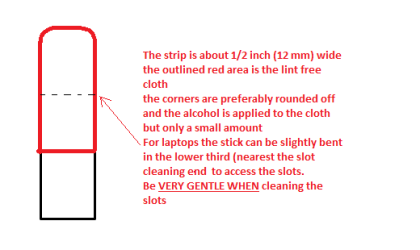
Now as for the slots to clean them use astrip of old credit card about 1/2 inch wide nip the corners off one end - preferably round them offhold apiece of thin lint free cloth over the end dab on some form of alcohol - isopropyl alcohol (what we swab the skin with before an injection) is good and GENTLY swipe along the slots.

This can also be done for the GPU slot/s. (Don't use this for the ribbon cable slots)

PS Meant to mention do this on a large white bath towel stretched out flat so the screws if dropped will not bounce onto the floor and can be easily seen if dropped
 

Attachments

  • STICK CLEANER.PNG
    STICK CLEANER.PNG
    4.9 KB · Views: 6

My Computer My Computer

At a glance

Desk1 7 Home Prem / Desk2 10 Pro / Main lap A...Desk1 i5 3750K / Laptop i7 GTX 860M / Desk2 i...Desk1 8GB (1866) / Desk2 16GB (1333) / Laptop...Desk 1& 2NVidia GTX 650 & Laptops on board Intel
Computer type
PC/Desktop
Computer Manufacturer/Model Number
Own build (new) Desk1 / Asus ROG Win 7 / Desk2 1st build
OS
Desk1 7 Home Prem / Desk2 10 Pro / Main lap Asus ROG 10 Pro 2 laptop Toshiba 7 Pro Asus P2520 7 & 10
CPU
Desk1 i5 3750K / Laptop i7 GTX 860M / Desk2 i5 2500
Motherboard
Desk1 Asus P877-V / Desk2 Gigabyte H67 UD3H / Laptop ?
Memory
Desk1 8GB (1866) / Desk2 16GB (1333) / Laptop 8Gb DDR3
Graphics Card(s)
Desk 1& 2NVidia GTX 650 & Laptops on board Intel
Sound Card
Desk 1 & 2 -XONAR DG Realtek High Def audio Laptop
Monitor(s) Displays
Desk 1 Benq HD 2450 / Desk2 Philips 24" / Laptop 17.5"
Screen Resolution
1920x1080 D1 & D2 & Laptop 1
Hard Drives
Desk1 Samsung 120GB 830 SSD
Asus ROG 256GB 850 Pro SSD
Desk2 Samsung 840 256 SSD
Toshiba 120GB EVO
PSU
Desk 1 Corsair HX 1050/ Laptop ? / Desk 2 Corsair HX 650
Case
Desk 1 Cooler HAF XM ? Toshiba laptop / Desk2 Coolermaster
Cooling
Fans on all Desk1 -2 Desk2 - all Coolermasters 5 Laptop ?
Keyboard
Desk 1 MS Sidewinder X6 Desk 2 MS Sidewinder X 4
Mouse
Desk 1&2 - Gigabyte MS 900 gamer - laptop - Logitec wireless
Internet Speed
ADSL2+
Other Info
One other Desktop (tester) and spare Toshba laptop both with SSD's
Running Kaspersky 2016 ISS on all machines config'd identically
Logitec audio stereo systems on each machine (x3)
Canon MG5250MFC
Router/modem TP-Link running WPA2SK
Oh dear mate sounds like the juice made it past the KB and unfortunatelyonto the motherboard or worse into the RAM stick hard drive optical drive slots

Check this out and all I can suggest is to very gently cleanout every slot you can find as well as the end of every ribbon cable https://www.youtube.com/watch?v=CMo6_0mkEE8 i fact just clean all you can see:(

SLOTCLEANING

Now as for the slots to clean them use astrip of old credit card about 1/2 inch wide nip the corners off one end - preferably round them offhold apiece of thin lint free cloth over the end dab on some form of alcohol - isopropyl alcohol (what we swab the skin with before an injection) is good and GENTLY swipe along the slots.

This can also be done for the GPU slot/s. (Don't use this for the ribbon cable slots)

PS Meant to mention do this on a large white bath towel stretched out flat so the screws if dropped will not bounce onto the floor and can be easily seen if dropped

Ah thats unfortunate, wouldn't have guessed that, but thanks for the response! I'll attempt that after backpacking my hard drive in case anything worse happens in the process.
I should use rubbing alcohol and some kind of cloth, correct?
 

My Computer My Computer

At a glance

windows 7 Home Premium 64 BitAMD FX-83504 GB RAM
Computer type
PC/Desktop
Computer Manufacturer/Model Number
Custom Build
OS
windows 7 Home Premium 64 Bit
CPU
AMD FX-8350
Motherboard
ASUS M5A78L-M/USB3
Memory
4 GB RAM
Monitor(s) Displays
Acer
Screen Resolution
1600x900
Hard Drives
WB Blue 7200RPM 1TB
Case
Antec 900
Cooling
Cooler Master Hyper Evo 212
Keyboard
SONY PCVA-KB4P/U
Mouse
Vivitar
Antivirus
Microsoft Security Essentials/Avira
Browser
Google Chrome
Yep iso propyl alcohol is best but any will do but NOT the drinking types even methylated spirits is fine and do use a lint free cloth - the best is the microweave cloths you can buy for cleaning these days but NOT the fluffy types. Ones used for cleaning glass are the best.

For the very fine slots find a card that is even thinner than a normal credit card - some of the supermarket reward cards are thinner so better. Sadly some of the very small ribbon cable slots you may not be able to get into anyway.

One last thing make sure you "ground" yourself from time to time when cleaning to discharge any static that may build up on you.
 

My Computer My Computer

At a glance

Desk1 7 Home Prem / Desk2 10 Pro / Main lap A...Desk1 i5 3750K / Laptop i7 GTX 860M / Desk2 i...Desk1 8GB (1866) / Desk2 16GB (1333) / Laptop...Desk 1& 2NVidia GTX 650 & Laptops on board Intel
Computer type
PC/Desktop
Computer Manufacturer/Model Number
Own build (new) Desk1 / Asus ROG Win 7 / Desk2 1st build
OS
Desk1 7 Home Prem / Desk2 10 Pro / Main lap Asus ROG 10 Pro 2 laptop Toshiba 7 Pro Asus P2520 7 & 10
CPU
Desk1 i5 3750K / Laptop i7 GTX 860M / Desk2 i5 2500
Motherboard
Desk1 Asus P877-V / Desk2 Gigabyte H67 UD3H / Laptop ?
Memory
Desk1 8GB (1866) / Desk2 16GB (1333) / Laptop 8Gb DDR3
Graphics Card(s)
Desk 1& 2NVidia GTX 650 & Laptops on board Intel
Sound Card
Desk 1 & 2 -XONAR DG Realtek High Def audio Laptop
Monitor(s) Displays
Desk 1 Benq HD 2450 / Desk2 Philips 24" / Laptop 17.5"
Screen Resolution
1920x1080 D1 & D2 & Laptop 1
Hard Drives
Desk1 Samsung 120GB 830 SSD
Asus ROG 256GB 850 Pro SSD
Desk2 Samsung 840 256 SSD
Toshiba 120GB EVO
PSU
Desk 1 Corsair HX 1050/ Laptop ? / Desk 2 Corsair HX 650
Case
Desk 1 Cooler HAF XM ? Toshiba laptop / Desk2 Coolermaster
Cooling
Fans on all Desk1 -2 Desk2 - all Coolermasters 5 Laptop ?
Keyboard
Desk 1 MS Sidewinder X6 Desk 2 MS Sidewinder X 4
Mouse
Desk 1&2 - Gigabyte MS 900 gamer - laptop - Logitec wireless
Internet Speed
ADSL2+
Other Info
One other Desktop (tester) and spare Toshba laptop both with SSD's
Running Kaspersky 2016 ISS on all machines config'd identically
Logitec audio stereo systems on each machine (x3)
Canon MG5250MFC
Router/modem TP-Link running WPA2SK
Yep iso propyl alcohol is best but any will do but NOT the drinking types even methylated spirits is fine and do use a lint free cloth - the best is the microweave cloths you can buy for cleaning these days but NOT the fluffy types. Ones used for cleaning glass are the best.

For the very fine slots find a card that is even thinner than a normal credit card - some of the supermarket reward cards are thinner so better. Sadly some of the very small ribbon cable slots you may not be able to get into anyway.

One last thing make sure you "ground" yourself from time to time when cleaning to discharge any static that may build up on you.

Alright I finally got to cleaning it and it now works fine! NOw I can freely use my USB keyboard. THanks!
 

My Computer My Computer

At a glance

windows 7 Home Premium 64 BitAMD FX-83504 GB RAM
Computer type
PC/Desktop
Computer Manufacturer/Model Number
Custom Build
OS
windows 7 Home Premium 64 Bit
CPU
AMD FX-8350
Motherboard
ASUS M5A78L-M/USB3
Memory
4 GB RAM
Monitor(s) Displays
Acer
Screen Resolution
1600x900
Hard Drives
WB Blue 7200RPM 1TB
Case
Antec 900
Cooling
Cooler Master Hyper Evo 212
Keyboard
SONY PCVA-KB4P/U
Mouse
Vivitar
Antivirus
Microsoft Security Essentials/Avira
Browser
Google Chrome
Back
Top