
Hi all,
I've recently updated my Dad's computer for him from XP to Windows 7 x64. The compatibility tool mantioned I shouldn't have any issues so I gave it a shot.
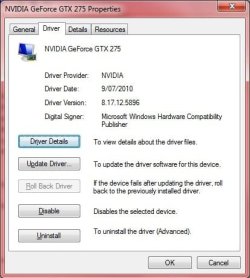
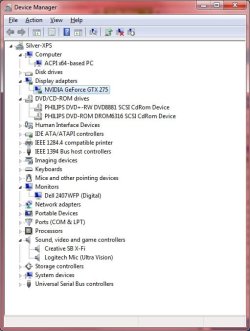
As it turns out, I have run into an issue .. The display cannot use any 1280 x XXX and any below resolution settings. What it looks like is snow with some major vertical and horizontal sync issues. I've never seen this before and I think/assume that this behaviour is odd.. I've searched around on the net for the last few days to no avail. I've uninstalled and reinstalled the nvidia driver (see 1.jpg). There are no device conflicts (see 2.jpg)
The troubleshooting steps I've done so far are:
ACTION:- replaced both video card (I put on the drivers for the new card) and DVI cable.
RESULT:- I have had no joy as same problem persists.
ACTION:- uninstalled the display adapter driver altogether.
RESULT:- Before the required reboot I could see low resolution.. ie the mandatory 640x480.. so this leads me to believe it does work and will again, somehow..
ACTION:- loaded into safe mode to see if the 640x480 worked in there
RESULT:- It did
ACTION:- Loaded windows 7 normally. The card was detected by Windows 7 and automatically installed a generic driver (I think)
RESULT:- I have had no joy as same problem persists.
ACTION:- Installed the latest NVidia driver
RESULT:- I have had no joy as same problem persists.
Given I have replaced the video card and the cable, and the fact that I can see low resolutions when no drivers are installed, I am assuming that there is a software problem??? Another thing backing that theory up is all this was working in XP 32bit.
Can any of you smart and helpful people offer a solution or at least something or some direction in which I can look for a solution? I am stuck.
Thanks in advance for any help.
Brad
I've recently updated my Dad's computer for him from XP to Windows 7 x64. The compatibility tool mantioned I shouldn't have any issues so I gave it a shot.
As it turns out, I have run into an issue
.. The display cannot use any 1280 x XXX and any below resolution settings. What it looks like is snow with some major vertical and horizontal sync issues. I've never seen this before and I think/assume that this behaviour is odd.. I've searched around on the net for the last few days to no avail. I've uninstalled and reinstalled the nvidia driver (see 1.jpg). There are no device conflicts (see 2.jpg)The troubleshooting steps I've done so far are:
ACTION:- replaced both video card (I put on the drivers for the new card) and DVI cable.
RESULT:- I have had no joy as same problem persists.
ACTION:- uninstalled the display adapter driver altogether.
RESULT:- Before the required reboot I could see low resolution.. ie the mandatory 640x480.. so this leads me to believe it does work and will again, somehow..
ACTION:- loaded into safe mode to see if the 640x480 worked in there
RESULT:- It did
ACTION:- Loaded windows 7 normally. The card was detected by Windows 7 and automatically installed a generic driver (I think)
RESULT:- I have had no joy as same problem persists.
ACTION:- Installed the latest NVidia driver
RESULT:- I have had no joy as same problem persists.
Given I have replaced the video card and the cable, and the fact that I can see low resolutions when no drivers are installed, I am assuming that there is a software problem??? Another thing backing that theory up is all this was working in XP 32bit.
Can any of you smart and helpful people offer a solution or at least something or some direction in which I can look for a solution? I am stuck.
Thanks in advance for any help.
Brad
Attachments
My Computer
- Computer Manufacturer/Model Number
- Dell XPS710
- OS
- Windows 7 Professional x64
- CPU
- Intel(R) Core(TM)2 CPU 6600@ 2.40GHz
- Memory
- 2.00 GB
- Graphics Card(s)
- Nvidia GeForce GTX 275
- Sound Card
- Creative SB X-Fi
- Monitor(s) Displays
- Dell 2407WFP (Digital)
- Hard Drives
- 1 x 250GB
1 x 15Gb SSD (for pagefily only)


