Generate a system health report does not work

mikesndbs

New member
Member
Local time
4:40 PM
Messages
76
Location
Sussex UK
OK, lets see if we can get this one to work next :)

Seems to be quite common out there.

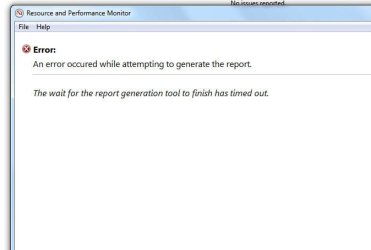
I run the application and get the little timer saying its working for 60 seconds then it fails and gives the error message:
 

Attachments

  • report.jpg
    report.jpg
    17.6 KB · Views: 27

My Computer My Computer

Computer type
PC/Desktop
Computer Manufacturer/Model Number
Novatech ltd
OS
Windows 7 pro 64bit SRP1
CPU
intel i5-4460 @3.20Ghz
Motherboard
Manufacturer Gigabyte Technology Co., Ltd. Model H81M-DS2V (
Memory
Type DDR3 Size 16GB
Graphics Card(s)
NVIDIA GeForce GTX 1050
Hard Drives
Samsung SSD 840 EVO 500G SCSI Disk Device
TOSHIBA DT01ACA100 SCSI Disk 1TB
WDC WD10EFRX-68PJCN0 SCSI Disk Device 1TB (red)
TOSHIBA DT01ABA300 SCSI Disk Device
PSU
600w
Antivirus
Kaspersky internet securities
Browser
Chrome and IE
Other Info
Back up, Acronis True image 2014 to external 2TB drive via front e-sata port supplied by PCI express card.

My Computer My Computer

Computer type
PC/Desktop
Computer Manufacturer/Model Number
Lenovo IdeaCenter 450
OS
Windows 10 Pro X64
CPU
Intel Quad Core i7-4770 @ 3.4Ghz
Memory
16.0GB PC3-12800 DDR3 SDRAM 1600 MHz
Graphics Card(s)
Intel Integrated HD Graphics
Sound Card
Realtek HD Audio
Monitor(s) Displays
HP 22" LCD
Screen Resolution
1680 x 1050
Hard Drives
250GB Samsung EVO SATA-3 SSD
2TB Seagate ST2000DM001 SATA-2
1.5TB Seagate ST3150041AS SATA
Keyboard
Dell USB
Mouse
Lenovo USB
Internet Speed
Cable via Road Runner 3MB Upload, 30MB Download
Antivirus
Windows Defender, MBAM Pro, MBAE
Browser
Seamonkey
Other Info
UEFI/GPT
PLDS DVD-RW DH16AERSH
Hi, thanks, gave that a try and no luck!
 

My Computer My Computer

Computer type
PC/Desktop
Computer Manufacturer/Model Number
Novatech ltd
OS
Windows 7 pro 64bit SRP1
CPU
intel i5-4460 @3.20Ghz
Motherboard
Manufacturer Gigabyte Technology Co., Ltd. Model H81M-DS2V (
Memory
Type DDR3 Size 16GB
Graphics Card(s)
NVIDIA GeForce GTX 1050
Hard Drives
Samsung SSD 840 EVO 500G SCSI Disk Device
TOSHIBA DT01ACA100 SCSI Disk 1TB
WDC WD10EFRX-68PJCN0 SCSI Disk Device 1TB (red)
TOSHIBA DT01ABA300 SCSI Disk Device
PSU
600w
Antivirus
Kaspersky internet securities
Browser
Chrome and IE
Other Info
Back up, Acronis True image 2014 to external 2TB drive via front e-sata port supplied by PCI express card.
Look in Event Viewer, see if any information in there.
 

My Computer My Computer

Computer type
PC/Desktop
Computer Manufacturer/Model Number
Lenovo IdeaCenter 450
OS
Windows 10 Pro X64
CPU
Intel Quad Core i7-4770 @ 3.4Ghz
Memory
16.0GB PC3-12800 DDR3 SDRAM 1600 MHz
Graphics Card(s)
Intel Integrated HD Graphics
Sound Card
Realtek HD Audio
Monitor(s) Displays
HP 22" LCD
Screen Resolution
1680 x 1050
Hard Drives
250GB Samsung EVO SATA-3 SSD
2TB Seagate ST2000DM001 SATA-2
1.5TB Seagate ST3150041AS SATA
Keyboard
Dell USB
Mouse
Lenovo USB
Internet Speed
Cable via Road Runner 3MB Upload, 30MB Download
Antivirus
Windows Defender, MBAM Pro, MBAE
Browser
Seamonkey
Other Info
UEFI/GPT
PLDS DVD-RW DH16AERSH
Hi, just tried it again. All that shows up is info as below:

Log Name: Application
Source: Microsoft-Windows-LoadPerf
Date: 11/07/2014 19:58:55
Event ID: 1001
Task Category: None
Level: Information
Keywords:
User: SYSTEM
Computer: Enigma
Description:
Performance counters for the WmiApRpl (WmiApRpl) service were removed successfully. The Record Data contains the new values of the system Last Counter and Last Help registry entries.
Event Xml:
<Event xmlns="http://schemas.microsoft.com/win/2004/08/events/event">


Log Name: Application
Source: Microsoft-Windows-LoadPerf
Date: 11/07/2014 19:58:55
Event ID: 1000
Task Category: None
Level: Information
Keywords:
User: SYSTEM
Computer: Enigma
Description:
Performance counters for the WmiApRpl (WmiApRpl) service were loaded successfully. The Record Data in the data section contains the new index values assigned to this service.
Event Xml:

 

My Computer My Computer

Computer type
PC/Desktop
Computer Manufacturer/Model Number
Novatech ltd
OS
Windows 7 pro 64bit SRP1
CPU
intel i5-4460 @3.20Ghz
Motherboard
Manufacturer Gigabyte Technology Co., Ltd. Model H81M-DS2V (
Memory
Type DDR3 Size 16GB
Graphics Card(s)
NVIDIA GeForce GTX 1050
Hard Drives
Samsung SSD 840 EVO 500G SCSI Disk Device
TOSHIBA DT01ACA100 SCSI Disk 1TB
WDC WD10EFRX-68PJCN0 SCSI Disk Device 1TB (red)
TOSHIBA DT01ABA300 SCSI Disk Device
PSU
600w
Antivirus
Kaspersky internet securities
Browser
Chrome and IE
Other Info
Back up, Acronis True image 2014 to external 2TB drive via front e-sata port supplied by PCI express card.
Clean Install seems to be the only fix found for this problem. That really stinks. If this is the only problem you are having I'd just live with it as I don't think it's worth starting over again forms scratch with a Clean Install.

Microsoft should be able top fix this one easily, don't know why they haven't done so.
 

My Computer My Computer

Computer type
PC/Desktop
Computer Manufacturer/Model Number
Lenovo IdeaCenter 450
OS
Windows 10 Pro X64
CPU
Intel Quad Core i7-4770 @ 3.4Ghz
Memory
16.0GB PC3-12800 DDR3 SDRAM 1600 MHz
Graphics Card(s)
Intel Integrated HD Graphics
Sound Card
Realtek HD Audio
Monitor(s) Displays
HP 22" LCD
Screen Resolution
1680 x 1050
Hard Drives
250GB Samsung EVO SATA-3 SSD
2TB Seagate ST2000DM001 SATA-2
1.5TB Seagate ST3150041AS SATA
Keyboard
Dell USB
Mouse
Lenovo USB
Internet Speed
Cable via Road Runner 3MB Upload, 30MB Download
Antivirus
Windows Defender, MBAM Pro, MBAE
Browser
Seamonkey
Other Info
UEFI/GPT
PLDS DVD-RW DH16AERSH
Back
Top