I would like to set my computer up to have two word processors in English and German with two keyboards one in English and one in German with the extra letters for German. I bought a German keyboard with the different layout. Then got Open Office office for free in German.
Hi KiwiinSwiss, welcome to the Seven Forums.
A bit long rant but I am not able to put this short so here we go. First the rant, thereafter my suggestions

.
I am a multilingual Windows user, typing (and needing respective input language) in my two mother tongues Finnish and Swedish, the language of my country of residence Germany, English and occasional French. That being said I really do not understand the need for two physical keyboards on one computer.
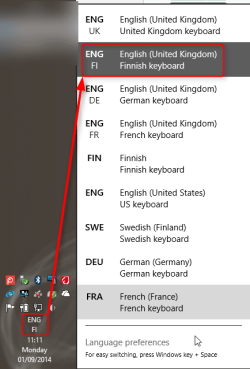
It does not take long practice to learn that although the physical keyboard layout I have is German (QWERTZ instead of QWERTY), when I have switched to Finnish or Swedish input language (identical keyboard layouts) the physical key Üü gives me Åå and the key ß gives me +, or that although the keyboard shows that @ is typed with AltGR + Q I in fact need to press AltGR + 2. Also the time and effort needed to change the input language is nothing compared to time and effort needed to put one keyboard aside to make room for another keyboard; I need two mouse clicks for that, first to open language menu (icon in notification area) and second to select the input language needed.
Screenshot of my language menu. Screenshot is from Windows 8.1, I have taskbar vertical at left so it might look a bit odd:
I understand from your post and a bit suggestive username you have selected that your mother tongue is English and that your second language is German, one of the four official languages of Switzerland, the country where you currently reside. The part I did not completely understand is why you had to get OpenOffice in German? Using again myself as an example, my Windows and all software including Microsoft Office are in English but I can still type letters in Word using German or Swedish or compose emails in Finnish in Outlook. I have of course separate user accounts in English, Finnish, German and Swedish because I had a work where it was essential that I could either make screenshots showing Windows controls and dialogs in respective language or demonstrate them in big screen, but as I do not work anymore I have noticed it can take weeks for me not to log in to other user accounts than the main English one. What I am saying is that you don't need a German word processor or German keyboard to type in German.
The above does not mean that I am happy about how Microsoft and other software makers and online services treat us ex-pats, users who use Windows, other software and online services with a language other than the language(s) of their country of residence. Read about my thoughts at our sister forums:
Microsoft Windows 9 Team: Please understand some of us live abroad!.
Conclusion:
If your goal is to be able to type using several input languages, you do not need to change anything, nor do you need two keyboards. Install and enable all input languages you need to, then swap between them with two fast mouse clicks in under a second. Tutorials:
Suggestions:
Step 1 in
this tutorial shows you how to get original Windows 7 Ultimate ISO install file. If you continue using Windows 7 and want to get multiple display languages, you need to get the Ultimate edition. Search Amazon and eBay for a 7 Ultimate product key but be careful, there are a lot of "if it sounds too good to be true it's probably not" offers out there.
When you have the Windows 7 Ultimate product key, you should be able to do an
Anytime Upgrade with it. If not, you can use the Windows 7 Ultimate ISO to create an install media and do a clean install.
Upgrading to 8 / 8.1 is an option. See this Microsoft article to learn how to check if your computer can be upgraded:
Upgrade to Windows 8.1 from Windows Vista or Windows XP - Windows Help. All editions of Windows 8 support multiple display languages, see this thread at another of our sister forums to learn how to set Windows 8 to use individual input languages in every application:
Solved How to use input method independently in various windows?
Mit freundliche Grüße,
Kari



