Get rid of GTP Protective partition so I can backup Windows 7?

Hawaga

New member
Local time
9:54 AM
Messages
12
Hi,

I just can't backup my C: system drive (windows 7 x64), I am getting the " A shadow copy could not be created...VSS error code 0x81000019"

After long research online I found out that it won't run because my c: drive is preceded with a 200MB GPT Protective partition on the same disk (not a "system reserved" one) as shown on this screen capture (click to enlarge):

Imgur: The most awesome images on the Internet

I really need to get this backup of my system Win7 c: drive because I have lots of professional software installed that I am using daily and I can't afford a complete reinstall, since I'm working continously with this machine. Other backup software like Acronis (I tried many others) won't do the job for the same reason.


So basically, I understand the backup VSS service won't run till I get rid of that GPT Protective partition.
Can I get rid of it? How to do this?

Anyone who can help?

Thanks in advance!:)
 
Last edited:

My Computer My Computer

At a glance

Windows 7 x64377032GB670
Computer type
PC/Desktop
Computer Manufacturer/Model Number
Custom build
OS
Windows 7 x64
CPU
3770
Motherboard
Z77 UP5 TH
Memory
32GB
Graphics Card(s)
670
Hard Drives
Samsung EVO Pro 128GB
PSU
Corsair 650W
Welcome to the forum. When you try and backup I assume you creating and image on to another disk are you trying to do a full disk image or just an image of c? If your just imaging c I don't see why it wouldn't work. If the partition is empty delete it move c to left then grow it
 

My Computer My Computer

At a glance

win 8 32 bit
Computer type
PC/Desktop
OS
win 8 32 bit

My Computers My Computers

  • At a glance

    Windows 7 HP 64i5 6600K - 800MHz to 4200MHz4+4G GSkill DDR4 3000IG - Intel 530
    Computer type
    PC/Desktop
    Computer Manufacturer/Model Number
    custom build
    OS
    Windows 7 HP 64
    CPU
    i5 6600K - 800MHz to 4200MHz
    Motherboard
    GA-Z170-HD3P
    Memory
    4+4G GSkill DDR4 3000
    Graphics Card(s)
    IG - Intel 530
    Monitor(s) Displays
    Samsung 226BW
    Screen Resolution
    1680x1050
    Hard Drives
    (1) -1 SM951 – 128GB M.2 AHCI PCIe SSD drive for Windows 7 and Lubuntu
    (2) -1 WD SATA 3 - 1T for Data
    (3) -1 WD SATA 3 - 1T for backup
    PSU
    Thermaltake 450W TR2 gold
    Keyboard
    Old and good Chicony mechanical keyboard
    Mouse
    Logitech mX performance - 9 buttons (had to disable some)
    Internet Speed
    500Mb/s
    Browser
    Firefox 64
    Other Info
    TinyWall firewall
  • At a glance

    Windows 7 Proi7-4500U 800MHz to 3.0GHz(4+4)G DDR3 1600IG intel 4400 + NVIDIA GeForce GT 745M
    Computer type
    Laptop
    System Manufacturer/Model Number
    Asus Q550LF
    OS
    Windows 7 Pro
    CPU
    i7-4500U 800MHz to 3.0GHz
    Motherboard
    Asus Q550LF
    Memory
    (4+4)G DDR3 1600
    Graphics Card(s)
    IG intel 4400 + NVIDIA GeForce GT 745M
    Sound Card
    Realtek
    Monitor(s) Displays
    LG Display LP156WF4-SPH1
    Screen Resolution
    1920 x 1080
    Hard Drives
    BX500 120G SSD for Windows and programs +
    1T HDD for data
    Internet Speed
    500 Mb/s
    Browser
    Firefox
    Other Info
    TinyWall firewall
Hi and welcome to SevenForums,
Well you win the posting something new I've never seen before :)
How on earth did you manage to install that gpt partition :confused:

Please follow the link above my signature to fill in your system spec's page.

Also so if you use Go Advanced button you'll see a paperclip icon so you can upload images here instead of using a file sharing site.
 

My Computer My Computer

At a glance

Win-7-Pro64bit 7-H-Prem-64biti7-5930K 2nd i9-9940x both water blocked VRM'...Trident-z 3200C14 2nd Trident-z 3600C16EVGA 1080ti ftw3 2nd Titan Xp both water blocked
Computer type
PC/Desktop
Computer Manufacturer/Model Number
Custom assembled by me :}
OS
Win-7-Pro64bit 7-H-Prem-64bit
CPU
i7-5930K 2nd i9-9940x both water blocked VRM's too
Motherboard
ASUS SABERTOOTH X99 2nd ASUS x299 Apex
Memory
Trident-z 3200C14 2nd Trident-z 3600C16
Graphics Card(s)
EVGA 1080ti ftw3 2nd Titan Xp both water blocked
Sound Card
Built-in Realtek
Monitor(s) Displays
1-AOC G2460PG 24"G-Sync 144Hz/ 2nd 1-ASUS VG248QE 24" 144Hz
Screen Resolution
1920 x 1080 144Hz
Hard Drives
2-Samsung M.2 Evo & Evo Plus
2-Samsung 850 EVO 500GB SSD's/ 3-2.5 W.D. Black 1tb-&3-1tb/3-3.5 WD Black 1tb hdd's
PSU
EVGA SuperNOVA 1000-P2 2nd 1200-P2
Case
2-Corsair Obsidian Series 450D Black ATX Mid Tower
Cooling
Custom water loops
Keyboard
Logitech G710+/ 2nd Logitech G910
Mouse
2-RedDragon M901 Perdition 16400 dpi Gaming mouse = wired
Internet Speed
Comcast Ping 19ms 89.31mbps download speed 6.12mbps upload
Antivirus
Malwarebytes Pro/ Superantispyware Pro
Browser
FireFox & Pale moon
Other Info
2nd ASUS X299 Apex/Intel i9-9940x with Custom water loop/7H-Prem-x64/Corsair 450D case/Ram Trident-z 3600C16 4x8gb / Samsung970Evo plus 500gb SSD/Dual ssd EZ swap evo/PSU EVGA SuperNova 1200w-P2 80+Platinum/GPU Titan Xp /8-ML-140 on push-pull on 2-280GTX rads
samuria
I'm trying to use the Control Panel Backup service, trynig to just backup my C: to another drive ( D: ) which is a bigger, totally newly formatted free NTFS partition.

When you say "If the partition is empty delete it" I assume you are referring to the "GPT Protective Partition"? Can I delete it without any risk that I can't boot my C: partition afterwards??? If so how may I do that?

Megahertz07

Hi, yes, I did, as many other softwares (Acronis True Image, AOMEI Backupper etc...) All fail.

ThrashZone

Hi, sorry I'm quite knew to this forum thing, can't see the link you are referring to, but I did update my system specs in my profile. I really don't know how I got this partition to be GPT in the first place, probably didn't have much of a choice when I installed windows 7...Anyway that's how it is now :confused:

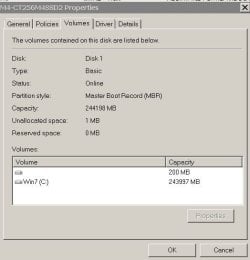
What's really strange is that when I right-click Disk 1 for properties in Disk Management, it does say the Disk 1 is a MBR partition style (as you can see in attachment)
 

Attachments

  • Capture2.JPG
    Capture2.JPG
    32 KB · Views: 44

My Computer My Computer

At a glance

Windows 7 x64377032GB670
Computer type
PC/Desktop
Computer Manufacturer/Model Number
Custom build
OS
Windows 7 x64
CPU
3770
Motherboard
Z77 UP5 TH
Memory
32GB
Graphics Card(s)
670
Hard Drives
Samsung EVO Pro 128GB
PSU
Corsair 650W
Can you please post a full shot of Disk Management, your 1st shot does not show up. Yes it`s quite amazing how your disk is MBR, but yet you have a 200 MB GPT partition. Who installed Windows on this PC ?

If C is marked Active, contains the System files, Boot, Page file, Crash Dump etc then you can most likely delete the 200 MB partition, then you should have no problems creating an image.

But we need to see the shot of DM from YOUR computer.
 

My Computer My Computer

At a glance

Windows 10 Pro x64Intel Core i7 6700KGSkill TridentZ RGB 16GB 3600 16-16-16-36EVGA GTX 980 Ti SC x2
Computer type
PC/Desktop
Computer Manufacturer/Model Number
Skylake Special #666
OS
Windows 10 Pro x64
CPU
Intel Core i7 6700K
Motherboard
Asus Sabertooth Z170 Mark 1
Memory
GSkill TridentZ RGB 16GB 3600 16-16-16-36
Graphics Card(s)
EVGA GTX 980 Ti SC x2
Sound Card
Realtek High Definition
Monitor(s) Displays
AOC G2460PG
Screen Resolution
1920 x 1080 144Hz
Hard Drives
Samsung 860 Pro 256GB, Seagate Barracuda 4TB x2
PSU
EVGA 1000 P2, EVGA White Custom Braided Cables
Case
Corsair Vengeance C70 Gunmetal Black
Cooling
Corsair H100i v2, Corsair ML120 x2, Thermal Grizzly Kryonaut
Keyboard
Logitech G910 Orion Spectrum
Mouse
Logitech G700s
Internet Speed
Verizon Fios Quantum Gateway 75/75
Antivirus
Windows Defender, Malwarebytes Free 3.8.3
Browser
Chrome
Other Info
Corsair SP120 x4, LG Blu-ray Drive, Durabrand HT-395 100 Watt Dolby Digital Amp, Corsair H2100 Wireless 7.1 Headset
I just want to intrude with this one post and have no intention of taking over this thread as you already have some good and better heads on it.

As AddRAM suggested post a full screenshot of Windows Disk Management.

The following tutorials will help. So read these and act accordingly.

Follow the guidelines here to post an untruncataed screenshot with all the information clearly visible. Disk Management - Post a Screen Capture Image

Snipping Tool How to Use the Snipping Tool in Vista

Upload to Seven Forums: Screenshots and Files - Upload and Post in Seven Forums

Technically speaking, there is no such thing as MBR Partition and GPT partition. One only initialises a disk as MBR or GPT.

Second, when one initialises a disk as GPT, a 128MB Microsoft System Reserved Partition (MSR) is created preceeding the system partition. In case of boot drives this is an essential partition which Microsoft creates with a purpose and should not be deleted. Windows Disk Management however will not show it.(Third party partitioning/ formatting softwate like Partition Wizard will however show the MSR partition..)

I also cannot see the screenshot you posted in post #1 to a third party server, but it clearly shows the 200 MB partition. So it is not a true GPT drive. How are you assuming and calling it as a GPT drive? And can you show me any documentation that says GPT drives cannot be backed up, as you aver ? I haven't heard anything like that.

With these comments, I shall go back to watch mode.
 
Last edited:

My Computer My Computer

At a glance

Windows 7 Home Premium 32 bit
OS
Windows 7 Home Premium 32 bit
Thank you for your answers!

Technically speaking, there is no such thing as MBR Partition and GPT partition. One only initialises a disk as MBR or GPT.

Second, when one initialises a disk as GPT, a 128MB Microsoft System Reserved Partition (MSR) is created preceeding the system partition. In case of boot drives this is an essential partition which Microsoft creates with a purpose and should not be deleted. Windows Disk Management however will not show it.(Third party partitioning/ formatting softwate like Partition Wizard will however show the MSR partition..)

Not in my case.

See picture : Imgur: The most awesome images on the Internet (same as attached below).

Still, when I right-click "Disk 1" (the left grey part saying Disk1 Basic 238,47GB Online) for properties, this is what I get:

Imgur: The most awesome images on the Internet


I also cannot see the screenshot you posted in post #1 to a third party server, but it clearly shows the 200 MB partition.


Can you please post a full shot of Disk Management, your 1st shot does not show up. Yes it`s quite amazing how your disk is MBR, but yet you have a 200 MB GPT partition.


The shot was showing up yesterday, I don't know why it didn't show up today. Anyway I edited the OP and provided a new link. Here it is again just in case (same as attached below) :

Imgur: The most awesome images on the Internet (same as attached below)

How are you assuming and calling it as a GPT drive?


Well... Imgur: The most awesome images on the Internet (same as attached below)

And can you show me any documentation that says GPT drives cannot be backed up, as you aver ? I haven't heard anything like that.

Researching for a solution online, I found that this problem can be dealt with when this 200MB partition is MSR. Didn't find ANY solution for a "GPT protective partition" like it shows in my case.

So what's the deal in the end? Can I delete that GPT Protective partition or not?

If C is marked Active, contains the System files, Boot, Page file, Crash Dump etc then you can most likely delete the 200 MB partition, then you should have no problems creating an image.

But we need to see the shot of DM from YOUR computer.

If so, how can I do it, and will I still be able to boot my C: without problem?
 

Attachments

  • Capture.JPG
    Capture.JPG
    21.6 KB · Views: 2
Last edited:

My Computer My Computer

At a glance

Windows 7 x64377032GB670
Computer type
PC/Desktop
Computer Manufacturer/Model Number
Custom build
OS
Windows 7 x64
CPU
3770
Motherboard
Z77 UP5 TH
Memory
32GB
Graphics Card(s)
670
Hard Drives
Samsung EVO Pro 128GB
PSU
Corsair 650W

My Computers My Computers

  • At a glance

    Windows 7 HP 64i5 6600K - 800MHz to 4200MHz4+4G GSkill DDR4 3000IG - Intel 530
    Computer type
    PC/Desktop
    Computer Manufacturer/Model Number
    custom build
    OS
    Windows 7 HP 64
    CPU
    i5 6600K - 800MHz to 4200MHz
    Motherboard
    GA-Z170-HD3P
    Memory
    4+4G GSkill DDR4 3000
    Graphics Card(s)
    IG - Intel 530
    Monitor(s) Displays
    Samsung 226BW
    Screen Resolution
    1680x1050
    Hard Drives
    (1) -1 SM951 – 128GB M.2 AHCI PCIe SSD drive for Windows 7 and Lubuntu
    (2) -1 WD SATA 3 - 1T for Data
    (3) -1 WD SATA 3 - 1T for backup
    PSU
    Thermaltake 450W TR2 gold
    Keyboard
    Old and good Chicony mechanical keyboard
    Mouse
    Logitech mX performance - 9 buttons (had to disable some)
    Internet Speed
    500Mb/s
    Browser
    Firefox 64
    Other Info
    TinyWall firewall
  • At a glance

    Windows 7 Proi7-4500U 800MHz to 3.0GHz(4+4)G DDR3 1600IG intel 4400 + NVIDIA GeForce GT 745M
    Computer type
    Laptop
    System Manufacturer/Model Number
    Asus Q550LF
    OS
    Windows 7 Pro
    CPU
    i7-4500U 800MHz to 3.0GHz
    Motherboard
    Asus Q550LF
    Memory
    (4+4)G DDR3 1600
    Graphics Card(s)
    IG intel 4400 + NVIDIA GeForce GT 745M
    Sound Card
    Realtek
    Monitor(s) Displays
    LG Display LP156WF4-SPH1
    Screen Resolution
    1920 x 1080
    Hard Drives
    BX500 120G SSD for Windows and programs +
    1T HDD for data
    Internet Speed
    500 Mb/s
    Browser
    Firefox
    Other Info
    TinyWall firewall

Attachments

  • Capture3.JPG
    Capture3.JPG
    176.7 KB · Views: 15

My Computer My Computer

At a glance

Windows 7 x64377032GB670
Computer type
PC/Desktop
Computer Manufacturer/Model Number
Custom build
OS
Windows 7 x64
CPU
3770
Motherboard
Z77 UP5 TH
Memory
32GB
Graphics Card(s)
670
Hard Drives
Samsung EVO Pro 128GB
PSU
Corsair 650W
What you have on disk 4? It has a EFI system partition (so it's a bootable drive) and has a HFSJ formatting.
It seems that you have a MAC OS on your system and that explains the GPT protective partition.
Tell us the story of installation process. Witch OS was installed first, witch disk was attached etc
 

My Computers My Computers

  • At a glance

    Windows 7 HP 64i5 6600K - 800MHz to 4200MHz4+4G GSkill DDR4 3000IG - Intel 530
    Computer type
    PC/Desktop
    Computer Manufacturer/Model Number
    custom build
    OS
    Windows 7 HP 64
    CPU
    i5 6600K - 800MHz to 4200MHz
    Motherboard
    GA-Z170-HD3P
    Memory
    4+4G GSkill DDR4 3000
    Graphics Card(s)
    IG - Intel 530
    Monitor(s) Displays
    Samsung 226BW
    Screen Resolution
    1680x1050
    Hard Drives
    (1) -1 SM951 – 128GB M.2 AHCI PCIe SSD drive for Windows 7 and Lubuntu
    (2) -1 WD SATA 3 - 1T for Data
    (3) -1 WD SATA 3 - 1T for backup
    PSU
    Thermaltake 450W TR2 gold
    Keyboard
    Old and good Chicony mechanical keyboard
    Mouse
    Logitech mX performance - 9 buttons (had to disable some)
    Internet Speed
    500Mb/s
    Browser
    Firefox 64
    Other Info
    TinyWall firewall
  • At a glance

    Windows 7 Proi7-4500U 800MHz to 3.0GHz(4+4)G DDR3 1600IG intel 4400 + NVIDIA GeForce GT 745M
    Computer type
    Laptop
    System Manufacturer/Model Number
    Asus Q550LF
    OS
    Windows 7 Pro
    CPU
    i7-4500U 800MHz to 3.0GHz
    Motherboard
    Asus Q550LF
    Memory
    (4+4)G DDR3 1600
    Graphics Card(s)
    IG intel 4400 + NVIDIA GeForce GT 745M
    Sound Card
    Realtek
    Monitor(s) Displays
    LG Display LP156WF4-SPH1
    Screen Resolution
    1920 x 1080
    Hard Drives
    BX500 120G SSD for Windows and programs +
    1T HDD for data
    Internet Speed
    500 Mb/s
    Browser
    Firefox
    Other Info
    TinyWall firewall
It's an OSX drive I currently use to exchange files with an OSX system.

I can simply eject that HFS drive if needed

I don't see any link to the GPT partition on my c drive.
 
Last edited:

My Computer My Computer

At a glance

Windows 7 x64377032GB670
Computer type
PC/Desktop
Computer Manufacturer/Model Number
Custom build
OS
Windows 7 x64
CPU
3770
Motherboard
Z77 UP5 TH
Memory
32GB
Graphics Card(s)
670
Hard Drives
Samsung EVO Pro 128GB
PSU
Corsair 650W
I've been backing up Windows for years now. I've used Macrium Reflect and Image for Windows. Bi-monthly at least, I make a full image of my Windows OS partition [often known as "C drive"] onto my external HD. Are you wanting to make a full image of only your windows OS partition? Or, are you wanting to make a full image of the entire HD?
 

My Computer My Computer

At a glance

Windows 7 Professional 64-bitDesktop i5; Acers i5 & i7desktop 16GB; 1 Acer 8GB & 1 Acer 16GB
Computer type
PC/Desktop
Computer Manufacturer/Model Number
Antec desktop; Acer Aspire laptops
OS
Windows 7 Professional 64-bit
CPU
Desktop i5; Acers i5 & i7
Memory
desktop 16GB; 1 Acer 8GB & 1 Acer 16GB
Hard Drives
1TB split into 2 equal partitions [OS and data] usable by RJS
Internet Speed
AT&T DSL
Browser
FF, GChrome, msIE
Other Info
Windows 7 Firewall, Emsisoft AM/AV, MSE [scan-only], SpywareBlaster, Ruiware/BillP combine
I've been backing up Windows for years now. I've used Macrium Reflect and Image for Windows. Bi-monthly at least, I make a full image of my Windows OS partition [often known as "C drive"] onto my external HD. Are you wanting to make a full image of only your windows OS partition? Or, are you wanting to make a full image of the entire HD?

Hello

As I mentioned earlier in the thread; I tried Macrium with no success; wether trying to do a Windows OS only or full image, same problem with other backup software
 

My Computer My Computer

At a glance

Windows 7 x64377032GB670
Computer type
PC/Desktop
Computer Manufacturer/Model Number
Custom build
OS
Windows 7 x64
CPU
3770
Motherboard
Z77 UP5 TH
Memory
32GB
Graphics Card(s)
670
Hard Drives
Samsung EVO Pro 128GB
PSU
Corsair 650W
So, whether attempting to make a full image of Windows OS partition, or of the whole HD -- same failure. Sorry if I missed it, have you already tried the Macrium Reflect usb or dvd boot and from within that menu attempted making a full image?
 

My Computer My Computer

At a glance

Windows 7 Professional 64-bitDesktop i5; Acers i5 & i7desktop 16GB; 1 Acer 8GB & 1 Acer 16GB
Computer type
PC/Desktop
Computer Manufacturer/Model Number
Antec desktop; Acer Aspire laptops
OS
Windows 7 Professional 64-bit
CPU
Desktop i5; Acers i5 & i7
Memory
desktop 16GB; 1 Acer 8GB & 1 Acer 16GB
Hard Drives
1TB split into 2 equal partitions [OS and data] usable by RJS
Internet Speed
AT&T DSL
Browser
FF, GChrome, msIE
Other Info
Windows 7 Firewall, Emsisoft AM/AV, MSE [scan-only], SpywareBlaster, Ruiware/BillP combine
So, whether attempting to make a full image of Windows OS partition, or of the whole HD -- same failure. Sorry if I missed it, have you already tried the Macrium Reflect usb or dvd boot and from within that menu attempted making a full image?

Yes I did with no success

Eventually I'd like to just be able to use Windows Beckup service rather than using a third party software

And I believe it should be possible right?
 

My Computer My Computer

At a glance

Windows 7 x64377032GB670
Computer type
PC/Desktop
Computer Manufacturer/Model Number
Custom build
OS
Windows 7 x64
CPU
3770
Motherboard
Z77 UP5 TH
Memory
32GB
Graphics Card(s)
670
Hard Drives
Samsung EVO Pro 128GB
PSU
Corsair 650W
Windows Backup/Restore has been a mixed bag - many have great backups and restores; many have had problems.
 

My Computer My Computer

At a glance

Windows 7 Professional 64-bitDesktop i5; Acers i5 & i7desktop 16GB; 1 Acer 8GB & 1 Acer 16GB
Computer type
PC/Desktop
Computer Manufacturer/Model Number
Antec desktop; Acer Aspire laptops
OS
Windows 7 Professional 64-bit
CPU
Desktop i5; Acers i5 & i7
Memory
desktop 16GB; 1 Acer 8GB & 1 Acer 16GB
Hard Drives
1TB split into 2 equal partitions [OS and data] usable by RJS
Internet Speed
AT&T DSL
Browser
FF, GChrome, msIE
Other Info
Windows 7 Firewall, Emsisoft AM/AV, MSE [scan-only], SpywareBlaster, Ruiware/BillP combine
Windows Backup/Restore has been a mixed bag - many have great backups and restores; many have had problems.

So what should I do then, as third-party software won't do the job either?
 

My Computer My Computer

At a glance

Windows 7 x64377032GB670
Computer type
PC/Desktop
Computer Manufacturer/Model Number
Custom build
OS
Windows 7 x64
CPU
3770
Motherboard
Z77 UP5 TH
Memory
32GB
Graphics Card(s)
670
Hard Drives
Samsung EVO Pro 128GB
PSU
Corsair 650W
It was Mac OS that created the GPT Protective Partition. This partition probably has the Time machine created under Mac OS.
How to Remove an EFI System Partition or GPT Protective Partition From a Drive in Windows
Can You Access GPT Protective Partition Or Recover Data Off It

I understood that it only can be removed with Diskpart, that will erase all disk, and that is exactly what you don't want.

This is what I would do.
- Remove all other drives, leaving only the disk 0 (C:)
- With Macrium Reflect Free I would try to make a partition (not disk) image of the C: drive.
- On another Legacy - MBR disk, restore the image on it.
- Remove the actual C: disk leaving only the new disk.
- With a Win 7 installation disk, go to Repair and do a Boot repair.
Then try to boot it. If it does, you have your C: backup. Don't attach it on the computer when using the Mac OS.
 

My Computers My Computers

  • At a glance

    Windows 7 HP 64i5 6600K - 800MHz to 4200MHz4+4G GSkill DDR4 3000IG - Intel 530
    Computer type
    PC/Desktop
    Computer Manufacturer/Model Number
    custom build
    OS
    Windows 7 HP 64
    CPU
    i5 6600K - 800MHz to 4200MHz
    Motherboard
    GA-Z170-HD3P
    Memory
    4+4G GSkill DDR4 3000
    Graphics Card(s)
    IG - Intel 530
    Monitor(s) Displays
    Samsung 226BW
    Screen Resolution
    1680x1050
    Hard Drives
    (1) -1 SM951 – 128GB M.2 AHCI PCIe SSD drive for Windows 7 and Lubuntu
    (2) -1 WD SATA 3 - 1T for Data
    (3) -1 WD SATA 3 - 1T for backup
    PSU
    Thermaltake 450W TR2 gold
    Keyboard
    Old and good Chicony mechanical keyboard
    Mouse
    Logitech mX performance - 9 buttons (had to disable some)
    Internet Speed
    500Mb/s
    Browser
    Firefox 64
    Other Info
    TinyWall firewall
  • At a glance

    Windows 7 Proi7-4500U 800MHz to 3.0GHz(4+4)G DDR3 1600IG intel 4400 + NVIDIA GeForce GT 745M
    Computer type
    Laptop
    System Manufacturer/Model Number
    Asus Q550LF
    OS
    Windows 7 Pro
    CPU
    i7-4500U 800MHz to 3.0GHz
    Motherboard
    Asus Q550LF
    Memory
    (4+4)G DDR3 1600
    Graphics Card(s)
    IG intel 4400 + NVIDIA GeForce GT 745M
    Sound Card
    Realtek
    Monitor(s) Displays
    LG Display LP156WF4-SPH1
    Screen Resolution
    1920 x 1080
    Hard Drives
    BX500 120G SSD for Windows and programs +
    1T HDD for data
    Internet Speed
    500 Mb/s
    Browser
    Firefox
    Other Info
    TinyWall firewall
Thank you so much for your answer! :)

It was Mac OS that created the GPT Protective Partition. This partition probably has the Time machine created under Mac OS.

I don't think any Mac OS created the GPT Partition, If I'm not mistaken I think it was probably created during the Win7 install process, as the Mac OS drive didn't even exist before and was attached to the system probably 2 years after the PC buildup. As far as I can tell there's no Time Machine involved with my Win7 drive whatsoever.


I'll definitely give a look to those links and let you know!

I understood that it only can be removed with Diskpart, that will erase all disk, and that is exactly what you don't want.

True!

This is what I would do.
- Remove all other drives, leaving only the disk 0 (C:)
- With Macrium Reflect Free I would try to make a partition (not disk) image of the C: drive.

Tried that already (Really!) with no success, Macrium wouldn't even start the backup... BUT!

Today I was desperately still googling for a solution while waiting for your answers and I just found a free program called Driveclone 11 (Clone, copy, migrate hard disk & SSD | Make an exact copy of your disk - DriveClone) which I started and it DOES seem to be cloning my Win7 partition (not disk) to my "Backup Win7" drive. It's now going 80% of the process.

Do you know about this program ? If so would you recommend it, or would you recommend using a "safer", more well-known program for my purpose?

- On another Legacy - MBR disk, restore the image on it.
- Remove the actual C: disk leaving only the new disk.
- With a Win 7 installation disk, go to Repair and do a Boot repair.
Then try to boot it. If it does, you have your C: backup. Don't attach it on the computer when using the Mac OS.

This Driveclone software I'm referring to does seem to have a "fixboot" repair option into it.

Anyway where in that process should I delete the "GPT Protective partition" of my original system C: Drive?
 

My Computer My Computer

At a glance

Windows 7 x64377032GB670
Computer type
PC/Desktop
Computer Manufacturer/Model Number
Custom build
OS
Windows 7 x64
CPU
3770
Motherboard
Z77 UP5 TH
Memory
32GB
Graphics Card(s)
670
Hard Drives
Samsung EVO Pro 128GB
PSU
Corsair 650W
Back
Top