Get rid of this homepage

kbbgood

New member
Local time
3:09 PM
Messages
71
When I start up the internet it goes to this new thing called homepage. It has all the optional search engines on it. I don't want it. I have my homepage set and this is just one more thing to deal with. How do I get rid of the homepage it wants to go to? Please ask questions about what I am talking about if need to.
 

My Computer My Computer

At a glance

Windows 7 Home Premium 64bit.AMD Athlon 64 X2 6000*4.0 Gig
Computer type
PC/Desktop
Computer Manufacturer/Model Number
Custom Build
OS
Windows 7 Home Premium 64bit.
CPU
AMD Athlon 64 X2 6000*
Motherboard
ECS 6100
Memory
4.0 Gig
Monitor(s) Displays
AOC
Hard Drives
250gig
PSU
AMD 3.0 gig
Cooling
Factory and coolermaster
Keyboard
Logitech combo
Internet Speed
Highspeed from the local phone company.
Antivirus
VIPRE
Browser
IE and Firefox
What browser are you using? Can you post a screenshot of this 'homepage' please.
 

My Computer My Computer

At a glance

W7 Pro x64 SP1 | W10 Pro IP x64 | W8.1 Pro x6...i7-4790k @ 4GHz (4.4GHz Boost)16GB DDR3 Kingston HyperX Fury @ 1600MHz CL 9...EVGA GTX 980 Classified
Computer type
PC/Desktop
Computer Manufacturer/Model Number
Custom Build
OS
W7 Pro x64 SP1 | W10 Pro IP x64 | W8.1 Pro x64 VM | Linux Mint VM
CPU
i7-4790k @ 4GHz (4.4GHz Boost)
Motherboard
ASUS Sabertooth Z87 (BIOS Rev 2004)
Memory
16GB DDR3 Kingston HyperX Fury @ 1600MHz CL 9-9-9-27
Graphics Card(s)
EVGA GTX 980 Classified
Sound Card
Realtek Onboard
Monitor(s) Displays
Samsung S27D390
Screen Resolution
1920 x 1080
Hard Drives
240GB Intel 520 Series SSD |
Samsung 850 EVO 120GB SSD |
2TB WD Caviar Black |
2TB WD Caviar Green
PSU
Corsair HX850-80 Gold Modular
Case
Cooler Master Silencio 650
Cooling
Corsair H80i w/2 x Corsair SP120 | 2 x 120mm Noctua NF-S12B
Keyboard
Microsoft Sidewinder X4
Mouse
Gigabyte M6900 optical
Internet Speed
152mb
Antivirus
F-Secure
Browser
Firefox 38.0
Other Info
Backup Rig: Win 7 Pro 64-bit | AMD A10-5800k | ASUS F2A85-V Pro | 8GB Samsung DDR3 @1600MHz | 120GB Toshiba SDD | 2TB Seagate HDD | Cooler Master Silencio 550
I use Yahoo.com home page and if I was told how to do the screenshot I would do it. No I don't know how to do it.
 

My Computer My Computer

At a glance

Windows 7 Home Premium 64bit.AMD Athlon 64 X2 6000*4.0 Gig
Computer type
PC/Desktop
Computer Manufacturer/Model Number
Custom Build
OS
Windows 7 Home Premium 64bit.
CPU
AMD Athlon 64 X2 6000*
Motherboard
ECS 6100
Memory
4.0 Gig
Monitor(s) Displays
AOC
Hard Drives
250gig
PSU
AMD 3.0 gig
Cooling
Factory and coolermaster
Keyboard
Logitech combo
Internet Speed
Highspeed from the local phone company.
Antivirus
VIPRE
Browser
IE and Firefox
This attachment is what I am trying to get rid of.
 

Attachments

My Computer My Computer

At a glance

Windows 7 Home Premium 64bit.AMD Athlon 64 X2 6000*4.0 Gig
Computer type
PC/Desktop
Computer Manufacturer/Model Number
Custom Build
OS
Windows 7 Home Premium 64bit.
CPU
AMD Athlon 64 X2 6000*
Motherboard
ECS 6100
Memory
4.0 Gig
Monitor(s) Displays
AOC
Hard Drives
250gig
PSU
AMD 3.0 gig
Cooling
Factory and coolermaster
Keyboard
Logitech combo
Internet Speed
Highspeed from the local phone company.
Antivirus
VIPRE
Browser
IE and Firefox

My Computer My Computer

At a glance

W7 Pro x64 SP1 | W10 Pro IP x64 | W8.1 Pro x6...i7-4790k @ 4GHz (4.4GHz Boost)16GB DDR3 Kingston HyperX Fury @ 1600MHz CL 9...EVGA GTX 980 Classified
Computer type
PC/Desktop
Computer Manufacturer/Model Number
Custom Build
OS
W7 Pro x64 SP1 | W10 Pro IP x64 | W8.1 Pro x64 VM | Linux Mint VM
CPU
i7-4790k @ 4GHz (4.4GHz Boost)
Motherboard
ASUS Sabertooth Z87 (BIOS Rev 2004)
Memory
16GB DDR3 Kingston HyperX Fury @ 1600MHz CL 9-9-9-27
Graphics Card(s)
EVGA GTX 980 Classified
Sound Card
Realtek Onboard
Monitor(s) Displays
Samsung S27D390
Screen Resolution
1920 x 1080
Hard Drives
240GB Intel 520 Series SSD |
Samsung 850 EVO 120GB SSD |
2TB WD Caviar Black |
2TB WD Caviar Green
PSU
Corsair HX850-80 Gold Modular
Case
Cooler Master Silencio 650
Cooling
Corsair H80i w/2 x Corsair SP120 | 2 x 120mm Noctua NF-S12B
Keyboard
Microsoft Sidewinder X4
Mouse
Gigabyte M6900 optical
Internet Speed
152mb
Antivirus
F-Secure
Browser
Firefox 38.0
Other Info
Backup Rig: Win 7 Pro 64-bit | AMD A10-5800k | ASUS F2A85-V Pro | 8GB Samsung DDR3 @1600MHz | 120GB Toshiba SDD | 2TB Seagate HDD | Cooler Master Silencio 550
Are you getting this homepage when you open Internet Explorer or just when you open a new tab?
 

My Computer My Computer

At a glance

W7 Pro x64 SP1 | W10 Pro IP x64 | W8.1 Pro x6...i7-4790k @ 4GHz (4.4GHz Boost)16GB DDR3 Kingston HyperX Fury @ 1600MHz CL 9...EVGA GTX 980 Classified
Computer type
PC/Desktop
Computer Manufacturer/Model Number
Custom Build
OS
W7 Pro x64 SP1 | W10 Pro IP x64 | W8.1 Pro x64 VM | Linux Mint VM
CPU
i7-4790k @ 4GHz (4.4GHz Boost)
Motherboard
ASUS Sabertooth Z87 (BIOS Rev 2004)
Memory
16GB DDR3 Kingston HyperX Fury @ 1600MHz CL 9-9-9-27
Graphics Card(s)
EVGA GTX 980 Classified
Sound Card
Realtek Onboard
Monitor(s) Displays
Samsung S27D390
Screen Resolution
1920 x 1080
Hard Drives
240GB Intel 520 Series SSD |
Samsung 850 EVO 120GB SSD |
2TB WD Caviar Black |
2TB WD Caviar Green
PSU
Corsair HX850-80 Gold Modular
Case
Cooler Master Silencio 650
Cooling
Corsair H80i w/2 x Corsair SP120 | 2 x 120mm Noctua NF-S12B
Keyboard
Microsoft Sidewinder X4
Mouse
Gigabyte M6900 optical
Internet Speed
152mb
Antivirus
F-Secure
Browser
Firefox 38.0
Other Info
Backup Rig: Win 7 Pro 64-bit | AMD A10-5800k | ASUS F2A85-V Pro | 8GB Samsung DDR3 @1600MHz | 120GB Toshiba SDD | 2TB Seagate HDD | Cooler Master Silencio 550
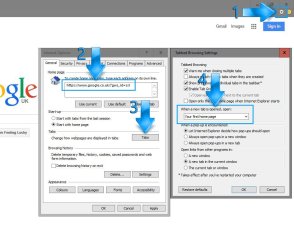
OK, open Internet Explorer then follow these instructions:

  1. Click on the Settings icon
  2. Ensure your preferred URL is entered into this box
  3. Click on the Tabs button
  4. In the dropdown box choose Your first home page
  5. Click OK in the Tabbed Browser Settings windowthen click Apply in the Internet Options window. You can then close the Internet Options window.
That should have you all set.
Capture.JPG
 

My Computer My Computer

At a glance

W7 Pro x64 SP1 | W10 Pro IP x64 | W8.1 Pro x6...i7-4790k @ 4GHz (4.4GHz Boost)16GB DDR3 Kingston HyperX Fury @ 1600MHz CL 9...EVGA GTX 980 Classified
Computer type
PC/Desktop
Computer Manufacturer/Model Number
Custom Build
OS
W7 Pro x64 SP1 | W10 Pro IP x64 | W8.1 Pro x64 VM | Linux Mint VM
CPU
i7-4790k @ 4GHz (4.4GHz Boost)
Motherboard
ASUS Sabertooth Z87 (BIOS Rev 2004)
Memory
16GB DDR3 Kingston HyperX Fury @ 1600MHz CL 9-9-9-27
Graphics Card(s)
EVGA GTX 980 Classified
Sound Card
Realtek Onboard
Monitor(s) Displays
Samsung S27D390
Screen Resolution
1920 x 1080
Hard Drives
240GB Intel 520 Series SSD |
Samsung 850 EVO 120GB SSD |
2TB WD Caviar Black |
2TB WD Caviar Green
PSU
Corsair HX850-80 Gold Modular
Case
Cooler Master Silencio 650
Cooling
Corsair H80i w/2 x Corsair SP120 | 2 x 120mm Noctua NF-S12B
Keyboard
Microsoft Sidewinder X4
Mouse
Gigabyte M6900 optical
Internet Speed
152mb
Antivirus
F-Secure
Browser
Firefox 38.0
Other Info
Backup Rig: Win 7 Pro 64-bit | AMD A10-5800k | ASUS F2A85-V Pro | 8GB Samsung DDR3 @1600MHz | 120GB Toshiba SDD | 2TB Seagate HDD | Cooler Master Silencio 550
Boozad,
NOPE! Didn't work even after a restart of the system. IE still opens up to: Homepage

Tools -> Internet Options has the correct information for the homepage we want. We have also double checked the tabs settings and it says first homepage as you have said.
 

My Computer My Computer

At a glance

Windows 7 Home Premium 64bit.AMD Athlon 64 X2 6000*4.0 Gig
Computer type
PC/Desktop
Computer Manufacturer/Model Number
Custom Build
OS
Windows 7 Home Premium 64bit.
CPU
AMD Athlon 64 X2 6000*
Motherboard
ECS 6100
Memory
4.0 Gig
Monitor(s) Displays
AOC
Hard Drives
250gig
PSU
AMD 3.0 gig
Cooling
Factory and coolermaster
Keyboard
Logitech combo
Internet Speed
Highspeed from the local phone company.
Antivirus
VIPRE
Browser
IE and Firefox
Check the shortcut to Internet Explorer

Right click the desktop icon or pinned icon on taskbar, whichever you are using to open IE and see what is the shortcut. Delete the extra bit and try again.
 

My Computer My Computer

At a glance

Windows 7 Ultimate x64 SP1AMD Phenom 2 1090T2x8GB Kingston HyperX Fury Black 1600Mhz Unga...MSI GTX 970 Gaming 4G
Computer type
PC/Desktop
Computer Manufacturer/Model Number
Custom Build
OS
Windows 7 Ultimate x64 SP1
CPU
AMD Phenom 2 1090T
Motherboard
Gigabyte GA-890FXA-UD5
Memory
2x8GB Kingston HyperX Fury Black 1600Mhz Unganged
Graphics Card(s)
MSI GTX 970 Gaming 4G
Sound Card
Realtek On-Board HD 7.1 Audio / Logitech G35
Monitor(s) Displays
3xAcer GD245HQ
Screen Resolution
1920x1080
Hard Drives
Samsung 850 Pro 512GB SSD - OS /
WD Caviar Black SATA 3 - 1 TBx2 - Dynamic RAID 0 /
WD Caviar Green SATA 2 - 640GBx2 - Dynamic RAID 0 /
WD Caviar Green SATA 2 - 640GB - Internal Backup /
Seagate Barracude SATA 3 - 3TB - External Backup/ Sync
PSU
HighPower 1000W
Case
Cooler Master HAF 932
Cooling
Noctua NH-D14
Keyboard
Logitech G19
Mouse
Logitech G500
Internet Speed
100/4 Mbit Cable (100GB quota)
Antivirus
ZoneAlarm Extreme Security / MBAM Pro / MBAE Free / SAS Free
Browser
IE 11 - Firefox - Chrome
Other Info
Logitech F710/ G27/ G940/ Z5500 // TrackIR 5 // Nvidia 3D Surround Vision
It's the same thing as I stated above. Just believe it is some sort of update that they decided we need. Daughter says it is on her work computer and she works for the state. Showed up 3 weeks ago. I just updated 3-4 days ago and it showed up then I think.
 

My Computer My Computer

At a glance

Windows 7 Home Premium 64bit.AMD Athlon 64 X2 6000*4.0 Gig
Computer type
PC/Desktop
Computer Manufacturer/Model Number
Custom Build
OS
Windows 7 Home Premium 64bit.
CPU
AMD Athlon 64 X2 6000*
Motherboard
ECS 6100
Memory
4.0 Gig
Monitor(s) Displays
AOC
Hard Drives
250gig
PSU
AMD 3.0 gig
Cooling
Factory and coolermaster
Keyboard
Logitech combo
Internet Speed
Highspeed from the local phone company.
Antivirus
VIPRE
Browser
IE and Firefox
A work computer is something different. Is your PC yours?

Just in case, download and scan with Malwarebytes Anti-Malware free (enable rootkit scanning too, settings - detections).
 

My Computer My Computer

At a glance

Windows 7 Ultimate x64 SP1AMD Phenom 2 1090T2x8GB Kingston HyperX Fury Black 1600Mhz Unga...MSI GTX 970 Gaming 4G
Computer type
PC/Desktop
Computer Manufacturer/Model Number
Custom Build
OS
Windows 7 Ultimate x64 SP1
CPU
AMD Phenom 2 1090T
Motherboard
Gigabyte GA-890FXA-UD5
Memory
2x8GB Kingston HyperX Fury Black 1600Mhz Unganged
Graphics Card(s)
MSI GTX 970 Gaming 4G
Sound Card
Realtek On-Board HD 7.1 Audio / Logitech G35
Monitor(s) Displays
3xAcer GD245HQ
Screen Resolution
1920x1080
Hard Drives
Samsung 850 Pro 512GB SSD - OS /
WD Caviar Black SATA 3 - 1 TBx2 - Dynamic RAID 0 /
WD Caviar Green SATA 2 - 640GBx2 - Dynamic RAID 0 /
WD Caviar Green SATA 2 - 640GB - Internal Backup /
Seagate Barracude SATA 3 - 3TB - External Backup/ Sync
PSU
HighPower 1000W
Case
Cooler Master HAF 932
Cooling
Noctua NH-D14
Keyboard
Logitech G19
Mouse
Logitech G500
Internet Speed
100/4 Mbit Cable (100GB quota)
Antivirus
ZoneAlarm Extreme Security / MBAM Pro / MBAE Free / SAS Free
Browser
IE 11 - Firefox - Chrome
Other Info
Logitech F710/ G27/ G940/ Z5500 // TrackIR 5 // Nvidia 3D Surround Vision
Sometimes it's necessary to close IE, go to Control Panel, Internet Options and on the General tab set the Home Page to Blank. Re-open IE and check that it worked, if so go to the page/site desired then use Tools, Internet Options to set that as the default.
 

My Computer My Computer

At a glance

Windows 7 Ultimate 64-bit, Windows 8.1 64-bit...
Computer type
PC/Desktop
Computer Manufacturer/Model Number
Customs, Dell, Gateway, HP, Toshiba, Acer, ASUS
OS
Windows 7 Ultimate 64-bit, Windows 8.1 64-bit, Mac OS X 10.10, Linux Mint 17, Windows 10 Pro TP
Keyboard
Microsoft
Mouse
Microsoft
Just curious. Did you install KB3065822? It was the latest cumulative update to IE11 on 07/14/15.
 

My Computer My Computer

At a glance

Windows 7 Home Premium 64 bit SP1i5-2320 @3.00 GHz6GBNVIDIA GeForce 7300 LE
Computer type
PC/Desktop
Computer Manufacturer/Model Number
ASUS
OS
Windows 7 Home Premium 64 bit SP1
CPU
i5-2320 @3.00 GHz
Memory
6GB
Graphics Card(s)
NVIDIA GeForce 7300 LE
Monitor(s) Displays
Acer S200HQL 19.5 LED
Screen Resolution
1280 x 800 (1900 x 900 max)
Hard Drives
Drive 1: 1 TB SATA internal: C drive
Drive 2: 250 GB SATA internal: User Data Backup
Drive 3: 500 GB SATA USB: Full System Backup 1, Father
Drive 4: 500 GB SATA USB: Full System Backup 2, Son
Drive 5: 40 GB IDE USB: Kindle, ASUS Tabl
Keyboard
ASUS KB34211
Mouse
Logitech m325 cordless
Internet Speed
27Mb down, 3 Mb up cable modem w/Netgear R6400 WiFi
Antivirus
NIS, Spybot S&D, CCleaner, Malwarebytes, MSERT, MRT
Browser
FF v44.0.2;IE11 v11.0.9600.18015,uv11.0.23;Chrome v44.0.2403
Other Info
FF has AdBlockPlus and Ghostery plugins,
Jamis, I liked and yes I did. Could it be my problem?

I did uninstall it and no it is not the problem. I restarted it and started it up and got the same results. Still the window I don't want. Just another thing in the way and slowing me down.
 

My Computer My Computer

At a glance

Windows 7 Home Premium 64bit.AMD Athlon 64 X2 6000*4.0 Gig
Computer type
PC/Desktop
Computer Manufacturer/Model Number
Custom Build
OS
Windows 7 Home Premium 64bit.
CPU
AMD Athlon 64 X2 6000*
Motherboard
ECS 6100
Memory
4.0 Gig
Monitor(s) Displays
AOC
Hard Drives
250gig
PSU
AMD 3.0 gig
Cooling
Factory and coolermaster
Keyboard
Logitech combo
Internet Speed
Highspeed from the local phone company.
Antivirus
VIPRE
Browser
IE and Firefox
kbbgood,
I do not see where you answered this question:
Are you getting this homepage when you open Internet Explorer or just when you open a new tab?
 

My Computer My Computer

At a glance

W7 Pro SP1 64biti78GBIntel HD Graphics
Computer type
Laptop
Computer Manufacturer/Model Number
Employer provided Dell Latitude
OS
W7 Pro SP1 64bit
CPU
i7
Memory
8GB
Graphics Card(s)
Intel HD Graphics
Hard Drives
crappy SSD
Antivirus
Employer mandated Symantec Endpoint Protection
Browser
Pale Moon 64bit, IE11 64bit & Chrome 64bit
Yes, when I open IE is when I get it. Then I have to click on home to get my regular homepage on yahoo.
 

My Computer My Computer

At a glance

Windows 7 Home Premium 64bit.AMD Athlon 64 X2 6000*4.0 Gig
Computer type
PC/Desktop
Computer Manufacturer/Model Number
Custom Build
OS
Windows 7 Home Premium 64bit.
CPU
AMD Athlon 64 X2 6000*
Motherboard
ECS 6100
Memory
4.0 Gig
Monitor(s) Displays
AOC
Hard Drives
250gig
PSU
AMD 3.0 gig
Cooling
Factory and coolermaster
Keyboard
Logitech combo
Internet Speed
Highspeed from the local phone company.
Antivirus
VIPRE
Browser
IE and Firefox
Did you set Explorer back to default settings yet ?

If yes and you`re still having issues, uninstall IE so it`s back to IE 8 then re install IE 11 through windows update.

Your problem will be solved.
 

My Computer My Computer

At a glance

Windows 10 Pro x64Intel Core i7 6700KGSkill TridentZ RGB 16GB 3600 16-16-16-36EVGA GTX 980 Ti SC x2
Computer type
PC/Desktop
Computer Manufacturer/Model Number
Skylake Special #666
OS
Windows 10 Pro x64
CPU
Intel Core i7 6700K
Motherboard
Asus Sabertooth Z170 Mark 1
Memory
GSkill TridentZ RGB 16GB 3600 16-16-16-36
Graphics Card(s)
EVGA GTX 980 Ti SC x2
Sound Card
Realtek High Definition
Monitor(s) Displays
AOC G2460PG
Screen Resolution
1920 x 1080 144Hz
Hard Drives
Samsung 860 Pro 256GB, Seagate Barracuda 4TB x2
PSU
EVGA 1000 P2, EVGA White Custom Braided Cables
Case
Corsair Vengeance C70 Gunmetal Black
Cooling
Corsair H100i v2, Corsair ML120 x2, Thermal Grizzly Kryonaut
Keyboard
Logitech G910 Orion Spectrum
Mouse
Logitech G700s
Internet Speed
Verizon Fios Quantum Gateway 75/75
Antivirus
Windows Defender, Malwarebytes Free 3.8.3
Browser
Chrome
Other Info
Corsair SP120 x4, LG Blu-ray Drive, Durabrand HT-395 100 Watt Dolby Digital Amp, Corsair H2100 Wireless 7.1 Headset
kbbgood,
I do not see where you answered this question:
Are you getting this homepage when you open Internet Explorer or just when you open a new tab?

Yes, when I open IE is when I get it. Then I have to click on home to get my regular homepage on yahoo.
Sorry, I read the question wrong.
When IE is already open and you open an additional tab,
what website does that tab go to.

Also, can you post a screenshot of the what you see when you checked the info from post #9? We would like to see if the target has a website on the end of it.
Capture.PNG
 

My Computer My Computer

At a glance

W7 Pro SP1 64biti78GBIntel HD Graphics
Computer type
Laptop
Computer Manufacturer/Model Number
Employer provided Dell Latitude
OS
W7 Pro SP1 64bit
CPU
i7
Memory
8GB
Graphics Card(s)
Intel HD Graphics
Hard Drives
crappy SSD
Antivirus
Employer mandated Symantec Endpoint Protection
Browser
Pale Moon 64bit, IE11 64bit & Chrome 64bit
I hope this turns out right. I don't really know how to do this stuff.

Also it opens to bing in the additional tab.

Addram, I looked to uninstall IE, all I found was Internet Explorer(Enable DEP). Should I uninstall it and then reinstall updates to get it back?
 

Attachments

My Computer My Computer

At a glance

Windows 7 Home Premium 64bit.AMD Athlon 64 X2 6000*4.0 Gig
Computer type
PC/Desktop
Computer Manufacturer/Model Number
Custom Build
OS
Windows 7 Home Premium 64bit.
CPU
AMD Athlon 64 X2 6000*
Motherboard
ECS 6100
Memory
4.0 Gig
Monitor(s) Displays
AOC
Hard Drives
250gig
PSU
AMD 3.0 gig
Cooling
Factory and coolermaster
Keyboard
Logitech combo
Internet Speed
Highspeed from the local phone company.
Antivirus
VIPRE
Browser
IE and Firefox
Thanks for the screenshot. You were almost there.

Please right-click on that same IE shortcut...
...and select Properties from the context menu.
(Select Properties via a regular left click.)

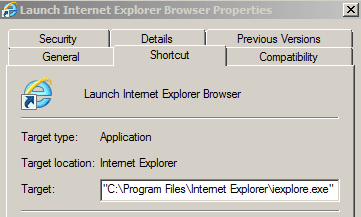
That should bring up a window that looks a bit like this:
366614d1437536864-get-rid-homepage-capture.png


The screenshot shown above is just the top part of the window that you should see.

The field named Target: should contain info like this:
"C:\Program Files\Internet Explorer\iexplore.exe"

If there is info after the iexplorer.exe part, then that can take you to a website.
"C:\Program Files\Internet Explorer\iexplore.exe" http://www.sevenforums.com

That is what GokAy was asking you to check in post #9.

Remove any info that might be after the iexplorer.exe part.


Please check the shortcut that is pinned to the Task Bar too.
Doing that takes a few more clicks:

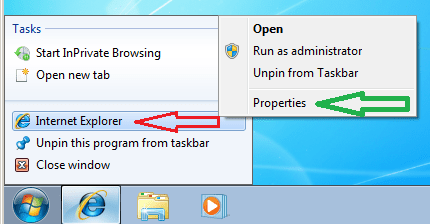
Right click on the pinned shortcut...
...and then right click on Internet Explorer as shown below.

1.PNG


When you right click on Internet Explorer...
...that should bring up another context menu.
2.PNG

Please select Properties from that context menu.
(Select Properties via a regular left click.)

You should now see a window that looks a bit like the first screenshot in this post.

Remove any info that might be after the iexplorer.exe part.


As a sidebar: please consider using Microsoft's Paint to save your screenshots.

Click on the Start button and type Paint in the field labeled Search programs and files.

Once the shortcut for Paint appears, please click on it.

These next steps, you will probably only need to do once:
Click on (and hold) the lower right corner of the whiteboard area.
Drag that corner diagonally until the whiteboard area is small.
Close MS Paint.
(Select Don't Save.)

304573d1391379217t-windows-firewall-blocking-exe-file-even-after-firewall-disabled-p1.png


304574d1391379217t-windows-firewall-blocking-exe-file-even-after-firewall-disabled-p2.png


The next time that you wish to post a screenshot, you can...
...press the Prnt Scrn button*
...open Paint
...press Ctrl + V to paste the image in
...save the file
...and attach that file to a post.

*pressing that button puts an image of the desktop in the Windows clipboard. If you only want the window of interest to be saved, press Alt + Prnt Scrn. That will place an image of the active window into the Windows clipboard.

If you want the attached images in your post to be in the middle what you write (instead of being at the end of the post), then follow steps 10, 11 and 12 in this tutorial.

 
Last edited:

My Computer My Computer

At a glance

W7 Pro SP1 64biti78GBIntel HD Graphics
Computer type
Laptop
Computer Manufacturer/Model Number
Employer provided Dell Latitude
OS
W7 Pro SP1 64bit
CPU
i7
Memory
8GB
Graphics Card(s)
Intel HD Graphics
Hard Drives
crappy SSD
Antivirus
Employer mandated Symantec Endpoint Protection
Browser
Pale Moon 64bit, IE11 64bit & Chrome 64bit
Back
Top