Get window 10 popup

GradeAbra

New member
Member
VIP
Local time
4:36 AM
Messages
223
Hi,

Just recently i notice theres a "Get Window 10" notification icon appearing at my notification bar.

I am currently still on Window 7. Should i upgrade it? Will is change anything?
 

My Computer

Computer Manufacturer/Model Number
Acer eMachines EL1850
OS
Windows 7 Home Premium 64bit
CPU
Pentium(R) Dual-Core CPU E5800 @ 3.20GHz
Motherboard
eMachines EL1850
Memory
4.00 GB
Graphics Card(s)
Intel(R) G41 Express Chipset
Sound Card
Realtek High Definition Audio
Monitor(s) Displays
Intel(R) G41 Express Chipset
Screen Resolution
1600 x 900 x 32 bits (4294967296 colors) @ 59 Hz
Hard Drives
(1) Hitachi HDS721032CLA362 ATA Device (2) Generic- Compact Flash USB Device (3) Multiple Flash Reader USB Device
Yes it will, Windows 10 looks nothing like Windows 7.

You will have to learn everything all over again.

You have installed an update that enables your computer to be upgraded to Windows 10, if you want to.

Updates not to Install

KB2876229 SKYPE
KB2923545
KB2970228
KB2977728
KB2978092
KB2994023
KB3022345
KB3035583
KB2990214
KB3021917
KB2952664
 

My Computer

Computer type
PC/Desktop
Computer Manufacturer/Model Number
Skylake Special #666
OS
Windows 10 Pro x64
CPU
Intel Core i7 6700K
Motherboard
Asus Sabertooth Z170 Mark 1
Memory
GSkill TridentZ RGB 16GB 3600 16-16-16-36
Graphics Card(s)
EVGA GTX 980 Ti SC x2
Sound Card
Realtek High Definition
Monitor(s) Displays
AOC G2460PG
Screen Resolution
1920 x 1080 144Hz
Hard Drives
Samsung 860 Pro 256GB, Seagate Barracuda 4TB x2
PSU
EVGA 1000 P2, EVGA White Custom Braided Cables
Case
Corsair Vengeance C70 Gunmetal Black
Cooling
Corsair H100i v2, Corsair ML120 x2, Thermal Grizzly Kryonaut
Keyboard
Logitech G910 Orion Spectrum
Mouse
Logitech G700s
Internet Speed
Verizon Fios Quantum Gateway 75/75
Antivirus
Windows Defender, Malwarebytes Free 3.8.3
Browser
Chrome
Other Info
Corsair SP120 x4, LG Blu-ray Drive, Durabrand HT-395 100 Watt Dolby Digital Amp, Corsair H2100 Wireless 7.1 Headset
If i upgrade is will it remove all deleted everything in my computer?

Can i just ignore and continue using Window 7?
 

My Computer

Computer Manufacturer/Model Number
Acer eMachines EL1850
OS
Windows 7 Home Premium 64bit
CPU
Pentium(R) Dual-Core CPU E5800 @ 3.20GHz
Motherboard
eMachines EL1850
Memory
4.00 GB
Graphics Card(s)
Intel(R) G41 Express Chipset
Sound Card
Realtek High Definition Audio
Monitor(s) Displays
Intel(R) G41 Express Chipset
Screen Resolution
1600 x 900 x 32 bits (4294967296 colors) @ 59 Hz
Hard Drives
(1) Hitachi HDS721032CLA362 ATA Device (2) Generic- Compact Flash USB Device (3) Multiple Flash Reader USB Device
You can ignore it and continue using Windows 7. Your files won't be removed if you remove the said updates.
 

My Computer

Computer type
PC/Desktop
Computer Manufacturer/Model Number
ASUS X550ZE
OS
Windows 7 Home Premium 64-BIT
CPU
AMD A8 7200P
Motherboard
N/A
Memory
8GB 1600mhz
Graphics Card(s)
Radeon R5 (APU) + Radeon R5 M230 2GB Dual Graphics
Sound Card
Realtek ALC269 with SonicMaster
Monitor(s) Displays
Laptop Display
Screen Resolution
1920 x 1080 @60hz
Hard Drives
WDC WD50 00LPVX-80V0TT0 (500GB)
PSU
Laptop Charger
Mouse
ARMAGGEDON TEXTRON SCORPION 7
Internet Speed
100 mbps DOWN / 50 mbps UP
Antivirus
Windows Defender
Browser
Mozzila FireFox, Valve Steam in-game internet browser
You can ignore it and continue using Windows 7. Your files won't be removed if you remove the said updates.

What if i continue with the upgrade to window 10? What will be deleted?
 

My Computer

Computer Manufacturer/Model Number
Acer eMachines EL1850
OS
Windows 7 Home Premium 64bit
CPU
Pentium(R) Dual-Core CPU E5800 @ 3.20GHz
Motherboard
eMachines EL1850
Memory
4.00 GB
Graphics Card(s)
Intel(R) G41 Express Chipset
Sound Card
Realtek High Definition Audio
Monitor(s) Displays
Intel(R) G41 Express Chipset
Screen Resolution
1600 x 900 x 32 bits (4294967296 colors) @ 59 Hz
Hard Drives
(1) Hitachi HDS721032CLA362 ATA Device (2) Generic- Compact Flash USB Device (3) Multiple Flash Reader USB Device
It`s just a reservation, Windows 10 is not out yet, just keep ignoring it.

Have you ever seen or used Windows 8 ?

That`s what Windows 10 looks like :sick:

No Aero, ugly square corners on everything.
 

Attachments

  • Untitled.jpg
    Untitled.jpg
    322.7 KB · Views: 3

My Computer

Computer type
PC/Desktop
Computer Manufacturer/Model Number
Skylake Special #666
OS
Windows 10 Pro x64
CPU
Intel Core i7 6700K
Motherboard
Asus Sabertooth Z170 Mark 1
Memory
GSkill TridentZ RGB 16GB 3600 16-16-16-36
Graphics Card(s)
EVGA GTX 980 Ti SC x2
Sound Card
Realtek High Definition
Monitor(s) Displays
AOC G2460PG
Screen Resolution
1920 x 1080 144Hz
Hard Drives
Samsung 860 Pro 256GB, Seagate Barracuda 4TB x2
PSU
EVGA 1000 P2, EVGA White Custom Braided Cables
Case
Corsair Vengeance C70 Gunmetal Black
Cooling
Corsair H100i v2, Corsair ML120 x2, Thermal Grizzly Kryonaut
Keyboard
Logitech G910 Orion Spectrum
Mouse
Logitech G700s
Internet Speed
Verizon Fios Quantum Gateway 75/75
Antivirus
Windows Defender, Malwarebytes Free 3.8.3
Browser
Chrome
Other Info
Corsair SP120 x4, LG Blu-ray Drive, Durabrand HT-395 100 Watt Dolby Digital Amp, Corsair H2100 Wireless 7.1 Headset
It`s just a reservation, Windows 10 is not out yet, just keep ignoring it.

Have you ever seen or used Windows 8 ?

That`s what Windows 10 looks like :sick:

I never use Win 8 before. I guess will ignore it for now. Thanks
 

My Computer

Computer Manufacturer/Model Number
Acer eMachines EL1850
OS
Windows 7 Home Premium 64bit
CPU
Pentium(R) Dual-Core CPU E5800 @ 3.20GHz
Motherboard
eMachines EL1850
Memory
4.00 GB
Graphics Card(s)
Intel(R) G41 Express Chipset
Sound Card
Realtek High Definition Audio
Monitor(s) Displays
Intel(R) G41 Express Chipset
Screen Resolution
1600 x 900 x 32 bits (4294967296 colors) @ 59 Hz
Hard Drives
(1) Hitachi HDS721032CLA362 ATA Device (2) Generic- Compact Flash USB Device (3) Multiple Flash Reader USB Device
Using or getting windows 10 is on the user. They may accept it, they may reject it. I can guide them in my way. But I need to ensure that I am not supplying any bad information in this process.

You will have to learn everything all over again.
You have to learn "nothing". It is windows, the old good windows. Just the graphical user interface is a little different from that of windows 7.

No Aero, ugly square corners on everything.
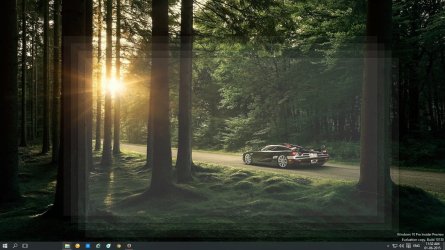
Is not it Aero Peek?
Untitled.jpg
Aero snap is also there, drag a window to the top or side. You will see.
 

My Computer

Computer type
PC/Desktop
Computer Manufacturer/Model Number
Self Assembled
OS
Microsoft Windows 10 Pro Insider Preview 64-bit
CPU
Intel(R) Core(TM) i3-4130 CPU @ 3.40GHz
Motherboard
Gigabyte Technology Co., Ltd. B85M-D3H
Memory
Corsair Vengence 4GB x2 (8.00GB Dual-Channel DDR3 @ 798MHz)
Graphics Card(s)
2047MB GeForce GTS 450 (ZOTAC International)
Sound Card
Onboard (Realtek High Definition Audio)
Monitor(s) Displays
LG Flatron E2040T
Screen Resolution
1600x900
Hard Drives
Western Digital 1 TB
Seagate 500 GB
PSU
Corsair VS550
Case
Cooler Master K380
Cooling
Cooler Master Seidon 120V Plus
Keyboard
Logitech MK260r
Mouse
Logitech MK260r
Internet Speed
PMPL Broadband
Antivirus
Windows Defender + MBAM
Browser
Firefox
Other Info
Dell Studio 15" Laptop
arc, what do you mean you will have to learn nothing, you have to learn where everything is all over again. It`s nothing like 7.

There is no aero in Windows 10, snap and peek are not examples of Aero.
 

My Computer

Computer type
PC/Desktop
Computer Manufacturer/Model Number
Skylake Special #666
OS
Windows 10 Pro x64
CPU
Intel Core i7 6700K
Motherboard
Asus Sabertooth Z170 Mark 1
Memory
GSkill TridentZ RGB 16GB 3600 16-16-16-36
Graphics Card(s)
EVGA GTX 980 Ti SC x2
Sound Card
Realtek High Definition
Monitor(s) Displays
AOC G2460PG
Screen Resolution
1920 x 1080 144Hz
Hard Drives
Samsung 860 Pro 256GB, Seagate Barracuda 4TB x2
PSU
EVGA 1000 P2, EVGA White Custom Braided Cables
Case
Corsair Vengeance C70 Gunmetal Black
Cooling
Corsair H100i v2, Corsair ML120 x2, Thermal Grizzly Kryonaut
Keyboard
Logitech G910 Orion Spectrum
Mouse
Logitech G700s
Internet Speed
Verizon Fios Quantum Gateway 75/75
Antivirus
Windows Defender, Malwarebytes Free 3.8.3
Browser
Chrome
Other Info
Corsair SP120 x4, LG Blu-ray Drive, Durabrand HT-395 100 Watt Dolby Digital Amp, Corsair H2100 Wireless 7.1 Headset
arc, what do you mean you will have to learn nothing, you have to learn where everything is all over again. It`s nothing like 7.
There is no difference between windows 7 and windows 10 other than some little changes in the GUI, a few additions and a few changes of programs. Nobody needs to learn everything allover, if they know windows.

There is no basic difference between windows 7 and windows 10. Windows 8 was different.

There is no aero in Windows 10, snap and peek are not examples of Aero.
There is no aero glass. The other features are nicely present there. There is Aero snap, there is aero peek, there is Win+tab (in a different look), there is live thumbnails on the taskbar.
 

My Computer

Computer type
PC/Desktop
Computer Manufacturer/Model Number
Self Assembled
OS
Microsoft Windows 10 Pro Insider Preview 64-bit
CPU
Intel(R) Core(TM) i3-4130 CPU @ 3.40GHz
Motherboard
Gigabyte Technology Co., Ltd. B85M-D3H
Memory
Corsair Vengence 4GB x2 (8.00GB Dual-Channel DDR3 @ 798MHz)
Graphics Card(s)
2047MB GeForce GTS 450 (ZOTAC International)
Sound Card
Onboard (Realtek High Definition Audio)
Monitor(s) Displays
LG Flatron E2040T
Screen Resolution
1600x900
Hard Drives
Western Digital 1 TB
Seagate 500 GB
PSU
Corsair VS550
Case
Cooler Master K380
Cooling
Cooler Master Seidon 120V Plus
Keyboard
Logitech MK260r
Mouse
Logitech MK260r
Internet Speed
PMPL Broadband
Antivirus
Windows Defender + MBAM
Browser
Firefox
Other Info
Dell Studio 15" Laptop
I also miss Aero Glass, rounded corners and the plain beauty of Windows 7 but Windows 10 is okay, though less attractive.

The hardest part I'm having with Windows 10 is their moving all the useful function out of Control Panel into Settings, and not putting it in (to me) logical places.

The Start Menu is useable in Win 10, not a joke like it was in Win 8 though right now I'm leaning toward installing Start10 from Stardock which give me a truly useful Start button again.

Many people are going to have a hard time with being forced to setup a Microsoft account to login to Windows 10 with. Yes I know you can setup a local account but it's well hidden and unlikely for a new Win 10 user to find unless guided.

Bottom line, Windows 10 will be a better and easier upgrade from Windows 7 for most people than Windows 8 was. After install you still boot to the Desktop, not a Cell phone looking Metro screen. You have a sort of familiar Start button (with Metro tiles added).

I see a landslide business in Windows 10 support forums for the foreseeable future !!!!
 

My Computer

Computer type
PC/Desktop
Computer Manufacturer/Model Number
Lenovo IdeaCenter 450
OS
Windows 10 Pro X64
CPU
Intel Quad Core i7-4770 @ 3.4Ghz
Memory
16.0GB PC3-12800 DDR3 SDRAM 1600 MHz
Graphics Card(s)
Intel Integrated HD Graphics
Sound Card
Realtek HD Audio
Monitor(s) Displays
HP 22" LCD
Screen Resolution
1680 x 1050
Hard Drives
250GB Samsung EVO SATA-3 SSD
2TB Seagate ST2000DM001 SATA-2
1.5TB Seagate ST3150041AS SATA
Keyboard
Dell USB
Mouse
Lenovo USB
Internet Speed
Cable via Road Runner 3MB Upload, 30MB Download
Antivirus
Windows Defender, MBAM Pro, MBAE
Browser
Seamonkey
Other Info
UEFI/GPT
PLDS DVD-RW DH16AERSH
The hardest part I'm having with Windows 10 is their moving all the useful function out of Control Panel into Settings, and not putting it in (to me) logical places.
Control Panel is still there with all its known functionality. The settings thing is just an addition.
2015-06-01_214430.jpg
 

My Computer

Computer type
PC/Desktop
Computer Manufacturer/Model Number
Self Assembled
OS
Microsoft Windows 10 Pro Insider Preview 64-bit
CPU
Intel(R) Core(TM) i3-4130 CPU @ 3.40GHz
Motherboard
Gigabyte Technology Co., Ltd. B85M-D3H
Memory
Corsair Vengence 4GB x2 (8.00GB Dual-Channel DDR3 @ 798MHz)
Graphics Card(s)
2047MB GeForce GTS 450 (ZOTAC International)
Sound Card
Onboard (Realtek High Definition Audio)
Monitor(s) Displays
LG Flatron E2040T
Screen Resolution
1600x900
Hard Drives
Western Digital 1 TB
Seagate 500 GB
PSU
Corsair VS550
Case
Cooler Master K380
Cooling
Cooler Master Seidon 120V Plus
Keyboard
Logitech MK260r
Mouse
Logitech MK260r
Internet Speed
PMPL Broadband
Antivirus
Windows Defender + MBAM
Browser
Firefox
Other Info
Dell Studio 15" Laptop
The Metro Tiles can easily be removed from Start Menu. I have adopted a few - Mail, Contacts, Weather, News, Calendar - which give me live updates for each at a glance. This is quite useful if they would all remain stable. MS may be jumping the gun with a release date so soon when half the apps don't always work or Update, I had to roll back the latest build because Youtube wouldn't play in any browser, then the Start button wouldn't work until I did a reset on the rollback. And after six months of decent performance the Mail app suddenly stopped letting all my Yahoo mail download so that I must do this manually within some emails. :huh:
 
The hardest part I'm having with Windows 10 is their moving all the useful function out of Control Panel into Settings, and not putting it in (to me) logical places.
Control Panel is still there with all its known functionality. The settings thing is just an addition.

Not true, stuff has been and will continue to be removed from Control Panel. Last I heard MS wanted to do away with it and move everything into Settings.

No longer in Control Panel:

Add features to Windows xxx
Family Safety
Folder Options
Location Settings
Personalization Desktop Background, Color, Sounds and Screen Saver options
Add a new account is now under Settings

There is other stuff I can't remember now.
 

My Computer

Computer type
PC/Desktop
Computer Manufacturer/Model Number
Lenovo IdeaCenter 450
OS
Windows 10 Pro X64
CPU
Intel Quad Core i7-4770 @ 3.4Ghz
Memory
16.0GB PC3-12800 DDR3 SDRAM 1600 MHz
Graphics Card(s)
Intel Integrated HD Graphics
Sound Card
Realtek HD Audio
Monitor(s) Displays
HP 22" LCD
Screen Resolution
1680 x 1050
Hard Drives
250GB Samsung EVO SATA-3 SSD
2TB Seagate ST2000DM001 SATA-2
1.5TB Seagate ST3150041AS SATA
Keyboard
Dell USB
Mouse
Lenovo USB
Internet Speed
Cable via Road Runner 3MB Upload, 30MB Download
Antivirus
Windows Defender, MBAM Pro, MBAE
Browser
Seamonkey
Other Info
UEFI/GPT
PLDS DVD-RW DH16AERSH
As a basic domestic computer user and the sole user of the computer, I have never used things like Add features, Family safety and Locations, I dont know where they were in previous versions, and dont know where they are in 10. So I will not comment on those.

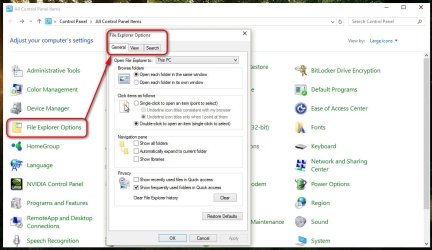
Folder options are right there in Control Panel, under a different name, File Explorer options.
1.jpg
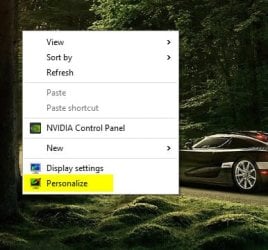
Personalization was always accessible by right clicking on the desktop, and it is right there. People never accessed it from control panel. So nothing is lost in this regard.
2.jpg
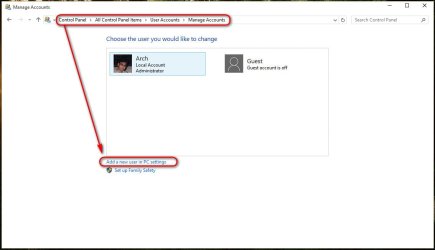
To add a new account, the process in windows 10 is ... Control Panel > User Accounts > Manage Another Account > Add a new user. So it is still in control panel.
3.jpg
Now let us think which is true and which is not.

What "will continue" is future tense. We cannot predict the future with certainty (in general). But if everything is moved to settings and becomes as easy and logical as the present settings is, I will be a happy user.
 

My Computer

Computer type
PC/Desktop
Computer Manufacturer/Model Number
Self Assembled
OS
Microsoft Windows 10 Pro Insider Preview 64-bit
CPU
Intel(R) Core(TM) i3-4130 CPU @ 3.40GHz
Motherboard
Gigabyte Technology Co., Ltd. B85M-D3H
Memory
Corsair Vengence 4GB x2 (8.00GB Dual-Channel DDR3 @ 798MHz)
Graphics Card(s)
2047MB GeForce GTS 450 (ZOTAC International)
Sound Card
Onboard (Realtek High Definition Audio)
Monitor(s) Displays
LG Flatron E2040T
Screen Resolution
1600x900
Hard Drives
Western Digital 1 TB
Seagate 500 GB
PSU
Corsair VS550
Case
Cooler Master K380
Cooling
Cooler Master Seidon 120V Plus
Keyboard
Logitech MK260r
Mouse
Logitech MK260r
Internet Speed
PMPL Broadband
Antivirus
Windows Defender + MBAM
Browser
Firefox
Other Info
Dell Studio 15" Laptop
Yes it will, Windows 10 looks nothing like Windows 7.

You will have to learn everything all over again.

You have installed an update that enables your computer to be upgraded to Windows 10, if you want to.

Updates not to Install

KB2876229 SKYPE
KB2923545
KB2970228
KB2977728
KB2978092
KB2994023
KB3022345
KB3035583
KB2990214
KB3021917
KB2952664

Is there an easy/quick way to disable/remove the Get Win10 Popup if you have installed these updates but do not intend to upgrade to Win10?
 

My Computer

Computer type
Laptop
Computer Manufacturer/Model Number
Sony VAIO
OS
Windows 7 Ultimate x64 +SP1
Antivirus
TrendMicro Titanium
Browser
Firefox

My Computer

Computer type
PC/Desktop
Computer Manufacturer/Model Number
Self Built
OS
Win 10 Pro x64
CPU
Intel I5-2500K @3.3GHz
Motherboard
Asrock P67 Extreme4
Memory
16GB G.Skill Ripjaws X (4x4GB)
Graphics Card(s)
EVGA GeForce 750 Ti SC 2GB
Sound Card
ASUS Xonar DG 5.1 Channels 24-bit 96KHz PCI Interface Sound
Monitor(s) Displays
auria eq2367
Screen Resolution
1920 x 1080
Hard Drives
250GB Samsung 850 EVO SSD
1TB WD Blue
1TB Hitachi
PSU
SeaSonic X 650W 80 Plus Gold
Case
Corsair Obsidian 750D
Cooling
Corsair H60, Three 140mm case fans
Keyboard
Logitech Wireless Keyboard K520
Mouse
Logitech Wireless Mouse M310
Internet Speed
Wave Broadband ~ 100 dn 5 up
Antivirus
Windows Defender, Malwarebytes Premium
Browser
Edge, IE11, Chrome
Other Info
Laptop specs: HP g7-1365dx /
CPU: AMD A6-3420M APU with Radeon(tm) HD Graphics /
RAM: Crucial 8Gb (2x4Gb) /
SSD: Crucial M4-CT128M4SSD2 ATA Device/ FW 000F /
GFX: AMD Radeon HD 6520G /
OS: Windows 10 Pro x64
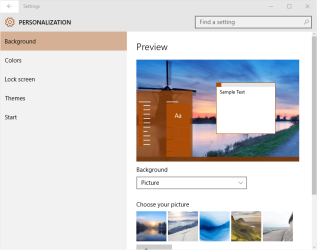
Arc, did you try Personalize? When you select it you go to Settings, not Personalization.

Personalization.png
 

My Computer

Computer type
PC/Desktop
Computer Manufacturer/Model Number
Lenovo IdeaCenter 450
OS
Windows 10 Pro X64
CPU
Intel Quad Core i7-4770 @ 3.4Ghz
Memory
16.0GB PC3-12800 DDR3 SDRAM 1600 MHz
Graphics Card(s)
Intel Integrated HD Graphics
Sound Card
Realtek HD Audio
Monitor(s) Displays
HP 22" LCD
Screen Resolution
1680 x 1050
Hard Drives
250GB Samsung EVO SATA-3 SSD
2TB Seagate ST2000DM001 SATA-2
1.5TB Seagate ST3150041AS SATA
Keyboard
Dell USB
Mouse
Lenovo USB
Internet Speed
Cable via Road Runner 3MB Upload, 30MB Download
Antivirus
Windows Defender, MBAM Pro, MBAE
Browser
Seamonkey
Other Info
UEFI/GPT
PLDS DVD-RW DH16AERSH
I love the fact that they put the Backup & Restore back to the way it was in Windows 7, so much easier.

I see MS does listen :)
 

My Computer

Computer type
PC/Desktop
Computer Manufacturer/Model Number
Skylake Special #666
OS
Windows 10 Pro x64
CPU
Intel Core i7 6700K
Motherboard
Asus Sabertooth Z170 Mark 1
Memory
GSkill TridentZ RGB 16GB 3600 16-16-16-36
Graphics Card(s)
EVGA GTX 980 Ti SC x2
Sound Card
Realtek High Definition
Monitor(s) Displays
AOC G2460PG
Screen Resolution
1920 x 1080 144Hz
Hard Drives
Samsung 860 Pro 256GB, Seagate Barracuda 4TB x2
PSU
EVGA 1000 P2, EVGA White Custom Braided Cables
Case
Corsair Vengeance C70 Gunmetal Black
Cooling
Corsair H100i v2, Corsair ML120 x2, Thermal Grizzly Kryonaut
Keyboard
Logitech G910 Orion Spectrum
Mouse
Logitech G700s
Internet Speed
Verizon Fios Quantum Gateway 75/75
Antivirus
Windows Defender, Malwarebytes Free 3.8.3
Browser
Chrome
Other Info
Corsair SP120 x4, LG Blu-ray Drive, Durabrand HT-395 100 Watt Dolby Digital Amp, Corsair H2100 Wireless 7.1 Headset
Arc, did you try Personalize? When you select it you go to Settings, not Personalization.

361261d1433300735t-get-window-10-popup-personalization.png

View attachment 361261
I see the personalization window is open there in the screenshot. :) What matters if it is under settings, when all the jobs can be done?
 

My Computer

Computer type
PC/Desktop
Computer Manufacturer/Model Number
Self Assembled
OS
Microsoft Windows 10 Pro Insider Preview 64-bit
CPU
Intel(R) Core(TM) i3-4130 CPU @ 3.40GHz
Motherboard
Gigabyte Technology Co., Ltd. B85M-D3H
Memory
Corsair Vengence 4GB x2 (8.00GB Dual-Channel DDR3 @ 798MHz)
Graphics Card(s)
2047MB GeForce GTS 450 (ZOTAC International)
Sound Card
Onboard (Realtek High Definition Audio)
Monitor(s) Displays
LG Flatron E2040T
Screen Resolution
1600x900
Hard Drives
Western Digital 1 TB
Seagate 500 GB
PSU
Corsair VS550
Case
Cooler Master K380
Cooling
Cooler Master Seidon 120V Plus
Keyboard
Logitech MK260r
Mouse
Logitech MK260r
Internet Speed
PMPL Broadband
Antivirus
Windows Defender + MBAM
Browser
Firefox
Other Info
Dell Studio 15" Laptop
Back
Top