
Solved Never was able to "...get Windows 10 for free!"

lyndon

New member
Local time
4:59 PM
Messages
21
Location
New Jersey
Now, back when Microsoft was giving away Windows 10 for free...

I ran the program and reserved my copy. The "Get Windows 10" program said that my copy was all reserved and all I had to dow was ...wait. The expiration date came and went. I wasn't really too worried, I just figured there was a backlog and they would get around to it when they could. After much waiting I talked to people I knew who built computers and installed operating systems (which I have done too), contacted support, and nobody seemed to really know what had happened. The only advice I got was "something must have gone wrong." Helpful! Eventually I just hit a dead end. The upgrade never arrived.

Windows 7 is great and I really like it. However, for the first time I am starting to get problems because many of the programs I use won't upgrade because they don't update them for Windows 7. So I started thinking about Windows 10 (or 11). Now that seems like a pretty costly option because I paid for my full-install version of Windows 7 and now I don't see why I should have to go out and pay again, especially after being promised by Microsoft that Windows 10 was on the way "for free!"

Microsoft seems to offer two solutions... buy Windows 10, or buy a new computer. There doesn't seem to be any way to hold Microsoft to their promise. What is the cheapest way to get Windows 10 and keep it as transferable as my Windows 7 currently is? If I bought a Windows 10 upgrade, I believe it would take over my Windows 7 serial number, but would my (now Windows 10) installation be transferable to a new computer when I upgrade? After all, I bought it as a full-install program, or would it be tied to the machine I now have? It seems I had to pay for Windows 7 once, and now have to buy Windows 10 in addition and I'm not even sure if that would be considered a full-install version of Windows. What are my best options?

And yes, Microsoft is still promising me that Windows 10 is on the way. Their confirmation of my reservation is still there. According to them, it's "All done for now" and there's "nothing else" I "need to do."

Any help would be appreciated!
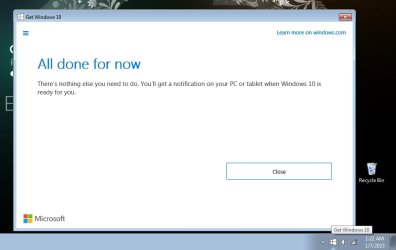
Upgrade.jpg
 

My Computer My Computer

At a glance

Laptop: Windows 7 64-bit Home Premium Desktop...Core i5-2450M 2 cores / Core i5-2500K 4 cores6GB / 4GBAMD Radeon 7450M Desktop: NVIDIA GeForce GT 1030
Computer type
PC/Desktop
Computer Manufacturer/Model Number
Dell Inspiron 15r laptop / custom desktop
OS
Laptop: Windows 7 64-bit Home Premium Desktop Windows 7 64-bit Professional
CPU
Core i5-2450M 2 cores / Core i5-2500K 4 cores
Motherboard
N5110 / Gigabyte ga-z77-d3h
Memory
6GB / 4GB
Graphics Card(s)
AMD Radeon 7450M Desktop: NVIDIA GeForce GT 1030
Sound Card
Laptop: onboard Desktop: onboard
Monitor(s) Displays
HP ZR2440w
Screen Resolution
Laptop: 1366x768 Desktop: 1920x1200
Hard Drives
Laptop: Hitachi HTS547575A9E384
Desktop: SSD 850 PRO 256GB ATA Device
Desktop: SSD 860 PRO 256GB ATA Device
External: LaCie Rugged FW/USB Device
Case
Desktop: Thermaltake Commander MS-I Snow Edition
What Microsoft said was that you can do either for free:
1. Upgrade an existing computer with Windows 7 or 8.1 to Windows 10. For example, you can upgrade Windows 7 Home to Windows 10 Home.
2. Create the install media (USB flash drive) and do a clean install of Windows 10. If the computer came with Windows 7 and the key is in the BIOS it should activate automatically. Otherwise you can use key for Windows 7 for the computer that used to have Windows 7 to activate Windows 10.

Officially Windows only offered this free upgrade the first year Windows 10 came out. However, they have not stopped anyone from getting the free upgrade anytime since them.

Just last year I upgraded for free three computers I have:
1. Windows 7 Ultimate 64-bit > Windows 10 Professional 64-bit
2. Windows 7 Home 64-bit > Windows 10 Home 64-bit
3. Windows 8.1 Professional 32-bit > Windows 10 Professional 32-bit


To get the free Windows 10 upgrade go to this Microsoft web site:

Download Windows 10
https://www.microsoft.com/en-us/software-download/windows10

You have two options:

1. Windows 10 2022 Update | Version 22H2
Select Update now to upgrade your Windows 7 computer to Windows 10.

2. Create Windows 10 installation media
Select Download Now to download the Media Creation tool. When you run this tool you have two options:
a. Upgrade your Windows 7 computer to Windows 10.
b. Have it create a bootable USB flash drive with the setup program for Windows 10. You can use it to do a clean install of Windows 10.
 

My Computers My Computers

  • At a glance

    Windows 7 Home Premium 64-bitsAMD FX-8350GSKILL Ripjaw-X PC3 12800 8GB (2x4GB)ASUS ROG STRIX GTX 1060 6GB
    Computer type
    PC/Desktop
    Computer Manufacturer/Model Number
    Custom build
    OS
    Windows 7 Home Premium 64-bits
    CPU
    AMD FX-8350
    Motherboard
    Gigabyte GA-990FXA-UD3 (AM3+)
    Memory
    GSKILL Ripjaw-X PC3 12800 8GB (2x4GB)
    Graphics Card(s)
    ASUS ROG STRIX GTX 1060 6GB
    Sound Card
    Integrated
    Monitor(s) Displays
    Asus VE228H (21.5-in)
    Screen Resolution
    1920x1080 60Hz
    Hard Drives
    SAMSUNG 870 EVO 2.5 Inch SATA SSD (1TB)
    SAMSUNG 870 EVO 2.5 Inch SATA SSD (1TB)
    SAMSUNG 870 EVO 2.5 Inch SATA SSD (1TB)
    PSU
    Corsair RM750x (750 watts)
    Case
    Corsair Carbide Series 200R
    Cooling
    Corsair Hydro Series H60 (CWCH60)
    Keyboard
    Logitech Elite
    Mouse
    Logitech M510 Wireless Mouse
    Internet Speed
    Comcast Gigabit Extra (1200Mbps down / 35Mbps up)
    Antivirus
    Malwarebytes
    Browser
    Firefox, Edge, Chrome
    Other Info
    ASUS DRW-24B1ST DVD-RW (24X) optical drive
    Seagate Expansion Desk (5TB) external SATA/USB HDD
    Comcast XB8 Internet Gateway
  • At a glance

    Windows 7 Pro (64-bit)AMD Phenom II 960T X4Corsair XMS2 DDR2-800 8GB (4x2GB)ASUS ENGTX560 DCII OC/2DI/1GD5 1GB
    Computer type
    PC/Desktop
    System Manufacturer/Model Number
    Custom
    OS
    Windows 7 Pro (64-bit)
    CPU
    AMD Phenom II 960T X4
    Motherboard
    ASUS M4N82 Deluxe
    Memory
    Corsair XMS2 DDR2-800 8GB (4x2GB)
    Graphics Card(s)
    ASUS ENGTX560 DCII OC/2DI/1GD5 1GB
    Monitor(s) Displays
    Samsung 930B 19-inch LCD
    Screen Resolution
    1280x1024
    Hard Drives
    Samsung SSD 870 EVO 1000 GB (Windows 10)
    Seagate ST1000DM003 1000 GB (Windows 7)
    PSU
    Antec TruePower (new) TP-650
    Case
    Antec Three Hundred
    Cooling
    AMD stock cooler from FX8350
    Mouse
    Logitech M100
    Internet Speed
    Xfinity Gigabit Extra 1200/35 Mbps
You can still upgrade free.

You would see a big improvement by replacing your mechanical hard disks with sata ssd.
 

My Computers My Computers

  • At a glance

    7 X64i5 84002x8gb 3200mhz
    Computer type
    PC/Desktop
    OS
    7 X64
    CPU
    i5 8400
    Motherboard
    gigabyte b365m ds3h
    Memory
    2x8gb 3200mhz
    Hard Drives
    various
    PSU
    pure power 11 400w cm
    Case
    Coolermaster
    Cooling
    cryorig m9i
  • At a glance

    7x64g54008gb ddr4 2400
    Computer type
    PC/Desktop
    OS
    7x64
    CPU
    g5400
    Motherboard
    ga b365m ds3h
    Memory
    8gb ddr4 2400
    PSU
    xfx pro 450w
Hi

if you installed a "blocker" program then it would not update/notify you again..... 3 i know off

I dont want 10
GWX
Never10


your system specs show 2 comps are both affected,
 

My Computer My Computer

At a glance

W7 home premium 32bit/W7HP 64bit/w10 tp insid...E5300 dual core3gbNvidia Geforce 7100 Nforce 630i
Computer type
PC/Desktop
Computer Manufacturer/Model Number
medionl/Aspire 6930G/acer x55a
OS
W7 home premium 32bit/W7HP 64bit/w10 tp insider ring
CPU
E5300 dual core
Motherboard
medion MS7366
Memory
3gb
Graphics Card(s)
Nvidia Geforce 7100 Nforce 630i
Monitor(s) Displays
avixc
Internet Speed
n (isp resticted to 72)
Antivirus
mse/pands
Browser
palemoon
Other Info
Belkin Fd7050 n USB using Railink RT2870 drivers, more upto date
Thanks to all of you!

I really wasn't expecting to get a reply at this late of a date.

As I (may) have said, so far the only problem is that my Brave browser will not update as there is no newer version for Windows 7. But... I know what's coming. I had the same thing with XP. It was a shame to give that up, but eventually it just became a liability because even the programs I had paid for would not update on it. When I bought the retail version of Windows 7 (Professional), I dual-booted it for a while. It was amazing how quickly I stopped booting up the XP, as 7 was just as good of an operating system, but more current. I suppose it will be the same way going to 10 (or 11). I had been holding out after the Windows 8 debacle. I was hoping to dual-boot the Windows 7 as well, but because of the way it upgrades, that may not be possible. It seems I would have to buy a new license one way or another. I will shop around.

My laptop runs Windows 7. It came with the Home version pre-installed. Unfortunately, I spilled water on it at some point. I mopped it up quickly, but it has never been the same. It runs fine, but it doesn't detect half of the memory I have installed. I put in new memory sticks, but it doesn't detect them either. I'm more of a tinkerer than a computer hobbyist. This was beyond me. Also, at some point I had deleted the restore partition that had been installed on it when I bought it. I never thought it would be an issue, but when it got so bloated I wanted to do a clean install, I found another problem: The sticker with the key number on it had worn off. (It was a stupid place to put the sticker - right on the bottom, not even recessed), so I can't reinstall, even with the disk I have. I don't use it much anyway. Maybe I'll just make a disk image of the drive and uninstall everything. That should speed it up some. It's a shame, but with the specs on that computer, it's not really going to run Windows 10. It's got Windows 7 Home all paid for, but I don't think I can reinstall it at this point.

I bought and built my desktop "future-proofed", and though I know there is really no such thing, the specs on it are still quite good. I made a few upgrades since I last posted the specs, but it runs fine. Quite brisk. Especially since I put in the SSDs.

Anyway, I did find and download the Windows 10 media creator last night (this morning, LoL) and downloaded the ISO to my drive. Unfortunately, for some reason I am having trouble with my disk drive. Perhaps it's the blank disk, but if it is I'll just buy another flash drive - can't have too many. One way or another I will have installation media. Then I'll see if I can upgrade to Windows 11.

The whole thing has been kind of funny really. People would see I'm running Windows 7 and tell me I should upgrade and I would show them the reservation and say "I already did. It'll be here any day!" LoL. But in practice, I have had no problems with Windows 7. I love it! Brave was the first thing and I suspect it's only the beginning.

Thank you all! It is good to know there are ...options. If I could find a way to dual-boot them both it would be ideal. I can find out what does and doesn't work on Windows 10 (or 11)

Much Obliged to you All!

Mike
 

My Computer My Computer

At a glance

Laptop: Windows 7 64-bit Home Premium Desktop...Core i5-2450M 2 cores / Core i5-2500K 4 cores6GB / 4GBAMD Radeon 7450M Desktop: NVIDIA GeForce GT 1030
Computer type
PC/Desktop
Computer Manufacturer/Model Number
Dell Inspiron 15r laptop / custom desktop
OS
Laptop: Windows 7 64-bit Home Premium Desktop Windows 7 64-bit Professional
CPU
Core i5-2450M 2 cores / Core i5-2500K 4 cores
Motherboard
N5110 / Gigabyte ga-z77-d3h
Memory
6GB / 4GB
Graphics Card(s)
AMD Radeon 7450M Desktop: NVIDIA GeForce GT 1030
Sound Card
Laptop: onboard Desktop: onboard
Monitor(s) Displays
HP ZR2440w
Screen Resolution
Laptop: 1366x768 Desktop: 1920x1200
Hard Drives
Laptop: Hitachi HTS547575A9E384
Desktop: SSD 850 PRO 256GB ATA Device
Desktop: SSD 860 PRO 256GB ATA Device
External: LaCie Rugged FW/USB Device
Case
Desktop: Thermaltake Commander MS-I Snow Edition
You can dual boot. Then in a while you will get the hang of the new os and move into it permananetly.

there is a file called called gatherosstate.exe in win10 installation media, in the sources folder. Copy it to your win7 desktop and run it - and it creates an xml file which you then use to activate win10 that you have installed onto another partition/disk on the same machine.

the same xml file can be used with win11.

There is a tutorial on tenforums.

If your win7 is activated, there is no need to buy another license for win10 or win11
 

My Computers My Computers

  • At a glance

    7 X64i5 84002x8gb 3200mhz
    Computer type
    PC/Desktop
    OS
    7 X64
    CPU
    i5 8400
    Motherboard
    gigabyte b365m ds3h
    Memory
    2x8gb 3200mhz
    Hard Drives
    various
    PSU
    pure power 11 400w cm
    Case
    Coolermaster
    Cooling
    cryorig m9i
  • At a glance

    7x64g54008gb ddr4 2400
    Computer type
    PC/Desktop
    OS
    7x64
    CPU
    g5400
    Motherboard
    ga b365m ds3h
    Memory
    8gb ddr4 2400
    PSU
    xfx pro 450w
Oh, also...

I misread torchwood's advice. I had thought that it said that maybe I had installed a blocker and that's why it wasn't downloading. I just reread it and I realize that what was meant is that I could get rid of the message by installing a blocker.

I never wanted to get rid of it. I thought it was funny. LoL. I know there was an update to remove the program from your computer so that you wouldn't get the message again. It only shows up if you open it. I used to keep the icon hidden from the taskbar. I only would show it if people called me out on not getting Windows 10!

Does anyone know of a good article on making Windows 10 or 11 look more like Windows 7? It's not that I want to live in the past, but I like changing things one at a time. Otherwise it's like trying to drive somebody else's car and everything is in the wrong place. Muscle memory can be a problem.

Mike
 

My Computer My Computer

At a glance

Laptop: Windows 7 64-bit Home Premium Desktop...Core i5-2450M 2 cores / Core i5-2500K 4 cores6GB / 4GBAMD Radeon 7450M Desktop: NVIDIA GeForce GT 1030
Computer type
PC/Desktop
Computer Manufacturer/Model Number
Dell Inspiron 15r laptop / custom desktop
OS
Laptop: Windows 7 64-bit Home Premium Desktop Windows 7 64-bit Professional
CPU
Core i5-2450M 2 cores / Core i5-2500K 4 cores
Motherboard
N5110 / Gigabyte ga-z77-d3h
Memory
6GB / 4GB
Graphics Card(s)
AMD Radeon 7450M Desktop: NVIDIA GeForce GT 1030
Sound Card
Laptop: onboard Desktop: onboard
Monitor(s) Displays
HP ZR2440w
Screen Resolution
Laptop: 1366x768 Desktop: 1920x1200
Hard Drives
Laptop: Hitachi HTS547575A9E384
Desktop: SSD 850 PRO 256GB ATA Device
Desktop: SSD 860 PRO 256GB ATA Device
External: LaCie Rugged FW/USB Device
Case
Desktop: Thermaltake Commander MS-I Snow Edition

My Computers My Computers

  • At a glance

    7 X64i5 84002x8gb 3200mhz
    Computer type
    PC/Desktop
    OS
    7 X64
    CPU
    i5 8400
    Motherboard
    gigabyte b365m ds3h
    Memory
    2x8gb 3200mhz
    Hard Drives
    various
    PSU
    pure power 11 400w cm
    Case
    Coolermaster
    Cooling
    cryorig m9i
  • At a glance

    7x64g54008gb ddr4 2400
    Computer type
    PC/Desktop
    OS
    7x64
    CPU
    g5400
    Motherboard
    ga b365m ds3h
    Memory
    8gb ddr4 2400
    PSU
    xfx pro 450w
Okay, thanks SIW2!

I'm pretty sure my desktop as it is now would run Windows 11, but if not... I will upgrade. In my worldview, updating to 10 without going to 11 will just kick the can down the road a bit.

I will just image my Windows 7 and get Windows 10 on here, and then see if I can go to 11 right away.

Thanks for the information on the customizing programs. I will check around myself too, but I figured someone in here may have known offhand. As always sevenforums came through. (I am hoping there is a tenforums or elevenforums out there.) I am going to get it all done though. I have used sevenforums a lot. I don't need to post much because the answers I want are usually in there somewhere.

I'll have to remember to update my hardware list.

Thanks again,

Mike
 

My Computer My Computer

At a glance

Laptop: Windows 7 64-bit Home Premium Desktop...Core i5-2450M 2 cores / Core i5-2500K 4 cores6GB / 4GBAMD Radeon 7450M Desktop: NVIDIA GeForce GT 1030
Computer type
PC/Desktop
Computer Manufacturer/Model Number
Dell Inspiron 15r laptop / custom desktop
OS
Laptop: Windows 7 64-bit Home Premium Desktop Windows 7 64-bit Professional
CPU
Core i5-2450M 2 cores / Core i5-2500K 4 cores
Motherboard
N5110 / Gigabyte ga-z77-d3h
Memory
6GB / 4GB
Graphics Card(s)
AMD Radeon 7450M Desktop: NVIDIA GeForce GT 1030
Sound Card
Laptop: onboard Desktop: onboard
Monitor(s) Displays
HP ZR2440w
Screen Resolution
Laptop: 1366x768 Desktop: 1920x1200
Hard Drives
Laptop: Hitachi HTS547575A9E384
Desktop: SSD 850 PRO 256GB ATA Device
Desktop: SSD 860 PRO 256GB ATA Device
External: LaCie Rugged FW/USB Device
Case
Desktop: Thermaltake Commander MS-I Snow Edition
You can dual boot. Then in a while you will get the hang of the new os and move into it permananetly.
there is a file called called gatherosstate.exe in win10 installation media, in the sources folder. Copy it to your win7 desktop and run it - and it creates an xml file which you then use to activate win10 that you have installed onto another partition/disk on the same machine.
Tutorial for using gatherosstate.exe here:

Clean Install Windows 10 Directly without having to Upgrade First | Tutorials
the same xml file can be used with win11.

Unfortunately no, you cannot upgrade from 7 directly to 11 and get activated with a digital licence, either with an in-place upgrade or gatherosstate. You need to go to 10 first to get the digital licence, then you can upgrade to or clean install 11. I tested that here:

To activate Win 11, what types of older license are good? | Page 3 | Windows 11 Forum - post #46
 

My Computers My Computers

  • At a glance

    Windows 7 Home Premium x64AMD V1204GB
    Computer type
    Laptop
    Computer Manufacturer/Model Number
    Toshiba satellite C650D
    OS
    Windows 7 Home Premium x64
    CPU
    AMD V120
    Memory
    4GB
    Internet Speed
    150 Mbps
    Antivirus
    MSE
    Browser
    IE11, Edge, Firefox
    Other Info
    I also have W7 Pro on my System Two, and several W7 Hyper-V VMs. My other machines run Windows 10/11. Their specs are in my Ten Forums & Eleven Forum profiles.
  • At a glance

    Windows 7 Pro x64Intel i5-3320M8 GB
    Computer type
    Laptop
    System Manufacturer/Model Number
    Lenovo Thinkpad T430
    OS
    Windows 7 Pro x64
    CPU
    Intel i5-3320M
    Memory
    8 GB
    Hard Drives
    250GB Samsung SSD 860 EVO
    Antivirus
    MSE
there is a file called called gatherosstate.exe in win10 installation media, in the sources folder. Copy it to your win7 desktop and run it - and it creates an xml file which you then use to activate win10 that you have installed onto another partition/disk on the same machine....
the same xml file can be used with win11.

which means win11 installed on another partition.

the xml file created by running win10 gatherosstate on win7 machine worked for win11

I used gatherosstate from win 10 10586 .

applied the win 11 image to different partition, did oobe etc, rebooted a couple of times - not activated of course.

then used the xml file created by running win 10 10586 gatherosstate on the desktop of the win7 installation.
 
Last edited:

My Computers My Computers

  • At a glance

    7 X64i5 84002x8gb 3200mhz
    Computer type
    PC/Desktop
    OS
    7 X64
    CPU
    i5 8400
    Motherboard
    gigabyte b365m ds3h
    Memory
    2x8gb 3200mhz
    Hard Drives
    various
    PSU
    pure power 11 400w cm
    Case
    Coolermaster
    Cooling
    cryorig m9i
  • At a glance

    7x64g54008gb ddr4 2400
    Computer type
    PC/Desktop
    OS
    7x64
    CPU
    g5400
    Motherboard
    ga b365m ds3h
    Memory
    8gb ddr4 2400
    PSU
    xfx pro 450w
Okay thanks,

These are all good leads. I will look into the dual-boot option.

Up until I heard about it I was considering getting another key code for Windows 7 Professional and installing that on a blank partition on my desktop (since I already have the retail install disk), then upgrading that to Windows 10. I would keep my original Windows 7 Professional in its current partition until I had things running on Windows 10.

When that was done, I could use my install disk to install Windows 7 back to the laptop and the missing key code would no longer be an issue. I think that would kill all the birds with one stone.

I wonder if I could just install the Windows 10 from the downloaded ISO and then buy a license to activate it. However, it might be cheaper to buy a Windows 7 license at this point and upgrade it.

I do have a disk image of the laptop from when I first installed Windows 7. I'm guessing though that since it is out of support I wouldn't be able to run updates to bring it up "to date" as far as that goes. Or are there rollups out there somewhere?

Either way I should be fine. I feel much more confident talking to people who have already done things than someone trained by Microsoft support.

Would any of these options I considered would work? Ideally I would like to have my desktop running Windows 10 and also Windows 7 (for at least a while), and get a (legal) version of Windows 7 running on my laptop. I don't really care which path I take to get there.

Thanks for all your help. You have given me options I hadn't considered.

Mike
 

My Computer My Computer

At a glance

Laptop: Windows 7 64-bit Home Premium Desktop...Core i5-2450M 2 cores / Core i5-2500K 4 cores6GB / 4GBAMD Radeon 7450M Desktop: NVIDIA GeForce GT 1030
Computer type
PC/Desktop
Computer Manufacturer/Model Number
Dell Inspiron 15r laptop / custom desktop
OS
Laptop: Windows 7 64-bit Home Premium Desktop Windows 7 64-bit Professional
CPU
Core i5-2450M 2 cores / Core i5-2500K 4 cores
Motherboard
N5110 / Gigabyte ga-z77-d3h
Memory
6GB / 4GB
Graphics Card(s)
AMD Radeon 7450M Desktop: NVIDIA GeForce GT 1030
Sound Card
Laptop: onboard Desktop: onboard
Monitor(s) Displays
HP ZR2440w
Screen Resolution
Laptop: 1366x768 Desktop: 1920x1200
Hard Drives
Laptop: Hitachi HTS547575A9E384
Desktop: SSD 850 PRO 256GB ATA Device
Desktop: SSD 860 PRO 256GB ATA Device
External: LaCie Rugged FW/USB Device
Case
Desktop: Thermaltake Commander MS-I Snow Edition
Well, the good news is...

Windows 10 is all installed and running well except for a few minor problems. I used the suggested Open Shell program to make it look like Windows 7 (a big help).

On the bad side, when I was installing I got an error saying "Windows cannot be installed to this disk. the selected disk has an MBR partition table", and it said the drive must be GPT. Now I had created a blank partition for Windows 10 (in fact it was an entire SSD). I quit the install and it asked if I was sure. I replied yes and it gave a message that Windows was cleaning up. It rebooted right back into the installer. Same thing. I went into the UEFI and changed the boot order so that it would boot off of the Windows 7 partition.

When it rebooted nothing came up, just a strange symbol in the upper left-hand corner blinking. I tried this a few more times to make sure it was correct. Finally I just decided to go ahead. I ran the install again and selected the partition I wanted, formatted it, and installed the OS. When I booted up into Windows 10 I went into disk management and was surprised to see that, though Windows 10 was on the partition that I wanted, my Windows 7 disk was showing as 100% free. Somehow it had all gotten deleted.

Unfortunately, I had not imaged the drive prior to installing. I did have a disk image on another drive, but it was from December of 2021. I put that back on the Windows 7 drive. It booted up fine. I brought it up to date with the periodic backups I run myself. However, the last time I had done it was Jan. 2, so I lost about a week's worth of data. The main things I lost were all my Sent e-mails for that week, and the family genealogy research I had done that week. Some of the sent messages were contained in replies, and the research I can redo.

I just checked back in to thank everybody for all the help. Both Windows 7 and Windows 10 are activated when I boot into them. Both run well. In fact, Windows 7 is running better than it had been. I guess the image was a better-running version than what I had on there before I wiped it all. So it's all good.

The only reason I didn't back up was because I was certain that since I was installing on an empty drive that there was no risk. But it just drove home the lesson once more to ALWAYS back up, no matter what the circumstances.

Thanks again All,

Mike
 

My Computer My Computer

At a glance

Laptop: Windows 7 64-bit Home Premium Desktop...Core i5-2450M 2 cores / Core i5-2500K 4 cores6GB / 4GBAMD Radeon 7450M Desktop: NVIDIA GeForce GT 1030
Computer type
PC/Desktop
Computer Manufacturer/Model Number
Dell Inspiron 15r laptop / custom desktop
OS
Laptop: Windows 7 64-bit Home Premium Desktop Windows 7 64-bit Professional
CPU
Core i5-2450M 2 cores / Core i5-2500K 4 cores
Motherboard
N5110 / Gigabyte ga-z77-d3h
Memory
6GB / 4GB
Graphics Card(s)
AMD Radeon 7450M Desktop: NVIDIA GeForce GT 1030
Sound Card
Laptop: onboard Desktop: onboard
Monitor(s) Displays
HP ZR2440w
Screen Resolution
Laptop: 1366x768 Desktop: 1920x1200
Hard Drives
Laptop: Hitachi HTS547575A9E384
Desktop: SSD 850 PRO 256GB ATA Device
Desktop: SSD 860 PRO 256GB ATA Device
External: LaCie Rugged FW/USB Device
Case
Desktop: Thermaltake Commander MS-I Snow Edition
Good to see you have everything working now. Now you can do it again if needed with no problem. BTW, now you know why people always say to back up your computer.

I have installed a dual-boot of Windows 7 and 10 a few times. In fact I have it on two different computers right now. However, it wasn't so easy on my second computer. With Windows 10 on the first hard drive I tried to install Windows 7 on a second hard drive. I could select each drive in the BIOS and boot that way I just couldn't get the normal boot menu to work right. I finally gave up and reinstalled both Windows 7 and 10 again. This time I installed Windows 7 first on the first hard drive followed by installing Windows 10 on the second hard drive. This time the boot menu worked fine.

I realized that I should have installed Windows 7 first because I have done that before. However, I thought that there should have been a way to do it the other way. I am still trying to figure that one out. Still it is working fine now so I will save that question for another day.

The only time I used the Classic Shell was with Windows 8. I found that a necessity. That computer was upgraded to Windows 10 so Classic Shell was no longer needed. I have a number of computers that have different operating systems including Windows XP, 7, 10 and 11. I have decided it better to deal each computer with their own native interface. I think that is the best course of action in the long run.
 

My Computers My Computers

  • At a glance

    Windows 7 Home Premium 64-bitsAMD FX-8350GSKILL Ripjaw-X PC3 12800 8GB (2x4GB)ASUS ROG STRIX GTX 1060 6GB
    Computer type
    PC/Desktop
    Computer Manufacturer/Model Number
    Custom build
    OS
    Windows 7 Home Premium 64-bits
    CPU
    AMD FX-8350
    Motherboard
    Gigabyte GA-990FXA-UD3 (AM3+)
    Memory
    GSKILL Ripjaw-X PC3 12800 8GB (2x4GB)
    Graphics Card(s)
    ASUS ROG STRIX GTX 1060 6GB
    Sound Card
    Integrated
    Monitor(s) Displays
    Asus VE228H (21.5-in)
    Screen Resolution
    1920x1080 60Hz
    Hard Drives
    SAMSUNG 870 EVO 2.5 Inch SATA SSD (1TB)
    SAMSUNG 870 EVO 2.5 Inch SATA SSD (1TB)
    SAMSUNG 870 EVO 2.5 Inch SATA SSD (1TB)
    PSU
    Corsair RM750x (750 watts)
    Case
    Corsair Carbide Series 200R
    Cooling
    Corsair Hydro Series H60 (CWCH60)
    Keyboard
    Logitech Elite
    Mouse
    Logitech M510 Wireless Mouse
    Internet Speed
    Comcast Gigabit Extra (1200Mbps down / 35Mbps up)
    Antivirus
    Malwarebytes
    Browser
    Firefox, Edge, Chrome
    Other Info
    ASUS DRW-24B1ST DVD-RW (24X) optical drive
    Seagate Expansion Desk (5TB) external SATA/USB HDD
    Comcast XB8 Internet Gateway
  • At a glance

    Windows 7 Pro (64-bit)AMD Phenom II 960T X4Corsair XMS2 DDR2-800 8GB (4x2GB)ASUS ENGTX560 DCII OC/2DI/1GD5 1GB
    Computer type
    PC/Desktop
    System Manufacturer/Model Number
    Custom
    OS
    Windows 7 Pro (64-bit)
    CPU
    AMD Phenom II 960T X4
    Motherboard
    ASUS M4N82 Deluxe
    Memory
    Corsair XMS2 DDR2-800 8GB (4x2GB)
    Graphics Card(s)
    ASUS ENGTX560 DCII OC/2DI/1GD5 1GB
    Monitor(s) Displays
    Samsung 930B 19-inch LCD
    Screen Resolution
    1280x1024
    Hard Drives
    Samsung SSD 870 EVO 1000 GB (Windows 10)
    Seagate ST1000DM003 1000 GB (Windows 7)
    PSU
    Antec TruePower (new) TP-650
    Case
    Antec Three Hundred
    Cooling
    AMD stock cooler from FX8350
    Mouse
    Logitech M100
    Internet Speed
    Xfinity Gigabit Extra 1200/35 Mbps
Well, I should have known better. LoL.

I used to work at the phone company when really there was only one. I worked in one of the R&D buildings as a system administrator. My main task was to keep everything backed up. So if anyone should know better it's me. The only time I ever lost a backup it turned out the tape drive was malfunctioning. Apart from that I was very good. I always keep everything double backed up.

This was a weird situation in that I wasn't even installing to the partition my OS was on. Still haven't quite figured that one out yet. Still I had just backed up about a week prior, so I really wasn't that worried. I knew I had all my data, and since the Windows 7 image from 2021 ran much quicker, I'll take a few lost e-mails and some genealogy research in trade. Still, I thought if anyone came across this thread it is probably my obligation to mention to back up, even though that advice is EVERYWHERE. LoL.

My problem was not with the technical side, it was more with Microsoft confusing the hell out of me as to whether I could get Windows 10 for free at this late date. But thanks to everyone here, it's done!

I have found through trial and error that the best setup for me is to have a drive for each OS, a data drive, and a backup drive. So far I have been able to recover from everything.

I do like the Windows 7 interface though. For me it's worth it to take the time to modify Windows 10 so that it's so similar to the way I had it on Windows 7 that I can just jump right in and it's like almost nothing has changed.

Still though, you can learn from any disaster and I moving things around bit by bit to save space and make it even more backed up. As soon as I have it exactly where I want it I plan to image my drives and update the images more regularly. So it all works out for the best in the end.

Mike
 

My Computer My Computer

At a glance

Laptop: Windows 7 64-bit Home Premium Desktop...Core i5-2450M 2 cores / Core i5-2500K 4 cores6GB / 4GBAMD Radeon 7450M Desktop: NVIDIA GeForce GT 1030
Computer type
PC/Desktop
Computer Manufacturer/Model Number
Dell Inspiron 15r laptop / custom desktop
OS
Laptop: Windows 7 64-bit Home Premium Desktop Windows 7 64-bit Professional
CPU
Core i5-2450M 2 cores / Core i5-2500K 4 cores
Motherboard
N5110 / Gigabyte ga-z77-d3h
Memory
6GB / 4GB
Graphics Card(s)
AMD Radeon 7450M Desktop: NVIDIA GeForce GT 1030
Sound Card
Laptop: onboard Desktop: onboard
Monitor(s) Displays
HP ZR2440w
Screen Resolution
Laptop: 1366x768 Desktop: 1920x1200
Hard Drives
Laptop: Hitachi HTS547575A9E384
Desktop: SSD 850 PRO 256GB ATA Device
Desktop: SSD 860 PRO 256GB ATA Device
External: LaCie Rugged FW/USB Device
Case
Desktop: Thermaltake Commander MS-I Snow Edition
Back
Top