Solved Getting 5.1 to work w\ subwoofer.

levelchaser

New member
Member
VIP
Local time
11:38 PM
Messages
119
Location
Brunswick, ME
Okay I will try to explain first the facts before I explain the actual problem. I HATE troubleshooting audio. Video/Software/Hardware is a breeze but wow do I hate audio. Anyways

-My mobo is listed in the specs, and has ALL of the updated drivers/BIOS/etc
-It uses the realtek HD audio manager for the audio driver.
-My goal is to use both of my sound outputs efficiently WITH the sub
-1st speakers are just simple, 2 average speakers with a 3.5mm jack
-second is a creative inspire 2.1 2400 which is basically a subwoofer and 2 side speakers that plug into the woofer itself. It's audio input is also a 3.5mm jack.

Okay. Now that I think I have most of the facts down let me try to explain the problem. I just recently got both the speakers, and most of my computer component. When I first hooked them up I was using an older version of the drivers. It was simple and easy. I simply plugged the 2 speakers into the green "Speaker" jack, the Audio manager recognized them instantly, and i plugged the creative sub/speakers into the subwoofer/center jack. It wasn't working at first but I ticked the "enable bass management" and voila! it worked perfectly. Since then I updated the driver to the latest version and the subwoofer has stopped outputting any bass. I've tinkered with the audio manager for hours and have not figured it out. I uninstalled/reinstalled the drivers twice and that didn't help either. However I noticed that if I plug the subwoofer into the "speakers" jack, it works beautifully, but then my other speakers won't work in any of the other jacks because they're specifically for surround sound/rear speakers/side/speakers/sub/etc. I know it's hard to understand and it looks like a giant wall of text, but I'd much appreciate anybody's help/input. Thanks

This is what the software looks like:
audios.png


and this is what the setup looks like. The bottom black one is the creative inspire and the top are the regular speakers.
img0168pi.jpg
 

My Computer My Computer

Computer Manufacturer/Model Number
Custom
OS
Windows 7 Ultimate x64
CPU
AMD FX 8150 Zambezi 3.6Ghz
Motherboard
MSI 990XA-GD55 AM3+
Memory
G.SKILL Ares Series 16GB (2 x 8GB) 240-Pin DDR3 1866
Graphics Card(s)
NVIDIA Gigabyte Geforce GTX 560 Fermi
Monitor(s) Displays
Samsung SyncMaster 2494HM
Screen Resolution
1920x1080
Hard Drives
500GB WD don't remember the speed.
PSU
500W Cooler Master
Case
Sentey Extreme Division GS-6510 Burton
Cooling
Stock FX8150 cooler. :( 5+ LED fans on the case.
Keyboard
Wireless Microsoft Keyboard
Mouse
Logitech M510 Wireless Mouse
The strangest part of the entire thing, is that when I use the HD audio manager to "test" the speakers the Sub comes in fine! But when playing videos/listening to music it doesn't work. ANOTHER weird thing to note is when I play games that include 5.1 surround sound like Dead Island for example, what I was playing earlier, it's like it takes over the bass and it allows it to work. GAH, WHY DOES AUDIO HAVE TO BE SO ANNOYING
 

My Computer My Computer

Computer Manufacturer/Model Number
Custom
OS
Windows 7 Ultimate x64
CPU
AMD FX 8150 Zambezi 3.6Ghz
Motherboard
MSI 990XA-GD55 AM3+
Memory
G.SKILL Ares Series 16GB (2 x 8GB) 240-Pin DDR3 1866
Graphics Card(s)
NVIDIA Gigabyte Geforce GTX 560 Fermi
Monitor(s) Displays
Samsung SyncMaster 2494HM
Screen Resolution
1920x1080
Hard Drives
500GB WD don't remember the speed.
PSU
500W Cooler Master
Case
Sentey Extreme Division GS-6510 Burton
Cooling
Stock FX8150 cooler. :( 5+ LED fans on the case.
Keyboard
Wireless Microsoft Keyboard
Mouse
Logitech M510 Wireless Mouse
You have a 7.1 sound card and you are trying to split 2 sets of speakers into 1. You have the 2.1 connected to the sub-woofer port (orange) and the simple speakers into the speaker out (green)
1st disregard your spare set of "simple" speakers and plug the 2.1 creative directly as you would normally (green). Test this setup and configure it accordingly so that the sub and speakers work the way they should.
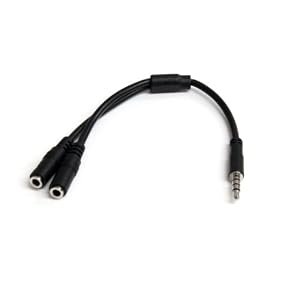
Then if this works you could add the "simple" speakers by using a cable like this

31C2Hr1S6ML._SL500_AA300_.jpg


(unplug the creative and stick them in the 1 hole then plug the "simple" speakers in the other and plug the single jack back into the green) ;)
 

My Computer My Computer

Computer type
PC/Desktop
Computer Manufacturer/Model Number
Self Built
OS
Windows 7 Ultimate 64bit
CPU
AMD Phenom Quad core 9950 black edition
Motherboard
Gigabyte
Memory
16Gb
Graphics Card(s)
2x XFX Radeon 5850
Sound Card
PCI Express X-Fi Titanium / Logitech G35
Monitor(s) Displays
2x HP 2410i
Screen Resolution
1920x1080
Hard Drives
2x 500Gb Seagate
1x 300Gb Seagate
1x 1Tb Seagate
2x 1Tb Hitatchi
PSU
Jean Tech Storm 700W
Case
Cooler Master COSMOS S
Cooling
Akasa Evo Blue Pro
Keyboard
Logitech G15
Mouse
Mad Catz M.M.O. 7
Internet Speed
12mb
you said
"Since then I updated the driver to the latest version and the subwoofer has stopped outputting any bass. I've tinkered with the audio manager for hours and have not figured it out."

simplest solution--roll back the driver to the previous version!
 

My Computer My Computer

Computer Manufacturer/Model Number
SALEON model 2.2b
OS
win7 ultimate 32bit
CPU
core2 Extreme QX6850-OCd to 3.15 GHz
Motherboard
ASUS P5G41-M LE
Memory
4 GB
Graphics Card(s)
NVidia 8600 GT
Monitor(s) Displays
23" acer
Hard Drives
one SATA 250GB partitioned equally in half
one SATA 160GB-internal storage
PSU
500W Thermaltake
Case
mini tower
You have a 7.1 sound card and you are trying to split 2 sets of speakers into 1. You have the 2.1 connected to the sub-woofer port (orange) and the simple speakers into the speaker out (green)
1st disregard your spare set of "simple" speakers and plug the 2.1 creative directly as you would normally (green). Test this setup and configure it accordingly so that the sub and speakers work the way they should.
Then if this works you could add the "simple" speakers by using a cable like this

31C2Hr1S6ML._SL500_AA300_.jpg


(unplug the creative and stick them in the 1 hole then plug the "simple" speakers in the other and plug the single jack back into the green) ;)

I actually had one of these laying around, and I've done what you said. All of the speakers now work, the only issue is that now the subwoofer is CRAZY LOUD, and the "simple" speakers are really quiet. In other words it's really hard to hear words/treble when all you hear is bass. Any way to fix this? Thanks for your help btw! They're also making a very slight..i don't want to say white noise because that's more harsh but this really high pitched ringing sound.
 

My Computer My Computer

Computer Manufacturer/Model Number
Custom
OS
Windows 7 Ultimate x64
CPU
AMD FX 8150 Zambezi 3.6Ghz
Motherboard
MSI 990XA-GD55 AM3+
Memory
G.SKILL Ares Series 16GB (2 x 8GB) 240-Pin DDR3 1866
Graphics Card(s)
NVIDIA Gigabyte Geforce GTX 560 Fermi
Monitor(s) Displays
Samsung SyncMaster 2494HM
Screen Resolution
1920x1080
Hard Drives
500GB WD don't remember the speed.
PSU
500W Cooler Master
Case
Sentey Extreme Division GS-6510 Burton
Cooling
Stock FX8150 cooler. :( 5+ LED fans on the case.
Keyboard
Wireless Microsoft Keyboard
Mouse
Logitech M510 Wireless Mouse
Disreguard my last post. In the room correction tab I signification lowered the decibels of the subwoofer, and my "simple" speakers were ringing because they were turned all the way up in trying to correct the sub being so loud.

Thank you guys ^^
 

My Computer My Computer

Computer Manufacturer/Model Number
Custom
OS
Windows 7 Ultimate x64
CPU
AMD FX 8150 Zambezi 3.6Ghz
Motherboard
MSI 990XA-GD55 AM3+
Memory
G.SKILL Ares Series 16GB (2 x 8GB) 240-Pin DDR3 1866
Graphics Card(s)
NVIDIA Gigabyte Geforce GTX 560 Fermi
Monitor(s) Displays
Samsung SyncMaster 2494HM
Screen Resolution
1920x1080
Hard Drives
500GB WD don't remember the speed.
PSU
500W Cooler Master
Case
Sentey Extreme Division GS-6510 Burton
Cooling
Stock FX8150 cooler. :( 5+ LED fans on the case.
Keyboard
Wireless Microsoft Keyboard
Mouse
Logitech M510 Wireless Mouse
Glad you got it sorted ;)
 

My Computer My Computer

Computer type
PC/Desktop
Computer Manufacturer/Model Number
Self Built
OS
Windows 7 Ultimate 64bit
CPU
AMD Phenom Quad core 9950 black edition
Motherboard
Gigabyte
Memory
16Gb
Graphics Card(s)
2x XFX Radeon 5850
Sound Card
PCI Express X-Fi Titanium / Logitech G35
Monitor(s) Displays
2x HP 2410i
Screen Resolution
1920x1080
Hard Drives
2x 500Gb Seagate
1x 300Gb Seagate
1x 1Tb Seagate
2x 1Tb Hitatchi
PSU
Jean Tech Storm 700W
Case
Cooler Master COSMOS S
Cooling
Akasa Evo Blue Pro
Keyboard
Logitech G15
Mouse
Mad Catz M.M.O. 7
Internet Speed
12mb
Glad you got it sorted ;)

The voices still sound a bit muffled, almost like people are speaking to me through a closet full of coats or something. But it's bearable. I'll tinker around with it a bit more and see if I can better it.
 

My Computer My Computer

Computer Manufacturer/Model Number
Custom
OS
Windows 7 Ultimate x64
CPU
AMD FX 8150 Zambezi 3.6Ghz
Motherboard
MSI 990XA-GD55 AM3+
Memory
G.SKILL Ares Series 16GB (2 x 8GB) 240-Pin DDR3 1866
Graphics Card(s)
NVIDIA Gigabyte Geforce GTX 560 Fermi
Monitor(s) Displays
Samsung SyncMaster 2494HM
Screen Resolution
1920x1080
Hard Drives
500GB WD don't remember the speed.
PSU
500W Cooler Master
Case
Sentey Extreme Division GS-6510 Burton
Cooling
Stock FX8150 cooler. :( 5+ LED fans on the case.
Keyboard
Wireless Microsoft Keyboard
Mouse
Logitech M510 Wireless Mouse
Make sure you turn off any "effects" or "room correction" and maybe play about with your graphic equaliser settings if need be .... let us know how you get on :)
 

My Computer My Computer

Computer type
PC/Desktop
Computer Manufacturer/Model Number
Self Built
OS
Windows 7 Ultimate 64bit
CPU
AMD Phenom Quad core 9950 black edition
Motherboard
Gigabyte
Memory
16Gb
Graphics Card(s)
2x XFX Radeon 5850
Sound Card
PCI Express X-Fi Titanium / Logitech G35
Monitor(s) Displays
2x HP 2410i
Screen Resolution
1920x1080
Hard Drives
2x 500Gb Seagate
1x 300Gb Seagate
1x 1Tb Seagate
2x 1Tb Hitatchi
PSU
Jean Tech Storm 700W
Case
Cooler Master COSMOS S
Cooling
Akasa Evo Blue Pro
Keyboard
Logitech G15
Mouse
Mad Catz M.M.O. 7
Internet Speed
12mb
What I did with the subwwofer being too loud I added a inline bass knob. On my current setup I have a rca bass knob connector it work wonders
 

My Computer My Computer

OS
windows 7
CPU
Intel Atom 1.66GHZ Dual Core
Memory
1g
Graphics Card(s)
INTEL GMA 3150
Monitor(s) Displays
iMo Pivot 7" touch
Hard Drives
SATA 2.5' 250g Samsung Hard Drive
Keyboard
touch screen
Mouse
touch screen
Internet Speed
300 mbps wifi
Back
Top