Solved Getting files from password protected but corrupt XP drive

BrianR1

New member
Local time
4:28 AM
Messages
38
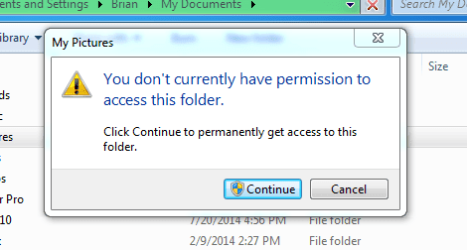
I am using Windows 7 and am trying to get files from and XP drive that won't boot. I can see the folders and files but they are password protected. I keep getting popups that ask me to take control but it doesn't work. This is a home computer and I didn't create a password when I installed Win 7. Any help out there with this?
 

My Computer My Computer

Computer type
PC/Desktop
Computer Manufacturer/Model Number
Custom
OS
Windows 7 64 bit
CPU
Intel G3258
Motherboard
Gigabyte
Memory
8 mb
Hard Drives
Seagate
Antivirus
Avast
Browser
Firefox
I'm not sure why you can't gain permission to those folders if you're using an Admin account. A Win7 Admin account should open another partition's files after applying Admin permission the first time. Are you giving it enough time to process which can take several minutes to release the files by opening the Window?

Otherwise use a boot disk such as the Win7 installation media or System Repair Disk
to Copy & Paste - in Windows Recovery Console which bypasses all permissions since the OS is inert.

Alternatives boot disks are Paragon Rescue Kit Free Edition 11.0 Free or a Linux boot disk like Peppermint3 - Create Live CD DVD USB To Use For Emergency Backup - Windows 7 Forums.

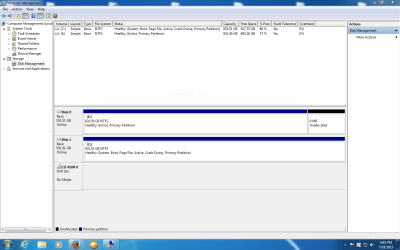
Once you have the files then post back a screenshot of Disk Management - Post a Screen Capture Image so we can help you correctly remove the XP partition which likely holds the System Active flags meaning XP is booting the whole System. Tell us what you'd like to do with the space. If it's on the left then its best to move Win7 there to benefit from slightly faster speeds. We can show you how to easily do this with tools that work perfectly.
 
I'm a little ignorant about what you're telling me to do. I'm booted into Win 7, can see the corrupt drive and view all files and folders. All I'm hoping to do is get the files from drive E which is the corrupt XP drive to my Win 7 D drive.

Are you telling me to try to get into the corrupt XP drive using the Win 7 disc?
 

My Computer My Computer

Computer type
PC/Desktop
Computer Manufacturer/Model Number
Custom
OS
Windows 7 64 bit
CPU
Intel G3258
Motherboard
Gigabyte
Memory
8 mb
Hard Drives
Seagate
Antivirus
Avast
Browser
Firefox
Yes, if you click the blue link it is an illustrated tutorial showing how to do it.

But first I asked if you had tried accessing the XP folders from Win7. When you attempt to open them from Win7 what type of password is blocking them? It couldn't be the XP password because the OS is not functioning. Normally all that is required from Win7 is to open them from an Admin-level account and wait patiently the first time while it applies permissions with a blue progress bar.

If there is some other type of password like 7Zip then it should be applied.

Let us know the exact error you're getting. If possible take a picture and attach it using the paper clip icon in reply box.

If you want to skip to the sure solution, then boot one of the disks suggested and browse to the files, copy them to a flash drive.

Also we need to see your Disk Mgmt. Win7 should not boot to D unless it was incorrectly installed from XP which locked out the letter C. Most users don't want an OS on another letter than C for various reasons, although you can leave it if you don't care.
 
I tried booting from my CD to repair computer in both Windows 7 and the XP drive, both came up with an error that said the OS was not compatible for repair. Why it wouldn't work on Win 7 is beyond me since I just installed it a few days ago.

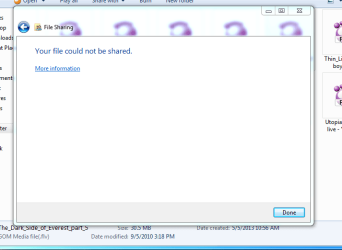
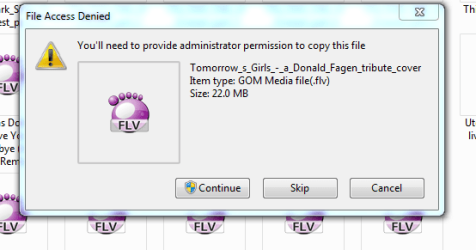
As far as trying to use permissions and sharing folders that doesn't work either. I've tried sharing with myself as administrator and moving files and folders to my boot drive and just get this.

Capture2.PNG

Capture3.PNG

Capture4.PNG
 

My Computer My Computer

Computer type
PC/Desktop
Computer Manufacturer/Model Number
Custom
OS
Windows 7 64 bit
CPU
Intel G3258
Motherboard
Gigabyte
Memory
8 mb
Hard Drives
Seagate
Antivirus
Avast
Browser
Firefox
Where is the disk management screenshot I have now requested three times?

You should be able to access the system recovery options In either the installation DVD or repair disk. If not use the other alternatives which I also listed.
 
Sorry, here you go
 

Attachments

  • Capture.PNG
    Capture.PNG
    45.1 KB · Views: 1

My Computer My Computer

Computer type
PC/Desktop
Computer Manufacturer/Model Number
Custom
OS
Windows 7 64 bit
CPU
Intel G3258
Motherboard
Gigabyte
Memory
8 mb
Hard Drives
Seagate
Antivirus
Avast
Browser
Firefox
And when I booted from the Win 7 disc it said the system was incompatible with both the XP drive and the Win 7 drive
 

My Computer My Computer

Computer type
PC/Desktop
Computer Manufacturer/Model Number
Custom
OS
Windows 7 64 bit
CPU
Intel G3258
Motherboard
Gigabyte
Memory
8 mb
Hard Drives
Seagate
Antivirus
Avast
Browser
Firefox
Follow http://www.sevenforums.com/tutorials/1911-take-ownership-shortcut.html to add context menu entry.

Select the xp partition in Windows Explorer and right click, Take ownership.

If that doesn't work right click partition again - properties - security -add - write your account name - ok/enter, and click under allow "full control" for your account. Ok out. May take a while to change permissions. Then try again.
 

My Computer My Computer

Computer type
PC/Desktop
Computer Manufacturer/Model Number
Custom Build
OS
Windows 7 Ultimate x64 SP1
CPU
AMD Phenom 2 1090T
Motherboard
Gigabyte GA-890FXA-UD5
Memory
2x8GB Kingston HyperX Fury Black 1600Mhz Unganged
Graphics Card(s)
MSI GTX 970 Gaming 4G
Sound Card
Realtek On-Board HD 7.1 Audio / Logitech G35
Monitor(s) Displays
3xAcer GD245HQ
Screen Resolution
1920x1080
Hard Drives
Samsung 850 Pro 512GB SSD - OS /
WD Caviar Black SATA 3 - 1 TBx2 - Dynamic RAID 0 /
WD Caviar Green SATA 2 - 640GBx2 - Dynamic RAID 0 /
WD Caviar Green SATA 2 - 640GB - Internal Backup /
Seagate Barracude SATA 3 - 3TB - External Backup/ Sync
PSU
HighPower 1000W
Case
Cooler Master HAF 932
Cooling
Noctua NH-D14
Keyboard
Logitech G19
Mouse
Logitech G500
Internet Speed
100/4 Mbit Cable (100GB quota)
Antivirus
ZoneAlarm Extreme Security / MBAM Pro / MBAE Free / SAS Free
Browser
IE 11 - Firefox - Chrome
Other Info
Logitech F710/ G27/ G940/ Z5500 // TrackIR 5 // Nvidia 3D Surround Vision
When I right click I don't have the take ownership tab. But, I have permission to do anything with these files on the corrupt drive but it still won't let me move them from that disc to my Win 7 disc. I still get the access denied. I am going to try and make a boot disc and see if that lets me repair the drive.
 

My Computer My Computer

Computer type
PC/Desktop
Computer Manufacturer/Model Number
Custom
OS
Windows 7 64 bit
CPU
Intel G3258
Motherboard
Gigabyte
Memory
8 mb
Hard Drives
Seagate
Antivirus
Avast
Browser
Firefox
You need to follow the tutorial in my post to get the right click menu item, then take ownership. It is not there by default.
 

My Computer My Computer

Computer type
PC/Desktop
Computer Manufacturer/Model Number
Custom Build
OS
Windows 7 Ultimate x64 SP1
CPU
AMD Phenom 2 1090T
Motherboard
Gigabyte GA-890FXA-UD5
Memory
2x8GB Kingston HyperX Fury Black 1600Mhz Unganged
Graphics Card(s)
MSI GTX 970 Gaming 4G
Sound Card
Realtek On-Board HD 7.1 Audio / Logitech G35
Monitor(s) Displays
3xAcer GD245HQ
Screen Resolution
1920x1080
Hard Drives
Samsung 850 Pro 512GB SSD - OS /
WD Caviar Black SATA 3 - 1 TBx2 - Dynamic RAID 0 /
WD Caviar Green SATA 2 - 640GBx2 - Dynamic RAID 0 /
WD Caviar Green SATA 2 - 640GB - Internal Backup /
Seagate Barracude SATA 3 - 3TB - External Backup/ Sync
PSU
HighPower 1000W
Case
Cooler Master HAF 932
Cooling
Noctua NH-D14
Keyboard
Logitech G19
Mouse
Logitech G500
Internet Speed
100/4 Mbit Cable (100GB quota)
Antivirus
ZoneAlarm Extreme Security / MBAM Pro / MBAE Free / SAS Free
Browser
IE 11 - Firefox - Chrome
Other Info
Logitech F710/ G27/ G940/ Z5500 // TrackIR 5 // Nvidia 3D Surround Vision
Thanks, I missed the part where I had to download the registry value. It seems to be working. That was too easy. All I wanted was to get the files from that drive to my c drive and then format the other disc for use as a backup. Your help is much appreciated.
 

My Computer My Computer

Computer type
PC/Desktop
Computer Manufacturer/Model Number
Custom
OS
Windows 7 64 bit
CPU
Intel G3258
Motherboard
Gigabyte
Memory
8 mb
Hard Drives
Seagate
Antivirus
Avast
Browser
Firefox
It is alright :) happens to all of us. So did taking ownership work and you have access to the files now?
 
Last edited:

My Computer My Computer

Computer type
PC/Desktop
Computer Manufacturer/Model Number
Custom Build
OS
Windows 7 Ultimate x64 SP1
CPU
AMD Phenom 2 1090T
Motherboard
Gigabyte GA-890FXA-UD5
Memory
2x8GB Kingston HyperX Fury Black 1600Mhz Unganged
Graphics Card(s)
MSI GTX 970 Gaming 4G
Sound Card
Realtek On-Board HD 7.1 Audio / Logitech G35
Monitor(s) Displays
3xAcer GD245HQ
Screen Resolution
1920x1080
Hard Drives
Samsung 850 Pro 512GB SSD - OS /
WD Caviar Black SATA 3 - 1 TBx2 - Dynamic RAID 0 /
WD Caviar Green SATA 2 - 640GBx2 - Dynamic RAID 0 /
WD Caviar Green SATA 2 - 640GB - Internal Backup /
Seagate Barracude SATA 3 - 3TB - External Backup/ Sync
PSU
HighPower 1000W
Case
Cooler Master HAF 932
Cooling
Noctua NH-D14
Keyboard
Logitech G19
Mouse
Logitech G500
Internet Speed
100/4 Mbit Cable (100GB quota)
Antivirus
ZoneAlarm Extreme Security / MBAM Pro / MBAE Free / SAS Free
Browser
IE 11 - Firefox - Chrome
Other Info
Logitech F710/ G27/ G940/ Z5500 // TrackIR 5 // Nvidia 3D Surround Vision
Yes am able to take ownership and transfer everything so far. I had done a recent backup of some files right before the crash but for some reason hadn't backed up all my pictures of kids and stuff for almost a year. Those were what I wanted most, the rest of what I'm getting is bonus. Again, thanks for the help. In reality that was a very simple method.
 

My Computer My Computer

Computer type
PC/Desktop
Computer Manufacturer/Model Number
Custom
OS
Windows 7 64 bit
CPU
Intel G3258
Motherboard
Gigabyte
Memory
8 mb
Hard Drives
Seagate
Antivirus
Avast
Browser
Firefox
Alright, great :)
 

My Computer My Computer

Computer type
PC/Desktop
Computer Manufacturer/Model Number
Custom Build
OS
Windows 7 Ultimate x64 SP1
CPU
AMD Phenom 2 1090T
Motherboard
Gigabyte GA-890FXA-UD5
Memory
2x8GB Kingston HyperX Fury Black 1600Mhz Unganged
Graphics Card(s)
MSI GTX 970 Gaming 4G
Sound Card
Realtek On-Board HD 7.1 Audio / Logitech G35
Monitor(s) Displays
3xAcer GD245HQ
Screen Resolution
1920x1080
Hard Drives
Samsung 850 Pro 512GB SSD - OS /
WD Caviar Black SATA 3 - 1 TBx2 - Dynamic RAID 0 /
WD Caviar Green SATA 2 - 640GBx2 - Dynamic RAID 0 /
WD Caviar Green SATA 2 - 640GB - Internal Backup /
Seagate Barracude SATA 3 - 3TB - External Backup/ Sync
PSU
HighPower 1000W
Case
Cooler Master HAF 932
Cooling
Noctua NH-D14
Keyboard
Logitech G19
Mouse
Logitech G500
Internet Speed
100/4 Mbit Cable (100GB quota)
Antivirus
ZoneAlarm Extreme Security / MBAM Pro / MBAE Free / SAS Free
Browser
IE 11 - Firefox - Chrome
Other Info
Logitech F710/ G27/ G940/ Z5500 // TrackIR 5 // Nvidia 3D Surround Vision
Back
Top