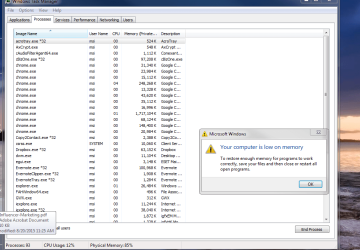
Getting low memory alerts on a new computer with 6GBs of RAM?

kwitel

New member
Member
VIP
Local time
1:18 PM
Messages
104
...while doing virtually nothing.
Specifically I am listening to music on Itunes and have a couple of tabs open in Chrome.

I think there is something wrong here as my old computer had only 4GBs of RAM and I never got low memory warnings.

When I go into my Task Manager Chrome appears to be using about 70% of my memory with only 4 tabs open!

I dont see how this is possible...and am guessing this is an OS issue?

Any help/tips here is greatly appreciated.
 

My Computer My Computer

At a glance

7/64 bitIntel Core i-5-34704gbIntel HD Graphics-1920x1080
Computer type
Laptop
Computer Manufacturer/Model Number
Dell E6400
OS
7/64 bit
CPU
Intel Core i-5-3470
Motherboard
Dell-042P49
Memory
4gb
Graphics Card(s)
Intel HD Graphics-1920x1080
Sound Card
Intel Display Audio
Monitor(s) Displays
Dell P2211H
Screen Resolution
19620*1080
Hard Drives
Samsung SSD
WDC 1TB
Browser
Chrome
Restart the PC, give it a minute to settle out and load everything, open Task Manager again, post your results.

Open the memory tab on Resource Monitor and post a complete snip.

Task Manager/Performance/Resource Monitor/Memory Tab.......Snip away.

No way should anything be using 70%

6 GB is not much nowadays, but still....
 

My Computer My Computer

At a glance

Windows 10 Pro x64Intel Core i7 6700KGSkill TridentZ RGB 16GB 3600 16-16-16-36EVGA GTX 980 Ti SC x2
Computer type
PC/Desktop
Computer Manufacturer/Model Number
Skylake Special #666
OS
Windows 10 Pro x64
CPU
Intel Core i7 6700K
Motherboard
Asus Sabertooth Z170 Mark 1
Memory
GSkill TridentZ RGB 16GB 3600 16-16-16-36
Graphics Card(s)
EVGA GTX 980 Ti SC x2
Sound Card
Realtek High Definition
Monitor(s) Displays
AOC G2460PG
Screen Resolution
1920 x 1080 144Hz
Hard Drives
Samsung 860 Pro 256GB, Seagate Barracuda 4TB x2
PSU
EVGA 1000 P2, EVGA White Custom Braided Cables
Case
Corsair Vengeance C70 Gunmetal Black
Cooling
Corsair H100i v2, Corsair ML120 x2, Thermal Grizzly Kryonaut
Keyboard
Logitech G910 Orion Spectrum
Mouse
Logitech G700s
Internet Speed
Verizon Fios Quantum Gateway 75/75
Antivirus
Windows Defender, Malwarebytes Free 3.8.3
Browser
Chrome
Other Info
Corsair SP120 x4, LG Blu-ray Drive, Durabrand HT-395 100 Watt Dolby Digital Amp, Corsair H2100 Wireless 7.1 Headset
Restart the PC, give it a minute to settle out and load everything, open Task Manager again, post your results.

Open the memory tab on Resource Monitor and post a complete snip.

Task Manager/Performance/Resource Monitor/Memory Tab.......Snip away.

No way should anything be using 70%

6 GB is not much nowadays, but still....

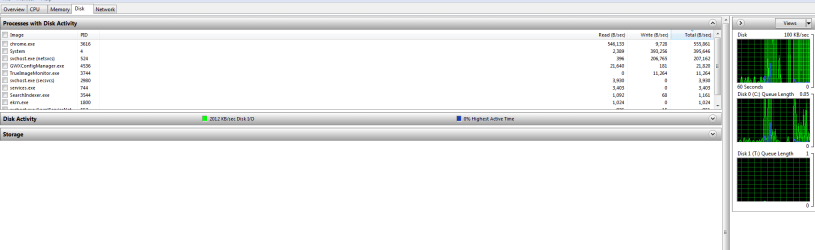
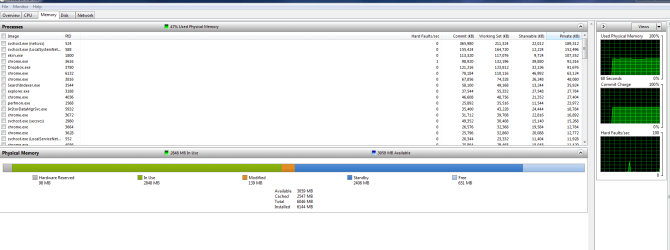
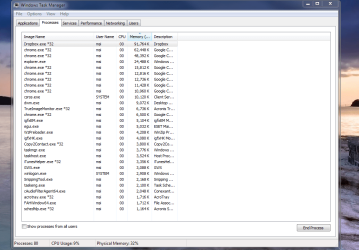
Here you go:
 

Attachments

  • Disk.PNG
    Disk.PNG
    20 KB · Views: 4
  • memory.PNG
    memory.PNG
    35 KB · Views: 6
  • Network.PNG
    Network.PNG
    18.8 KB · Views: 2
  • Processes.PNG
    Processes.PNG
    61 KB · Views: 2
  • Resource Monitor.PNG
    Resource Monitor.PNG
    22.6 KB · Views: 7

My Computer My Computer

At a glance

7/64 bitIntel Core i-5-34704gbIntel HD Graphics-1920x1080
Computer type
Laptop
Computer Manufacturer/Model Number
Dell E6400
OS
7/64 bit
CPU
Intel Core i-5-3470
Motherboard
Dell-042P49
Memory
4gb
Graphics Card(s)
Intel HD Graphics-1920x1080
Sound Card
Intel Display Audio
Monitor(s) Displays
Dell P2211H
Screen Resolution
19620*1080
Hard Drives
Samsung SSD
WDC 1TB
Browser
Chrome
Anyone else have any thoughts here?

Ive never had memory issue before on any previous computer and ive always had 4gbs or less...
 

My Computer My Computer

At a glance

7/64 bitIntel Core i-5-34704gbIntel HD Graphics-1920x1080
Computer type
Laptop
Computer Manufacturer/Model Number
Dell E6400
OS
7/64 bit
CPU
Intel Core i-5-3470
Motherboard
Dell-042P49
Memory
4gb
Graphics Card(s)
Intel HD Graphics-1920x1080
Sound Card
Intel Display Audio
Monitor(s) Displays
Dell P2211H
Screen Resolution
19620*1080
Hard Drives
Samsung SSD
WDC 1TB
Browser
Chrome
Nothing out of ordinary in your screenshots. Re-screenshot Memory of Resource Monitor if this happens again.

Also check the amount of Paging File (Computer - Properties - Advanced System Settings - Performance Settings - Advanced - Change).
 

My Computer My Computer

At a glance

Windows 7 Ultimate x64 SP1AMD Phenom 2 1090T2x8GB Kingston HyperX Fury Black 1600Mhz Unga...MSI GTX 970 Gaming 4G
Computer type
PC/Desktop
Computer Manufacturer/Model Number
Custom Build
OS
Windows 7 Ultimate x64 SP1
CPU
AMD Phenom 2 1090T
Motherboard
Gigabyte GA-890FXA-UD5
Memory
2x8GB Kingston HyperX Fury Black 1600Mhz Unganged
Graphics Card(s)
MSI GTX 970 Gaming 4G
Sound Card
Realtek On-Board HD 7.1 Audio / Logitech G35
Monitor(s) Displays
3xAcer GD245HQ
Screen Resolution
1920x1080
Hard Drives
Samsung 850 Pro 512GB SSD - OS /
WD Caviar Black SATA 3 - 1 TBx2 - Dynamic RAID 0 /
WD Caviar Green SATA 2 - 640GBx2 - Dynamic RAID 0 /
WD Caviar Green SATA 2 - 640GB - Internal Backup /
Seagate Barracude SATA 3 - 3TB - External Backup/ Sync
PSU
HighPower 1000W
Case
Cooler Master HAF 932
Cooling
Noctua NH-D14
Keyboard
Logitech G19
Mouse
Logitech G500
Internet Speed
100/4 Mbit Cable (100GB quota)
Antivirus
ZoneAlarm Extreme Security / MBAM Pro / MBAE Free / SAS Free
Browser
IE 11 - Firefox - Chrome
Other Info
Logitech F710/ G27/ G940/ Z5500 // TrackIR 5 // Nvidia 3D Surround Vision
Nothing out of ordinary in your screenshots. Re-screenshot Memory of Resource Monitor if this happens again.

Also check the amount of Paging File (Computer - Properties - Advanced System Settings - Performance Settings - Advanced - Change).

So its continuing to happen and I think I found out what it is. Its Shockwave.
I will get the low memory alert and then, my Chrome tabs will crash telling me its shockwave.

I tried to get a screen shot of my memory but once Chrome crashed, my memory dropped immediately to 50%.

I used to be able to choose between two types of Adobe Flash products (and would shut one off), in the Plugins section of Chrome.
I seem to not be able to do that anymore as there is now one embedded into Chrome?

Could this be the source of my problem and if so, how to remedy it?

Can be a coincidence that Shockwave crashes right after I get that memory alert, no?
 

My Computer My Computer

At a glance

7/64 bitIntel Core i-5-34704gbIntel HD Graphics-1920x1080
Computer type
Laptop
Computer Manufacturer/Model Number
Dell E6400
OS
7/64 bit
CPU
Intel Core i-5-3470
Motherboard
Dell-042P49
Memory
4gb
Graphics Card(s)
Intel HD Graphics-1920x1080
Sound Card
Intel Display Audio
Monitor(s) Displays
Dell P2211H
Screen Resolution
19620*1080
Hard Drives
Samsung SSD
WDC 1TB
Browser
Chrome
Any problems with IE or Firefox?
 

My Computer My Computer

At a glance

Windows 10 Pro X64Intel Quad Core i7-4770 @ 3.4Ghz16.0GB PC3-12800 DDR3 SDRAM 1600 MHzIntel Integrated HD Graphics
Computer type
PC/Desktop
Computer Manufacturer/Model Number
Lenovo IdeaCenter 450
OS
Windows 10 Pro X64
CPU
Intel Quad Core i7-4770 @ 3.4Ghz
Memory
16.0GB PC3-12800 DDR3 SDRAM 1600 MHz
Graphics Card(s)
Intel Integrated HD Graphics
Sound Card
Realtek HD Audio
Monitor(s) Displays
HP 22" LCD
Screen Resolution
1680 x 1050
Hard Drives
250GB Samsung EVO SATA-3 SSD
2TB Seagate ST2000DM001 SATA-2
1.5TB Seagate ST3150041AS SATA
Keyboard
Dell USB
Mouse
Lenovo USB
Internet Speed
Cable via Road Runner 3MB Upload, 30MB Download
Antivirus
Windows Defender, MBAM Pro, MBAE
Browser
Seamonkey
Other Info
UEFI/GPT
PLDS DVD-RW DH16AERSH
Any problems with IE or Firefox?

Actually have been testing Firefox all day today. Seems ok thus far.

That said, before I closed Chrome I checked my CPU usage and "NACL64.exe" was using 30% of my cpu.
Also, after I close down Chrome, its still running and utilizing memory in the background. Why is that?

Will all of that, there is still something very wrong with my computer.
I shoudl not be suing 82% of my memory by having three Chrome tabs open, along with Outlook and iTunes.
Not with 6GBs of RAM.
 

My Computer My Computer

At a glance

7/64 bitIntel Core i-5-34704gbIntel HD Graphics-1920x1080
Computer type
Laptop
Computer Manufacturer/Model Number
Dell E6400
OS
7/64 bit
CPU
Intel Core i-5-3470
Motherboard
Dell-042P49
Memory
4gb
Graphics Card(s)
Intel HD Graphics-1920x1080
Sound Card
Intel Display Audio
Monitor(s) Displays
Dell P2211H
Screen Resolution
19620*1080
Hard Drives
Samsung SSD
WDC 1TB
Browser
Chrome

My Computer My Computer

At a glance

W7 Pro SP1 64biti78GBIntel HD Graphics
Computer type
Laptop
Computer Manufacturer/Model Number
Employer provided Dell Latitude
OS
W7 Pro SP1 64bit
CPU
i7
Memory
8GB
Graphics Card(s)
Intel HD Graphics
Hard Drives
crappy SSD
Antivirus
Employer mandated Symantec Endpoint Protection
Browser
Pale Moon 64bit, IE11 64bit & Chrome 64bit
If you wish, you can install Process Explorer and configure it to check running files with VirusTotal:
http://www.sevenforums.com/tutorial...er-virustotal-check-all-processes-50-avs.html

If you want to get rid of "NACL64.exe" all together, then uninstall the 32 bit Chrome that you have and install the 64 bit version via one of the links in my thread: http://www.sevenforums.com/browsers...-offline-google-chrome-installer-windows.html

I never even thought about 64 bit...
Is there any downside to running the 64 bit version?
I looked at your link; is there any reason I cant just download the 64 bit version from Google? Your post seems a bit confusing to me being that I am not that tech savvy.
 

My Computer My Computer

At a glance

7/64 bitIntel Core i-5-34704gbIntel HD Graphics-1920x1080
Computer type
Laptop
Computer Manufacturer/Model Number
Dell E6400
OS
7/64 bit
CPU
Intel Core i-5-3470
Motherboard
Dell-042P49
Memory
4gb
Graphics Card(s)
Intel HD Graphics-1920x1080
Sound Card
Intel Display Audio
Monitor(s) Displays
Dell P2211H
Screen Resolution
19620*1080
Hard Drives
Samsung SSD
WDC 1TB
Browser
Chrome

My Computer My Computer

At a glance

W7 Pro SP1 64biti78GBIntel HD Graphics
Computer type
Laptop
Computer Manufacturer/Model Number
Employer provided Dell Latitude
OS
W7 Pro SP1 64bit
CPU
i7
Memory
8GB
Graphics Card(s)
Intel HD Graphics
Hard Drives
crappy SSD
Antivirus
Employer mandated Symantec Endpoint Protection
Browser
Pale Moon 64bit, IE11 64bit & Chrome 64bit
UNI: Click on "Download Chrome for another platform" :p
 

My Computer My Computer

At a glance

Windows 7 Ultimate x64 SP1AMD Phenom 2 1090T2x8GB Kingston HyperX Fury Black 1600Mhz Unga...MSI GTX 970 Gaming 4G
Computer type
PC/Desktop
Computer Manufacturer/Model Number
Custom Build
OS
Windows 7 Ultimate x64 SP1
CPU
AMD Phenom 2 1090T
Motherboard
Gigabyte GA-890FXA-UD5
Memory
2x8GB Kingston HyperX Fury Black 1600Mhz Unganged
Graphics Card(s)
MSI GTX 970 Gaming 4G
Sound Card
Realtek On-Board HD 7.1 Audio / Logitech G35
Monitor(s) Displays
3xAcer GD245HQ
Screen Resolution
1920x1080
Hard Drives
Samsung 850 Pro 512GB SSD - OS /
WD Caviar Black SATA 3 - 1 TBx2 - Dynamic RAID 0 /
WD Caviar Green SATA 2 - 640GBx2 - Dynamic RAID 0 /
WD Caviar Green SATA 2 - 640GB - Internal Backup /
Seagate Barracude SATA 3 - 3TB - External Backup/ Sync
PSU
HighPower 1000W
Case
Cooler Master HAF 932
Cooling
Noctua NH-D14
Keyboard
Logitech G19
Mouse
Logitech G500
Internet Speed
100/4 Mbit Cable (100GB quota)
Antivirus
ZoneAlarm Extreme Security / MBAM Pro / MBAE Free / SAS Free
Browser
IE 11 - Firefox - Chrome
Other Info
Logitech F710/ G27/ G940/ Z5500 // TrackIR 5 // Nvidia 3D Surround Vision
UNI: Click on "Download Chrome for another platform" :p
Thanks. I do require being spoon fed at times :-)

Multiple posts just said, "select 64bit". Perhaps at one time, the link actually said that. I must not consider a different bit level a different platform. But of course - it is. I never really gave the term much thought.

I also try to avoid the web install process.

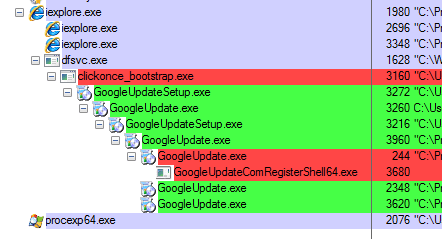
Too much extra stuff happens:

chrome-web.PNG

That screenshot does not show all of the extra processes. I just could not get them into one shot. There are about 5 or 6 more processes via web install vs. standalone install.
 

My Computer My Computer

At a glance

W7 Pro SP1 64biti78GBIntel HD Graphics
Computer type
Laptop
Computer Manufacturer/Model Number
Employer provided Dell Latitude
OS
W7 Pro SP1 64bit
CPU
i7
Memory
8GB
Graphics Card(s)
Intel HD Graphics
Hard Drives
crappy SSD
Antivirus
Employer mandated Symantec Endpoint Protection
Browser
Pale Moon 64bit, IE11 64bit & Chrome 64bit
Those files are from Google :-)

I'll pick a link for you:
https://www.google.com/chrome/browser/desktop/index.html?system=true&standalone=1&platform=win64


I did not have any luck finding a better way to select 64bit installer.

Several places said to go here...
https://www.google.com/chrome/browser/desktop/index.html
...and select 64 bits. I might be blind - but I don't see a place to select 64 bits on that website. Your mileage (and eyesight) may vary :-)

UNI: Click on "Download Chrome for another platform" :p

Finally caught a baffling low memory scenario.
Check out how much memory Chrome is using. I have only one tab open! (and I did dload the 64 bit version).

Once I close all the tabs and restart Chrome, although I no longer have the NACL64.EXE running anymore, I now have another chrome process once again using 25-30% of my CPU (and while this process is running, my computers CPU is working and buzzing away).
I have to repeatedly close this instance, just like I did with the NACL64.

Is this memory usage and constant CPU hogging normal?

Ran all sorts of Virus and Malware scans...never had these issues with my past computer which had less memory but ran the exact same setup.
 

Attachments

  • Memory.PNG
    Memory.PNG
    53.5 KB · Views: 3
Last edited:

My Computer My Computer

At a glance

7/64 bitIntel Core i-5-34704gbIntel HD Graphics-1920x1080
Computer type
Laptop
Computer Manufacturer/Model Number
Dell E6400
OS
7/64 bit
CPU
Intel Core i-5-3470
Motherboard
Dell-042P49
Memory
4gb
Graphics Card(s)
Intel HD Graphics-1920x1080
Sound Card
Intel Display Audio
Monitor(s) Displays
Dell P2211H
Screen Resolution
19620*1080
Hard Drives
Samsung SSD
WDC 1TB
Browser
Chrome
There is 1 chrome.exe process with 1.717MB memory usage that is catching attention. Perhaps an add-on/extension (I am not versed in Chrome) causing this?

This was for another Chrome thread, see if it helps you:
Hmm, try:
- a clean startup - Troubleshoot Application Conflicts by Performing a Clean Startup
- another user account - User Account - Create
- start Chrome in Safe Mode (start with command line switch "--safe-plugins" and also in incognito mode How to run Google Chrome in “Safe Mode” or "Incognito Mode"? - Tech Help Buzz)

It will help if you sort by memory before taking a screenshot (also make sure show processes from all users are checked).
 

My Computer My Computer

At a glance

Windows 7 Ultimate x64 SP1AMD Phenom 2 1090T2x8GB Kingston HyperX Fury Black 1600Mhz Unga...MSI GTX 970 Gaming 4G
Computer type
PC/Desktop
Computer Manufacturer/Model Number
Custom Build
OS
Windows 7 Ultimate x64 SP1
CPU
AMD Phenom 2 1090T
Motherboard
Gigabyte GA-890FXA-UD5
Memory
2x8GB Kingston HyperX Fury Black 1600Mhz Unganged
Graphics Card(s)
MSI GTX 970 Gaming 4G
Sound Card
Realtek On-Board HD 7.1 Audio / Logitech G35
Monitor(s) Displays
3xAcer GD245HQ
Screen Resolution
1920x1080
Hard Drives
Samsung 850 Pro 512GB SSD - OS /
WD Caviar Black SATA 3 - 1 TBx2 - Dynamic RAID 0 /
WD Caviar Green SATA 2 - 640GBx2 - Dynamic RAID 0 /
WD Caviar Green SATA 2 - 640GB - Internal Backup /
Seagate Barracude SATA 3 - 3TB - External Backup/ Sync
PSU
HighPower 1000W
Case
Cooler Master HAF 932
Cooling
Noctua NH-D14
Keyboard
Logitech G19
Mouse
Logitech G500
Internet Speed
100/4 Mbit Cable (100GB quota)
Antivirus
ZoneAlarm Extreme Security / MBAM Pro / MBAE Free / SAS Free
Browser
IE 11 - Firefox - Chrome
Other Info
Logitech F710/ G27/ G940/ Z5500 // TrackIR 5 // Nvidia 3D Surround Vision
~~~
Is there any downside to running the 64 bit version?
~~~
It used to be slower in some benchmark tests. I've not seen recent testing.

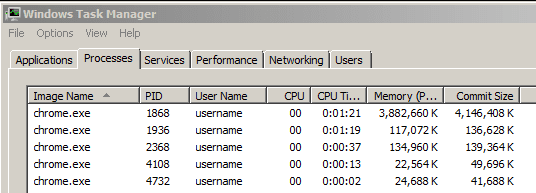
Here is a single tab while visiting this website: A continuous stream of stellar images made by the community

3.9GB-chrome64.PNG

I just kept pressing the END key on the keyboard to load more images.

In my testing, a Chrome 64bit process tends to crash around 4GB. I never got the out of memory warning from the OS. I have 8GB of RAM on this laptop. Windows is set to manage the swap file. The swap file is at 1GB. No apps are writing to that swap file (per Process Monitor). I'm not sure what causes the error that you see.
 
Last edited:

My Computer My Computer

At a glance

W7 Pro SP1 64biti78GBIntel HD Graphics
Computer type
Laptop
Computer Manufacturer/Model Number
Employer provided Dell Latitude
OS
W7 Pro SP1 64bit
CPU
i7
Memory
8GB
Graphics Card(s)
Intel HD Graphics
Hard Drives
crappy SSD
Antivirus
Employer mandated Symantec Endpoint Protection
Browser
Pale Moon 64bit, IE11 64bit & Chrome 64bit
Back
Top