Solved Getting "Preparing Security Options"

LevelBest

New member
Member
VIP
Local time
10:53 PM
Messages
268
I have been trying to solve a problem for the last four weeks and am out of ideas. Having got a virus, I decided to run a system image I created a week after I got my Samsung S3511 Laptop in 2011. I’m running Windows 7 Home Premium 64 bit, Service Pack 1, with Microsoft Office 2007 and McAfee Total Protection for anti-virus. I have successfully used this system image before so I knew it would work.

After gradually re-building the computer which included an overnight of Windows updates, installing IE11, Chrome and Windows Livemail, I began to experience a problem whereby the computer would slow to the extent of being unusable and the mouse would freeze. Hitting Alt, Ctrl Delete would, when the computer bounced back into life, show “preparing security options” on the blue Microsoft welcome/logging off screen.

I’ve read practically every post on the net about this and the problem is that there is no clear view on what is causing this; some posters think it’s a virus, others think it relates to a possible hardware problem, a conflict with Malwarebytes or a virus of explorer.exe.

What I’ve tried so far:

Microsoft’s advice on this is to run scannow which I’ve done– no issues. MS also suggest running checkdisk, I’ve done this three times now.The first time it stated problems with “Unable to locate the file name attribute of index entry” however, it fixed those.It also corrected errors in the Volume Bitmap.I ran checkdisk another two times and both times is said there were no problems.I also performed a disc clean up.

I had downloaded Malwarebytes at the beginning of there-build and scanned half a dozen times – no issues. I’ve also run McAfee half a dozen times – no issues.I’ve let McAfee scan my windows files on the C drive – no issues.

I uninstalled Malwarebytes as I thought there may be a security conflict but it has not resolved the problem.

I’ve looked at logs in the event viewer to try and track down anything suspicious but can’t find anything obvious.

A tech person I spoke to suggested I ensure that windows is activated/ authenticated as sometimes it needs to be re-activated after running a system image. However, it is authenticated so this is not an issue.

When the problem of “preparing security options” does not occur, my computer is quick and responsive, moving effortlessly between applications so my feeling is that this isn’t a hardware problem. For instance, last Sunday, I spent about six hours on the computer and during all this time, it behaved perfectly!But logged on the following day and“preparing security options” occurred twice.After it had cleared, the computer behaved well.

For added info, I did not install Windows telemetry updates or any updates for upgrading to Windows 10. I don’t believe “preparing security options”relates only to Windows 7 as I’ve seen posts saying this is happening with versions 8 and 10.

Having been trying to solve this for the last four weeks,including a couple of times where I’d taken two steps backwards but managed to save the situation with restore points (including in safemode) I’m reluctant to mess around with the computer too much now as when the problem doesn’t occur it functions well. However, it is still frustrating and I’d like to get it sorted.

Do any forum users have any further suggestions as to what I can try next or any clear consensus as to what is the cause?
 
Last edited:

My Computer

Computer type
Laptop
Computer Manufacturer/Model Number
Samsung S3511
OS
Windows 7 Home Premium 64 Bit (Service Pack 1)
CPU
Premium Dual Core P6200
Motherboard
Samsung S3511
Memory
4 GB
Graphics Card(s)
Intel (R) HD Graphic
Sound Card
Realtek High Definition Audio
Screen Resolution
1366 x 768
Hard Drives
C: D: E: (NTFS)
Cooling
Drive temperature: 38 / 100
Mouse
Wired Logitech B100
Antivirus
McAfee Total Protection
Browser
Supermium Portable and r3dfox
I have been monitoring my computer over the last several days and the problem of 'preparing security options' seems to occur within the first 10 minutes or so of starting up the computer.

Does anyone have anything suggestions as to what I can do to try and resolve this, or is everyone in the dark as much as I am?
 

My Computer

Computer type
Laptop
Computer Manufacturer/Model Number
Samsung S3511
OS
Windows 7 Home Premium 64 Bit (Service Pack 1)
CPU
Premium Dual Core P6200
Motherboard
Samsung S3511
Memory
4 GB
Graphics Card(s)
Intel (R) HD Graphic
Sound Card
Realtek High Definition Audio
Screen Resolution
1366 x 768
Hard Drives
C: D: E: (NTFS)
Cooling
Drive temperature: 38 / 100
Mouse
Wired Logitech B100
Antivirus
McAfee Total Protection
Browser
Supermium Portable and r3dfox
Hi LevelBest,
How many user profiles do you have.

Roy
 

My Computer

Computer type
PC/Desktop
Computer Manufacturer/Model Number
medionl/Aspire 6930G/acer x55a
OS
W7 home premium 32bit/W7HP 64bit/w10 tp insider ring
CPU
E5300 dual core
Motherboard
medion MS7366
Memory
3gb
Graphics Card(s)
Nvidia Geforce 7100 Nforce 630i
Monitor(s) Displays
avixc
Internet Speed
n (isp resticted to 72)
Antivirus
mse/pands
Browser
palemoon
Other Info
Belkin Fd7050 n USB using Railink RT2870 drivers, more upto date
Hi Roy

Thank you so much for responding.

I've not come across the term user profile, but I'm wondering if it is similar to a user account? In either case, no one but myself has access to the computer?

I've been on the computer for the morning but will log off now and re-check tomorrow for any advice.

Thanks.
 

My Computer

Computer type
Laptop
Computer Manufacturer/Model Number
Samsung S3511
OS
Windows 7 Home Premium 64 Bit (Service Pack 1)
CPU
Premium Dual Core P6200
Motherboard
Samsung S3511
Memory
4 GB
Graphics Card(s)
Intel (R) HD Graphic
Sound Card
Realtek High Definition Audio
Screen Resolution
1366 x 768
Hard Drives
C: D: E: (NTFS)
Cooling
Drive temperature: 38 / 100
Mouse
Wired Logitech B100
Antivirus
McAfee Total Protection
Browser
Supermium Portable and r3dfox
Hi levelbest,
follow the instructions below, then can you copy/paste yours


  1. type >> regedit << in the Search box, and then press ENTER.
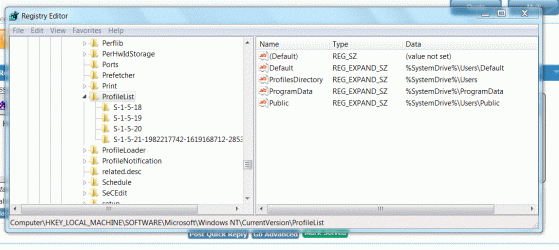
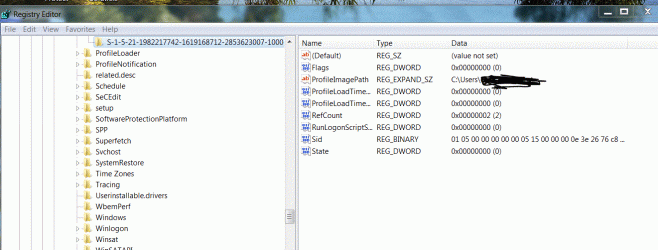
  2. In Registry Editor, navigate to HKEY_LOCAL_MACHINE\SOFTWARE\Microsoft\Windows NT\CurrentVersion\ProfileList\(expand it)
yours should be like mine.

Roy
 

Attachments

  • regpro.PNG
    regpro.PNG
    22.1 KB · Views: 0

My Computer

Computer type
PC/Desktop
Computer Manufacturer/Model Number
medionl/Aspire 6930G/acer x55a
OS
W7 home premium 32bit/W7HP 64bit/w10 tp insider ring
CPU
E5300 dual core
Motherboard
medion MS7366
Memory
3gb
Graphics Card(s)
Nvidia Geforce 7100 Nforce 630i
Monitor(s) Displays
avixc
Internet Speed
n (isp resticted to 72)
Antivirus
mse/pands
Browser
palemoon
Other Info
Belkin Fd7050 n USB using Railink RT2870 drivers, more upto date
Hello Roy

I've put the registry screenshot below. It seems look like yours.
 

Attachments

  • Capture Registry GIF.GIF
    Capture Registry GIF.GIF
    94.7 KB · Views: 1

My Computer

Computer type
Laptop
Computer Manufacturer/Model Number
Samsung S3511
OS
Windows 7 Home Premium 64 Bit (Service Pack 1)
CPU
Premium Dual Core P6200
Motherboard
Samsung S3511
Memory
4 GB
Graphics Card(s)
Intel (R) HD Graphic
Sound Card
Realtek High Definition Audio
Screen Resolution
1366 x 768
Hard Drives
C: D: E: (NTFS)
Cooling
Drive temperature: 38 / 100
Mouse
Wired Logitech B100
Antivirus
McAfee Total Protection
Browser
Supermium Portable and r3dfox
Hi LB,
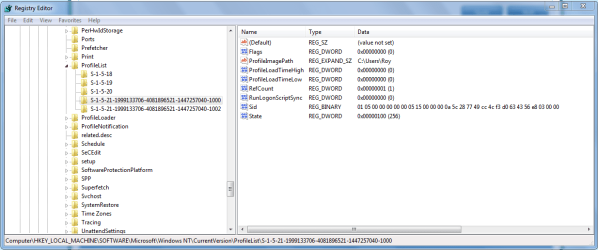
in the 1 5 21 section what are the last 4 digits 1000 or 1002
1000 is the admin 1002 is a user, ill post the right hand side block details of BOTH
compare and change as required.


Roy
 

Attachments

  • reg1000.PNG
    reg1000.PNG
    27.7 KB · Views: 1
  • reg1002.PNG
    reg1002.PNG
    27.2 KB · Views: 1
Last edited:

My Computer

Computer type
PC/Desktop
Computer Manufacturer/Model Number
medionl/Aspire 6930G/acer x55a
OS
W7 home premium 32bit/W7HP 64bit/w10 tp insider ring
CPU
E5300 dual core
Motherboard
medion MS7366
Memory
3gb
Graphics Card(s)
Nvidia Geforce 7100 Nforce 630i
Monitor(s) Displays
avixc
Internet Speed
n (isp resticted to 72)
Antivirus
mse/pands
Browser
palemoon
Other Info
Belkin Fd7050 n USB using Railink RT2870 drivers, more upto date
Hi Roy

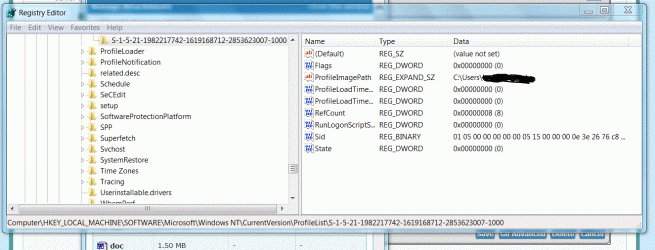
I hope this is the info you need.......
 

Attachments

  • Capture Registry 2.GIF
    Capture Registry 2.GIF
    95.4 KB · Views: 0
  • Capture registry 3.GIF
    Capture registry 3.GIF
    113.5 KB · Views: 2
Last edited:

My Computer

Computer type
Laptop
Computer Manufacturer/Model Number
Samsung S3511
OS
Windows 7 Home Premium 64 Bit (Service Pack 1)
CPU
Premium Dual Core P6200
Motherboard
Samsung S3511
Memory
4 GB
Graphics Card(s)
Intel (R) HD Graphic
Sound Card
Realtek High Definition Audio
Screen Resolution
1366 x 768
Hard Drives
C: D: E: (NTFS)
Cooling
Drive temperature: 38 / 100
Mouse
Wired Logitech B100
Antivirus
McAfee Total Protection
Browser
Supermium Portable and r3dfox

Hi LevelBest,
please amend the values for
refcount to 1
state 100 (256)

the same as mine

Roy
 

My Computer

Computer type
PC/Desktop
Computer Manufacturer/Model Number
medionl/Aspire 6930G/acer x55a
OS
W7 home premium 32bit/W7HP 64bit/w10 tp insider ring
CPU
E5300 dual core
Motherboard
medion MS7366
Memory
3gb
Graphics Card(s)
Nvidia Geforce 7100 Nforce 630i
Monitor(s) Displays
avixc
Internet Speed
n (isp resticted to 72)
Antivirus
mse/pands
Browser
palemoon
Other Info
Belkin Fd7050 n USB using Railink RT2870 drivers, more upto date
Hi Roy

Can I double check what you mean? I’ve not ever entered into registry territory and am a little nervous.
The line on yours that states Ref Count which ends with 01 (1) and on mine ends with an 08 (8) – do I change both the long figure that ends with 08 and the bracketed (08)? Or does changing the long number automatically update the number in brackets?

Secondly, on yours on the state line which ends with 100 (256) and mine says 000 (0), you want me to change those numbers?

Thirdly, can I reverse this via a restore point if something goes wrong or would I need to go back into the registry and manually change it?

Many thanks.
 

My Computer

Computer type
Laptop
Computer Manufacturer/Model Number
Samsung S3511
OS
Windows 7 Home Premium 64 Bit (Service Pack 1)
CPU
Premium Dual Core P6200
Motherboard
Samsung S3511
Memory
4 GB
Graphics Card(s)
Intel (R) HD Graphic
Sound Card
Realtek High Definition Audio
Screen Resolution
1366 x 768
Hard Drives
C: D: E: (NTFS)
Cooling
Drive temperature: 38 / 100
Mouse
Wired Logitech B100
Antivirus
McAfee Total Protection
Browser
Supermium Portable and r3dfox
I forget people get nervous,
There are registry back up progs, most use Erunt. ERUNT Download
ONLY change the first field values (8 and 0 on yours to 1 and 100 mine)
RIGHT click on the field name>>then on Modify , a smaller window will appear with the current value in it just input the new value

reboot to update the registry

And they are reversable values

Roy
 

My Computer

Computer type
PC/Desktop
Computer Manufacturer/Model Number
medionl/Aspire 6930G/acer x55a
OS
W7 home premium 32bit/W7HP 64bit/w10 tp insider ring
CPU
E5300 dual core
Motherboard
medion MS7366
Memory
3gb
Graphics Card(s)
Nvidia Geforce 7100 Nforce 630i
Monitor(s) Displays
avixc
Internet Speed
n (isp resticted to 72)
Antivirus
mse/pands
Browser
palemoon
Other Info
Belkin Fd7050 n USB using Railink RT2870 drivers, more upto date
Hello Roy

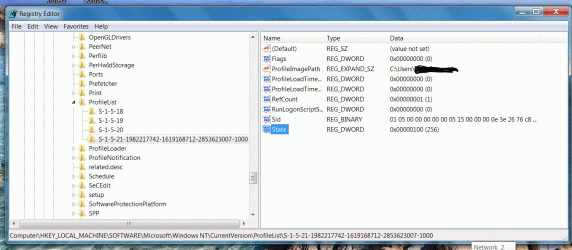
I've gone ahead and changed the registry entries.

The first gif shows the new registry numbers altered to the new value. I immediately re-booted the machine but when I went back to check, the entries had changed, the Refcount showing 2 and State had gone back to 00000. Is this normal? Or should the values stay to what I changed them to?
 

Attachments

  • CaptureAltered registry.GIF
    CaptureAltered registry.GIF
    125.9 KB · Views: 0
  • registry alterend back to 2.GIF
    registry alterend back to 2.GIF
    83.7 KB · Views: 0

My Computer

Computer type
Laptop
Computer Manufacturer/Model Number
Samsung S3511
OS
Windows 7 Home Premium 64 Bit (Service Pack 1)
CPU
Premium Dual Core P6200
Motherboard
Samsung S3511
Memory
4 GB
Graphics Card(s)
Intel (R) HD Graphic
Sound Card
Realtek High Definition Audio
Screen Resolution
1366 x 768
Hard Drives
C: D: E: (NTFS)
Cooling
Drive temperature: 38 / 100
Mouse
Wired Logitech B100
Antivirus
McAfee Total Protection
Browser
Supermium Portable and r3dfox
Hi LevelBest,
NO they should not change back.
When you ran Malwarebytes, did you have the Rootkit option ticked?
if not please rerun it with it checked, would you also run ESET on-line scan, dissable Mcafee first.

Can you also check in Mcafee's logs to see a if it stopped the change, or any other reference to a registry change or permissions/user rights

Roy
 

My Computer

Computer type
PC/Desktop
Computer Manufacturer/Model Number
medionl/Aspire 6930G/acer x55a
OS
W7 home premium 32bit/W7HP 64bit/w10 tp insider ring
CPU
E5300 dual core
Motherboard
medion MS7366
Memory
3gb
Graphics Card(s)
Nvidia Geforce 7100 Nforce 630i
Monitor(s) Displays
avixc
Internet Speed
n (isp resticted to 72)
Antivirus
mse/pands
Browser
palemoon
Other Info
Belkin Fd7050 n USB using Railink RT2870 drivers, more upto date
Hi Roy

I downloaded and ran Malwarebytes as it came, I didn't make any changes to what it was scanning. I've since uninstalled Malwarebytes but I'll download it again.

I've found ESET and will run. Do you want me to run both ESET and Malwarebytes?

Where do I access McAfee logs? (via event viewer?)

I'll need to leave all this now until the weekend when I'll have more time.

I've also seen on the net about changing the permissions of registry entries - would this be a way forward or are we trying to determine whether preparing security options is a virus?

Many thanks for your continuing help.
 

My Computer

Computer type
Laptop
Computer Manufacturer/Model Number
Samsung S3511
OS
Windows 7 Home Premium 64 Bit (Service Pack 1)
CPU
Premium Dual Core P6200
Motherboard
Samsung S3511
Memory
4 GB
Graphics Card(s)
Intel (R) HD Graphic
Sound Card
Realtek High Definition Audio
Screen Resolution
1366 x 768
Hard Drives
C: D: E: (NTFS)
Cooling
Drive temperature: 38 / 100
Mouse
Wired Logitech B100
Antivirus
McAfee Total Protection
Browser
Supermium Portable and r3dfox
Not intruding Torchwood, your advice is exactly what I would have given, but just a note for LevelBest: -

Malwarebytes was designed NOT to cause conflicts with any other AV product. For example: I run Kasperky Total Security and Hitman Pro, with Malwarebytes Pro and have no conflicts whatsoever. I also ran Bitdfender in the past for 3 years with Malwarebytes Pro and never had a conflict. So I am almost certain that your problem is not a conflict between AV/anti Malware programmes, unless McAfee does cause conflicts.

EDIT: I found this: https://tinyurl.com/gr6vkcj

You will have to delve into the Malwarebytes Exclusion folder and add 3 files as shown by the link. If there are conflicts, this will prevent them. Were I you, at McAfee upgrade time, I would drop it and buy a better AV product. Just my poinion, I do not like McAfee or Norton.
 
Last edited:

My Computer

Computer type
PC/Desktop
Computer Manufacturer/Model Number
bertison
OS
Windows 7/64 HPremium.
CPU
AMD FX-6300.
Motherboard
Asus M5A78L-M LE/USB3.
Memory
Corsair (2x4) GB DDR3 CMXGX3M2A1337CL9.
Graphics Card(s)
NVidia/Gigabyte GT730 (2GB) GDDR5.
Sound Card
Onboard.
Monitor(s) Displays
Iiyama PLE2407HDS.
Screen Resolution
1920 x 1280
Hard Drives
Desktop: 1TB. WD10EZEX-00BN5A0.
Zyxel nsa310 NAS: 2TB Seagate Barracuda 7200.14.
Cache Drive: Sandisk SDSSDRC032G.
Laptop Lenovo B50/80 128 GB SSD.
PSU
Corsair 750M.
Case
Coolermaster N300.
Cooling
FRONT: (2X) 140mm. TOP: (1x) 120mm. REAR: (1x) 120mm.
Keyboard
Logitech K290
Mouse
Trust Optical Wired
Internet Speed
15 Mb Down, 0.55 Up.
Antivirus
Kaspersky Total Security 2017, Hitman Pro.
Browser
Firefox.
Other Info
NETWORK:
Sky "Q box" and router.
Desktop & NAS - 30 Metres Cat6 Ethernet wired, via TP-Link 4-port switch.
Lenovo B50/80 Laptop, 2x Wileyfox phones, Lenovo TAB3-8 tablet - all wireless.
Grandchildren, their parents and friends as bandwidth 'parasites' at various times!
This is how I use Malwarebytes settings.

Malware bytes settings.PNG
 

My Computer

Computer type
PC/Desktop
Computer Manufacturer/Model Number
Home made Desktop
OS
Windows 10 Pro. 64/ version 1709 Windows 7 Pro/64
CPU
Intel i7-6800K @ 4.3
Motherboard
ASUS X-99 Deluxe II
Memory
Corsair Platinum 16 gig @2400
Graphics Card(s)
EVGA GTX 1070 OC
Monitor(s) Displays
Asus 27" LED LCD/VE278Q
Screen Resolution
1920-1080 or 1280-720 HDMI
Hard Drives
INTEL SSD 730-240 Gb Sata 3.0/
PSU
EVGA Platium 1200W
Case
Phanteks Luxe Tempered Glass 8 fans/ one radiator
Cooling
XSPC/ Water Cooled CPU
Keyboard
Das 4 Professional
Mouse
Logitech M705/MX Anywhere 2-S
Internet Speed
100 mbits
Antivirus
Microsoft Security Essentials/ Malwarebytes Premium 3.0/ SAS
Browser
I.E. 11 default/Firefox/ ISP Time Warner Cable/Spectrum
Other Info
LG BluRay Burner/
Sound system-KLipsch-THX/
Icy Dock ssd Hot Swap bays.
I came home a little early from work, so am getting started on Roy's list.

The reason I uninstalled Malwarebytes was because I thought that was causing the PSO problem. However, I'm still getting it, so I was intending to reinstall at some point, so this has given me the opportunity to do that. Thank you, Layback Bear, I found the rootkit option. I've performed a MB scan without the rootkit option ticked and I am re-running again with the rootkit option ticked.

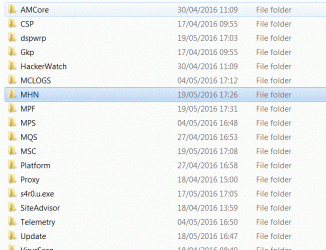
I'm going to need some guidance with delving into the McAfee logs. I've located them in the C drive programmes but there is a large list of folders (gif attached) and I don't know which one/s I should be looking at. I'll await Roy's guidance on that one.

I'll also await Roy's response or whether it's an idea to change the registry permission settings.

Many thanks for all of your inputs.
 

Attachments

  • Capture McAfee logs.GIF
    Capture McAfee logs.GIF
    71.1 KB · Views: 46

My Computer

Computer type
Laptop
Computer Manufacturer/Model Number
Samsung S3511
OS
Windows 7 Home Premium 64 Bit (Service Pack 1)
CPU
Premium Dual Core P6200
Motherboard
Samsung S3511
Memory
4 GB
Graphics Card(s)
Intel (R) HD Graphic
Sound Card
Realtek High Definition Audio
Screen Resolution
1366 x 768
Hard Drives
C: D: E: (NTFS)
Cooling
Drive temperature: 38 / 100
Mouse
Wired Logitech B100
Antivirus
McAfee Total Protection
Browser
Supermium Portable and r3dfox
Hi Roy

As above post, I've done two scans with MB, the second one with the root kit option ticked. No issues.

Could you please help with what McAfee logs to look at.

I'll leave the scan with ESET to another time (bit nervous about disabling McAfee!)

I'm logging off now for the evening but many thanks for your continued support.
 

Attachments

  • Capture MW no issues.GIF
    Capture MW no issues.GIF
    19.9 KB · Views: 0

My Computer

Computer type
Laptop
Computer Manufacturer/Model Number
Samsung S3511
OS
Windows 7 Home Premium 64 Bit (Service Pack 1)
CPU
Premium Dual Core P6200
Motherboard
Samsung S3511
Memory
4 GB
Graphics Card(s)
Intel (R) HD Graphic
Sound Card
Realtek High Definition Audio
Screen Resolution
1366 x 768
Hard Drives
C: D: E: (NTFS)
Cooling
Drive temperature: 38 / 100
Mouse
Wired Logitech B100
Antivirus
McAfee Total Protection
Browser
Supermium Portable and r3dfox
I know nothing about McAfee. I haven't use it in 10 years or so.
I hear or read nothing good about McAfee.
 

My Computer

Computer type
PC/Desktop
Computer Manufacturer/Model Number
Home made Desktop
OS
Windows 10 Pro. 64/ version 1709 Windows 7 Pro/64
CPU
Intel i7-6800K @ 4.3
Motherboard
ASUS X-99 Deluxe II
Memory
Corsair Platinum 16 gig @2400
Graphics Card(s)
EVGA GTX 1070 OC
Monitor(s) Displays
Asus 27" LED LCD/VE278Q
Screen Resolution
1920-1080 or 1280-720 HDMI
Hard Drives
INTEL SSD 730-240 Gb Sata 3.0/
PSU
EVGA Platium 1200W
Case
Phanteks Luxe Tempered Glass 8 fans/ one radiator
Cooling
XSPC/ Water Cooled CPU
Keyboard
Das 4 Professional
Mouse
Logitech M705/MX Anywhere 2-S
Internet Speed
100 mbits
Antivirus
Microsoft Security Essentials/ Malwarebytes Premium 3.0/ SAS
Browser
I.E. 11 default/Firefox/ ISP Time Warner Cable/Spectrum
Other Info
LG BluRay Burner/
Sound system-KLipsch-THX/
Icy Dock ssd Hot Swap bays.

My Computer

Computer type
PC/Desktop
Computer Manufacturer/Model Number
medionl/Aspire 6930G/acer x55a
OS
W7 home premium 32bit/W7HP 64bit/w10 tp insider ring
CPU
E5300 dual core
Motherboard
medion MS7366
Memory
3gb
Graphics Card(s)
Nvidia Geforce 7100 Nforce 630i
Monitor(s) Displays
avixc
Internet Speed
n (isp resticted to 72)
Antivirus
mse/pands
Browser
palemoon
Other Info
Belkin Fd7050 n USB using Railink RT2870 drivers, more upto date
Back
Top