Solved Getting "Preparing Security Options"

Hello Roy

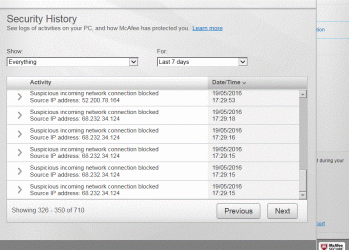
I found that link yesterday when searching for the location of the logs so I could find them. But there's no info on where to look for anything stopping me from changing the registry keys. When I access the logs I get this list. What folders do I look in? And what am I looking for?
 

Attachments

  • Capture McAfee logs.GIF
    Capture McAfee logs.GIF
    71.1 KB · Views: 54
  • Capture McAfee logs.GIF 2ndpart.GIF
    Capture McAfee logs.GIF 2ndpart.GIF
    40 KB · Views: 1

My Computer

Computer type
Laptop
Computer Manufacturer/Model Number
Samsung S3511
OS
Windows 7 Home Premium 64 Bit (Service Pack 1)
CPU
Premium Dual Core P6200
Motherboard
Samsung S3511
Memory
4 GB
Graphics Card(s)
Intel (R) HD Graphic
Sound Card
Realtek High Definition Audio
Screen Resolution
1366 x 768
Hard Drives
C: D: E: (NTFS)
Cooling
Drive temperature: 38 / 100
Mouse
Wired Logitech B100
Antivirus
McAfee Total Protection
Browser
Supermium Portable and r3dfox
Hello Roy

Haven't heard from you for a while - hope all is OK with you.

I've spent the morning on the computer and have run an ESET scan. A mighty scan it was too, lasting an hour an a half. The good news is that no issues were found. So that's no issues found from McAfee, Malwarebytes or ESET. Is it now safe to rule out a virus causing PSO?

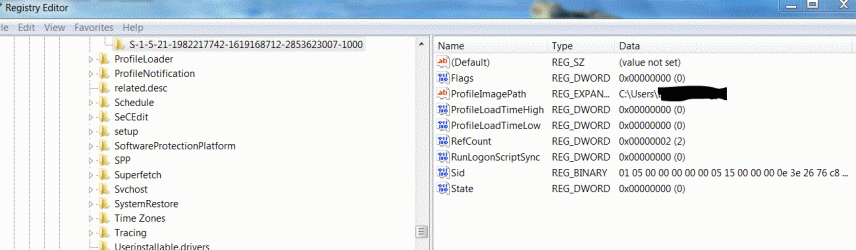
There may also be some progress, not done knowingly. but I've gone into the registry and changed those numbers a couple of times and just lately (up to 3 separate sessions) the bottom state line seems to be retaining the 100 (256) figure where as the refcount number changes each time I go in; it's either 5, 8, 2 etc. Not sure what this means.

Are you able to help with what McAfee files to look into to see if it's preventing the registry changes being made; although now of course it's only one line that isn't remaining the same; so I would have thought if the culprit was McAfee it would stop both lines being changed.

I await further guidance.
 

Attachments

  • Capture eset scan results.GIF
    Capture eset scan results.GIF
    18.8 KB · Views: 4

My Computer

Computer type
Laptop
Computer Manufacturer/Model Number
Samsung S3511
OS
Windows 7 Home Premium 64 Bit (Service Pack 1)
CPU
Premium Dual Core P6200
Motherboard
Samsung S3511
Memory
4 GB
Graphics Card(s)
Intel (R) HD Graphic
Sound Card
Realtek High Definition Audio
Screen Resolution
1366 x 768
Hard Drives
C: D: E: (NTFS)
Cooling
Drive temperature: 38 / 100
Mouse
Wired Logitech B100
Antivirus
McAfee Total Protection
Browser
Supermium Portable and r3dfox
Hi LevelBest,
the logs will be accessible from the Mcafee main menu, either directly or from the history option.

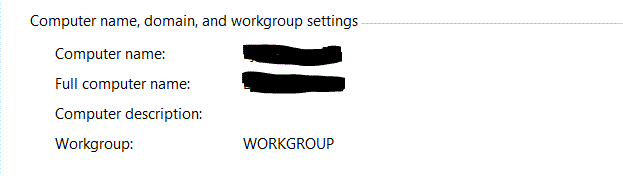
How is your comp set-up as a Workgroup/Domain or Homegroup ??

Roy
 

My Computer

Computer type
PC/Desktop
Computer Manufacturer/Model Number
medionl/Aspire 6930G/acer x55a
OS
W7 home premium 32bit/W7HP 64bit/w10 tp insider ring
CPU
E5300 dual core
Motherboard
medion MS7366
Memory
3gb
Graphics Card(s)
Nvidia Geforce 7100 Nforce 630i
Monitor(s) Displays
avixc
Internet Speed
n (isp resticted to 72)
Antivirus
mse/pands
Browser
palemoon
Other Info
Belkin Fd7050 n USB using Railink RT2870 drivers, more upto date
Hi Roy

I've attached a gif for the 19th which is when I tried to change the registry. It only seems to list scans or incoming security threats though (have to say I didn't realise McAfee was working so hard in the background) no blocks to registry changes.

Also I am listed as a Workgroup.
 

Attachments

  • Capture McAee List of Security for 19 may.GIF
    Capture McAee List of Security for 19 may.GIF
    148.9 KB · Views: 0
  • Capture WORKGROUP.GIF
    Capture WORKGROUP.GIF
    5.3 KB · Views: 45
Last edited:

My Computer

Computer type
Laptop
Computer Manufacturer/Model Number
Samsung S3511
OS
Windows 7 Home Premium 64 Bit (Service Pack 1)
CPU
Premium Dual Core P6200
Motherboard
Samsung S3511
Memory
4 GB
Graphics Card(s)
Intel (R) HD Graphic
Sound Card
Realtek High Definition Audio
Screen Resolution
1366 x 768
Hard Drives
C: D: E: (NTFS)
Cooling
Drive temperature: 38 / 100
Mouse
Wired Logitech B100
Antivirus
McAfee Total Protection
Browser
Supermium Portable and r3dfox
Hi LevelBest,
As you only have 1 profile, and its the admin account, i'm loathed to follow the usuall course of action, rename/recreate/delete, why copy a corrupt version, the "new" profile is not checked or verified.
(its possible that it will bork your comp)

Please read then run this MS fixit from this link, no Fixit no: so not sure if you have previously used it
https://www.google.co.uk/url?sa=t&r...ention&usg=AFQjCNErgi5qvaroY_b7BznnXgHcXYD1JA

AFTER running the above
REBOOT (sorry)

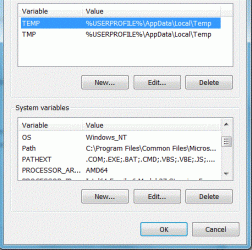
then goto system > advanced > enviromental settings
should look like the following.

system variables
pathext
cmd vbs js jse wsf wsh msc

User variables
temp & tmp
%userprofile% appdata local temp

Do you have a W7 disc, not the system image?

Roy
 

My Computer

Computer type
PC/Desktop
Computer Manufacturer/Model Number
medionl/Aspire 6930G/acer x55a
OS
W7 home premium 32bit/W7HP 64bit/w10 tp insider ring
CPU
E5300 dual core
Motherboard
medion MS7366
Memory
3gb
Graphics Card(s)
Nvidia Geforce 7100 Nforce 630i
Monitor(s) Displays
avixc
Internet Speed
n (isp resticted to 72)
Antivirus
mse/pands
Browser
palemoon
Other Info
Belkin Fd7050 n USB using Railink RT2870 drivers, more upto date
Hi Roy

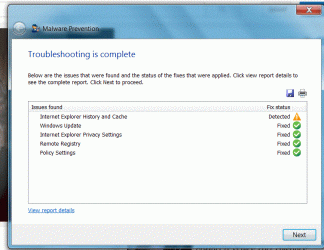
I've run the fix it tool, posted results below.

Went into System, Environmental variables: the path text is different from yours. But the usual variables seem the same.

I don't have and never had a windows 7 disc. I don't want to put the laptop back to factory settings as I'll lose MS Office.

Have changed the registry after re-booting and gone back in but only state is staying the same. Ref count is at 5
 

Attachments

  • Capture fix it tool.GIF
    Capture fix it tool.GIF
    62.4 KB · Views: 1
  • Capture.GIF System variables.GIF
    Capture.GIF System variables.GIF
    54.9 KB · Views: 44

My Computer

Computer type
Laptop
Computer Manufacturer/Model Number
Samsung S3511
OS
Windows 7 Home Premium 64 Bit (Service Pack 1)
CPU
Premium Dual Core P6200
Motherboard
Samsung S3511
Memory
4 GB
Graphics Card(s)
Intel (R) HD Graphic
Sound Card
Realtek High Definition Audio
Screen Resolution
1366 x 768
Hard Drives
C: D: E: (NTFS)
Cooling
Drive temperature: 38 / 100
Mouse
Wired Logitech B100
Antivirus
McAfee Total Protection
Browser
Supermium Portable and r3dfox
Hi Roy

I tried an experiment: disconnecting the laptop from the computer, changing the registry and re-booting. The numbers have still reverted (as gif). I'm not sure if this is meaningful.
 

Attachments

  • Capture. registry after disconnecting from net.GIF
    Capture. registry after disconnecting from net.GIF
    62.2 KB · Views: 1

My Computer

Computer type
Laptop
Computer Manufacturer/Model Number
Samsung S3511
OS
Windows 7 Home Premium 64 Bit (Service Pack 1)
CPU
Premium Dual Core P6200
Motherboard
Samsung S3511
Memory
4 GB
Graphics Card(s)
Intel (R) HD Graphic
Sound Card
Realtek High Definition Audio
Screen Resolution
1366 x 768
Hard Drives
C: D: E: (NTFS)
Cooling
Drive temperature: 38 / 100
Mouse
Wired Logitech B100
Antivirus
McAfee Total Protection
Browser
Supermium Portable and r3dfox
Hi LevelBest,
Im wondering what malware that troubleshooter found, what does it say in the detail report.

Did Office not install on a seperate partition, usually Q.

Roy
 

My Computer

Computer type
PC/Desktop
Computer Manufacturer/Model Number
medionl/Aspire 6930G/acer x55a
OS
W7 home premium 32bit/W7HP 64bit/w10 tp insider ring
CPU
E5300 dual core
Motherboard
medion MS7366
Memory
3gb
Graphics Card(s)
Nvidia Geforce 7100 Nforce 630i
Monitor(s) Displays
avixc
Internet Speed
n (isp resticted to 72)
Antivirus
mse/pands
Browser
palemoon
Other Info
Belkin Fd7050 n USB using Railink RT2870 drivers, more upto date
Hi Roy

There was no Q drive installed. I found the reports in the temp folder. Not sure which bits you need or how to make them legible. I don't know if the following helps.....

If we're still pursuing a virus angle, would it be worth running Microsoft safety scanner?
 

Attachments

My Computer

Computer type
Laptop
Computer Manufacturer/Model Number
Samsung S3511
OS
Windows 7 Home Premium 64 Bit (Service Pack 1)
CPU
Premium Dual Core P6200
Motherboard
Samsung S3511
Memory
4 GB
Graphics Card(s)
Intel (R) HD Graphic
Sound Card
Realtek High Definition Audio
Screen Resolution
1366 x 768
Hard Drives
C: D: E: (NTFS)
Cooling
Drive temperature: 38 / 100
Mouse
Wired Logitech B100
Antivirus
McAfee Total Protection
Browser
Supermium Portable and r3dfox
Hello Roy

Does the results from the scan help in tracking down possible cause of PSO? It says in the report that the WSCAPI system file does not exist and WSCSVC Disabled.

LevelBest
 

My Computer

Computer type
Laptop
Computer Manufacturer/Model Number
Samsung S3511
OS
Windows 7 Home Premium 64 Bit (Service Pack 1)
CPU
Premium Dual Core P6200
Motherboard
Samsung S3511
Memory
4 GB
Graphics Card(s)
Intel (R) HD Graphic
Sound Card
Realtek High Definition Audio
Screen Resolution
1366 x 768
Hard Drives
C: D: E: (NTFS)
Cooling
Drive temperature: 38 / 100
Mouse
Wired Logitech B100
Antivirus
McAfee Total Protection
Browser
Supermium Portable and r3dfox
Hi

I've been on the computer for most of the day (instead of doing the DIY!)

I've done a near 3 hour scan using MS Safety Scanner and no issues were found.

I've run another 'scannow' and it is still saying that the WSCAPI.dll file is missing or deleted. However, after a bit of digging around I've found the file in windows\system32. I've also run a McAfee and Malwarebytes Scan on that file and both say no issues.

So why would scannow say the file is missing when it's not?
 

Attachments

  • Capture WSCAPI.DLL FILE.gif
    Capture WSCAPI.DLL FILE.gif
    121.2 KB · Views: 1

My Computer

Computer type
Laptop
Computer Manufacturer/Model Number
Samsung S3511
OS
Windows 7 Home Premium 64 Bit (Service Pack 1)
CPU
Premium Dual Core P6200
Motherboard
Samsung S3511
Memory
4 GB
Graphics Card(s)
Intel (R) HD Graphic
Sound Card
Realtek High Definition Audio
Screen Resolution
1366 x 768
Hard Drives
C: D: E: (NTFS)
Cooling
Drive temperature: 38 / 100
Mouse
Wired Logitech B100
Antivirus
McAfee Total Protection
Browser
Supermium Portable and r3dfox
Thank for the reply. Are you or anyone else able to help in Roy's absence (trust that he is OK).

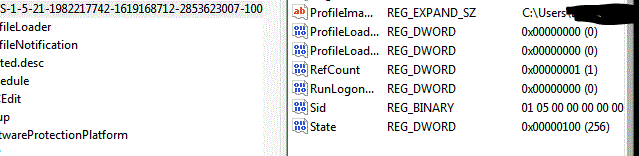
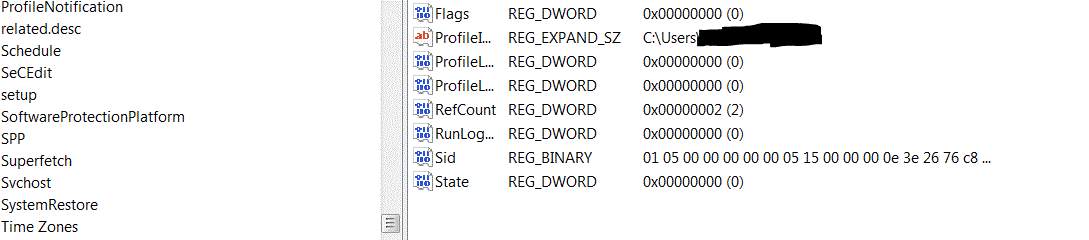
Regarding the previously discussed changes to the registry which aren't staying. I have this morning booted in safemode (with net connection) and going into the registry, it states the correct numbers, i.e 1 for refcount, 100 for state (shown on gif 2) However, re-booting normally, it has changed to recount 2, state 0 (in gif 1). So some programme / application / service is changing my registry from what it should be. Would a simple changing the registry permissions resolve this? Or should I try to track down what programme etc is causing the change. How would I go about this?
 

Attachments

  • Capture correct registry in safe mode.GIF
    Capture correct registry in safe mode.GIF
    13.8 KB · Views: 29
  • Capture. Registry after being in safemode normal but logged back on and ......GIF
    Capture. Registry after being in safemode normal but logged back on and ......GIF
    19.6 KB · Views: 0

My Computer

Computer type
Laptop
Computer Manufacturer/Model Number
Samsung S3511
OS
Windows 7 Home Premium 64 Bit (Service Pack 1)
CPU
Premium Dual Core P6200
Motherboard
Samsung S3511
Memory
4 GB
Graphics Card(s)
Intel (R) HD Graphic
Sound Card
Realtek High Definition Audio
Screen Resolution
1366 x 768
Hard Drives
C: D: E: (NTFS)
Cooling
Drive temperature: 38 / 100
Mouse
Wired Logitech B100
Antivirus
McAfee Total Protection
Browser
Supermium Portable and r3dfox
Hi LevelBest,
Been reviewing the thread,
Im concerned that the reinstall via the image was also corrupt.
IT should have had at least 3 profiles
Admin, User and Guest, they are bulk standard on a prime install.
(something must have changed them prior to your image creation, Admin only!)

can you run this, check all options please
MiniToolBox Download

what is drive E

Roy
 

My Computer

Computer type
PC/Desktop
Computer Manufacturer/Model Number
medionl/Aspire 6930G/acer x55a
OS
W7 home premium 32bit/W7HP 64bit/w10 tp insider ring
CPU
E5300 dual core
Motherboard
medion MS7366
Memory
3gb
Graphics Card(s)
Nvidia Geforce 7100 Nforce 630i
Monitor(s) Displays
avixc
Internet Speed
n (isp resticted to 72)
Antivirus
mse/pands
Browser
palemoon
Other Info
Belkin Fd7050 n USB using Railink RT2870 drivers, more upto date
Hi Roy

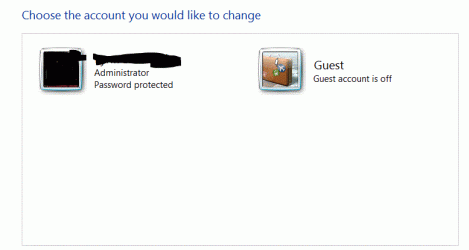
Glad you're back! v What I don't understand is that I've used that system image to rebuild my computer 3 years ago and it was fine. I'm not sure what you mean by 'IT'. I've never changed or created a new profile. It's always just been me as administrator.

Not sure what you mean by Drive E. I have a C and D, E may show up if I use a USB perhaps.

I've attached the log. Bit concerned about these 'wild tangent' games. I've never downloaded games nor do I play games. I've seen something on the net about viruses masquerading as quotes from famous novels. Can I uninstall / delete them?

Gif of accounts.
 

Attachments

Last edited:

My Computer

Computer type
Laptop
Computer Manufacturer/Model Number
Samsung S3511
OS
Windows 7 Home Premium 64 Bit (Service Pack 1)
CPU
Premium Dual Core P6200
Motherboard
Samsung S3511
Memory
4 GB
Graphics Card(s)
Intel (R) HD Graphic
Sound Card
Realtek High Definition Audio
Screen Resolution
1366 x 768
Hard Drives
C: D: E: (NTFS)
Cooling
Drive temperature: 38 / 100
Mouse
Wired Logitech B100
Antivirus
McAfee Total Protection
Browser
Supermium Portable and r3dfox
Hi LevelBest,
IT (meant your image),
When i asked you to look at 1 5 21, i needed to know the last 4 digits 1000 or 1002, to see the profile(user) in use.
see my screenshot
>> same as yours <<, your 1002 is missing it shouldn't be, something removed it >>BEFORE<< your image was made!

Wild Tangent
This comes as bloatware on most OEM machines. you can uninstall the program folder with no ill effects to you.

Now lets get back to the log

Plusnet Protect
McAfee WebAdvisor
More bloatware uninstall the above, when you update Flash UNcheck the little box for Mcafee, your AV suite allready does these.
The Knowhow prog can also be removed, your out of warrenty, they'll charge you if you use them now.

NOW more importantly
Office
You have both 7 and 10 but your restore point info says 10 removed?
did you uninstall it via progs and features or use the MS removal tool.
Microsoft Office 2007 Service Pack 3
Microsoft Office 2010
Microsoft Office Home and Student 2007
Microsoft Office File Validation Add-In

Seem to have been a few problems with certain Office updates lately, did your system start acting up after installing any of them,( 4weeks ago, check your installed updates log for about then)
now the last file listed above performs an licence activation check, when the system starts.
can you run this tool, copy/paste results
http://go.microsoft.com/fwlink/?LinkID=52012


Other comments
Do you have additional language packs installed

B6AA-47Microsoft SQL Server 2005 Compact Edition - its no longer supported
Windows Live Mail - update KB3093594 known to cause problems - being phased out

Roy
 

Attachments

  • memine.PNG
    memine.PNG
    6.6 KB · Views: 18

My Computer

Computer type
PC/Desktop
Computer Manufacturer/Model Number
medionl/Aspire 6930G/acer x55a
OS
W7 home premium 32bit/W7HP 64bit/w10 tp insider ring
CPU
E5300 dual core
Motherboard
medion MS7366
Memory
3gb
Graphics Card(s)
Nvidia Geforce 7100 Nforce 630i
Monitor(s) Displays
avixc
Internet Speed
n (isp resticted to 72)
Antivirus
mse/pands
Browser
palemoon
Other Info
Belkin Fd7050 n USB using Railink RT2870 drivers, more upto date
Hi Roy

I understand now about the 1002 line missing in the regedit profile, thanks.

Mcafee is my AV and paid for monthly as part of PlusNet, I would not want to remove the webadvisor as I rely on it to let me know of any dodgy sites.

I use MS Office 2007 which I purchased when I got the laptop. I went to uninstall MSOffice 10 in progammes thinking it was Windows 10 but then realised it was not W10 and cancelled. I tend to make restore points before doing any changes to give the computer a safety net.

When I did the system image, apart from installing McAfee and IE11, I made no further changes for a few days as I wanted to be sure everything was stable (which it was) before adding further programmes and software. From memory, my feeling is that the PSO began after an overnight update of windows updates. I've checked and don't have the KB update you mentioned.

I don't have any other language packs that I'm aware of.

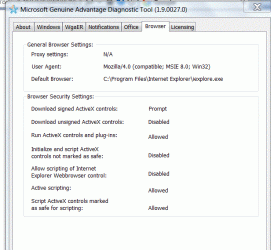
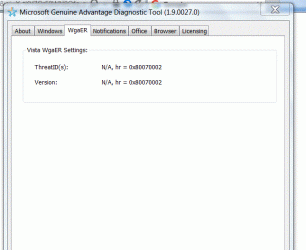
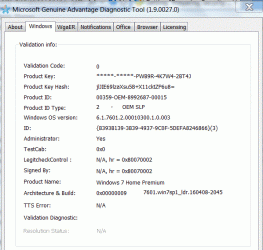
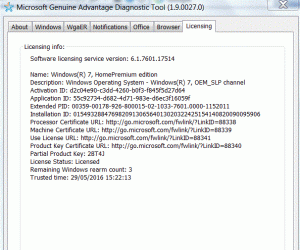
I can't attach the logs. It comes up as a cabinet file which there isn't an option to attach as. I've attached as screenshots over the next few posts.
 
Last edited:

My Computer

Computer type
Laptop
Computer Manufacturer/Model Number
Samsung S3511
OS
Windows 7 Home Premium 64 Bit (Service Pack 1)
CPU
Premium Dual Core P6200
Motherboard
Samsung S3511
Memory
4 GB
Graphics Card(s)
Intel (R) HD Graphic
Sound Card
Realtek High Definition Audio
Screen Resolution
1366 x 768
Hard Drives
C: D: E: (NTFS)
Cooling
Drive temperature: 38 / 100
Mouse
Wired Logitech B100
Antivirus
McAfee Total Protection
Browser
Supermium Portable and r3dfox
I've attached screenshots of each screen, hopefully that will give you the info:
 

Attachments

  • Capture. MGA dialogue tool output 5.GIF
    Capture. MGA dialogue tool output 5.GIF
    40.6 KB · Views: 16
  • Capture. MGA dialogue tool output 4.GIF
    Capture. MGA dialogue tool output 4.GIF
    37.7 KB · Views: 16
  • Capture. MGA dialogue tool output 3.GIF
    Capture. MGA dialogue tool output 3.GIF
    37.4 KB · Views: 16
  • Capture. MGA dialogue tool output 2.GIF
    Capture. MGA dialogue tool output 2.GIF
    34.2 KB · Views: 16
  • Capture. MGA dialogue tool output 1.GIF
    Capture. MGA dialogue tool output 1.GIF
    38.6 KB · Views: 16

My Computer

Computer type
Laptop
Computer Manufacturer/Model Number
Samsung S3511
OS
Windows 7 Home Premium 64 Bit (Service Pack 1)
CPU
Premium Dual Core P6200
Motherboard
Samsung S3511
Memory
4 GB
Graphics Card(s)
Intel (R) HD Graphic
Sound Card
Realtek High Definition Audio
Screen Resolution
1366 x 768
Hard Drives
C: D: E: (NTFS)
Cooling
Drive temperature: 38 / 100
Mouse
Wired Logitech B100
Antivirus
McAfee Total Protection
Browser
Supermium Portable and r3dfox
Last screenshot
 

Attachments

  • Capture. MGA dialogue tool output 6.GIF
    Capture. MGA dialogue tool output 6.GIF
    40.3 KB · Views: 16

My Computer

Computer type
Laptop
Computer Manufacturer/Model Number
Samsung S3511
OS
Windows 7 Home Premium 64 Bit (Service Pack 1)
CPU
Premium Dual Core P6200
Motherboard
Samsung S3511
Memory
4 GB
Graphics Card(s)
Intel (R) HD Graphic
Sound Card
Realtek High Definition Audio
Screen Resolution
1366 x 768
Hard Drives
C: D: E: (NTFS)
Cooling
Drive temperature: 38 / 100
Mouse
Wired Logitech B100
Antivirus
McAfee Total Protection
Browser
Supermium Portable and r3dfox
Hi Level,
please compare your WU list to mine, i dont have Office,
list your extras i'll check them

Did the office 10 uninstall/cancell happen just before the problem?

Do you know anyone with a W7 disc?


Roy
 

My Computer

Computer type
PC/Desktop
Computer Manufacturer/Model Number
medionl/Aspire 6930G/acer x55a
OS
W7 home premium 32bit/W7HP 64bit/w10 tp insider ring
CPU
E5300 dual core
Motherboard
medion MS7366
Memory
3gb
Graphics Card(s)
Nvidia Geforce 7100 Nforce 630i
Monitor(s) Displays
avixc
Internet Speed
n (isp resticted to 72)
Antivirus
mse/pands
Browser
palemoon
Other Info
Belkin Fd7050 n USB using Railink RT2870 drivers, more upto date
Back
Top