Solved Getting "Preparing Security Options"

Hi Roy

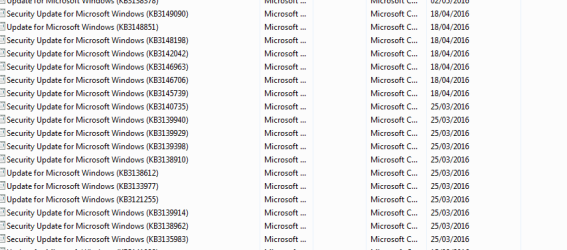
Were you going to attach a list of Windows Updates for me to compare?

The office 2010 would have come as part of the package of office 2007 as I remember there was the option of ungrading for free at the time. I've been getting the problem of PSO since several weeks before joining this forum (I did the potential uninstall for O10 only yesterday).

I do not have a windows 7 disc, the laptop didn't come with it. The curious thing is I've been on the net pretty much all day and not one instance of PSO and when it doesn't happen the laptop behaves perfectly. My gut feel is that this is connected to a Windows update as that was when the problem started.
 

My Computer

Computer type
Laptop
Computer Manufacturer/Model Number
Samsung S3511
OS
Windows 7 Home Premium 64 Bit (Service Pack 1)
CPU
Premium Dual Core P6200
Motherboard
Samsung S3511
Memory
4 GB
Graphics Card(s)
Intel (R) HD Graphic
Sound Card
Realtek High Definition Audio
Screen Resolution
1366 x 768
Hard Drives
C: D: E: (NTFS)
Cooling
Drive temperature: 38 / 100
Mouse
Wired Logitech B100
Antivirus
McAfee Total Protection
Browser
Supermium Portable and r3dfox
I found this thread and just want to point out that there is a lot of reports of this "Preparing Security Options" on the web and no one seems to have any idea what it is or how to fix it. I've spent hours and hours searching for info about it.
I have an OEM HP laptop with W7 64bit and it started having this issue several months ago. I am the only one who uses it, I use Malware Bytes pro lifetime and AVG Pro antivirus and firewall always, and have never had a major virus to my knowledge.

So just wanted to add this info to the conversation, as it seems not to be a virus. I also ran scanck and other things with no clues given as to what this is or how to fix it. Just fyi. Am watching this thread with interest. Personally I don't think it's a virus. I think it's a Windows 7 bug of some sort.
 

My Computer

OS
7 Home Premium 64bit
Internet Speed
2mbps (Yes, only TWO!!)
Antivirus
Emsisoft pay version
Browser
Firefox and sometimes chrome
Hi LevelBest
Spot the wally :confused:, to eager to get to me pub quiz.

list attached.

can you confirm something in post 33 you mentioned booting in safe mode, did you get the PSO??
IF NOT then it pointing towards a driver issue.

Roy
 

Attachments

  • marapril.PNG
    marapril.PNG
    6.5 KB · Views: 0

My Computer

Computer type
PC/Desktop
Computer Manufacturer/Model Number
medionl/Aspire 6930G/acer x55a
OS
W7 home premium 32bit/W7HP 64bit/w10 tp insider ring
CPU
E5300 dual core
Motherboard
medion MS7366
Memory
3gb
Graphics Card(s)
Nvidia Geforce 7100 Nforce 630i
Monitor(s) Displays
avixc
Internet Speed
n (isp resticted to 72)
Antivirus
mse/pands
Browser
palemoon
Other Info
Belkin Fd7050 n USB using Railink RT2870 drivers, more upto date
i also opened my laptop up for the first time in 2 weeks, and it did the preparing security options. i hit c a d and logged off. when i logged back on it did it again. i freaked ah just hit the power button, when i started it bac up all was well i havant installed any updates since april, because i was looking fo r the "bad UPDATES" list. can you point me in the right direction
jean
 

My Computer

Computer type
PC/Desktop
Computer Manufacturer/Model Number
dell
OS
windows 7 ultimate x64
Memory
3gb
Graphics Card(s)
nvidia
Antivirus
microsoft security
Browser
google,aol
Hi Roy

My head hurts after putting that list together! :) I've attached as one word document with a full set of screenshots taking out the ones I have that appear on your list. You'll see that the fun and games began on 18th April.

When I booted in safemode, I probably wasn't on there long enough to see whether PSO came up. I've lived with this long enough to know that it occurs within the first 10 minutes. Once it's passed, it's business as usual.

Re a possible driver issue, just yesterday I checked that all the drivers (via device manager and right clicking) for everything were up to date and each one reported that it was.

Pdsnickles: like you, I've spent hours reading all the posts on this problem. Like you, I don't think it's a virus and what stood out for me was on the Microsoft forum, a technician was doing a beautiful job of avoiding, when being pressed, stating whether it was a virus or not. My own feeling that this is a MS issue, collecting data or something similar.

LB
 

Attachments

Last edited:

My Computer

Computer type
Laptop
Computer Manufacturer/Model Number
Samsung S3511
OS
Windows 7 Home Premium 64 Bit (Service Pack 1)
CPU
Premium Dual Core P6200
Motherboard
Samsung S3511
Memory
4 GB
Graphics Card(s)
Intel (R) HD Graphic
Sound Card
Realtek High Definition Audio
Screen Resolution
1366 x 768
Hard Drives
C: D: E: (NTFS)
Cooling
Drive temperature: 38 / 100
Mouse
Wired Logitech B100
Antivirus
McAfee Total Protection
Browser
Supermium Portable and r3dfox
I find it odd that NO ONE on any forum anywhere on the net that I can find, has a solution for this or can even explain what is causing it.
My guess is it's MS themselves doing something and it was probably brought to us via an update.
The only question is why isn't EVERYONE having the problem?

I know in my case I didn't update for a long time and then I began again. I wonder if it has something to do with that?
 

My Computer

OS
7 Home Premium 64bit
Internet Speed
2mbps (Yes, only TWO!!)
Antivirus
Emsisoft pay version
Browser
Firefox and sometimes chrome
Hi LeveBest,
ploughing thru,
Would you like to try a different tac.
As i've said before i believe it to be a user profile problem.
I have sent you a copy of both of my profiles 1000/1002, for you to merge/import. run this first tho
ERUNT Download
(registry back-up program)
THE ATTACHED FILES ARE SPECIFIC TO THIS USER ONLY
DO NOT ATTEMPT ANY ACTIONS ON YOUR COMP AS THIS MAY CAUSE MAJOR PROBLEMS .

Roy
 

Attachments

My Computer

Computer type
PC/Desktop
Computer Manufacturer/Model Number
medionl/Aspire 6930G/acer x55a
OS
W7 home premium 32bit/W7HP 64bit/w10 tp insider ring
CPU
E5300 dual core
Motherboard
medion MS7366
Memory
3gb
Graphics Card(s)
Nvidia Geforce 7100 Nforce 630i
Monitor(s) Displays
avixc
Internet Speed
n (isp resticted to 72)
Antivirus
mse/pands
Browser
palemoon
Other Info
Belkin Fd7050 n USB using Railink RT2870 drivers, more upto date
Hi Roy

I am dead nervous about trying to import these files. I could seriously do damage to my computer, make things worse, perhaps beyond repair. Apart from the times I get PSO, the computer behaves perfectly.

I still find it odd that when I ran the system image, from which I'd successfully re-built the computer before, all was well for three days. It was only when I downloaded all the windows updates that I started getting the problem.

I would rather wait until you maybe find some possible troublesome updates and leave the importing registry as a last resort.

LB
 

My Computer

Computer type
Laptop
Computer Manufacturer/Model Number
Samsung S3511
OS
Windows 7 Home Premium 64 Bit (Service Pack 1)
CPU
Premium Dual Core P6200
Motherboard
Samsung S3511
Memory
4 GB
Graphics Card(s)
Intel (R) HD Graphic
Sound Card
Realtek High Definition Audio
Screen Resolution
1366 x 768
Hard Drives
C: D: E: (NTFS)
Cooling
Drive temperature: 38 / 100
Mouse
Wired Logitech B100
Antivirus
McAfee Total Protection
Browser
Supermium Portable and r3dfox
Hi LevelBest,
Understand perfectly.

Before uninstalling the KB's below would you boot via
SAFE MODE ONLY, does the PSO screen appear.

Been basing my update search on the comments from post #30, re WSCAPI.
now there was a specific update that made changes in XML core and cause this error
KB 3148541, can you uninstall it. (WU can be sorted hit the description>> down arrow)
note could not see it in your list.

please also unistall these as well
KB3148538 KB3148527 KB3148522

Reboot

Roy
 

My Computer

Computer type
PC/Desktop
Computer Manufacturer/Model Number
medionl/Aspire 6930G/acer x55a
OS
W7 home premium 32bit/W7HP 64bit/w10 tp insider ring
CPU
E5300 dual core
Motherboard
medion MS7366
Memory
3gb
Graphics Card(s)
Nvidia Geforce 7100 Nforce 630i
Monitor(s) Displays
avixc
Internet Speed
n (isp resticted to 72)
Antivirus
mse/pands
Browser
palemoon
Other Info
Belkin Fd7050 n USB using Railink RT2870 drivers, more upto date
Hi Roy

I booted in safe mode for about 20 minutes. No PSO but then I booted as normal and I didn't get it then either.

I've checked three times and I don't have any of the KB updates you've listed.

Re the missing WSCAPI file - I was going to attempt to re-register it. Would you agree with that course of action?

LB
 
Last edited:

My Computer

Computer type
Laptop
Computer Manufacturer/Model Number
Samsung S3511
OS
Windows 7 Home Premium 64 Bit (Service Pack 1)
CPU
Premium Dual Core P6200
Motherboard
Samsung S3511
Memory
4 GB
Graphics Card(s)
Intel (R) HD Graphic
Sound Card
Realtek High Definition Audio
Screen Resolution
1366 x 768
Hard Drives
C: D: E: (NTFS)
Cooling
Drive temperature: 38 / 100
Mouse
Wired Logitech B100
Antivirus
McAfee Total Protection
Browser
Supermium Portable and r3dfox
Hi LevelBest,
Interesting and GOOD turn of events,
NO PSO issues after running safe mode then normal,
2 things spring to mind,
a) the safe boot option caused some kind of reset, re-enabled a corrupt file (wscapi?)
b) a newly re-issued previouly installed update patch.

If everything is running normally, let it be, but make another image.

Give it a week or so, if the problem resurfaces, PM me so i can pick it up again.

Roy
 

My Computer

Computer type
PC/Desktop
Computer Manufacturer/Model Number
medionl/Aspire 6930G/acer x55a
OS
W7 home premium 32bit/W7HP 64bit/w10 tp insider ring
CPU
E5300 dual core
Motherboard
medion MS7366
Memory
3gb
Graphics Card(s)
Nvidia Geforce 7100 Nforce 630i
Monitor(s) Displays
avixc
Internet Speed
n (isp resticted to 72)
Antivirus
mse/pands
Browser
palemoon
Other Info
Belkin Fd7050 n USB using Railink RT2870 drivers, more upto date
Hi Roy

Yesterday was appalling, I was getting PSO a lot of the time, even between separate boots with "last know good config". I decided to go into safemode and no instances of PSO during the hour I was on it. It was then OK in normal mode for the rest of the day but I've had PSO again this morning.

I'm going to re-register the WSCAPI file this morning.

I'd also like to investigate the health of my hard drive. Would you be able to recommend a good and safe hard drive diagnostic.

Thanks for your continuing help.

LB
 

My Computer

Computer type
Laptop
Computer Manufacturer/Model Number
Samsung S3511
OS
Windows 7 Home Premium 64 Bit (Service Pack 1)
CPU
Premium Dual Core P6200
Motherboard
Samsung S3511
Memory
4 GB
Graphics Card(s)
Intel (R) HD Graphic
Sound Card
Realtek High Definition Audio
Screen Resolution
1366 x 768
Hard Drives
C: D: E: (NTFS)
Cooling
Drive temperature: 38 / 100
Mouse
Wired Logitech B100
Antivirus
McAfee Total Protection
Browser
Supermium Portable and r3dfox
Well that went well!


I see there's a few sites offering fixes for this. Are you able to recommend a safe one?
 

Attachments

  • Capture.GIF wscapi file missing no go.GIF
    Capture.GIF wscapi file missing no go.GIF
    30 KB · Views: 32

My Computer

Computer type
Laptop
Computer Manufacturer/Model Number
Samsung S3511
OS
Windows 7 Home Premium 64 Bit (Service Pack 1)
CPU
Premium Dual Core P6200
Motherboard
Samsung S3511
Memory
4 GB
Graphics Card(s)
Intel (R) HD Graphic
Sound Card
Realtek High Definition Audio
Screen Resolution
1366 x 768
Hard Drives
C: D: E: (NTFS)
Cooling
Drive temperature: 38 / 100
Mouse
Wired Logitech B100
Antivirus
McAfee Total Protection
Browser
Supermium Portable and r3dfox
Hi LevelBest,

I dont trust any advertised registry fix sites. I'D only use Forums and follow the instructions from them, even use these with care:cool:, (ie Erunt back-up).
There is 1 program/forumsite however, tweaking.com, that has a good reputation

That error will require a fix, (back to exporting/importing registry entries :mad:)
see this W7 thread
https://www.google.co.uk/url?sa=t&r...r.html&usg=AFQjCNERTabUm20hbMLtt3ddI3ot_CzCdw

Richard AKA Niemiro, is now a Sysnative forum super guru.


Seagate tends to be the preffered HDD checker
https://www.google.co.uk/url?sa=t&r...tools/&usg=AFQjCNHHjpxkBjBahPGn3HJ0Gtw0i61BiA

Any thoughts about performing a repair install
http://www.sevenforums.com/tutorials/3413-repair-install.html?ltr=R

Roy
 

My Computer

Computer type
PC/Desktop
Computer Manufacturer/Model Number
medionl/Aspire 6930G/acer x55a
OS
W7 home premium 32bit/W7HP 64bit/w10 tp insider ring
CPU
E5300 dual core
Motherboard
medion MS7366
Memory
3gb
Graphics Card(s)
Nvidia Geforce 7100 Nforce 630i
Monitor(s) Displays
avixc
Internet Speed
n (isp resticted to 72)
Antivirus
mse/pands
Browser
palemoon
Other Info
Belkin Fd7050 n USB using Railink RT2870 drivers, more upto date
Hi Roy

I tried to download a dll fixit and it sent McAfee into a frenzy so I stopped.

I have exported the registry to the D drive as well as an external hard drive in preparation for the now failed attempt at re-registering the wscapi file.

Haven't heard of the repair install - maybe worth a try at a future point.

I have found a thread about copying the wscapi file from another computer with the same OS (which I have). I may give that a go. If that doesn't work, I think I'm on the verge of just living with it. I've spent weeks / hours trying to resolve this and it is really beginning to depress me. Plus the fact that when PSO isn't happening, the computer is fine.

LB
 

My Computer

Computer type
Laptop
Computer Manufacturer/Model Number
Samsung S3511
OS
Windows 7 Home Premium 64 Bit (Service Pack 1)
CPU
Premium Dual Core P6200
Motherboard
Samsung S3511
Memory
4 GB
Graphics Card(s)
Intel (R) HD Graphic
Sound Card
Realtek High Definition Audio
Screen Resolution
1366 x 768
Hard Drives
C: D: E: (NTFS)
Cooling
Drive temperature: 38 / 100
Mouse
Wired Logitech B100
Antivirus
McAfee Total Protection
Browser
Supermium Portable and r3dfox
Hi Roy

Given that one of the possibilities is that my original profile may be corrupt, I am going to create a new user account/profile and run with it for a while and see if it PSO happens in that new profile.

LB
 

My Computer

Computer type
Laptop
Computer Manufacturer/Model Number
Samsung S3511
OS
Windows 7 Home Premium 64 Bit (Service Pack 1)
CPU
Premium Dual Core P6200
Motherboard
Samsung S3511
Memory
4 GB
Graphics Card(s)
Intel (R) HD Graphic
Sound Card
Realtek High Definition Audio
Screen Resolution
1366 x 768
Hard Drives
C: D: E: (NTFS)
Cooling
Drive temperature: 38 / 100
Mouse
Wired Logitech B100
Antivirus
McAfee Total Protection
Browser
Supermium Portable and r3dfox
Hi Roy

Unfortunately the new profile failed to resolve the problem. It had an occurrence of "preparing security options."

My last solution (before just living with it) was to try a BitDefender Rescue Disk. After some tinkering, I got the disk to run for about an hour and a half this morning. No issues were found. However, it did say at the end that some filepaths "failed to scan". Some of these filepaths read:

sys/fs/group/devices/devices.allow
/etc/polkit-1/rules.d
/sys/fs/fuse/connections/8388612

I don't know why these didn't scan or what I can to make it scan. Or maybe there is a better rescue disk brand (although reviews seem to think BitDefender one of the best).

Would you have any suggestions?

LevelBest


/
 

My Computer

Computer type
Laptop
Computer Manufacturer/Model Number
Samsung S3511
OS
Windows 7 Home Premium 64 Bit (Service Pack 1)
CPU
Premium Dual Core P6200
Motherboard
Samsung S3511
Memory
4 GB
Graphics Card(s)
Intel (R) HD Graphic
Sound Card
Realtek High Definition Audio
Screen Resolution
1366 x 768
Hard Drives
C: D: E: (NTFS)
Cooling
Drive temperature: 38 / 100
Mouse
Wired Logitech B100
Antivirus
McAfee Total Protection
Browser
Supermium Portable and r3dfox
Hi LevelBest,
Where did you get POLICY KIT, (polkit), it only tends to be used on Linux systems, and can be used to alter policy settings.
Its part of FUSE
https://www.jboss.org/products/fuse.html

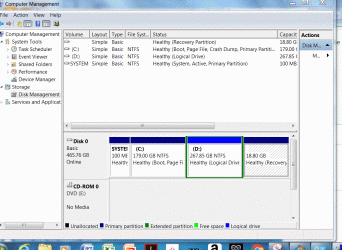
Can you list/post a copy of your installed programs -- especially ones you dont recognise
and a copy of your disk management structure
Control panel >> admin tools >> computer managment >> disk management

Roy
 

My Computer

Computer type
PC/Desktop
Computer Manufacturer/Model Number
medionl/Aspire 6930G/acer x55a
OS
W7 home premium 32bit/W7HP 64bit/w10 tp insider ring
CPU
E5300 dual core
Motherboard
medion MS7366
Memory
3gb
Graphics Card(s)
Nvidia Geforce 7100 Nforce 630i
Monitor(s) Displays
avixc
Internet Speed
n (isp resticted to 72)
Antivirus
mse/pands
Browser
palemoon
Other Info
Belkin Fd7050 n USB using Railink RT2870 drivers, more upto date
Hello Roy

The "polkit" is connected to BitDefender - just looking at the instructions, it says "you're booting into a clean Linux based environment". Maybe the above files then are to do with BitDefender and it didn't need to scan its own files.

I've attached screenshots of all my programmes.

Also attached is disk management structure.

LevelBest
 

Attachments

My Computer

Computer type
Laptop
Computer Manufacturer/Model Number
Samsung S3511
OS
Windows 7 Home Premium 64 Bit (Service Pack 1)
CPU
Premium Dual Core P6200
Motherboard
Samsung S3511
Memory
4 GB
Graphics Card(s)
Intel (R) HD Graphic
Sound Card
Realtek High Definition Audio
Screen Resolution
1366 x 768
Hard Drives
C: D: E: (NTFS)
Cooling
Drive temperature: 38 / 100
Mouse
Wired Logitech B100
Antivirus
McAfee Total Protection
Browser
Supermium Portable and r3dfox
Would it be easier to simply wipe the drive and re-install Win 7 ... clean and fresh?
 

My Computer

Computer type
PC/Desktop
Computer Manufacturer/Model Number
Dell
OS
Windows 10 x64
CPU
i7-7700K
Memory
16 GB 2400 MHz
Graphics Card(s)
GTX 1060
Sound Card
Integrated, plus external Presonus Audiobox USB
Monitor(s) Displays
2x AOC 27"
Screen Resolution
1920x1080
Hard Drives
512 GB M.2 SSD
2 TB 7200 RPM disk
Internet Speed
110 Mbps
Browser
Firefox
Back
Top