Getting rid of rootkits without normal/safe mode

TomanMT

New member
Member
Local time
11:59 AM
Messages
52
Hello,
I was wondering if it's possible to remove a rootkit without having to access normal or safe mode through windows recovery. Something like putting a program on a flash drive and running it from cmd.
I have recently run TDSSKiller recently and removed all threats, but due to unknown problems, I can't even use safe mode anymore (I just get the desktop with nothing on it.
I previously created a couple threads where I worked with VistaKing (why is he banned?) To remove any viruses, and the other when the problem came back but twice as bad.

http://www.sevenforums.com/system-s...es-even-safe-mode-found-obfuscator-virus.html

http://www.sevenforums.com/windows-...e-kb2859537-cannot-boot-normal-safe-mode.html

The first problem was solved by uninstalling the update, but the second now seems to be a virus.

It would be of great help if someone could even point me in a direction because I'm not sure it is a virus since I worked through it with VistaKing.

If you read through this thank you for your time,
TomanMT
 

My Computer My Computer

Computer type
PC/Desktop
Computer Manufacturer/Model Number
Asus n55sf
OS
Windows 7 Home Premium 64bit
CPU
i7
Memory
8gb
Graphics Card(s)
GeForce GT 555M
Antivirus
superantispyware, MSE, Malwarebytes
Browser
firefox
I should add the reason why I'm looking at root kits as the issue: I suspect the update kb2859537 to be part of the problem and apparently it has lots of problems when rootkits are installed. It should be noted that I couldn't find the update when searching with DISM though. So I'm pretty lost and have no idea why this is all going so badly.
 

My Computer My Computer

Computer type
PC/Desktop
Computer Manufacturer/Model Number
Asus n55sf
OS
Windows 7 Home Premium 64bit
CPU
i7
Memory
8gb
Graphics Card(s)
GeForce GT 555M
Antivirus
superantispyware, MSE, Malwarebytes
Browser
firefox

My Computer My Computer

Computer type
Laptop
Computer Manufacturer/Model Number
Sony Vaio VPCEB47GM Laptop
OS
Win 7 Pro 64-bit
CPU
Intel i5 2.4 Ghz
Memory
8GB DDR3
Graphics Card(s)
Intel HD 3000
Sound Card
IDT High Definition
Monitor(s) Displays
15.6 WGXA Anti-Glare LED
Screen Resolution
1280x800
Hard Drives
640Gb 7200rpm
Antivirus
MSE
Browser
Opera (primary) with IE9 backup
Thank you for responding, no I have not!
 

My Computer My Computer

Computer type
PC/Desktop
Computer Manufacturer/Model Number
Asus n55sf
OS
Windows 7 Home Premium 64bit
CPU
i7
Memory
8gb
Graphics Card(s)
GeForce GT 555M
Antivirus
superantispyware, MSE, Malwarebytes
Browser
firefox
You can use a boot partition manager called GParted. A rootkit will show up on the end of the drive as a hidden partition between 1 - 10 MB. In most cases it won't show up on Windows disk management, it will become visible with GParted.

GParted -- A free application for graphically managing disk device partitions

If you remove update kb2859537 & are still having problems, you could try running SFC to see if this can restore the integrity of your corrupted files. Be sure to run it 3X as it doesn't always fix everything the 1st or 2nd time.

http://www.sevenforums.com/tutorials/1538-sfc-scannow-command-system-file-checker.html

However, if your having that much trouble with your system, you may just want to wipe the drive & reinstall the OS. That way you get a clean start.
 

My Computer My Computer

Computer type
PC/Desktop
Computer Manufacturer/Model Number
Dell Hell oh Well
OS
Win 7 32 Home Premium, Win 7 64 Pro, Win 8.1, Win 10
CPU
Intel Core 2 Duo 2.93GHz
Memory
Not much with my ADHD
Graphics Card(s)
ATI Radeon HD 4350
Monitor(s) Displays
24" HDTV/Monitor
Screen Resolution
Blurry after a Scotch or 2
Hard Drives
1 HDD 250 GB, 1 HDD 1 TB, 3 - 1 TB Externals
Case
Don't get on my case...man :D
Cooling
I have an Air Conditioner & Diet Pepsi
Keyboard
Saitek Cyborg
Mouse
10 yr old MS optical mouse that still works
Internet Speed
Never fast enough
Antivirus
Various
Browser
Various
Hello, how do I run GParted?
I can't run sfc because there is a "system repair pending."
I'm trying to do everything possible to avoid a clean start, as I have a lot of important data.
 

My Computer My Computer

Computer type
PC/Desktop
Computer Manufacturer/Model Number
Asus n55sf
OS
Windows 7 Home Premium 64bit
CPU
i7
Memory
8gb
Graphics Card(s)
GeForce GT 555M
Antivirus
superantispyware, MSE, Malwarebytes
Browser
firefox
GParted is a boot disk. It is downloaded as an .iso file. Once the file is downloaded, double clicking on it will launch your default CD Burning Software & create a boot disk.

You may want to make this disk on another PC so as to avoid the possibility of corruption.
 

My Computer My Computer

Computer type
PC/Desktop
Computer Manufacturer/Model Number
Dell Hell oh Well
OS
Win 7 32 Home Premium, Win 7 64 Pro, Win 8.1, Win 10
CPU
Intel Core 2 Duo 2.93GHz
Memory
Not much with my ADHD
Graphics Card(s)
ATI Radeon HD 4350
Monitor(s) Displays
24" HDTV/Monitor
Screen Resolution
Blurry after a Scotch or 2
Hard Drives
1 HDD 250 GB, 1 HDD 1 TB, 3 - 1 TB Externals
Case
Don't get on my case...man :D
Cooling
I have an Air Conditioner & Diet Pepsi
Keyboard
Saitek Cyborg
Mouse
10 yr old MS optical mouse that still works
Internet Speed
Never fast enough
Antivirus
Various
Browser
Various
Oh. For some reason I got a tar.bz2 file.
 

My Computer My Computer

Computer type
PC/Desktop
Computer Manufacturer/Model Number
Asus n55sf
OS
Windows 7 Home Premium 64bit
CPU
i7
Memory
8gb
Graphics Card(s)
GeForce GT 555M
Antivirus
superantispyware, MSE, Malwarebytes
Browser
firefox
TomanMT,

I was wondering if it's possible to remove a rootkit without having to access normal or safe mode...

:info: Using a computer with Windows 7, 64-bit system, create a System Repair Disk:
Instructions:
System Repair Disc - Create
[Note: a 64-bit System Repair Disc can only be created on a 64-bit Windows 7]
We will use the disc shortly.

:info: Next, plug in a USB pen drive into the working computer.

Go to the the Farbar Recovery Scan Tool Download
Select the 64-bit download.
Save the program to the >> USB flash drive.
Remove when done.


[You may want to print these instructions so you can have access to them. Also, you may want to read them once before you apply them.]


:info: Now, go to the problem computer.
Plug in the USB pen drive which has FRST.

:info: Using the Windows 7 System Repair Disc just created, boot to the System Recovery Options (Option Two)
Instructions:
System Recovery Options

Select: Command Prompt

■In the Command Prompt window, at the blinking cursor type notepad and press: Enter
■In Notepad, under the File menu select: Open
■Double-click the Computer icon on the left.
■Find the pen drive letter, remember what letter it is, click on it, and press: Open
■Close out of Notepad.

■Click the Command Prompt window
■Type x:\frst64.exe, and press: Enter
Note: Replace the drive letter x with the drive letter of your pen drive!
■FRST starts, and prepares to run. Follow the prompts.
■Click Yes to the Disclaimer.
■Press the Scan button.

The scan runs, and, the program saves the FRST.txt, on the flash drive.

When done, click the Command Prompt window, type exit, and press: Enter
Back at the System Recovery Options, press: Shutdown
Remove the USB pen drive.

:ar: Plug the USB pen drive in the working computer, and please provide the FRST.txt in your reply.
 

My Computer My Computer

Computer type
PC/Desktop
Computer Manufacturer/Model Number
An ol' eMachines
OS
Windows 7 Home Premium
Internet Speed
Fine for me...I'm retired!
I have actually run Farbar before, but I'll do it again when I can (running kaspersky rescue disk)
Thanks!
 

My Computer My Computer

Computer type
PC/Desktop
Computer Manufacturer/Model Number
Asus n55sf
OS
Windows 7 Home Premium 64bit
CPU
i7
Memory
8gb
Graphics Card(s)
GeForce GT 555M
Antivirus
superantispyware, MSE, Malwarebytes
Browser
firefox
You may not even have a RootKit...

Do you have the last report created by TDSSKiller?

Logs have a name/location like:
C:\TDSSKiller.2.4.7_23.10.2013_15.31.43_log.txt
 

My Computer My Computer

Computer type
PC/Desktop
Computer Manufacturer/Model Number
An ol' eMachines
OS
Windows 7 Home Premium
Internet Speed
Fine for me...I'm retired!
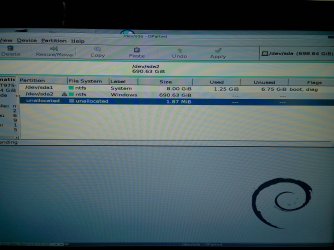
Okay so this is what Gparted found.
Could you tell me if there's any thing wrong and how to get rid of it?
Otherwise I ran kaspersky, Microsoft offline defender, and bitdefender. Bitdefender was the only one to find two Trojans, which I deleted even though I'm pretty sure they were false positives (from Skype and adw cleaner or something like that).
I have yet to run FRST, and will do so asap.
 

Attachments

  • IMG_20130901_131555.jpg
    IMG_20130901_131555.jpg
    584.5 KB · Views: 7

My Computer My Computer

Computer type
PC/Desktop
Computer Manufacturer/Model Number
Asus n55sf
OS
Windows 7 Home Premium 64bit
CPU
i7
Memory
8gb
Graphics Card(s)
GeForce GT 555M
Antivirus
superantispyware, MSE, Malwarebytes
Browser
firefox
I have no idea what it is so I'm looking in any direction...
I recently ran kaspersky rescue disk so does that qualify?
What do you think it could be? The update still?
 

My Computer My Computer

Computer type
PC/Desktop
Computer Manufacturer/Model Number
Asus n55sf
OS
Windows 7 Home Premium 64bit
CPU
i7
Memory
8gb
Graphics Card(s)
GeForce GT 555M
Antivirus
superantispyware, MSE, Malwarebytes
Browser
firefox
Do not see any partition in GParted with Flags: boot, hidden

Don't think there is a RootKit...

If you post the TDSSKiller report, as previously requested, and the Farbar Recovery Scan Tool, that will provide some enlightenment as to whether the problem is malware.
 

My Computer My Computer

Computer type
PC/Desktop
Computer Manufacturer/Model Number
An ol' eMachines
OS
Windows 7 Home Premium
Internet Speed
Fine for me...I'm retired!
I have attached the FRST text. How can I get the TDSSKiller log since I can't access safe mode?
 

Attachments

My Computer My Computer

Computer type
PC/Desktop
Computer Manufacturer/Model Number
Asus n55sf
OS
Windows 7 Home Premium 64bit
CPU
i7
Memory
8gb
Graphics Card(s)
GeForce GT 555M
Antivirus
superantispyware, MSE, Malwarebytes
Browser
firefox
You do not need to access Safe Mode to get the TDSSKiller report.

Logs have a name/location like:
C:\TDSSKiller.2.4.7_23.10.2013_15.31.43_log.txt

It is located in drive C: (or the drive where the Operating System is located)
 

My Computer My Computer

Computer type
PC/Desktop
Computer Manufacturer/Model Number
An ol' eMachines
OS
Windows 7 Home Premium
Internet Speed
Fine for me...I'm retired!
I have more logs, but I'm not sure they're necessary. I'll upload them if you like.
 

Attachments

My Computer My Computer

Computer type
PC/Desktop
Computer Manufacturer/Model Number
Asus n55sf
OS
Windows 7 Home Premium 64bit
CPU
i7
Memory
8gb
Graphics Card(s)
GeForce GT 555M
Antivirus
superantispyware, MSE, Malwarebytes
Browser
firefox
Don't see a rootkit in those reports.

On the Safe Mode issue...

At this point, are you able, or, not able to boot to Safe Mode?

What happens if you try to do so?
 

My Computer My Computer

Computer type
PC/Desktop
Computer Manufacturer/Model Number
An ol' eMachines
OS
Windows 7 Home Premium
Internet Speed
Fine for me...I'm retired!
No I can't boot into safe mode. Previously, it would just get stuck on the welcome screen, with the wheel spinning and freezing at points. When I tried booting normally I got a message saying that the user service profile couldn't log on or something like that, so searching this problem on the internet I created an administrator account. Now when booting into safe mode it will load into the background but there is no toolbar or icons. I can log in with cmd, but it doesn't work. I can type things in and move around the screen, but actual commands freeze everything and once unfrozen don't do anything.
 

My Computer My Computer

Computer type
PC/Desktop
Computer Manufacturer/Model Number
Asus n55sf
OS
Windows 7 Home Premium 64bit
CPU
i7
Memory
8gb
Graphics Card(s)
GeForce GT 555M
Antivirus
superantispyware, MSE, Malwarebytes
Browser
firefox
As of right now, what happens if you log in normally to your regular account?

Do you still get:
"User Profile Service failed the logon"


:info: See if you can open a Command Prompt:
Start > All Programs > Accessories > Command Prompt

Once Command Prompt is open, copy (highlite with mouse and select: Copy) the command that follows, and at the blinking cursor, click to the right of it, and select Paste:

Code:
wmic useraccount get name,sid
Press: Enter
Please provide the results by clicking on the icon on the upper left frame of the Command Prompt, and selecting Edit > Select All
Once again, do the same and select: Edit > Copy
Open Notepad, and provide the results in your reply.


:info: Also, at the Command Prompt type:

Code:
set userprof
Please provide the results as above.
 
Last edited:

My Computer My Computer

Computer type
PC/Desktop
Computer Manufacturer/Model Number
An ol' eMachines
OS
Windows 7 Home Premium
Internet Speed
Fine for me...I'm retired!
Back
Top