
Getting sound out of speakers

calccrypto

New member
Member
VIP
Local time
3:47 PM
Messages
132
Location
Third Rock From the Sun
I plugged in a 2.1 speaker system into my desktop (XP sp3), and for some reason, windows media player refuses to output sound from them when music/movies are playing. instead, the sound comes through the monitor. otherwise, all sound comes through the speakers, even the error sounds that windows media player plays when i click the video screen while still having the properties window open.

Does anyone know a fix to this?
 

My Computer My Computer

At a glance

7 Ultimate x64, Windows 7 Enterprise x64Intel Q6600 @ 3.33 GHz, Intel i5 @ 2.53 GHzOCZ Gold 800 4GB, Some sort of RAM 4GBGeForce GT240, NVIDA NVS 3100M
Computer Manufacturer/Model Number
Self Built, Lenovo T410
OS
7 Ultimate x64, Windows 7 Enterprise x64
CPU
Intel Q6600 @ 3.33 GHz, Intel i5 @ 2.53 GHz
Motherboard
ASUS P5Q Pro, Lenovo 2522DY1
Memory
OCZ Gold 800 4GB, Some sort of RAM 4GB
Graphics Card(s)
GeForce GT240, NVIDA NVS 3100M
Monitor(s) Displays
H213H
Screen Resolution
1900 x 1080, 1440 x 900
Hard Drives
Seagate 2 Tb
Seagate 160 Gb
WD 750 Gb, HITACHI 500GB
PSU
ISO-450
Case
Sunbeam ACIII-T Transparent Clear Acrylic ATX Mid Tower
Cooling
Spin Q
Mouse
Logitec G600, Ultranav
Other Info
EDIMAX EW-7811Un Wireless Nano Adapter
Did you plug the speakers into a different sound port than your monitor speakers are plugged into?
 

My Computer My Computer

At a glance

W7 Professional x64AMD Athlon II X3 445 Rana 3.10 GHzPNY XLR DDR3 1600 4x2GBNVIDIA GeForce GTS 450 (fermi) 1GB GDDR5
Computer Manufacturer/Model Number
Pugh Technologies
OS
W7 Professional x64
CPU
AMD Athlon II X3 445 Rana 3.10 GHz
Motherboard
MSI 870A-G54
Memory
PNY XLR DDR3 1600 4x2GB
Graphics Card(s)
NVIDIA GeForce GTS 450 (fermi) 1GB GDDR5
Sound Card
Realtek ALC892 onboard
Monitor(s) Displays
ASUS VE205t, Viewsonic VX2035WM
Screen Resolution
1600x900, 1600x1050
Hard Drives
977GB Hitachi Hitachi HDS721010CLA332
244GB Western Digital WDC WD2500AAJS-65B4A0
488GB Western Digital WDC WD5000AAJS-00A8B0
488GB Western Digital WDC WD5000AAKS-00UU3A0
PSU
Antec EarthWatts EA650 650W
Case
ThermalTake Armor A90 Mid Tower
Cooling
3x 120mm in, 1x 120mm & 200mm out, self built hydro-cooler
Keyboard
Logitec 55
Mouse
Razer Deathadder
Internet Speed
20 Mbps D/L, 9 Mbps U/L
my speakers are in the green speaker/headphone jack. my monitor is connected by hdmi, so i dont really have a second sound wire/connector
 

My Computer My Computer

At a glance

7 Ultimate x64, Windows 7 Enterprise x64Intel Q6600 @ 3.33 GHz, Intel i5 @ 2.53 GHzOCZ Gold 800 4GB, Some sort of RAM 4GBGeForce GT240, NVIDA NVS 3100M
Computer Manufacturer/Model Number
Self Built, Lenovo T410
OS
7 Ultimate x64, Windows 7 Enterprise x64
CPU
Intel Q6600 @ 3.33 GHz, Intel i5 @ 2.53 GHz
Motherboard
ASUS P5Q Pro, Lenovo 2522DY1
Memory
OCZ Gold 800 4GB, Some sort of RAM 4GB
Graphics Card(s)
GeForce GT240, NVIDA NVS 3100M
Monitor(s) Displays
H213H
Screen Resolution
1900 x 1080, 1440 x 900
Hard Drives
Seagate 2 Tb
Seagate 160 Gb
WD 750 Gb, HITACHI 500GB
PSU
ISO-450
Case
Sunbeam ACIII-T Transparent Clear Acrylic ATX Mid Tower
Cooling
Spin Q
Mouse
Logitec G600, Ultranav
Other Info
EDIMAX EW-7811Un Wireless Nano Adapter
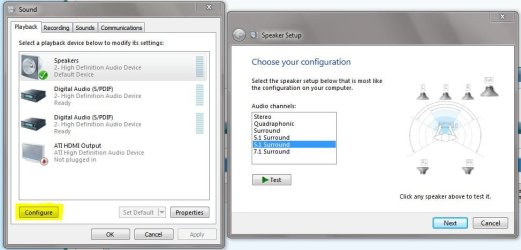
Right click your volume icon, and select "playback"

Select your speakers and click "Configure"

Choose some different settings and test each speaker, and see if that fixes it. If it does, save the settings.
 

Attachments

  • Sound.JPG
    Sound.JPG
    57.8 KB · Views: 35

My Computer My Computer

At a glance

W7 Professional x64AMD Athlon II X3 445 Rana 3.10 GHzPNY XLR DDR3 1600 4x2GBNVIDIA GeForce GTS 450 (fermi) 1GB GDDR5
Computer Manufacturer/Model Number
Pugh Technologies
OS
W7 Professional x64
CPU
AMD Athlon II X3 445 Rana 3.10 GHz
Motherboard
MSI 870A-G54
Memory
PNY XLR DDR3 1600 4x2GB
Graphics Card(s)
NVIDIA GeForce GTS 450 (fermi) 1GB GDDR5
Sound Card
Realtek ALC892 onboard
Monitor(s) Displays
ASUS VE205t, Viewsonic VX2035WM
Screen Resolution
1600x900, 1600x1050
Hard Drives
977GB Hitachi Hitachi HDS721010CLA332
244GB Western Digital WDC WD2500AAJS-65B4A0
488GB Western Digital WDC WD5000AAJS-00A8B0
488GB Western Digital WDC WD5000AAKS-00UU3A0
PSU
Antec EarthWatts EA650 650W
Case
ThermalTake Armor A90 Mid Tower
Cooling
3x 120mm in, 1x 120mm & 200mm out, self built hydro-cooler
Keyboard
Logitec 55
Mouse
Razer Deathadder
Internet Speed
20 Mbps D/L, 9 Mbps U/L
my desktop has xp, unfortunately, and the playback button is simply a choice, not a link to another menu
 

My Computer My Computer

At a glance

7 Ultimate x64, Windows 7 Enterprise x64Intel Q6600 @ 3.33 GHz, Intel i5 @ 2.53 GHzOCZ Gold 800 4GB, Some sort of RAM 4GBGeForce GT240, NVIDA NVS 3100M
Computer Manufacturer/Model Number
Self Built, Lenovo T410
OS
7 Ultimate x64, Windows 7 Enterprise x64
CPU
Intel Q6600 @ 3.33 GHz, Intel i5 @ 2.53 GHz
Motherboard
ASUS P5Q Pro, Lenovo 2522DY1
Memory
OCZ Gold 800 4GB, Some sort of RAM 4GB
Graphics Card(s)
GeForce GT240, NVIDA NVS 3100M
Monitor(s) Displays
H213H
Screen Resolution
1900 x 1080, 1440 x 900
Hard Drives
Seagate 2 Tb
Seagate 160 Gb
WD 750 Gb, HITACHI 500GB
PSU
ISO-450
Case
Sunbeam ACIII-T Transparent Clear Acrylic ATX Mid Tower
Cooling
Spin Q
Mouse
Logitec G600, Ultranav
Other Info
EDIMAX EW-7811Un Wireless Nano Adapter
I could swear I set up multiple speakers the same way, or a similar way, in XP... It's been about five years since I've set up an XP machine, however.

Let me research the issue, maybe I have an XP machine lying around somewhere.
 

My Computer My Computer

At a glance

W7 Professional x64AMD Athlon II X3 445 Rana 3.10 GHzPNY XLR DDR3 1600 4x2GBNVIDIA GeForce GTS 450 (fermi) 1GB GDDR5
Computer Manufacturer/Model Number
Pugh Technologies
OS
W7 Professional x64
CPU
AMD Athlon II X3 445 Rana 3.10 GHz
Motherboard
MSI 870A-G54
Memory
PNY XLR DDR3 1600 4x2GB
Graphics Card(s)
NVIDIA GeForce GTS 450 (fermi) 1GB GDDR5
Sound Card
Realtek ALC892 onboard
Monitor(s) Displays
ASUS VE205t, Viewsonic VX2035WM
Screen Resolution
1600x900, 1600x1050
Hard Drives
977GB Hitachi Hitachi HDS721010CLA332
244GB Western Digital WDC WD2500AAJS-65B4A0
488GB Western Digital WDC WD5000AAJS-00A8B0
488GB Western Digital WDC WD5000AAKS-00UU3A0
PSU
Antec EarthWatts EA650 650W
Case
ThermalTake Armor A90 Mid Tower
Cooling
3x 120mm in, 1x 120mm & 200mm out, self built hydro-cooler
Keyboard
Logitec 55
Mouse
Razer Deathadder
Internet Speed
20 Mbps D/L, 9 Mbps U/L
my desktop has xp, unfortunately, and the playback button is simply a choice, not a link to another menu


These are simply guesses but worth a shot. Open Control Panel and go to Sound/Audio Devices... look at your options there, there may be a place to set default audio device.

Another place to look is the WMP options menu..

And last, odd as it sounds Control Panel Display, see if there's an option to disable HDMI audio.

One of the reasons audio is shifted to HDMI is because the system might recognize some of it as being surround capable?

Ap
 

My Computer My Computer

At a glance

Windows 7 Home PremiumIntel Core 2 Duo @ 3.00gHz4 GBATI Radeon HD 2600 XT
Computer Manufacturer/Model Number
Assembled in my workshop
OS
Windows 7 Home Premium
CPU
Intel Core 2 Duo @ 3.00gHz
Motherboard
Gigabyte GA-P35-S3G
Memory
4 GB
Graphics Card(s)
ATI Radeon HD 2600 XT
Sound Card
RME 24/96 Card, Realtek Internal Audio PreSonus FireStudio
Monitor(s) Displays
Acer 1917 (x2)
Screen Resolution
1280 x 1024 on both monitors
Hard Drives
Three 250GB Seagate SATA Barracuda 7200rpm
PSU
Rosewill 500-watt
Case
Rosewill mid-tower
Cooling
Noctua NH-U9B (CPU), PwrSupply fan + single large case Fan
Keyboard
Macally w/2/USB ports.
Mouse
Trackman Wheel
Other Info
Event 20/20 bas studio monitors, Yamaha sub.
Rackmount Korg/Roland/Yamaha synthesizers,
Cubase MIDI/audio recording. Sony Soundforge audio/mastering software. CD Architect Mastering. RME & Presonus audio interfaces.
Update drivers????
Check device manager
 

My Computer My Computer

At a glance

Windows 7 Home Premium & Windows XP Pro SP3 D...Intel Pentium Dual Core T2060 @ 1.6Ghz1048MB DDR2 RamATI Xpress 200M
Computer Manufacturer/Model Number
ASUS F5R
OS
Windows 7 Home Premium & Windows XP Pro SP3 Dualboot
CPU
Intel Pentium Dual Core T2060 @ 1.6Ghz
Memory
1048MB DDR2 Ram
Graphics Card(s)
ATI Xpress 200M
Sound Card
Realtek High Definition Audio
Hard Drives
Western Digital Scorpio Blue 250 GB, SATA 3 Gb/s, 8 MB Cache, 5400 RPM
Keyboard
Microsoft Digital Media 3000
Other Info
Sound System: Logitech Z313 2.1
Ive tried the control panel, but nothing. where's the WMP options menu?
 

My Computer My Computer

At a glance

7 Ultimate x64, Windows 7 Enterprise x64Intel Q6600 @ 3.33 GHz, Intel i5 @ 2.53 GHzOCZ Gold 800 4GB, Some sort of RAM 4GBGeForce GT240, NVIDA NVS 3100M
Computer Manufacturer/Model Number
Self Built, Lenovo T410
OS
7 Ultimate x64, Windows 7 Enterprise x64
CPU
Intel Q6600 @ 3.33 GHz, Intel i5 @ 2.53 GHz
Motherboard
ASUS P5Q Pro, Lenovo 2522DY1
Memory
OCZ Gold 800 4GB, Some sort of RAM 4GB
Graphics Card(s)
GeForce GT240, NVIDA NVS 3100M
Monitor(s) Displays
H213H
Screen Resolution
1900 x 1080, 1440 x 900
Hard Drives
Seagate 2 Tb
Seagate 160 Gb
WD 750 Gb, HITACHI 500GB
PSU
ISO-450
Case
Sunbeam ACIII-T Transparent Clear Acrylic ATX Mid Tower
Cooling
Spin Q
Mouse
Logitec G600, Ultranav
Other Info
EDIMAX EW-7811Un Wireless Nano Adapter
Help

When you get to the dropdown as shown in the 4th picture there, set it to the sound card instead of HDMI audio.
 

My Computer My Computer

At a glance

Win 7 Ultimate x64FX-8350 @ 4.6 GHz so farADATA XPG V1 Series Black 8GB DDR3 1600Sapphire R9 270x Dual-X
Computer type
PC/Desktop
Computer Manufacturer/Model Number
Me
OS
Win 7 Ultimate x64
CPU
FX-8350 @ 4.6 GHz so far
Motherboard
Asus M5A97 EVO
Memory
ADATA XPG V1 Series Black 8GB DDR3 1600
Graphics Card(s)
Sapphire R9 270x Dual-X
Sound Card
Xonar DGX w/ Corsair Vengence 1300
Monitor(s) Displays
Acer S232HL Abid
Screen Resolution
1920x1080
Hard Drives
120 GB OCZ Vertex 3
500 GB Seagate 7200.12
PSU
Antec Earthwatts 650W Green
Case
Antec Three Hundred
Cooling
Cooler Master 212 EVO
Keyboard
Logitech G510
Mouse
Logitech G500s
Internet Speed
35000/3000
I did that and it didnt do anything, unfortunately

EDIT: i plugged in a vga cable and now its telling me that the sound drivers are old, but then why do the speakers work for everything else?

EDIT again: wow. it suddenly decided to work
 
Last edited:

My Computer My Computer

At a glance

7 Ultimate x64, Windows 7 Enterprise x64Intel Q6600 @ 3.33 GHz, Intel i5 @ 2.53 GHzOCZ Gold 800 4GB, Some sort of RAM 4GBGeForce GT240, NVIDA NVS 3100M
Computer Manufacturer/Model Number
Self Built, Lenovo T410
OS
7 Ultimate x64, Windows 7 Enterprise x64
CPU
Intel Q6600 @ 3.33 GHz, Intel i5 @ 2.53 GHz
Motherboard
ASUS P5Q Pro, Lenovo 2522DY1
Memory
OCZ Gold 800 4GB, Some sort of RAM 4GB
Graphics Card(s)
GeForce GT240, NVIDA NVS 3100M
Monitor(s) Displays
H213H
Screen Resolution
1900 x 1080, 1440 x 900
Hard Drives
Seagate 2 Tb
Seagate 160 Gb
WD 750 Gb, HITACHI 500GB
PSU
ISO-450
Case
Sunbeam ACIII-T Transparent Clear Acrylic ATX Mid Tower
Cooling
Spin Q
Mouse
Logitec G600, Ultranav
Other Info
EDIMAX EW-7811Un Wireless Nano Adapter
Back
Top