Solved Getting universal stop symbol in browsers

coolecho

New member
Member
Local time
10:30 PM
Messages
38
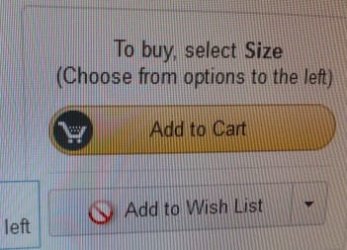
I installed and used Bitdefender internet security 2013 and was getting windows explorer crashes so I deinstalled it. I enabled Windows defender, and checked Windows firewall was enabled after deinstall. Now when I'm browsing Amazon for example in Firefox I get a "universal stop symbol" when hovering over "add to wish", or "add to cart" and can't perform the action. I installed and tried Opera and it does the same thing! I tried disabling Defender and Firewall and I still get the same. I also checked security settings in Firefox. It seems that perhaps scripting has been disabled??
 

My Computer My Computer

OS
Windows 7 64bit
Can you post a screen shot of this "universal stop symbol"?

Was this something that started with Bitdefender? Suggest you run the Bitdefender Removal Tool and see if it isn't a remnant left over.

Support

A Guy
 

My Computer My Computer

Computer type
PC/Desktop
OS
Windows 10 Home x64
CPU
INTEL Core i5-750 Quad-Core 3.37GHz
Motherboard
ASUS P7P55D
Memory
HyperX Fury Black Series 8GB (2 x 4GB) 1866Mhz
Graphics Card(s)
EVGA GeForce GTX 750 Superclocked 1GB 128-Bit GDDR5
Monitor(s) Displays
LG 32MA68HY 32" IPS
Screen Resolution
1920 x 1080
Hard Drives
Samsung 840 Evo 120GB, SEAGATE 500GB Barracuda® 7200.12, SATA 3 Gb/s, 7200 RPM, 16MB cache
PSU
ANTEC TruePower New TP-550, 80 PLUS, 550W
Case
ANTEC Three Hundred Illusion
Cooling
COOLER MASTER Hyper 212 Plus, 4 x 120mm 1 x 140mm Noctua's
Internet Speed
85 + Mbps
Antivirus
Avast
Browser
Vivaldi
Not sure what this is. The stop symbol in the picture attached is actually my cursor when I pause (or try to click on) over the add to wishlist, or add to cart. This never happened when bitdefender was installed. I'll try the bitdefender removal. This happens in two browsers. I won't Try Windows IE browser cause I hate it. I have another working PC to use in the interim.

StopSymbol.jpg
 

My Computer My Computer

OS
Windows 7 64bit
If this just started, I'd suggest a System Restore Point from before it began.

http://www.sevenforums.com/tutorials/700-system-restore.html

It does almost sound like scripting, but you have it in 2 browsers. I'd also suggest deleting temp internet files, but again, it sounds like it happened in Opera with a new install. Try booting to Safe Mode with Networking, and see if you get it there.

http://www.sevenforums.com/tutorials/69585-safe-mode.html

You can check to see if scripting is disabled in FF, but it's unlikely Opera has it disabled as well. You really should check with IE as this will confirm 100% it isn't a browser problem. Delete temp files, and if no fix, try in safe mode.

A Guy
 

My Computer My Computer

Computer type
PC/Desktop
OS
Windows 10 Home x64
CPU
INTEL Core i5-750 Quad-Core 3.37GHz
Motherboard
ASUS P7P55D
Memory
HyperX Fury Black Series 8GB (2 x 4GB) 1866Mhz
Graphics Card(s)
EVGA GeForce GTX 750 Superclocked 1GB 128-Bit GDDR5
Monitor(s) Displays
LG 32MA68HY 32" IPS
Screen Resolution
1920 x 1080
Hard Drives
Samsung 840 Evo 120GB, SEAGATE 500GB Barracuda® 7200.12, SATA 3 Gb/s, 7200 RPM, 16MB cache
PSU
ANTEC TruePower New TP-550, 80 PLUS, 550W
Case
ANTEC Three Hundred Illusion
Cooling
COOLER MASTER Hyper 212 Plus, 4 x 120mm 1 x 140mm Noctua's
Internet Speed
85 + Mbps
Antivirus
Avast
Browser
Vivaldi
Thanks. Gotta put this off. Now I have to troubleshoot my RAID setup!
 

My Computer My Computer

OS
Windows 7 64bit
Back
Top