Solved Ghost images on desktop

Elljay

New member
Power User
VIP
Local time
5:50 PM
Messages
417
Location
In the woods by the creek.
Hello there.
How do I explain this?
For quite sometime, I have been having a weird issue with images remaining on my desktop, long after I have moved them to a folder and off my desktop completely. Starting to make me nuts.
If I download or move an image to my desktop and click on it to view it, I will see images that used to be there. In order to view the new image, I need to move it around my desktop and find a space where the new image will finally display.
I would appreciate anyone's help with this.
Thank you.
 

My Computer

Computer type
Laptop
Computer Manufacturer/Model Number
HP 2000-150CA Notebook
OS
Windows 7 Home Premium (x64) Service Pack 1 (build 7601)
CPU
Intel Pentium P6200 2.13 GHz
Motherboard
HP 3674 28.49 1066 MH / BIOS: HP F.34
Memory
4.00 GB
Graphics Card(s)
Intel HD Graphics
Sound Card
Multimedia HD
Monitor(s) Displays
15.3
Screen Resolution
1366X768
Hard Drives
Hitachi HTS545050B9A300 ATA
(500.11 GB)
Keyboard
Standard PS2
Mouse
Synaptics PS2 Port Touch Pad / Microsoft HID-compliant mouse
Internet Speed
100 Mbps
Antivirus
MSE
Browser
PaleMoon / Fire Fox
Other Info
Purchased 2011
Could you add a screenshot to show the problem?
 

My Computer

Computer type
PC/Desktop
Computer Manufacturer/Model Number
Custom Built
OS
Windows 10 Pro
CPU
AMD Ryzen 5 2400G Processor with Radeon RX Vega 11 Graphics
Motherboard
ASRock X470 Master SLI/AC AM4 AMD Promontory X470 SATA 6Gb/s
Memory
G.SKILL Ripjaws V Series 16GB (2 x 8GB) 288-Pin DDR4 SDRAM D
Graphics Card(s)
2047MB NVIDIA GeForce GTX 1060 6GB (EVGA)
Sound Card
Motherboard Built in
Monitor(s) Displays
Acer R240HY bidx 23.8-Inch IPS HDMI DVI VGA (1920 x 1080) Wi
Screen Resolution
1920 x 1080
Hard Drives
1TB Sandisk SSD PLUS (Main drive)
500 GB Seagate 7200 RPM (Games)
500 GB Western Digital 7200 RPM (Virtual Machines)
PSU
CORSAIR TX Series TX650M 650W 80+ Gold Modular Power Supply
Case
CORSAIR CARBIDE SPEC-02 Mid-Tower Gaming Case, Red LED Fan
Cooling
220mm, two 120mm, and four 60mm fans
Keyboard
Wired Dell keyboard
Mouse
Wireless Logitech mouse
Internet Speed
250mb down, 30mb up
Antivirus
Panda Cloud Antivirus
Browser
Chrome-ish x64
Other Info
Your awesome for reading this.
Ok. I will. I need a few minutes though. :) I'm still green at this.
 

My Computer

Computer type
Laptop
Computer Manufacturer/Model Number
HP 2000-150CA Notebook
OS
Windows 7 Home Premium (x64) Service Pack 1 (build 7601)
CPU
Intel Pentium P6200 2.13 GHz
Motherboard
HP 3674 28.49 1066 MH / BIOS: HP F.34
Memory
4.00 GB
Graphics Card(s)
Intel HD Graphics
Sound Card
Multimedia HD
Monitor(s) Displays
15.3
Screen Resolution
1366X768
Hard Drives
Hitachi HTS545050B9A300 ATA
(500.11 GB)
Keyboard
Standard PS2
Mouse
Synaptics PS2 Port Touch Pad / Microsoft HID-compliant mouse
Internet Speed
100 Mbps
Antivirus
MSE
Browser
PaleMoon / Fire Fox
Other Info
Purchased 2011
Use this to capture the screen:
PicPick | All-in-one design tool, Screen Capture, Image Editor, Color Picker, Pixel Ruler and More
But I believe what you are trying to explain is that, when you move pictures from one folder to another, you still see those pictures when you are looking at the files in preview mode?, like in big icons?, sometimes the system takes time in refreshing those previews. Or if a picture won't do, try to record the screen with this, CamStudio and upload it to youtube:
CamStudio - Free Screen Recording Software
or make a .gif file with this app, GifCam if youtube won't do:
GifCam | BahraniApps Blog
It's all open-source software, so it's free for use.
 

My Computer

Computer type
PC/Desktop
Computer Manufacturer/Model Number
Custom Build
OS
Windows 7 Ultimate 64bit
CPU
AMD Phenom X4 9850
Motherboard
Gigabyte Technology GA-MA74GM-S2 (Socket M2)
Memory
4.00GB Crucial Dual-Channel DDR2 @ 401MHz (5-5-5-18)
Graphics Card(s)
ATI Radeon 2100 (Gigabyte)
Sound Card
Realtek High Definition Audio
Monitor(s) Displays
LM742 on ATI Radeon 2100
Screen Resolution
1280x1024 pixels
Hard Drives
WDC WD15EARS-00Z5B1 ATA Device, 1.5 TB, 2 partitions: - 500 GB (aprox.) Where Windows 7 resides, - 1 TB (aprox.) Storage
PSU
Ultra X4 ATX 600W
Case
ST ATX Mid-Tower Case
Cooling
Ultra Carbon X3
Keyboard
Logitech K360
Mouse
Logitech MX10
Internet Speed
802.11n USB Wireless LAN Card
Antivirus
AVG Internet Security 2014
Browser
Firefox Mozilla
Other Info
I use a graphic tablet, a XBOX360 Wired Controller, a external CD/DVD Driver, and my entire system is connected to a 6 slots Protected Power-surge
Hi Andrew.
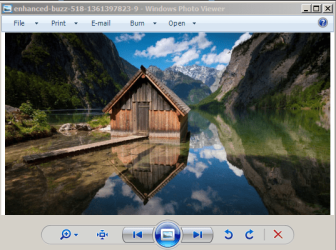
Here is what I will see. Say I want to look at this quote. When I click on it, I will see an image I filed and moved off my desktop months ago.
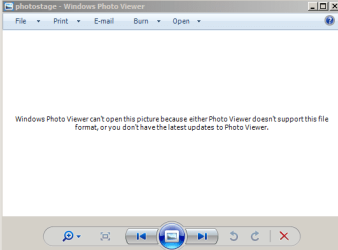
Occasionally (like now) I will also see 'Windows Photo Viewer can't open this picture because Photo Viewer doesn't support this file format or you don't have the latest updates to Photo Viewer.' I then have to move the image I want to view around the desktop to find 'a blank spot', so to speak and only then will it display.
 

Attachments

  • CAPTURE 1.PNG
    CAPTURE 1.PNG
    10.7 KB · Views: 48
  • Capture 2.PNG
    Capture 2.PNG
    97.5 KB · Views: 48
  • Capture 4.PNG
    Capture 4.PNG
    8.5 KB · Views: 47
  • Capture 3.PNG
    Capture 3.PNG
    65.8 KB · Views: 47
Last edited:

My Computer

Computer type
Laptop
Computer Manufacturer/Model Number
HP 2000-150CA Notebook
OS
Windows 7 Home Premium (x64) Service Pack 1 (build 7601)
CPU
Intel Pentium P6200 2.13 GHz
Motherboard
HP 3674 28.49 1066 MH / BIOS: HP F.34
Memory
4.00 GB
Graphics Card(s)
Intel HD Graphics
Sound Card
Multimedia HD
Monitor(s) Displays
15.3
Screen Resolution
1366X768
Hard Drives
Hitachi HTS545050B9A300 ATA
(500.11 GB)
Keyboard
Standard PS2
Mouse
Synaptics PS2 Port Touch Pad / Microsoft HID-compliant mouse
Internet Speed
100 Mbps
Antivirus
MSE
Browser
PaleMoon / Fire Fox
Other Info
Purchased 2011
Hmm that is odd. Do you have issues with any other graphic objects? Like in other programs or anything?

I use windows live photo gallery as it supports more formats. I do not use the original photo viewer.

May I make a suggestion? I normally do not recoomend to replace something just because it does not work, but could you try windows live photo gallery and set it as the default program for photos?

The issue should then no longer occur.

Windows live photo gallery:

Photo Gallery - Microsoft Windows

Check what programs you want. The photo gallery and video editor are quite decent.
 

My Computer

Computer type
PC/Desktop
Computer Manufacturer/Model Number
Custom Built
OS
Windows 10 Pro
CPU
AMD Ryzen 5 2400G Processor with Radeon RX Vega 11 Graphics
Motherboard
ASRock X470 Master SLI/AC AM4 AMD Promontory X470 SATA 6Gb/s
Memory
G.SKILL Ripjaws V Series 16GB (2 x 8GB) 288-Pin DDR4 SDRAM D
Graphics Card(s)
2047MB NVIDIA GeForce GTX 1060 6GB (EVGA)
Sound Card
Motherboard Built in
Monitor(s) Displays
Acer R240HY bidx 23.8-Inch IPS HDMI DVI VGA (1920 x 1080) Wi
Screen Resolution
1920 x 1080
Hard Drives
1TB Sandisk SSD PLUS (Main drive)
500 GB Seagate 7200 RPM (Games)
500 GB Western Digital 7200 RPM (Virtual Machines)
PSU
CORSAIR TX Series TX650M 650W 80+ Gold Modular Power Supply
Case
CORSAIR CARBIDE SPEC-02 Mid-Tower Gaming Case, Red LED Fan
Cooling
220mm, two 120mm, and four 60mm fans
Keyboard
Wired Dell keyboard
Mouse
Wireless Logitech mouse
Internet Speed
250mb down, 30mb up
Antivirus
Panda Cloud Antivirus
Browser
Chrome-ish x64
Other Info
Your awesome for reading this.
I would recommend also scanning each photo for infection. All it takes in one infected photo to mess up the rest of the photos and possibly more problems.
 

My Computer

Computer type
PC/Desktop
Computer Manufacturer/Model Number
Home made Desktop
OS
Windows 10 Pro. 64/ version 1709 Windows 7 Pro/64
CPU
Intel i7-6800K @ 4.3
Motherboard
ASUS X-99 Deluxe II
Memory
Corsair Platinum 16 gig @2400
Graphics Card(s)
EVGA GTX 1070 OC
Monitor(s) Displays
Asus 27" LED LCD/VE278Q
Screen Resolution
1920-1080 or 1280-720 HDMI
Hard Drives
INTEL SSD 730-240 Gb Sata 3.0/
PSU
EVGA Platium 1200W
Case
Phanteks Luxe Tempered Glass 8 fans/ one radiator
Cooling
XSPC/ Water Cooled CPU
Keyboard
Das 4 Professional
Mouse
Logitech M705/MX Anywhere 2-S
Internet Speed
100 mbits
Antivirus
Microsoft Security Essentials/ Malwarebytes Premium 3.0/ SAS
Browser
I.E. 11 default/Firefox/ ISP Time Warner Cable/Spectrum
Other Info
LG BluRay Burner/
Sound system-KLipsch-THX/
Icy Dock ssd Hot Swap bays.
Sorry Damien, I don't think you know what I mean. It can be a family photo that I just want to view and I see images that I once had one my desktop... but moved into a folder and OFF my desktop a long time ago. I can not explain it any other way.
 

My Computer

Computer type
Laptop
Computer Manufacturer/Model Number
HP 2000-150CA Notebook
OS
Windows 7 Home Premium (x64) Service Pack 1 (build 7601)
CPU
Intel Pentium P6200 2.13 GHz
Motherboard
HP 3674 28.49 1066 MH / BIOS: HP F.34
Memory
4.00 GB
Graphics Card(s)
Intel HD Graphics
Sound Card
Multimedia HD
Monitor(s) Displays
15.3
Screen Resolution
1366X768
Hard Drives
Hitachi HTS545050B9A300 ATA
(500.11 GB)
Keyboard
Standard PS2
Mouse
Synaptics PS2 Port Touch Pad / Microsoft HID-compliant mouse
Internet Speed
100 Mbps
Antivirus
MSE
Browser
PaleMoon / Fire Fox
Other Info
Purchased 2011
Really? Scan everyone Layback Bear... that would be intense and take me many many hours of work. Out of curiosity, how do I do that?
 

My Computer

Computer type
Laptop
Computer Manufacturer/Model Number
HP 2000-150CA Notebook
OS
Windows 7 Home Premium (x64) Service Pack 1 (build 7601)
CPU
Intel Pentium P6200 2.13 GHz
Motherboard
HP 3674 28.49 1066 MH / BIOS: HP F.34
Memory
4.00 GB
Graphics Card(s)
Intel HD Graphics
Sound Card
Multimedia HD
Monitor(s) Displays
15.3
Screen Resolution
1366X768
Hard Drives
Hitachi HTS545050B9A300 ATA
(500.11 GB)
Keyboard
Standard PS2
Mouse
Synaptics PS2 Port Touch Pad / Microsoft HID-compliant mouse
Internet Speed
100 Mbps
Antivirus
MSE
Browser
PaleMoon / Fire Fox
Other Info
Purchased 2011
Andrew and Bear are right, you should try to use other program to open image files, or scan for virus, that never hurts to know. I personally use XNView:
XnView Software · Software for reading, organizing and processing images
This program is open source, is free and it opens almost ANY kind of existing image file, and to be. Try to check if those programs do open correctly your files, because to be honest, the native windows file viewer is not good at all, it doesn't even open .gif files.
 

My Computer

Computer type
PC/Desktop
Computer Manufacturer/Model Number
Custom Build
OS
Windows 7 Ultimate 64bit
CPU
AMD Phenom X4 9850
Motherboard
Gigabyte Technology GA-MA74GM-S2 (Socket M2)
Memory
4.00GB Crucial Dual-Channel DDR2 @ 401MHz (5-5-5-18)
Graphics Card(s)
ATI Radeon 2100 (Gigabyte)
Sound Card
Realtek High Definition Audio
Monitor(s) Displays
LM742 on ATI Radeon 2100
Screen Resolution
1280x1024 pixels
Hard Drives
WDC WD15EARS-00Z5B1 ATA Device, 1.5 TB, 2 partitions: - 500 GB (aprox.) Where Windows 7 resides, - 1 TB (aprox.) Storage
PSU
Ultra X4 ATX 600W
Case
ST ATX Mid-Tower Case
Cooling
Ultra Carbon X3
Keyboard
Logitech K360
Mouse
Logitech MX10
Internet Speed
802.11n USB Wireless LAN Card
Antivirus
AVG Internet Security 2014
Browser
Firefox Mozilla
Other Info
I use a graphic tablet, a XBOX360 Wired Controller, a external CD/DVD Driver, and my entire system is connected to a 6 slots Protected Power-surge
Really? Scan everyone Layback Bear... that would be intense and take me many many hours of work. Out of curiosity, how do I do that?

He means to scan your pc for infection with your antivirus, such as running a full scan. Do you know how to do this?

I suggest this as well.

It could also be a bad thumbnail causing the issue.

Unfortunately these kind of issues can be hard to pinpoint.
 

My Computer

Computer type
PC/Desktop
Computer Manufacturer/Model Number
Custom Built
OS
Windows 10 Pro
CPU
AMD Ryzen 5 2400G Processor with Radeon RX Vega 11 Graphics
Motherboard
ASRock X470 Master SLI/AC AM4 AMD Promontory X470 SATA 6Gb/s
Memory
G.SKILL Ripjaws V Series 16GB (2 x 8GB) 288-Pin DDR4 SDRAM D
Graphics Card(s)
2047MB NVIDIA GeForce GTX 1060 6GB (EVGA)
Sound Card
Motherboard Built in
Monitor(s) Displays
Acer R240HY bidx 23.8-Inch IPS HDMI DVI VGA (1920 x 1080) Wi
Screen Resolution
1920 x 1080
Hard Drives
1TB Sandisk SSD PLUS (Main drive)
500 GB Seagate 7200 RPM (Games)
500 GB Western Digital 7200 RPM (Virtual Machines)
PSU
CORSAIR TX Series TX650M 650W 80+ Gold Modular Power Supply
Case
CORSAIR CARBIDE SPEC-02 Mid-Tower Gaming Case, Red LED Fan
Cooling
220mm, two 120mm, and four 60mm fans
Keyboard
Wired Dell keyboard
Mouse
Wireless Logitech mouse
Internet Speed
250mb down, 30mb up
Antivirus
Panda Cloud Antivirus
Browser
Chrome-ish x64
Other Info
Your awesome for reading this.
Really? Scan everyone Layback Bear... that would be intense and take me many many hours of work. Out of curiosity, how do I do that?

You just do a complete file scan with your current anti-virus software, or select the directories you presume may be infected, it may take some time, but you don't have to check every single file, let the software take care of that.
 

My Computer

Computer type
PC/Desktop
Computer Manufacturer/Model Number
Custom Build
OS
Windows 7 Ultimate 64bit
CPU
AMD Phenom X4 9850
Motherboard
Gigabyte Technology GA-MA74GM-S2 (Socket M2)
Memory
4.00GB Crucial Dual-Channel DDR2 @ 401MHz (5-5-5-18)
Graphics Card(s)
ATI Radeon 2100 (Gigabyte)
Sound Card
Realtek High Definition Audio
Monitor(s) Displays
LM742 on ATI Radeon 2100
Screen Resolution
1280x1024 pixels
Hard Drives
WDC WD15EARS-00Z5B1 ATA Device, 1.5 TB, 2 partitions: - 500 GB (aprox.) Where Windows 7 resides, - 1 TB (aprox.) Storage
PSU
Ultra X4 ATX 600W
Case
ST ATX Mid-Tower Case
Cooling
Ultra Carbon X3
Keyboard
Logitech K360
Mouse
Logitech MX10
Internet Speed
802.11n USB Wireless LAN Card
Antivirus
AVG Internet Security 2014
Browser
Firefox Mozilla
Other Info
I use a graphic tablet, a XBOX360 Wired Controller, a external CD/DVD Driver, and my entire system is connected to a 6 slots Protected Power-surge
No, no issues Andrew. Just this one with the Windows Photo Viewer.
 

My Computer

Computer type
Laptop
Computer Manufacturer/Model Number
HP 2000-150CA Notebook
OS
Windows 7 Home Premium (x64) Service Pack 1 (build 7601)
CPU
Intel Pentium P6200 2.13 GHz
Motherboard
HP 3674 28.49 1066 MH / BIOS: HP F.34
Memory
4.00 GB
Graphics Card(s)
Intel HD Graphics
Sound Card
Multimedia HD
Monitor(s) Displays
15.3
Screen Resolution
1366X768
Hard Drives
Hitachi HTS545050B9A300 ATA
(500.11 GB)
Keyboard
Standard PS2
Mouse
Synaptics PS2 Port Touch Pad / Microsoft HID-compliant mouse
Internet Speed
100 Mbps
Antivirus
MSE
Browser
PaleMoon / Fire Fox
Other Info
Purchased 2011
I know, I am referring to that issue.
 

My Computer

Computer type
PC/Desktop
Computer Manufacturer/Model Number
Custom Built
OS
Windows 10 Pro
CPU
AMD Ryzen 5 2400G Processor with Radeon RX Vega 11 Graphics
Motherboard
ASRock X470 Master SLI/AC AM4 AMD Promontory X470 SATA 6Gb/s
Memory
G.SKILL Ripjaws V Series 16GB (2 x 8GB) 288-Pin DDR4 SDRAM D
Graphics Card(s)
2047MB NVIDIA GeForce GTX 1060 6GB (EVGA)
Sound Card
Motherboard Built in
Monitor(s) Displays
Acer R240HY bidx 23.8-Inch IPS HDMI DVI VGA (1920 x 1080) Wi
Screen Resolution
1920 x 1080
Hard Drives
1TB Sandisk SSD PLUS (Main drive)
500 GB Seagate 7200 RPM (Games)
500 GB Western Digital 7200 RPM (Virtual Machines)
PSU
CORSAIR TX Series TX650M 650W 80+ Gold Modular Power Supply
Case
CORSAIR CARBIDE SPEC-02 Mid-Tower Gaming Case, Red LED Fan
Cooling
220mm, two 120mm, and four 60mm fans
Keyboard
Wired Dell keyboard
Mouse
Wireless Logitech mouse
Internet Speed
250mb down, 30mb up
Antivirus
Panda Cloud Antivirus
Browser
Chrome-ish x64
Other Info
Your awesome for reading this.
No Andrew, sorry I don't know how. It's something I've never done.
 

My Computer

Computer type
Laptop
Computer Manufacturer/Model Number
HP 2000-150CA Notebook
OS
Windows 7 Home Premium (x64) Service Pack 1 (build 7601)
CPU
Intel Pentium P6200 2.13 GHz
Motherboard
HP 3674 28.49 1066 MH / BIOS: HP F.34
Memory
4.00 GB
Graphics Card(s)
Intel HD Graphics
Sound Card
Multimedia HD
Monitor(s) Displays
15.3
Screen Resolution
1366X768
Hard Drives
Hitachi HTS545050B9A300 ATA
(500.11 GB)
Keyboard
Standard PS2
Mouse
Synaptics PS2 Port Touch Pad / Microsoft HID-compliant mouse
Internet Speed
100 Mbps
Antivirus
MSE
Browser
PaleMoon / Fire Fox
Other Info
Purchased 2011
Geez, now I feel kind of stund. I have Microsoft Security Essentials. Run that?
 

My Computer

Computer type
Laptop
Computer Manufacturer/Model Number
HP 2000-150CA Notebook
OS
Windows 7 Home Premium (x64) Service Pack 1 (build 7601)
CPU
Intel Pentium P6200 2.13 GHz
Motherboard
HP 3674 28.49 1066 MH / BIOS: HP F.34
Memory
4.00 GB
Graphics Card(s)
Intel HD Graphics
Sound Card
Multimedia HD
Monitor(s) Displays
15.3
Screen Resolution
1366X768
Hard Drives
Hitachi HTS545050B9A300 ATA
(500.11 GB)
Keyboard
Standard PS2
Mouse
Synaptics PS2 Port Touch Pad / Microsoft HID-compliant mouse
Internet Speed
100 Mbps
Antivirus
MSE
Browser
PaleMoon / Fire Fox
Other Info
Purchased 2011
Thank you Damian. I will try it.
 

My Computer

Computer type
Laptop
Computer Manufacturer/Model Number
HP 2000-150CA Notebook
OS
Windows 7 Home Premium (x64) Service Pack 1 (build 7601)
CPU
Intel Pentium P6200 2.13 GHz
Motherboard
HP 3674 28.49 1066 MH / BIOS: HP F.34
Memory
4.00 GB
Graphics Card(s)
Intel HD Graphics
Sound Card
Multimedia HD
Monitor(s) Displays
15.3
Screen Resolution
1366X768
Hard Drives
Hitachi HTS545050B9A300 ATA
(500.11 GB)
Keyboard
Standard PS2
Mouse
Synaptics PS2 Port Touch Pad / Microsoft HID-compliant mouse
Internet Speed
100 Mbps
Antivirus
MSE
Browser
PaleMoon / Fire Fox
Other Info
Purchased 2011
Ok. I get it. Starting a scan now. Thanks for all your help everyone. Let you know what happens.
 

My Computer

Computer type
Laptop
Computer Manufacturer/Model Number
HP 2000-150CA Notebook
OS
Windows 7 Home Premium (x64) Service Pack 1 (build 7601)
CPU
Intel Pentium P6200 2.13 GHz
Motherboard
HP 3674 28.49 1066 MH / BIOS: HP F.34
Memory
4.00 GB
Graphics Card(s)
Intel HD Graphics
Sound Card
Multimedia HD
Monitor(s) Displays
15.3
Screen Resolution
1366X768
Hard Drives
Hitachi HTS545050B9A300 ATA
(500.11 GB)
Keyboard
Standard PS2
Mouse
Synaptics PS2 Port Touch Pad / Microsoft HID-compliant mouse
Internet Speed
100 Mbps
Antivirus
MSE
Browser
PaleMoon / Fire Fox
Other Info
Purchased 2011
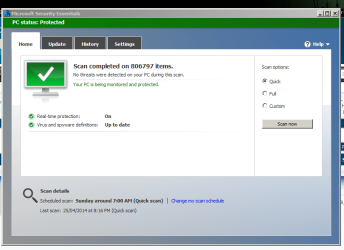
OK. I just finished scanning all my pictures and docs. Then ran a scan on the entire C:drive. No issues were found.
Question. I am wondering if I should uninstall the Windows Photo Viewer or just leave it alone?
 

Attachments

  • Capture.PNG
    Capture.PNG
    49.1 KB · Views: 1

My Computer

Computer type
Laptop
Computer Manufacturer/Model Number
HP 2000-150CA Notebook
OS
Windows 7 Home Premium (x64) Service Pack 1 (build 7601)
CPU
Intel Pentium P6200 2.13 GHz
Motherboard
HP 3674 28.49 1066 MH / BIOS: HP F.34
Memory
4.00 GB
Graphics Card(s)
Intel HD Graphics
Sound Card
Multimedia HD
Monitor(s) Displays
15.3
Screen Resolution
1366X768
Hard Drives
Hitachi HTS545050B9A300 ATA
(500.11 GB)
Keyboard
Standard PS2
Mouse
Synaptics PS2 Port Touch Pad / Microsoft HID-compliant mouse
Internet Speed
100 Mbps
Antivirus
MSE
Browser
PaleMoon / Fire Fox
Other Info
Purchased 2011
How old is your current Windows installation?, perhaps the Image Viewer itself (or even worse, the Win Explorer) has some corrupt files, that's some unusual behavior. Try to run a scan for corrupt files, here is a tutorial:
http://www.sevenforums.com/tutorials/1538-sfc-scannow-command-system-file-checker.html
Or try to clean the thumbnail cache, like this:
http://www.sevenforums.com/tutorials/10797-thumbnail-cache-clear-reset.html
Also, if we take the spyware infection more seriously, then run Malwarebytes Anti-Malware to be 100% sure it's not a malicious agent:
Malwarebytes | Free Anti-Malware & Internet Security Software
Also, try to clean your system with software such as:
CCleaner:
CCleaner - PC Optimization and Cleaning - Free Download
Wise Disk Cleaner:
Wise Disk Cleaner - Best Free Disk Cleaner - cleanup your disk in one minute
Wise Registry Cleaner:
Wise Registry Cleaner - Best Free Registry Cleaner - speedup slow PC in one minute
All is free for use software, so you don't have to worry about that. And if that doesn't seem to find a solution, there's always the go-back-to-baiscs solution of backing your files up, and reinstall that OS, which if this was my case, I would do it, but let's see if someone else knows more about this particular issue.
 

My Computer

Computer type
PC/Desktop
Computer Manufacturer/Model Number
Custom Build
OS
Windows 7 Ultimate 64bit
CPU
AMD Phenom X4 9850
Motherboard
Gigabyte Technology GA-MA74GM-S2 (Socket M2)
Memory
4.00GB Crucial Dual-Channel DDR2 @ 401MHz (5-5-5-18)
Graphics Card(s)
ATI Radeon 2100 (Gigabyte)
Sound Card
Realtek High Definition Audio
Monitor(s) Displays
LM742 on ATI Radeon 2100
Screen Resolution
1280x1024 pixels
Hard Drives
WDC WD15EARS-00Z5B1 ATA Device, 1.5 TB, 2 partitions: - 500 GB (aprox.) Where Windows 7 resides, - 1 TB (aprox.) Storage
PSU
Ultra X4 ATX 600W
Case
ST ATX Mid-Tower Case
Cooling
Ultra Carbon X3
Keyboard
Logitech K360
Mouse
Logitech MX10
Internet Speed
802.11n USB Wireless LAN Card
Antivirus
AVG Internet Security 2014
Browser
Firefox Mozilla
Other Info
I use a graphic tablet, a XBOX360 Wired Controller, a external CD/DVD Driver, and my entire system is connected to a 6 slots Protected Power-surge
Back
Top