

Giveaway of the Day - Paragon Drive Backup 2010 Special Edition
Kari
EDIT: I downloaded the 64-bit version and got this when unpacking the zip packet and running the included setup.exe:
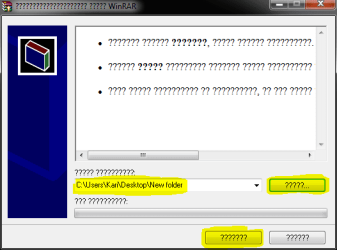
Click first the button next to the drop down list to browse to a folder where you want to extract the installer. Click then at bottom right the button on the left. This extracts installer to folder you chose.
Run then the installer.
Full article and download here. As always with Giweaway of the Day, you have to download and start installation to get serial before 8AM UTC tomorrow Thursday, December 3rd (9AM CET, 3AM EST or 12PM today PST)
- Complete set of features for entire disk imaging and file Backup;
- Backup to any destination: Including local mounted/un-mounted partitions, external storage locations, CD/DVD/Blu-ray discs, network shares, FTP as well as a secured hidden partition on your local drive (Paragon Backup Capsule);
- Smart Backup options for headache-free security, so you can backup exactly what you need and with the best backup method, chosen automatically depending on the data to protect;
- Professional recovery tools;
- Useful extras: boot corrector, simple partitioning and more.
Kari
EDIT: I downloaded the 64-bit version and got this when unpacking the zip packet and running the included setup.exe:
Click first the button next to the drop down list to browse to a folder where you want to extract the installer. Click then at bottom right the button on the left. This extracts installer to folder you chose.
Run then the installer.
Last edited:
My Computer
At a glance
Windows 10 Pro x64 EN-GB1.6 GHz Intel Core i7-720QM Processor6 GBATI Mobility Radeon HD 5850 Graphics
- Computer type
- Laptop
- Computer Manufacturer/Model Number
- HP ENVY 17-1150eg
- OS
- Windows 10 Pro x64 EN-GB
- CPU
- 1.6 GHz Intel Core i7-720QM Processor
- Memory
- 6 GB
- Graphics Card(s)
- ATI Mobility Radeon HD 5850 Graphics
- Sound Card
- Beats sound system with integrated subwoofer
- Monitor(s) Displays
- 17" laptop display, 22" LED and 32" Full HD TV through HDMI
- Screen Resolution
- 1600*900 (1), 1920*1080 (2&3)
- Hard Drives
- Internal: 2 x 500 GB SATA Hard Disk Drive 7200 rpm
External: 2TB for backups, 3TB USB3 network drive for media
- Cooling
- As Envy runs a bit warm, I have it on a Cooler Master pad
- Keyboard
- Logitech diNovo Media Desktop Laser (bluetooth)
- Mouse
- Logitech Performance Mouse MX
- Internet Speed
- 50/10 Mbps VDSL
- Antivirus
- Windows Defender 4.3.9431.0
- Browser
- Maxthon 3.5.2., IE11


