I take no credit for this, I found the original post on win7vista.com.
1. Download the .exe
2. Create a shortcut of the .exe
3. Click on start, and type "SHELL:STARTUP"
4. Drag the shortcut to the folder
5. Right click on the shortcut, and click on properties
6. Set it to run minimized in the run drop down menu
and you're done!
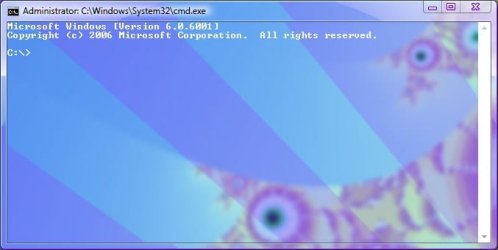
I've also found a nice way of getting it to run at startup.If you are using Windows Vista or 7 and your graphics card supports Aero, then you must be enjoying the transparent windows having glass in their borders. The one and only thing which doesn't match with the new Aero interface is "Command Prompt" window.
Microsoft has not changed anything in the Command Prompt window. It's been the same for ages. Many people use Command Prompt regularly. Wouldn't it be great if we can somehow make the Command Prompt window transparent and have glass in it?
The following is a screenshot of Command Prompt window having glass:

As you can see it looks awesome. You can download the script using following link:
Glass CMD for Vista by ~komalo on deviantART
Simply run the EXE file and open Command Prompt. It'll have the glass automatically. To remove the glass, simply close the exe from the system tray. So start enjoying it now..
1. Download the .exe
2. Create a shortcut of the .exe
3. Click on start, and type "SHELL:STARTUP"
4. Drag the shortcut to the folder
5. Right click on the shortcut, and click on properties
6. Set it to run minimized in the run drop down menu
and you're done!
Last edited:
My Computer
- OS
- Windows 7 RTM x86 (Build 7600)