"Glass" effect on taskbar icons

Denikar

New member
Local time
5:03 PM
Messages
3
Hi all,

I installed Windows 7 for the first time over the weekend and would like to know how to remove the "glass" effect on the taskbar icons, similar to what is described in this thread:
Unfortunately modifying the ColorizationGlassReflectionIntensity entry in the registry which was identified in the thread does not seem to work, even after relogging and / or rebooting.

I do not want to go back to the classic theme, just want the diagonal gradients removed. Mainly because I have multiple instances of an application open at the same time, and it isn't intuitive looking at the taskbar which one is active. Would like to either specify a completely different color for the active application or get rid of the gradients.

WindowBlinds figured out a way to do it, but that package causes all sorts of other problems with other applications (Thunderbird 5.0 for one). I had to manually block many apps to get it to work right. Also it needs to run in the background. :banghead: Uninstalled it almost immediately.

Regards,

Tim
 

My Computer My Computer

OS
Windows 7 Professional 64-bit

My Computer My Computer

Computer type
Laptop
Computer Manufacturer/Model Number
Sager NP9170
OS
Win 7 Pro x64 / Win 10 Pro
CPU
Intel(R) Core(TM) i7-3630QM CPU @ 2.40GHz
Motherboard
CLEVO P170EM
Memory
12 GB
Graphics Card(s)
(1) Intel(R) HD Graphics 4000 (2) NVIDIA GeForce GTX 675M
Sound Card
(1) Realtek High Definition Audio (2) Intel(R) Display Aud
Monitor(s) Displays
17.3
Screen Resolution
1920x1080
Hard Drives
(1) Samsung 860 EVO 500GB(OS) (1) Samsung 860 EVO 500GB(Data)
Keyboard
Backlite
Antivirus
MSE, Malwarebytes Pro
Browser
Firefox
Other Info
DESKTOP: Custom-built.
OS: Win 10 Pro x64.
CASE: Rosewill R5.
CPU: Intel I5 4670K CPU @ 3.40GHz.
CPU COOLER: Cool Master Hyper 212 EVO.
MOTHERBOARD: Asus Z87-A.
MEMORY: Kingston HyperX 2x4 GB.
GPU: Nvidia Geforce 650 TI.
PSU: Corsair TX750.
DRIVES: (1) Samsung 840 120 GB SSD (2) Western Digital blue 500 GB 7200 RPM.
Hi Jerry,

Thanks for your reply.

I've attached an image of an icon with a red line drawn around what I am talking about.

Regards,

Tim
 

Attachments

  • win7 button.jpg
    win7 button.jpg
    2.3 KB · Views: 853

My Computer My Computer

OS
Windows 7 Professional 64-bit

My Computer My Computer

Computer type
Laptop
Computer Manufacturer/Model Number
Sager NP9170
OS
Win 7 Pro x64 / Win 10 Pro
CPU
Intel(R) Core(TM) i7-3630QM CPU @ 2.40GHz
Motherboard
CLEVO P170EM
Memory
12 GB
Graphics Card(s)
(1) Intel(R) HD Graphics 4000 (2) NVIDIA GeForce GTX 675M
Sound Card
(1) Realtek High Definition Audio (2) Intel(R) Display Aud
Monitor(s) Displays
17.3
Screen Resolution
1920x1080
Hard Drives
(1) Samsung 860 EVO 500GB(OS) (1) Samsung 860 EVO 500GB(Data)
Keyboard
Backlite
Antivirus
MSE, Malwarebytes Pro
Browser
Firefox
Other Info
DESKTOP: Custom-built.
OS: Win 10 Pro x64.
CASE: Rosewill R5.
CPU: Intel I5 4670K CPU @ 3.40GHz.
CPU COOLER: Cool Master Hyper 212 EVO.
MOTHERBOARD: Asus Z87-A.
MEMORY: Kingston HyperX 2x4 GB.
GPU: Nvidia Geforce 650 TI.
PSU: Corsair TX750.
DRIVES: (1) Samsung 840 120 GB SSD (2) Western Digital blue 500 GB 7200 RPM.
This is what it can look like.
Region.png
Jerry
 

My Computer My Computer

Computer type
Laptop
Computer Manufacturer/Model Number
Sager NP9170
OS
Win 7 Pro x64 / Win 10 Pro
CPU
Intel(R) Core(TM) i7-3630QM CPU @ 2.40GHz
Motherboard
CLEVO P170EM
Memory
12 GB
Graphics Card(s)
(1) Intel(R) HD Graphics 4000 (2) NVIDIA GeForce GTX 675M
Sound Card
(1) Realtek High Definition Audio (2) Intel(R) Display Aud
Monitor(s) Displays
17.3
Screen Resolution
1920x1080
Hard Drives
(1) Samsung 860 EVO 500GB(OS) (1) Samsung 860 EVO 500GB(Data)
Keyboard
Backlite
Antivirus
MSE, Malwarebytes Pro
Browser
Firefox
Other Info
DESKTOP: Custom-built.
OS: Win 10 Pro x64.
CASE: Rosewill R5.
CPU: Intel I5 4670K CPU @ 3.40GHz.
CPU COOLER: Cool Master Hyper 212 EVO.
MOTHERBOARD: Asus Z87-A.
MEMORY: Kingston HyperX 2x4 GB.
GPU: Nvidia Geforce 650 TI.
PSU: Corsair TX750.
DRIVES: (1) Samsung 840 120 GB SSD (2) Western Digital blue 500 GB 7200 RPM.
Very nice! It is unfortunate that the system files need to be modified to make this however.

This is the best difference I could create just using the Win 7 standard settings:


I will have to do some digging into the two applications you posted. Thanks!
 

Attachments

  • win7 taskbar.jpg
    win7 taskbar.jpg
    3.3 KB · Views: 830
Last edited:

My Computer My Computer

OS
Windows 7 Professional 64-bit
Very nice! It is unfortunate that the system files need to be modified to make this however.

This is the best difference I could create just using the Win 7 standard settings:


I will have to do some digging into the two applications you posted. Thanks!
The 1st link does not modified system files it's a service that allows custom themes. If you need help with it let me know.
Jerry
 

My Computer My Computer

Computer type
Laptop
Computer Manufacturer/Model Number
Sager NP9170
OS
Win 7 Pro x64 / Win 10 Pro
CPU
Intel(R) Core(TM) i7-3630QM CPU @ 2.40GHz
Motherboard
CLEVO P170EM
Memory
12 GB
Graphics Card(s)
(1) Intel(R) HD Graphics 4000 (2) NVIDIA GeForce GTX 675M
Sound Card
(1) Realtek High Definition Audio (2) Intel(R) Display Aud
Monitor(s) Displays
17.3
Screen Resolution
1920x1080
Hard Drives
(1) Samsung 860 EVO 500GB(OS) (1) Samsung 860 EVO 500GB(Data)
Keyboard
Backlite
Antivirus
MSE, Malwarebytes Pro
Browser
Firefox
Other Info
DESKTOP: Custom-built.
OS: Win 10 Pro x64.
CASE: Rosewill R5.
CPU: Intel I5 4670K CPU @ 3.40GHz.
CPU COOLER: Cool Master Hyper 212 EVO.
MOTHERBOARD: Asus Z87-A.
MEMORY: Kingston HyperX 2x4 GB.
GPU: Nvidia Geforce 650 TI.
PSU: Corsair TX750.
DRIVES: (1) Samsung 840 120 GB SSD (2) Western Digital blue 500 GB 7200 RPM.
Hello, the first link in post#4 does not work, the second link does, but it seems it's only instructions to allow the OS to accept 3rd party themes. I would like to know what's the next step to solve the problem, is it finding custom themes which do not have the white gradient effect? Thanks.
 

My Computer My Computer

OS
Windows 7 Ultimae x64
Hello, the first link in post#4 does not work, the second link does, but it seems it's only instructions to allow the OS to accept 3rd party themes. I would like to know what's the next step to solve the problem, is it finding custom themes which do not have the white gradient effect? Thanks.

I am investigating why that first link does not work, it's just another way of enabling third party custom themes, and yes you would have to search for a theme that does not have that white effect but if you are using the default aero theme I can change that for you and post it in a zip folder here, all I need from you is a name to call the custom theme.
Let me know.
Jerry

UPDATE: The first link works now.
 
Last edited:

My Computer My Computer

Computer type
Laptop
Computer Manufacturer/Model Number
Sager NP9170
OS
Win 7 Pro x64 / Win 10 Pro
CPU
Intel(R) Core(TM) i7-3630QM CPU @ 2.40GHz
Motherboard
CLEVO P170EM
Memory
12 GB
Graphics Card(s)
(1) Intel(R) HD Graphics 4000 (2) NVIDIA GeForce GTX 675M
Sound Card
(1) Realtek High Definition Audio (2) Intel(R) Display Aud
Monitor(s) Displays
17.3
Screen Resolution
1920x1080
Hard Drives
(1) Samsung 860 EVO 500GB(OS) (1) Samsung 860 EVO 500GB(Data)
Keyboard
Backlite
Antivirus
MSE, Malwarebytes Pro
Browser
Firefox
Other Info
DESKTOP: Custom-built.
OS: Win 10 Pro x64.
CASE: Rosewill R5.
CPU: Intel I5 4670K CPU @ 3.40GHz.
CPU COOLER: Cool Master Hyper 212 EVO.
MOTHERBOARD: Asus Z87-A.
MEMORY: Kingston HyperX 2x4 GB.
GPU: Nvidia Geforce 650 TI.
PSU: Corsair TX750.
DRIVES: (1) Samsung 840 120 GB SSD (2) Western Digital blue 500 GB 7200 RPM.
"A name"? Well, any name works, "Cheese" for instance.

and if it is not much trouble, I would like for it to be based on "Basic" instead of "Aero" (yep, the first link is working).
 

My Computer My Computer

OS
Windows 7 Ultimae x64
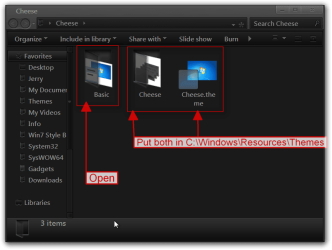
Here you go download and extract the zip folder to your desktop open the folder and put both 1 Cheese folder and 1 Cheese.theme file in C:\Windows\Resources\Themes
Cheese.png

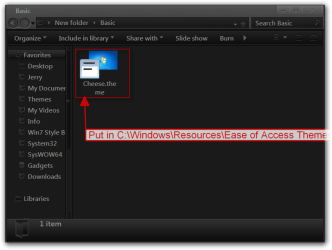
Then open up the basic folder and put the 1 Cheese.theme file in C:\Windows\Resources\Ease of Access Themes
Basic.png

It will show up in Personalization as Cheese in both aero and basic themes.
Jerry
 

Attachments

My Computer My Computer

Computer type
Laptop
Computer Manufacturer/Model Number
Sager NP9170
OS
Win 7 Pro x64 / Win 10 Pro
CPU
Intel(R) Core(TM) i7-3630QM CPU @ 2.40GHz
Motherboard
CLEVO P170EM
Memory
12 GB
Graphics Card(s)
(1) Intel(R) HD Graphics 4000 (2) NVIDIA GeForce GTX 675M
Sound Card
(1) Realtek High Definition Audio (2) Intel(R) Display Aud
Monitor(s) Displays
17.3
Screen Resolution
1920x1080
Hard Drives
(1) Samsung 860 EVO 500GB(OS) (1) Samsung 860 EVO 500GB(Data)
Keyboard
Backlite
Antivirus
MSE, Malwarebytes Pro
Browser
Firefox
Other Info
DESKTOP: Custom-built.
OS: Win 10 Pro x64.
CASE: Rosewill R5.
CPU: Intel I5 4670K CPU @ 3.40GHz.
CPU COOLER: Cool Master Hyper 212 EVO.
MOTHERBOARD: Asus Z87-A.
MEMORY: Kingston HyperX 2x4 GB.
GPU: Nvidia Geforce 650 TI.
PSU: Corsair TX750.
DRIVES: (1) Samsung 840 120 GB SSD (2) Western Digital blue 500 GB 7200 RPM.
First, I attempted to install the UxStyle, but it failed, saying that some of my files were "tampered with", so I assumed that maybe I enabled custom themes on this computer in the past.

I proceeded with positioning the files of the "Cheese" themes in their respective locations, and I was able to see and apply them from the "Personalization" utility, however both of them are applying the "Windows Classic" effects on both the taskbar and the windows of applications. Something's wrong, or?
 

My Computer My Computer

OS
Windows 7 Ultimae x64
First, I attempted to install the UxStyle, but it failed, saying that some of my files were "tampered with", so I assumed that maybe I enabled custom themes on this computer in the past.

I proceeded with positioning the files of the "Cheese" themes in their respective locations, and I was able to see and apply them from the "Personalization" utility, however both of them are applying the "Windows Classic" effects on both the taskbar and the windows of applications. Something's wrong, or?

Change back to the default aero theme,
Then do Option 2 of this tutorial it will not harm any data or programs http://www.sevenforums.com/tutorials/1538-sfc-scannow-command-system-file-checker.html it will fix the system files at Universal Theme Patcher changed then try UxStyle again.
Jerry
 

My Computer My Computer

Computer type
Laptop
Computer Manufacturer/Model Number
Sager NP9170
OS
Win 7 Pro x64 / Win 10 Pro
CPU
Intel(R) Core(TM) i7-3630QM CPU @ 2.40GHz
Motherboard
CLEVO P170EM
Memory
12 GB
Graphics Card(s)
(1) Intel(R) HD Graphics 4000 (2) NVIDIA GeForce GTX 675M
Sound Card
(1) Realtek High Definition Audio (2) Intel(R) Display Aud
Monitor(s) Displays
17.3
Screen Resolution
1920x1080
Hard Drives
(1) Samsung 860 EVO 500GB(OS) (1) Samsung 860 EVO 500GB(Data)
Keyboard
Backlite
Antivirus
MSE, Malwarebytes Pro
Browser
Firefox
Other Info
DESKTOP: Custom-built.
OS: Win 10 Pro x64.
CASE: Rosewill R5.
CPU: Intel I5 4670K CPU @ 3.40GHz.
CPU COOLER: Cool Master Hyper 212 EVO.
MOTHERBOARD: Asus Z87-A.
MEMORY: Kingston HyperX 2x4 GB.
GPU: Nvidia Geforce 650 TI.
PSU: Corsair TX750.
DRIVES: (1) Samsung 840 120 GB SSD (2) Western Digital blue 500 GB 7200 RPM.
Ran the system scan, and it reported that all my files were already intact, ran UxStyle again, and it worked, applied both themes, and both are working, success! finally.

Thanks alot for the help.
 

My Computer My Computer

OS
Windows 7 Ultimae x64
Ran the system scan, and it reported that all my files were already intact, ran UxStyle again, and it worked, applied both themes, and both are working, success! finally.

Thanks alot for the help.

Go to hear you got it.
You're Welcome
 

My Computer My Computer

Computer type
Laptop
Computer Manufacturer/Model Number
Sager NP9170
OS
Win 7 Pro x64 / Win 10 Pro
CPU
Intel(R) Core(TM) i7-3630QM CPU @ 2.40GHz
Motherboard
CLEVO P170EM
Memory
12 GB
Graphics Card(s)
(1) Intel(R) HD Graphics 4000 (2) NVIDIA GeForce GTX 675M
Sound Card
(1) Realtek High Definition Audio (2) Intel(R) Display Aud
Monitor(s) Displays
17.3
Screen Resolution
1920x1080
Hard Drives
(1) Samsung 860 EVO 500GB(OS) (1) Samsung 860 EVO 500GB(Data)
Keyboard
Backlite
Antivirus
MSE, Malwarebytes Pro
Browser
Firefox
Other Info
DESKTOP: Custom-built.
OS: Win 10 Pro x64.
CASE: Rosewill R5.
CPU: Intel I5 4670K CPU @ 3.40GHz.
CPU COOLER: Cool Master Hyper 212 EVO.
MOTHERBOARD: Asus Z87-A.
MEMORY: Kingston HyperX 2x4 GB.
GPU: Nvidia Geforce 650 TI.
PSU: Corsair TX750.
DRIVES: (1) Samsung 840 120 GB SSD (2) Western Digital blue 500 GB 7200 RPM.
Back
Top