

What’s changing
Earlier this year, we announced the launch of Gmail confidential mode for G Suite in beta. On June 25, 2019, this feature will become generally available and your users will have the option to send emails with confidential mode.
At launch, confidential mode will be set to default ON for all domains with Gmail enabled, unless you choose to disable this feature (see instructions below).
Who’s impacted
Admins and end users
Why you’d use it
Confidential mode provides built-in information rights management controls in your emails by allowing senders to create expiration dates and revoke previously sent messages. Because a sender can require additional authentication via text message to view an email, it’s also possible to protect data even if a recipient’s email account has been hijacked while the message is active. Additionally, with confidential mode, recipients don’t have the option to forward, copy, print, or download their content or attachments.
How to get started
Additional details
- Admins: As an administrator, you can determine whether your users can use confidential mode by navigating to Apps > G Suite > Settings for Gmail > User settings and selecting from the following options:
- Disable: This option will prevent users in your domain from sending emails with confidential mode.
- Enable now (beta): This option will enable confidential mode, which is currently in beta. The feature will remain enabled when it enters into general availability on June 25, 2019.
- Enable when the feature is in general availability: This is the default option and will enable confidential mode when this feature becomes generally available on June 25, 2019.
- End users: Once Gmail confidential mode launches, you can follow the steps in this Help Center article to send & open confidential emails.
How Gmail confidential mode works with Vault and eDiscovery
When a user sends a confidential message, Gmail replaces the message body and attachments with a link. Only the subject and body containing the link are sent via SMTP. This means that if your users send or receive messages in Gmail confidential mode, Vault will retain, preserve, search and export confidential mode messages. The message body of received messages will be accessible in Vault only if the sender of the message is from within your organization.
Helpful links
Availability
- Help Center: Protect Gmail messages with confidential mode
- Help Center: Send & open confidential emails
- Help Center: Vault and Gmail confidential mode
Rollout details
G Suite editions
- Rapid Release domains: Full rollout (1–3 days for feature visibility) starting on June 25, 2019
- Scheduled Release domains: Full rollout (1–3 days for feature visibility) starting on June 25, 2019
On/off by default?
- Available to all G Suite editions
- This feature will be ON by default beginning on June 25, 2019.
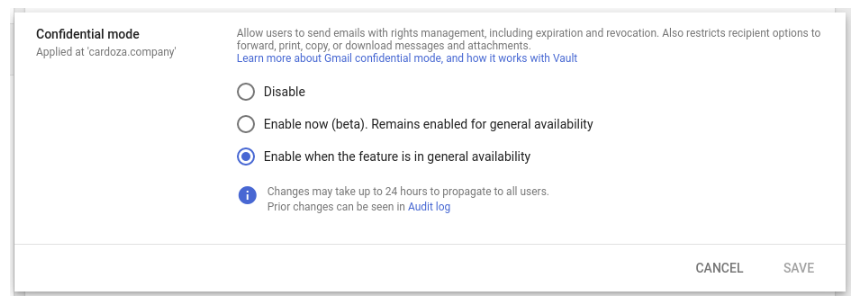
Source: G Suite Updates Blog: Gmail confidential mode launching on by default on June 25, 2019
My Computer
At a glance
64-bit Windows 11 Pro for WorkstationsIntel i7-8700K OC'd to 5 GHz64 GB (4x16GB) G.SKILL TridentZ RGB DDR4 3600...ASUS ROG-STRIX-GTX1080TI-O11G-GAMING
- Computer type
- PC/Desktop
- Computer Manufacturer/Model Number
- Self built custom
- OS
- 64-bit Windows 11 Pro for Workstations
- CPU
- Intel i7-8700K OC'd to 5 GHz
- Motherboard
- ASUS ROG Maximus XI Formula Z390
- Memory
- 64 GB (4x16GB) G.SKILL TridentZ RGB DDR4 3600 MHz
- Graphics Card(s)
- ASUS ROG-STRIX-GTX1080TI-O11G-GAMING
- Sound Card
- Integrated
- Monitor(s) Displays
- 2 x Samsung Odyssey G7 27"
- Screen Resolution
- 2560x1440
- Hard Drives
- 1TB Samsung 990 PRO M.2,
4TB Samsung 990 PRO PRO M.2,
TerraMaster F8 SSD Plus NAS
- PSU
- Seasonic Prime Titanium 850W
- Case
- Thermaltake Core P3
- Cooling
- Corsair Hydro H115i
- Keyboard
- Logitech wireless K800
- Mouse
- Logitech MX Master 4
- Internet Speed
- 2 Gb/s Download and 100 Mb/s Upload
- Antivirus
- Malwarebyte Anti-Malware Premium
- Browser
- Google Chrome
- Other Info
- Logitech Z625 speaker system,
Logitech BRIO 4K Pro webcam,
HP Color LaserJet Pro MFP M477fdn,
APC SMART-UPS RT 1000 XL - SURT1000XLI,
Galaxy S23 Plus phone
