Solved good HDD showing up as RAW asking for format via USB cradle

Prozak

New member
Local time
2:47 AM
Messages
8
I have a laptop that boots up to windows 7 pro 64 just fine. I went to copy some files to another windows 7 pro 64 machine. I took the HDD out of the laptop and connected it to my external caddy on my desktop. The drive shows up as a healthy drive, but in RAW format. Its asking me to format it.

Why is this happening? I looked around for answers and saw something about permissions, but I don't have the security tab to even change the permissions of the drive.

any help would be appreciated.
 

My Computer My Computer

At a glance

Windows 7 pro 64Intel G3220 dual core 3.0Ghz16Gb Avexir Core series 2133MhzGeForce GTX 660 2Gb
Computer type
PC/Desktop
Computer Manufacturer/Model Number
Custom Build
OS
Windows 7 pro 64
CPU
Intel G3220 dual core 3.0Ghz
Motherboard
MSI Z87-G45 Gaming
Memory
16Gb Avexir Core series 2133Mhz
Graphics Card(s)
GeForce GTX 660 2Gb
Hard Drives
Kingston V300 SSD 120Gb
Mouse
Razor
IN my own experience, a formatted drive suddenly showing up as RAW indicates some kind of hardware failures on that drive. I've had that happen to me three times (all on different drives), the latest being last week -- and in all three cases, the drives were failing. The latest one crashed suddenly and could not be recovered short of commercial data recovery.

My own suggestion is to download and install RecoverMyFiles, run it, and see if it can find any folders or files on that drive. IF it does, then consider buying a license and using that product to recover what you can from the drive.

You could also do the same with the new Minitool Data Recovery app.

Both of these are free to install and try -- to see how well they work -- but both require purchase of a license to do the actual data recovery.

If neither of these work, your drive is likely to be trashed -- as was the case with mine.
 

My Computer My Computer

At a glance

Win7 Pro 32-bit, Win8 Pro 32-bitAMD Phenom II X6 1090T4GB ddr3 1300AMD HD 4290 onboard
Computer type
PC/Desktop
Computer Manufacturer/Model Number
Custom
OS
Win7 Pro 32-bit, Win8 Pro 32-bit
CPU
AMD Phenom II X6 1090T
Motherboard
Gigabyte
Memory
4GB ddr3 1300
Graphics Card(s)
AMD HD 4290 onboard
Sound Card
Builtin Realtek HD Audio
Monitor(s) Displays
Samsung 24" widescreen, LG 23" widescreen
Screen Resolution
1920x1200/1920x1080
Hard Drives
Kingston 256GB SSD
Keyboard
Logitech Illuminated Keyboard
Mouse
Logitech M705 wireless mouse
Antivirus
Norton Av 2013
Browser
IE v10
I have a laptop that boots up to windows 7 pro 64 just fine. I went to copy some files to another windows 7 pro 64 machine. I took the HDD out of the laptop and connected it to my external caddy on my desktop. The drive shows up as a healthy drive, but in RAW format. Its asking me to format it.

Why is this happening? I looked around for answers and saw something about permissions, but I don't have the security tab to even change the permissions of the drive.

any help would be appreciated.
Post screenshot of disk managenment please
 

My Computer My Computer

At a glance

Microsoft Windows 7 Home Premium 64-bits 7601...Intel(R) Core(TM) i3 CPU M 370 @ 2.40GHz4,00 GBATI Mobility Radeon HD 5400 Series
Computer type
Laptop
Computer Manufacturer/Model Number
ACER ASPIRE 5742G
OS
Microsoft Windows 7 Home Premium 64-bits 7601 Multiprocessor Free Service Pack 1
CPU
Intel(R) Core(TM) i3 CPU M 370 @ 2.40GHz
Motherboard
Acer Aspire 5742G
Memory
4,00 GB
Graphics Card(s)
ATI Mobility Radeon HD 5400 Series
Sound Card
(1) AMD High Definition Audio Device (2) Realtek High Defi
Screen Resolution
1366 x 768 x 32 bits (4294967296 colors) @ 60 Hz
Hard Drives
WDC WD5000BEVT-22ZAT0
What happens if you put it back into the laptop.

There are certainly better ways to copy some files.
 

My Computer My Computer

At a glance

Vista, Windows7, Mint Mate, Zorin, Windows 8from 1.6GHz Duo to i7
Computer Manufacturer/Model Number
HP, Dell, Gateway, Toshiba - 4 laptops and 2 desktops
OS
Vista, Windows7, Mint Mate, Zorin, Windows 8
CPU
from 1.6GHz Duo to i7
Monitor(s) Displays
2x HP w2207
Hard Drives
5x HDD, 7x SSD, 12x Externals
Keyboard
with trackball - no mices
Mouse
Trackball mice
Internet Speed
DSL 6000

My Computer My Computer

At a glance

x64 (6.3.9600) Win8.1 Pro & soon dual boot x6...AMD A6-3420M APU with Radeon(tm) HD Graphics6.00 GBAMD Radeon(TM) HD 6520G
Computer type
Laptop
Computer Manufacturer/Model Number
HP Pavilion dv6-6c10us
OS
x64 (6.3.9600) Win8.1 Pro & soon dual boot x64 (6.1.7601) Win7_SP1 HomePrem
CPU
AMD A6-3420M APU with Radeon(tm) HD Graphics
Motherboard
Hewlett-Packard 1805
Memory
6.00 GB
Graphics Card(s)
AMD Radeon(TM) HD 6520G
Sound Card
(1) AMD High Definition Audio Device (2) IDT High Definiti
Monitor(s) Displays
HP W2072a 20" LCD (1600 x 900) @ 60 Hz
Screen Resolution
1366 x 768 x 32 bits (4294967296 colors) @ 60 Hz
Hard Drives
ST640LM0 00 HM641JI SATA Disk Device
Keyboard
Logitech k520 wireless KB
Mouse
Logitech m320 wireless mouse (bundled with KB)
Internet Speed
15/5 | 54 MB Wireless 'n'
Antivirus
Realtime: Defender or Avast | On-demand: Malwarebytes, ESET
Browser
IE 11 on Win8, IE 10 on win 7
Other Info
Media: [Gimp, Audacity, VLC] || Comm: [WEmail 2012, Skype] || Productivity: [OpenOffice,| Textpad] || Utils: [Sysinternals, cCleaner, Speccy, Defraggler]
What happens if you put it back into the laptop.

There are certainly better ways to copy some files.


it works fine when back in the laptop. the drive is in perfect working order. Yes I realize there are better ways to copy files, but im baffled as to why I cant see the files on another computer with the same exact OS.

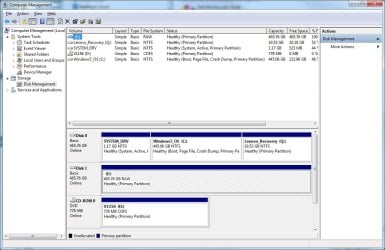
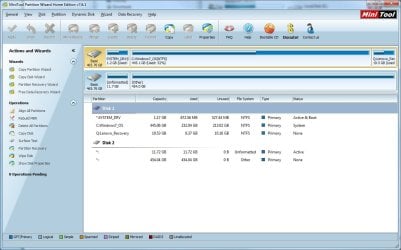
here is a screen shot of disk management
 

Attachments

  • disk.jpg
    disk.jpg
    106.3 KB · Views: 1

My Computer My Computer

At a glance

Windows 7 pro 64Intel G3220 dual core 3.0Ghz16Gb Avexir Core series 2133MhzGeForce GTX 660 2Gb
Computer type
PC/Desktop
Computer Manufacturer/Model Number
Custom Build
OS
Windows 7 pro 64
CPU
Intel G3220 dual core 3.0Ghz
Motherboard
MSI Z87-G45 Gaming
Memory
16Gb Avexir Core series 2133Mhz
Graphics Card(s)
GeForce GTX 660 2Gb
Hard Drives
Kingston V300 SSD 120Gb
Mouse
Razor

Attachments

  • disk1.jpg
    disk1.jpg
    105.2 KB · Views: 2

My Computer My Computer

At a glance

Windows 7 pro 64Intel G3220 dual core 3.0Ghz16Gb Avexir Core series 2133MhzGeForce GTX 660 2Gb
Computer type
PC/Desktop
Computer Manufacturer/Model Number
Custom Build
OS
Windows 7 pro 64
CPU
Intel G3220 dual core 3.0Ghz
Motherboard
MSI Z87-G45 Gaming
Memory
16Gb Avexir Core series 2133Mhz
Graphics Card(s)
GeForce GTX 660 2Gb
Hard Drives
Kingston V300 SSD 120Gb
Mouse
Razor
Disk management shows whole disk as 1 partition. It calls it E and is RAW.
PW shows 2 partitions!!! 1 unformatted 11.72GB and 1 "other" siezed 454.04GB.

Both screen taken on same machine within win7?

Is it really 1 partition or 2 (check on other machine)?
 

My Computer My Computer

At a glance

Microsoft Windows 7 Home Premium 64-bits 7601...Intel(R) Core(TM) i3 CPU M 370 @ 2.40GHz4,00 GBATI Mobility Radeon HD 5400 Series
Computer type
Laptop
Computer Manufacturer/Model Number
ACER ASPIRE 5742G
OS
Microsoft Windows 7 Home Premium 64-bits 7601 Multiprocessor Free Service Pack 1
CPU
Intel(R) Core(TM) i3 CPU M 370 @ 2.40GHz
Motherboard
Acer Aspire 5742G
Memory
4,00 GB
Graphics Card(s)
ATI Mobility Radeon HD 5400 Series
Sound Card
(1) AMD High Definition Audio Device (2) Realtek High Defi
Screen Resolution
1366 x 768 x 32 bits (4294967296 colors) @ 60 Hz
Hard Drives
WDC WD5000BEVT-22ZAT0
Yes those screen shots were taken from the same machine. My Desktop.


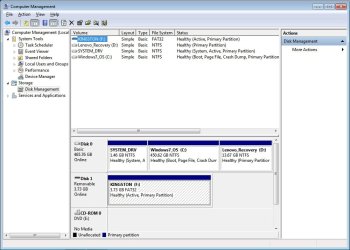
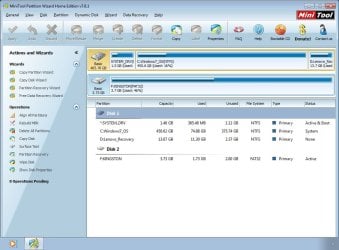
These following screen shots are from the LAPTOP drive when placed back into the laptop. The drive is working fine, and it actually shows 3 partitions....
 

Attachments

  • DmDrive.jpg
    DmDrive.jpg
    80.1 KB · Views: 0
  • pwdrive.jpg
    pwdrive.jpg
    86 KB · Views: 0

My Computer My Computer

At a glance

Windows 7 pro 64Intel G3220 dual core 3.0Ghz16Gb Avexir Core series 2133MhzGeForce GTX 660 2Gb
Computer type
PC/Desktop
Computer Manufacturer/Model Number
Custom Build
OS
Windows 7 pro 64
CPU
Intel G3220 dual core 3.0Ghz
Motherboard
MSI Z87-G45 Gaming
Memory
16Gb Avexir Core series 2133Mhz
Graphics Card(s)
GeForce GTX 660 2Gb
Hard Drives
Kingston V300 SSD 120Gb
Mouse
Razor
I see a usb stick and a hard drive in the latest screenshot. Where is the external disk ... size about 465GB ??
 

My Computer My Computer

At a glance

Microsoft Windows 7 Home Premium 64-bits 7601...Intel(R) Core(TM) i3 CPU M 370 @ 2.40GHz4,00 GBATI Mobility Radeon HD 5400 Series
Computer type
Laptop
Computer Manufacturer/Model Number
ACER ASPIRE 5742G
OS
Microsoft Windows 7 Home Premium 64-bits 7601 Multiprocessor Free Service Pack 1
CPU
Intel(R) Core(TM) i3 CPU M 370 @ 2.40GHz
Motherboard
Acer Aspire 5742G
Memory
4,00 GB
Graphics Card(s)
ATI Mobility Radeon HD 5400 Series
Sound Card
(1) AMD High Definition Audio Device (2) Realtek High Defi
Screen Resolution
1366 x 768 x 32 bits (4294967296 colors) @ 60 Hz
Hard Drives
WDC WD5000BEVT-22ZAT0
I see a usb stick and a hard drive in the latest screenshot. Where is the external disk ... size about 465GB ??


that's the external disk back in the original laptop.... Sorry for the confusion, have to read carefully to follow my madness.
 

My Computer My Computer

At a glance

Windows 7 pro 64Intel G3220 dual core 3.0Ghz16Gb Avexir Core series 2133MhzGeForce GTX 660 2Gb
Computer type
PC/Desktop
Computer Manufacturer/Model Number
Custom Build
OS
Windows 7 pro 64
CPU
Intel G3220 dual core 3.0Ghz
Motherboard
MSI Z87-G45 Gaming
Memory
16Gb Avexir Core series 2133Mhz
Graphics Card(s)
GeForce GTX 660 2Gb
Hard Drives
Kingston V300 SSD 120Gb
Mouse
Razor
What kind of USB enclosure you are using ? (make and model).
 

My Computer My Computer

At a glance

Windows 7 Ultimate x64
Computer type
PC/Desktop
OS
Windows 7 Ultimate x64
If I were you, I would leave the disk in the laptop. You may risk losing the whole thing if you keep mucking around with it.
 

My Computer My Computer

At a glance

Vista, Windows7, Mint Mate, Zorin, Windows 8from 1.6GHz Duo to i7
Computer Manufacturer/Model Number
HP, Dell, Gateway, Toshiba - 4 laptops and 2 desktops
OS
Vista, Windows7, Mint Mate, Zorin, Windows 8
CPU
from 1.6GHz Duo to i7
Monitor(s) Displays
2x HP w2207
Hard Drives
5x HDD, 7x SSD, 12x Externals
Keyboard
with trackball - no mices
Mouse
Trackball mice
Internet Speed
DSL 6000
This is a very interesting thread.

The drive appears fine in it's proper location, the laptop.

When it is in a USB enclosure the USB adapter is used to connect it to the Desktop the entire disk appears as RAW in Disk Mgmt, but PW shows two parts; 11.72 GB unallocated, and 454.04 GB Type: Other

Both the Desktop and Laptop are Lenovo machines and the respective Disk0 have the identical layout (system, OS, Recovery) except for the slight variances in size.

System and Recovery parts
Looking at the PW screen shots, when the drive in enclosed is connected using the USB adapter it seems as though the System and Recovery parts are presented together in the unallocated part. When the drive is in the Laptop, the parts are presented normally.

No solution in this post, just thinking out loud.
 
Last edited:

My Computer My Computer

At a glance

x64 (6.3.9600) Win8.1 Pro & soon dual boot x6...AMD A6-3420M APU with Radeon(tm) HD Graphics6.00 GBAMD Radeon(TM) HD 6520G
Computer type
Laptop
Computer Manufacturer/Model Number
HP Pavilion dv6-6c10us
OS
x64 (6.3.9600) Win8.1 Pro & soon dual boot x64 (6.1.7601) Win7_SP1 HomePrem
CPU
AMD A6-3420M APU with Radeon(tm) HD Graphics
Motherboard
Hewlett-Packard 1805
Memory
6.00 GB
Graphics Card(s)
AMD Radeon(TM) HD 6520G
Sound Card
(1) AMD High Definition Audio Device (2) IDT High Definiti
Monitor(s) Displays
HP W2072a 20" LCD (1600 x 900) @ 60 Hz
Screen Resolution
1366 x 768 x 32 bits (4294967296 colors) @ 60 Hz
Hard Drives
ST640LM0 00 HM641JI SATA Disk Device
Keyboard
Logitech k520 wireless KB
Mouse
Logitech m320 wireless mouse (bundled with KB)
Internet Speed
15/5 | 54 MB Wireless 'n'
Antivirus
Realtime: Defender or Avast | On-demand: Malwarebytes, ESET
Browser
IE 11 on Win8, IE 10 on win 7
Other Info
Media: [Gimp, Audacity, VLC] || Comm: [WEmail 2012, Skype] || Productivity: [OpenOffice,| Textpad] || Utils: [Sysinternals, cCleaner, Speccy, Defraggler]
What kind of USB enclosure you are using ? (make and model).

its a Tripp-lite USB to SATA/IDE adapter, model U238-000. Its just a cheap tool ive been using for years to recover data. I haven't tried connecting it to the motherboard directly, but I suppose I could try that.

and to the comment about mucking around with it ? I'm a network technician and have been for 15 years. Moving a hard drive around is not going to ruin it. Why I'm doing this is not important. I'm just looking for the reason & solution. I need to get this to work to test something else.
 

My Computer My Computer

At a glance

Windows 7 pro 64Intel G3220 dual core 3.0Ghz16Gb Avexir Core series 2133MhzGeForce GTX 660 2Gb
Computer type
PC/Desktop
Computer Manufacturer/Model Number
Custom Build
OS
Windows 7 pro 64
CPU
Intel G3220 dual core 3.0Ghz
Motherboard
MSI Z87-G45 Gaming
Memory
16Gb Avexir Core series 2133Mhz
Graphics Card(s)
GeForce GTX 660 2Gb
Hard Drives
Kingston V300 SSD 120Gb
Mouse
Razor
... I haven't tried connecting it to the motherboard directly, but I suppose I could try that.
...

That would provide more information
- please post both Disk Mgmt & PW screen shots if you decide to connect it directly to a port in the Desktop

Have you used the enclosure adapter and this particular drive together successfully in the past?

Thanks,

Bill
.
 
Last edited:

My Computer My Computer

At a glance

x64 (6.3.9600) Win8.1 Pro & soon dual boot x6...AMD A6-3420M APU with Radeon(tm) HD Graphics6.00 GBAMD Radeon(TM) HD 6520G
Computer type
Laptop
Computer Manufacturer/Model Number
HP Pavilion dv6-6c10us
OS
x64 (6.3.9600) Win8.1 Pro & soon dual boot x64 (6.1.7601) Win7_SP1 HomePrem
CPU
AMD A6-3420M APU with Radeon(tm) HD Graphics
Motherboard
Hewlett-Packard 1805
Memory
6.00 GB
Graphics Card(s)
AMD Radeon(TM) HD 6520G
Sound Card
(1) AMD High Definition Audio Device (2) IDT High Definiti
Monitor(s) Displays
HP W2072a 20" LCD (1600 x 900) @ 60 Hz
Screen Resolution
1366 x 768 x 32 bits (4294967296 colors) @ 60 Hz
Hard Drives
ST640LM0 00 HM641JI SATA Disk Device
Keyboard
Logitech k520 wireless KB
Mouse
Logitech m320 wireless mouse (bundled with KB)
Internet Speed
15/5 | 54 MB Wireless 'n'
Antivirus
Realtime: Defender or Avast | On-demand: Malwarebytes, ESET
Browser
IE 11 on Win8, IE 10 on win 7
Other Info
Media: [Gimp, Audacity, VLC] || Comm: [WEmail 2012, Skype] || Productivity: [OpenOffice,| Textpad] || Utils: [Sysinternals, cCleaner, Speccy, Defraggler]
its a Tripp-lite USB to SATA/IDE adapter, model U238-000. Its just a cheap tool ive been using for years to recover data.

Have you tried another HDD as a test ?. May be the converter just gone bad. Since you are a networking pro, i assume you won't have difficulty to get another HDD for testing.
 

My Computer My Computer

At a glance

Windows 7 Ultimate x64
Computer type
PC/Desktop
OS
Windows 7 Ultimate x64
So I connected the HDD directly to the motherboard, and what do you know? It worked perfectly, making the USB adapter the culprit. Time for a new one. Thanks for the help.
 

My Computer My Computer

At a glance

Windows 7 pro 64Intel G3220 dual core 3.0Ghz16Gb Avexir Core series 2133MhzGeForce GTX 660 2Gb
Computer type
PC/Desktop
Computer Manufacturer/Model Number
Custom Build
OS
Windows 7 pro 64
CPU
Intel G3220 dual core 3.0Ghz
Motherboard
MSI Z87-G45 Gaming
Memory
16Gb Avexir Core series 2133Mhz
Graphics Card(s)
GeForce GTX 660 2Gb
Hard Drives
Kingston V300 SSD 120Gb
Mouse
Razor
Good news Prozak.

Shop for a new one very carefully. There are a lot of threads about this same type of behavior, all with different enclosures, adapters - and different drives

Unfortunately, I don't have a good recommendation. The issue seems to be represented fairly evenly across the board.

Pleas update the thread with what you get and if it works or doesn't work (that will help making a recommendation). If it doesn't work, I'm sure you'll try another brand / type.

Thanks,

Bill
.
 

My Computer My Computer

At a glance

x64 (6.3.9600) Win8.1 Pro & soon dual boot x6...AMD A6-3420M APU with Radeon(tm) HD Graphics6.00 GBAMD Radeon(TM) HD 6520G
Computer type
Laptop
Computer Manufacturer/Model Number
HP Pavilion dv6-6c10us
OS
x64 (6.3.9600) Win8.1 Pro & soon dual boot x64 (6.1.7601) Win7_SP1 HomePrem
CPU
AMD A6-3420M APU with Radeon(tm) HD Graphics
Motherboard
Hewlett-Packard 1805
Memory
6.00 GB
Graphics Card(s)
AMD Radeon(TM) HD 6520G
Sound Card
(1) AMD High Definition Audio Device (2) IDT High Definiti
Monitor(s) Displays
HP W2072a 20" LCD (1600 x 900) @ 60 Hz
Screen Resolution
1366 x 768 x 32 bits (4294967296 colors) @ 60 Hz
Hard Drives
ST640LM0 00 HM641JI SATA Disk Device
Keyboard
Logitech k520 wireless KB
Mouse
Logitech m320 wireless mouse (bundled with KB)
Internet Speed
15/5 | 54 MB Wireless 'n'
Antivirus
Realtime: Defender or Avast | On-demand: Malwarebytes, ESET
Browser
IE 11 on Win8, IE 10 on win 7
Other Info
Media: [Gimp, Audacity, VLC] || Comm: [WEmail 2012, Skype] || Productivity: [OpenOffice,| Textpad] || Utils: [Sysinternals, cCleaner, Speccy, Defraggler]
Back
Top