google browser problem

skeggy

New member
Local time
10:17 AM
Messages
43
hi all I have installed google chrome browser but when I click on its icon its asks for permision to run it every time also it shows a blue and yellow shield over the icon after running it I am the administrator on this laptop so why is this happening all help welcome thanks.
 

My Computer

Computer type
Laptop
Computer Manufacturer/Model Number
acer
OS
windows 7 home premium 64 bit
CPU
i3
Memory
8 gig
Hard Drives
1 1terrabite
Antivirus
none at present but when get it online microsoft security es
Browser
google chrome
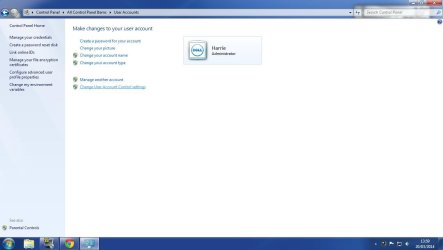
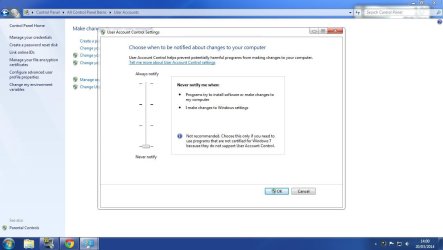
turn off UAC control, Or down it down. If your not an experienced user.
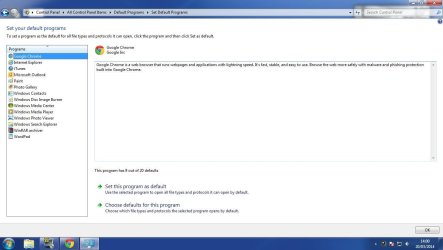
Also set program defaults to Google chrome. Make the browser you default.
 

Attachments

  • Dwm 2014-03-20 13-59-54-07.jpg
    Dwm 2014-03-20 13-59-54-07.jpg
    43.3 KB · Views: 0
  • Dwm 2014-03-20 14-00-22-96.jpg
    Dwm 2014-03-20 14-00-22-96.jpg
    68.7 KB · Views: 0
  • Dwm 2014-03-20 14-01-00-64.jpg
    Dwm 2014-03-20 14-01-00-64.jpg
    71 KB · Views: 1

My Computer

Computer type
PC/Desktop
Computer Manufacturer/Model Number
Custom Build
OS
Windows 7 Ultimate 64-bit
CPU
Intel G3420 3.2GHZ Dual Core
Motherboard
Gigabyte H87-HD3
Memory
Kingson 8GB 1600mhz
Graphics Card(s)
MSI R7970 TF 3GD5/OC BE
Monitor(s) Displays
21" LG & "19 Vertical Samsung
Hard Drives
120GB SSD - Boot
1TB WD
350GB External
2TB External (Wireless)
PSU
Corsair CX 500 modular
Case
Zalman Z11 Plus (modified)
Cooling
Corsair H55, 2x 120mm SP Corsair, 1x 140 Coolermaster
Keyboard
Corsair K50
Mouse
CSL Gaming
Internet Speed
164Mbps
Antivirus
Avast, Malwarebytes
Browser
Google Chrome, IE, Firefox
Is this resolved?
 

My Computer

Computer type
PC/Desktop
Computer Manufacturer/Model Number
Custom Build
OS
Windows 7 Ultimate 64-bit
CPU
Intel G3420 3.2GHZ Dual Core
Motherboard
Gigabyte H87-HD3
Memory
Kingson 8GB 1600mhz
Graphics Card(s)
MSI R7970 TF 3GD5/OC BE
Monitor(s) Displays
21" LG & "19 Vertical Samsung
Hard Drives
120GB SSD - Boot
1TB WD
350GB External
2TB External (Wireless)
PSU
Corsair CX 500 modular
Case
Zalman Z11 Plus (modified)
Cooling
Corsair H55, 2x 120mm SP Corsair, 1x 140 Coolermaster
Keyboard
Corsair K50
Mouse
CSL Gaming
Internet Speed
164Mbps
Antivirus
Avast, Malwarebytes
Browser
Google Chrome, IE, Firefox
Welcome to Seven Forums skeggy. You could try creating an Elevated Program shortcut

http://www.sevenforums.com/tutorials/11949-elevated-program-shortcut-without-uac-prompt-create.html

Or, you can set the Programs Integrity Level to Medium for the Start Menu or Desktop

Fix Start Menu Shortcuts Open File Security Warning in Windows 7 and Windows Vista - The Winhelponline Blog

For desktop just substitute C:\>ICACLS "C:\Users\YOUR_USERNAME\Desktop" /Setintegritylevel (OI)(CI)M

Chances are a new User profile would also correct this, although it is a mystery why this happens in the first place. A Guy
 

My Computer

Computer type
PC/Desktop
OS
Windows 10 Home x64
CPU
INTEL Core i5-750 Quad-Core 3.37GHz
Motherboard
ASUS P7P55D
Memory
HyperX Fury Black Series 8GB (2 x 4GB) 1866Mhz
Graphics Card(s)
EVGA GeForce GTX 750 Superclocked 1GB 128-Bit GDDR5
Monitor(s) Displays
LG 32MA68HY 32" IPS
Screen Resolution
1920 x 1080
Hard Drives
Samsung 840 Evo 120GB, SEAGATE 500GB Barracuda® 7200.12, SATA 3 Gb/s, 7200 RPM, 16MB cache
PSU
ANTEC TruePower New TP-550, 80 PLUS, 550W
Case
ANTEC Three Hundred Illusion
Cooling
COOLER MASTER Hyper 212 Plus, 4 x 120mm 1 x 140mm Noctua's
Internet Speed
85 + Mbps
Antivirus
Avast
Browser
Vivaldi
Back
Top