Google Chrome - browser lags every few seconds!

toxicwaste288

New member
Local time
2:13 AM
Messages
4
I am running Windows 7 Ultimate 64 bit, and every few seconds my Google Chrome browser will lag, and then catch up with its self several seconds after. Even whilst typing this message it has happened twice. I don't want to have to revert to crap browser! These are my computer specifications:
Dell studio 15
Intel Core i7 720, x1.6ghz
4GB DD2 Ram
6mb cache

Thanks :)
 

My Computer

Computer Manufacturer/Model Number
Dell Studio 15
OS
Windows 7
CPU
Intel Core i7 720
Memory
4gb DDR3
Graphics Card(s)
512 ATI Mobility HD
Screen Resolution
1080p
Other Info
Reh
I am not familiar with Chrome, but I do know Explorer. In Explorer in the Internet Option box (Tools>Internet Options>Advanced, there is a button. It is labled reset. Now my help comes to an end, other than to say find the equivilent in Chrome and I think your problem will be solved.
 

My Computer

Computer type
PC/Desktop
Computer Manufacturer/Model Number
Dell XPS 420
OS
Windows 10, Home Clean Install
CPU
Intel Core2 processsor Q8200(2.33Ghz 1333FSB) Quad Core Tech
Motherboard
Dell
Memory
6 gb
Graphics Card(s)
ATI Radeon 256MB HD3650
Sound Card
Intergrated 7.1 Channel Audio
Monitor(s) Displays
Dell SP2009W 20"
Hard Drives
640 GB Serial ATA Hard drive
Cooling
Fan
Keyboard
Dell USB Keyboard
Mouse
Dell Premium Optical USB
Internet Speed
DSL 2.85
Mer, erm, no, there is no button like that... tbh, its a problem that is deep set in the browser, that will require something a lot more significant than a reset button I am afraid... thanks anyway.
 

My Computer

Computer Manufacturer/Model Number
Dell Studio 15
OS
Windows 7
CPU
Intel Core i7 720
Memory
4gb DDR3
Graphics Card(s)
512 ATI Mobility HD
Screen Resolution
1080p
Other Info
Reh
Mer, erm, no, there is no button like that... tbh, its a problem that is deep set in the browser, that will require something a lot more significant than a reset button I am afraid... thanks anyway.


Sounds like a bad installation. Set up a restore point, then uninstall and install the browser again. The restore point can bring you back to where you were prior to uninstalling.
 

My Computer

Computer type
PC/Desktop
Computer Manufacturer/Model Number
Dell XPS 420
OS
Windows 10, Home Clean Install
CPU
Intel Core2 processsor Q8200(2.33Ghz 1333FSB) Quad Core Tech
Motherboard
Dell
Memory
6 gb
Graphics Card(s)
ATI Radeon 256MB HD3650
Sound Card
Intergrated 7.1 Channel Audio
Monitor(s) Displays
Dell SP2009W 20"
Hard Drives
640 GB Serial ATA Hard drive
Cooling
Fan
Keyboard
Dell USB Keyboard
Mouse
Dell Premium Optical USB
Internet Speed
DSL 2.85
Sorry, tried that already. . . I have heard its a problem with all x64 Win 7 with intel core processors. I don't know how to fix it...
 

My Computer

Computer Manufacturer/Model Number
Dell Studio 15
OS
Windows 7
CPU
Intel Core i7 720
Memory
4gb DDR3
Graphics Card(s)
512 ATI Mobility HD
Screen Resolution
1080p
Other Info
Reh
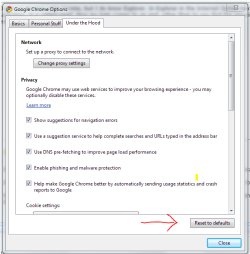
There is a reset button
 

Attachments

  • Capture.PNG
    Capture.PNG
    19.7 KB · Views: 1,177

My Computer

OS
Home Premium x64
CPU
Intel e7400 2.8GHz Dual Core, OC @ 3.36GHz
Motherboard
Gigabyte GA-EP43-DS3L/S3L
Memory
4GB DDR2 1066
Graphics Card(s)
Nvidia GeForce 9800 GT
Sound Card
Realtek Surround Onboard.
Monitor(s) Displays
ASUS VW224, 22 Inch and Samsung SyncMaster 713v
Screen Resolution
Main Screen @1680x1050, Secondary @ 1280x1024
Hard Drives
Western Digital WD3200AAKS 320GB 7200 RPM SATA 3.0Gb/s
PSU
Thermaltake Purepower W0100RU 500W
Case
Rosewill R5601-BK Screw-less
Cooling
Two 120mm fans and Stock CPU fans
Keyboard
Old Dell Keyboard my neighbor gave me.
Mouse
Logitech MX518
Internet Speed
6Kbps
Other Info
Logitech X-540 70 watts 5.1 Speakers
Back
Top