Solved Got this when booting, "remove boot execute record unsuccessfully"...

There may be better packages out there, but AVG serves its purpose for my needs.

How can the 2013 edition that retailers sell on their shelves today, and which updates daily, be long past its sell by date as you state?

Regardless, you're missing my point. Walking away from a problem doesn't solve the problem if someone is seeking a solution and wishes to avoid dropping another $40 on new software. I'm betting that there is an easier fix. And if not, I believe AVG offers a 30 day money back guarantee. So they deserve the chance to fix their own issue.

AVG, better known back when as AntiVirus Grisoft, has a forum. Have you tried there for help.

http://forums.avg.com/us-en/avg-forums
 

My Computer

Computer type
PC/Desktop
Computer Manufacturer/Model Number
Custom Built
OS
Windows 7 Professional x64
CPU
Intel i5 quad processor
Motherboard
DP67BG
Memory
16 GB
Graphics Card(s)
Radeon HD 5770
Sound Card
Realtek High Definition Audio
Monitor(s) Displays
Samsung SyncMaster
Screen Resolution
1920X1080
Hard Drives
WD 2TB (SATA Internal)
WD 1TB (USB External)
PSU
Corsair GS800
Case
Tower (Generic)
Cooling
3 Internal Fans
Keyboard
MS Wireless
Mouse
MS Optical Wired
Internet Speed
54 mbps
Antivirus
Emsisoft
Browser
IE-Version 9, Palemoon-Version 24.2.0
I am having the same issue. So this can be confirmed that comes from AVG 2013 or from Tuneup? If someone is getting this error without one of those apps would be very helpful to know from where the problem really comes.
 

My Computer

OS
Windows 7 Ultimate x64
CPU
i7 950 3.07Ghz
Motherboard
Gigabyte X58-USB
Memory
12GB
Graphics Card(s)
nVIDIA GTX 570 1.28GB
Sound Card
Realteck High Definition Audio
Monitor(s) Displays
Asus 24" 1080p
Hard Drives
Seagate 2TB
PSU
Corsair GS800
Case
NZXT Phantom White
Cooling
Artic Freezer V13
update:

Hey guys,
Unfortunately I am still getting the start up message with no solution yet. However I am convinced its the result of tuneup rather than avg in general. I remember scheduling a defragment on startup the first day I trialled tuneup (this could be the reason?), hoever since the trial period has finished, I can't access any of the settings in tuneup without buying it. So I went through hell removing tuneup as best I could (really hard), yet no difference.
Anyone else had any luck?

Cheers
 

My Computer

OS
Vista 32 bit
Hey guys,
Unfortunately I am still getting the start up message with no solution yet. However I am convinced its the result of tuneup rather than avg in general. I remember scheduling a defragment on startup the first day I trialled tuneup (this could be the reason?), hoever since the trial period has finished, I can't access any of the settings in tuneup without buying it. So I went through hell removing tuneup as best I could (really hard), yet no difference.
Anyone else had any luck?

Cheers

Check the video at the following link;

http://www.youtube.com/watch?v=yZV7HGgw4oA

I have never used the program, so I can't say whether the process shown will work or not.

HTH
 
Last edited:

My Computer

Computer type
PC/Desktop
Computer Manufacturer/Model Number
Custom Built
OS
Windows 7 Professional x64
CPU
Intel i5 quad processor
Motherboard
DP67BG
Memory
16 GB
Graphics Card(s)
Radeon HD 5770
Sound Card
Realtek High Definition Audio
Monitor(s) Displays
Samsung SyncMaster
Screen Resolution
1920X1080
Hard Drives
WD 2TB (SATA Internal)
WD 1TB (USB External)
PSU
Corsair GS800
Case
Tower (Generic)
Cooling
3 Internal Fans
Keyboard
MS Wireless
Mouse
MS Optical Wired
Internet Speed
54 mbps
Antivirus
Emsisoft
Browser
IE-Version 9, Palemoon-Version 24.2.0
Hey guys,
Unfortunately I am still getting the start up message with no solution yet. However I am convinced its the result of tuneup rather than avg in general. I remember scheduling a defragment on startup the first day I trialled tuneup (this could be the reason?), hoever since the trial period has finished, I can't access any of the settings in tuneup without buying it. So I went through hell removing tuneup as best I could (really hard), yet no difference.
Anyone else had any luck?

Cheers

Check the video at the following link;

http://www.youtube.com/watch?v=yZV7HGgw4oA

I have never used the program, so I can't say the whether the process shown will work or not.

HTH

Thanks HTH,
yeah thats exactly what happened to me. Ended up having to go into program files and deleting what I could, then found an extension program called tuneup rescue centre or something and that got the rest of it off
 

My Computer

OS
Vista 32 bit
possible cause

Ok I have been doing a bit of looking around, and I think I have found what is causing the message. btw I was able to uninstall tuneup the best I could.
So go to:
Computer Cdrive, program files, AVG, AVG 2013, tuneup folder. This is the only part of tuneup that remains on my computer - but I cant delete the files that are 'application extensions'

Anyway: I went to start, run, regedit,
HKEY LOCAL MACHINE - Software - Delete the entire folder 'tuneup'
Then delete under AVG - avg2013 -folder AWL2012

HKEY current USER - software - delete entire tuneup folder
and under AVG folder there was a tuneup folder too, delete that

The outcome of this was......
Now I'm not getting the message 'remove boot execute unuccessful......' Im getting a different message hahaha. It now says:
'turegopt program not found. skipping autocheck'

So I have definitely removed the program file, and the message that comes up now doesnt last as long.
So basically, the message we have been getting is an autocheck - setting of tuneup in some way. I have an exam tomorrow, but after that I am going to try and delete all avg folders under regedit and reinstall.
 
Last edited:

My Computer

OS
Vista 32 bit
I found the way to fix this problem


How to fix "remove boot execute record unsuccessfully"

First of all, you dont need to either unninstall TuneUp or AVG. That error message is harmless and only shows the actual state after you programmed/executed the registry defrag tool from TuneUp.

Why this happen?

TuneUp Registry Defrag runs on boot while AVG just try to protect our PC. This makes TuneUp impossible to do its defragmentation task, but aside of that, there arent any problem. You just cant use TuneUp Registry Defrag till AVG works in a fix to allow this application to work which isnt something really necessary (I rather like to have both software installed and get the best benefits of them missing a single feature that will be patched more soon or later...).


So, how to fix this problem?

This is really easy to fix. First we need Autoruns software, a really powerfull application that give us complete control over what will be loaded when Windows start.

You can download Autoruns from microsfot website here.

After you downloaded the application, extract the files in a folder of your choice and run the application with administrator rights.

Wait some seconds till everything loads and then go to the Logon tab and uncheck the entry RegistryDefrag Success Message as shown in the following screenshot.


gFQWl.png


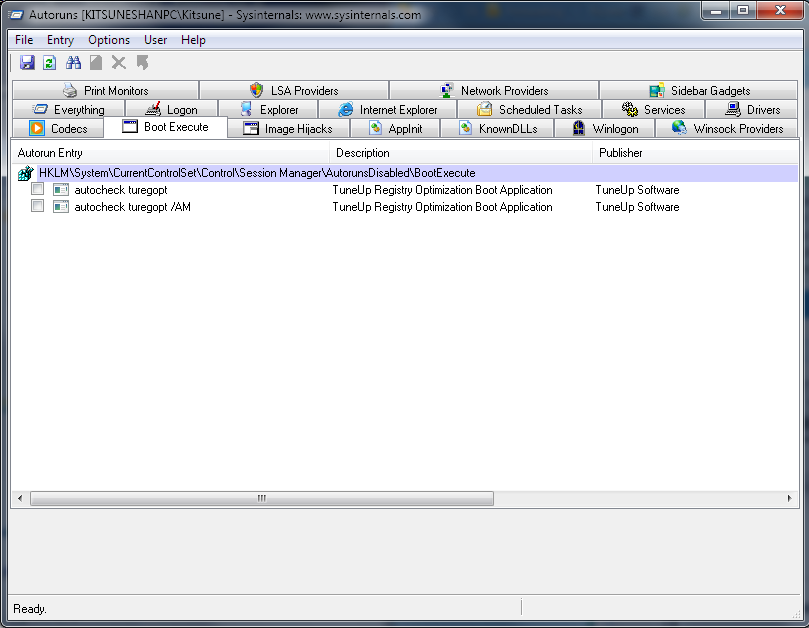
Now click on the Boot Execute tab and uncheck the entries autocheck turegopt and autocheck turegopt /AM as shown in the following screenshot.


ZqAIu.png


Now close the application and restart. You will see that the error message is gone forever.

Take in account that those entries may vary depending of your OS, if you already unninstalled TuneUp or AVG or if you have done any other change. Also remember, that if you execute TuneUp Registry Defrag (even if you just only scan) you will probably get the same error message on logon screen so I recommend you to wait for an AVG update where you can know clearly that this problem have been fixed.

I made this small guide by myself and tested on my own PC. Working perfectly on Windows 7 Ultimate x64 with the latest updates at time of writing this message.


I hope you find this useful, regards, Kitsune Shan.-
 

My Computer

OS
Windows 7 Ultimate x64
CPU
i7 950 3.07Ghz
Motherboard
Gigabyte X58-USB
Memory
12GB
Graphics Card(s)
nVIDIA GTX 570 1.28GB
Sound Card
Realteck High Definition Audio
Monitor(s) Displays
Asus 24" 1080p
Hard Drives
Seagate 2TB
PSU
Corsair GS800
Case
NZXT Phantom White
Cooling
Artic Freezer V13
The Problem Solved!!!!!

Finally!! no more message when booting! :party::party:

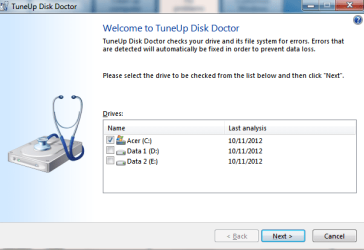
I try to check my C: drive with 'TuneUp Disk Doctor' 2013. Just follow the step and it will ask you to restart to complete the check, then windows will check the drive after you restart.

tuneup.png

And the message is not showing anymore when booting :D

Hope this will also help you guys out ;)
Thanks to everybody who kindly reply my post to help me solve this problem :grouphug:
thumbs.gif

THANK YOU ALL!!!! :D
 

My Computer

OS
Windows 7 Ultimate x32
I found the way to fix this problem


How to fix "remove boot execute record unsuccessfully"

First of all, you dont need to either unninstall TuneUp or AVG. That error message is harmless and only shows the actual state after you programmed/executed the registry defrag tool from TuneUp.

Why this happen?

TuneUp Registry Defrag runs on boot while AVG just try to protect our PC. This makes TuneUp impossible to do its defragmentation task, but aside of that, there arent any problem. You just cant use TuneUp Registry Defrag till AVG works in a fix to allow this application to work which isnt something really necessary (I rather like to have both software installed and get the best benefits of them missing a single feature that will be patched more soon or later...).


So, how to fix this problem?

This is really easy to fix. First we need Autoruns software, a really powerfull application that give us complete control over what will be loaded when Windows start.

You can download Autoruns from microsfot website here.

After you downloaded the application, extract the files in a folder of your choice and run the application with administrator rights.

Wait some seconds till everything loads and then go to the Logon tab and uncheck the entry RegistryDefrag Success Message as shown in the following screenshot.


gFQWl.png


Now click on the Boot Execute tab and uncheck the entries autocheck turegopt and autocheck turegopt /AM as shown in the following screenshot.


ZqAIu.png


Now close the application and restart. You will see that the error message is gone forever.

Take in account that those entries may vary depending of your OS, if you already unninstalled TuneUp or AVG or if you have done any other change. Also remember, that if you execute TuneUp Registry Defrag (even if you just only scan) you will probably get the same error message on logon screen so I recommend you to wait for an AVG update where you can know clearly that this problem have been fixed.

I made this small guide by myself and tested on my own PC. Working perfectly on Windows 7 Ultimate x64 with the latest updates at time of writing this message.


I hope you find this useful, regards, Kitsune Shan.-

Hey kitsune, thanks for reply my post :D
I didn't uninstall the avg 2013 or the tuneup. I just try to do the tuneup disk check doctor and now can boot normally

Maybe not everyone can solve the problem with my method, they can try your method too. :D

Once again, thanks for the reply :D

Regards,
Tony
 

My Computer

OS
Windows 7 Ultimate x32
Ok I have been doing a bit of looking around, and I think I have found what is causing the message. btw I was able to uninstall tuneup the best I could.
So go to:
Computer Cdrive, program files, AVG, AVG 2013, tuneup folder. This is the only part of tuneup that remains on my computer - but I cant delete the files that are 'application extensions'

Anyway: I went to start, run, regedit,
HKEY LOCAL MACHINE - Software - Delete the entire folder 'tuneup'
Then delete under AVG - avg2013 -folder AWL2012

HKEY current USER - software - delete entire tuneup folder
and under AVG folder there was a tuneup folder too, delete that

The outcome of this was......
Now I'm not getting the message 'remove boot execute unuccessful......' Im getting a different message hahaha. It now says:
'turegopt program not found. skipping autocheck'

So I have definitely removed the program file, and the message that comes up now doesnt last as long.
So basically, the message we have been getting is an autocheck - setting of tuneup in some way. I have an exam tomorrow, but after that I am going to try and delete all avg folders under regedit and reinstall.

You don't need to uninstall tune up, just try to do the tuneup disk doctor.
I did it and now the message completely gone
Hope you can solve your problem too :D

Regards,
Tony
 

My Computer

OS
Windows 7 Ultimate x32
There may be better packages out there, but AVG serves its purpose for my needs.

How can the 2013 edition that retailers sell on their shelves today, and which updates daily, be long past its sell by date as you state?

Regardless, you're missing my point. Walking away from a problem doesn't solve the problem if someone is seeking a solution and wishes to avoid dropping another $40 on new software. I'm betting that there is an easier fix. And if not, I believe AVG offers a 30 day money back guarantee. So they deserve the chance to fix their own issue.
Please let us know when you get this problem figured out and how you did it. The reason I ask is many people using Windows 7 and AVG have been having problems for a long time and could use help and a fix.
 

My Computer

Computer type
PC/Desktop
Computer Manufacturer/Model Number
Home made Desktop
OS
Windows 10 Pro. 64/ version 1709 Windows 7 Pro/64
CPU
Intel i7-6800K @ 4.3
Motherboard
ASUS X-99 Deluxe II
Memory
Corsair Platinum 16 gig @2400
Graphics Card(s)
EVGA GTX 1070 OC
Monitor(s) Displays
Asus 27" LED LCD/VE278Q
Screen Resolution
1920-1080 or 1280-720 HDMI
Hard Drives
INTEL SSD 730-240 Gb Sata 3.0/
PSU
EVGA Platium 1200W
Case
Phanteks Luxe Tempered Glass 8 fans/ one radiator
Cooling
XSPC/ Water Cooled CPU
Keyboard
Das 4 Professional
Mouse
Logitech M705/MX Anywhere 2-S
Internet Speed
100 mbits
Antivirus
Microsoft Security Essentials/ Malwarebytes Premium 3.0/ SAS
Browser
I.E. 11 default/Firefox/ ISP Time Warner Cable/Spectrum
Other Info
LG BluRay Burner/
Sound system-KLipsch-THX/
Icy Dock ssd Hot Swap bays.
I found the way to fix this problem


How to fix "remove boot execute record unsuccessfully"

First of all, you dont need to either unninstall TuneUp or AVG. That error message is harmless and only shows the actual state after you programmed/executed the registry defrag tool from TuneUp.

Why this happen?

TuneUp Registry Defrag runs on boot while AVG just try to protect our PC. This makes TuneUp impossible to do its defragmentation task, but aside of that, there arent any problem. You just cant use TuneUp Registry Defrag till AVG works in a fix to allow this application to work which isnt something really necessary (I rather like to have both software installed and get the best benefits of them missing a single feature that will be patched more soon or later...).


So, how to fix this problem?

This is really easy to fix. First we need Autoruns software, a really powerfull application that give us complete control over what will be loaded when Windows start.

You can download Autoruns from microsfot website here.

After you downloaded the application, extract the files in a folder of your choice and run the application with administrator rights.

Wait some seconds till everything loads and then go to the Logon tab and uncheck the entry RegistryDefrag Success Message as shown in the following screenshot.


gFQWl.png


Now click on the Boot Execute tab and uncheck the entries autocheck turegopt and autocheck turegopt /AM as shown in the following screenshot.


ZqAIu.png


Now close the application and restart. You will see that the error message is gone forever.

Take in account that those entries may vary depending of your OS, if you already unninstalled TuneUp or AVG or if you have done any other change. Also remember, that if you execute TuneUp Registry Defrag (even if you just only scan) you will probably get the same error message on logon screen so I recommend you to wait for an AVG update where you can know clearly that this problem have been fixed.

I made this small guide by myself and tested on my own PC. Working perfectly on Windows 7 Ultimate x64 with the latest updates at time of writing this message.


I hope you find this useful, regards, Kitsune Shan.-

Hey kitsune, thanks for reply my post :D
I didn't uninstall the avg 2013 or the tuneup. I just try to do the tuneup disk check doctor and now can boot normally

Maybe not everyone can solve the problem with my method, they can try your method too. :D

Once again, thanks for the reply :D

Regards,
Tony

My method removes what is wrong fromt he logon process at Windows start. So surely it does fix the error message. There just should show something like "TuneUp Registry Defrag finished sucessfully" but since AVG doesnt let it to even start, the message returned is just wrong.

Repairing the disk may be an option, but that shouldnt be really a reasson to fix the problem. Scandisk just scan for corrupted files and tries to repair them, nothing to do at all with executing an app at Windows startup. Also, you dont need TuneUp Disk Doctor for that. Just go tou your computer, right click in your HDD, select tools and there select the scan option. Actually TuneUp doesnt have any dedicated tool to check the disks. TuneUp just uses the own Windows scandisk.

So usin scandisk may "fix" temporary the error message, but those invalid entries will still in the registry and in the worst of cases you can end being unable to start Windows for trying to acces to invalid files. So I recommend 100% my method because is really safe and harmless. I DO NOT recommend to unnistall either AVG and even less TuneUp till you have already fixed this problems and deleted the entries I wrote on my post.
 

My Computer

OS
Windows 7 Ultimate x64
CPU
i7 950 3.07Ghz
Motherboard
Gigabyte X58-USB
Memory
12GB
Graphics Card(s)
nVIDIA GTX 570 1.28GB
Sound Card
Realteck High Definition Audio
Monitor(s) Displays
Asus 24" 1080p
Hard Drives
Seagate 2TB
PSU
Corsair GS800
Case
NZXT Phantom White
Cooling
Artic Freezer V13
There may be better packages out there, but AVG serves its purpose for my needs.

How can the 2013 edition that retailers sell on their shelves today, and which updates daily, be long past its sell by date as you state?

Regardless, you're missing my point. Walking away from a problem doesn't solve the problem if someone is seeking a solution and wishes to avoid dropping another $40 on new software. I'm betting that there is an easier fix. And if not, I believe AVG offers a 30 day money back guarantee. So they deserve the chance to fix their own issue.
Please let us know when you get this problem figured out and how you did it. The reason I ask is many people using Windows 7 and AVG have been having problems for a long time and could use help and a fix.


The problem have been fixed already (I posted the solution above). I use AVG since 4 or 5 years ago. Installed in all Windows 7 computers of my home and my customers. Never had a problem before with it fortunately. Working perfectly and smooth in Windows 7 32 and 64 bits, Home Premium and Ultimate.
 

My Computer

OS
Windows 7 Ultimate x64
CPU
i7 950 3.07Ghz
Motherboard
Gigabyte X58-USB
Memory
12GB
Graphics Card(s)
nVIDIA GTX 570 1.28GB
Sound Card
Realteck High Definition Audio
Monitor(s) Displays
Asus 24" 1080p
Hard Drives
Seagate 2TB
PSU
Corsair GS800
Case
NZXT Phantom White
Cooling
Artic Freezer V13
I was wondering if gmsmagic1 has got his computer fixed. I hope that is not bothersome to anyone. I might of missed gmsmagic1 post that everything is okay.
 

My Computer

Computer type
PC/Desktop
Computer Manufacturer/Model Number
Home made Desktop
OS
Windows 10 Pro. 64/ version 1709 Windows 7 Pro/64
CPU
Intel i7-6800K @ 4.3
Motherboard
ASUS X-99 Deluxe II
Memory
Corsair Platinum 16 gig @2400
Graphics Card(s)
EVGA GTX 1070 OC
Monitor(s) Displays
Asus 27" LED LCD/VE278Q
Screen Resolution
1920-1080 or 1280-720 HDMI
Hard Drives
INTEL SSD 730-240 Gb Sata 3.0/
PSU
EVGA Platium 1200W
Case
Phanteks Luxe Tempered Glass 8 fans/ one radiator
Cooling
XSPC/ Water Cooled CPU
Keyboard
Das 4 Professional
Mouse
Logitech M705/MX Anywhere 2-S
Internet Speed
100 mbits
Antivirus
Microsoft Security Essentials/ Malwarebytes Premium 3.0/ SAS
Browser
I.E. 11 default/Firefox/ ISP Time Warner Cable/Spectrum
Other Info
LG BluRay Burner/
Sound system-KLipsch-THX/
Icy Dock ssd Hot Swap bays.
I found the way to fix this problem


How to fix "remove boot execute record unsuccessfully"

First of all, you dont need to either unninstall TuneUp or AVG. That error message is harmless and only shows the actual state after you programmed/executed the registry defrag tool from TuneUp.

Why this happen?

TuneUp Registry Defrag runs on boot while AVG just try to protect our PC. This makes TuneUp impossible to do its defragmentation task, but aside of that, there arent any problem. You just cant use TuneUp Registry Defrag till AVG works in a fix to allow this application to work which isnt something really necessary (I rather like to have both software installed and get the best benefits of them missing a single feature that will be patched more soon or later...).


So, how to fix this problem?

This is really easy to fix. First we need Autoruns software, a really powerfull application that give us complete control over what will be loaded when Windows start.

You can download Autoruns from microsfot website here.

After you downloaded the application, extract the files in a folder of your choice and run the application with administrator rights.

Wait some seconds till everything loads and then go to the Logon tab and uncheck the entry RegistryDefrag Success Message as shown in the following screenshot.


gFQWl.png


Now click on the Boot Execute tab and uncheck the entries autocheck turegopt and autocheck turegopt /AM as shown in the following screenshot.


ZqAIu.png


Now close the application and restart. You will see that the error message is gone forever.

Take in account that those entries may vary depending of your OS, if you already unninstalled TuneUp or AVG or if you have done any other change. Also remember, that if you execute TuneUp Registry Defrag (even if you just only scan) you will probably get the same error message on logon screen so I recommend you to wait for an AVG update where you can know clearly that this problem have been fixed.

I made this small guide by myself and tested on my own PC. Working perfectly on Windows 7 Ultimate x64 with the latest updates at time of writing this message.


I hope you find this useful, regards, Kitsune Shan.-

Hey kitsune, thanks for reply my post :D
I didn't uninstall the avg 2013 or the tuneup. I just try to do the tuneup disk check doctor and now can boot normally

Maybe not everyone can solve the problem with my method, they can try your method too. :D

Once again, thanks for the reply :D

Regards,
Tony

My method removes what is wrong fromt he logon process at Windows start. So surely it does fix the error message. There just should show something like "TuneUp Registry Defrag finished sucessfully" but since AVG doesnt let it to even start, the message returned is just wrong.

Repairing the disk may be an option, but that shouldnt be really a reasson to fix the problem. Scandisk just scan for corrupted files and tries to repair them, nothing to do at all with executing an app at Windows startup. Also, you dont need TuneUp Disk Doctor for that. Just go tou your computer, right click in your HDD, select tools and there select the scan option. Actually TuneUp doesnt have any dedicated tool to check the disks. TuneUp just uses the own Windows scandisk.

So usin scandisk may "fix" temporary the error message, but those invalid entries will still in the registry and in the worst of cases you can end being unable to start Windows for trying to acces to invalid files. So I recommend 100% my method because is really safe and harmless. I DO NOT recommend to unnistall either AVG and even less TuneUp till you have already fixed this problems and deleted the entries I wrote on my post.

I know your method is safe and definitely right

Before I got that message i tried to do the tuneup registry defrag. If the defrag success, there will be the notification. but in my occasion there isn't.

After I do the tuneup disk doctor, the registry defrag success notification shown up.

I tried to use the Autoruns software and in the logon tab there is no RegistryDefrag Success Message entry. And also in the boot execute tab. Maybe because the registry defrag process already finished. And I think now the problem already fixed.

Thanks for sharing your method too, its better to have more than one method to fix this problem right? :D
 

My Computer

OS
Windows 7 Ultimate x32
Back
Top