My Computer
- OS
- Windows 7 Ultimate x32
Hey Tony,
I actually have windows vista, however just in the last week, I have noticed exactly the same message appearing at startup. It doesn't seem to affect anything however has made me a little nervous. The only thing I have done recently is install the latest AVG.
Any help as to the reasoning behind this message would be great
Cheers
Rubes
I can't even delete the AVG 2013 from my PC as few others, that's why i have to re-install my window 7. AVG ::banghead:
after the boot screen
View attachment 237513
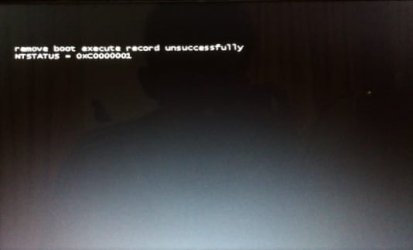
i got this message
View attachment 237516
after that it continue normally
but usually i didn't get that
i have no idea what's the problem
can anyone help?
„remove boot execute record unsuccessfully NTSTATUS = 0x00000000“
or
„remove boot execute record unsuccessfully NTSTATUS = 0xC0000001“ ?
after the boot screen
View attachment 237513
i got this message
View attachment 237516
after that it continue normally
but usually i didn't get that
i have no idea what's the problem
can anyone help?
i have de same problem after used boot time defrag in tuneup utilities.
Any idea to solve the problem??
Thanks in advance
you do boot time defrag? or tuneup utilities?
Any... try http://www.sevenforums.com/tutorial...ation-conflicts-performing-clean-startup.html
same problem?
Yea avg 2013, I'm still getting the messages tony. Maybe it's a setting in avg ? That routinely scans something at start up ? I'll give it another week but if nothing's changed I might uninstall avg 2013 (hopefullly i dont have the problems jack has lol) and see if that makes a difference.
![]()
after the boot screen
View attachment 237513
i got this message
View attachment 237516
after that it continue normally
but usually i didn't get that
i have no idea what's the problem
can anyone help?
i have de same problem after used boot time defrag in tuneup utilities.
Any idea to solve the problem??
Thanks in advance
mario is right, i used 'defragment registry' with tune up utilities right before i got that message
after the defragment registry process it needs to reboot
and suddenly got that message
i have de same problem after used boot time defrag in tuneup utilities.
Any idea to solve the problem??
Thanks in advance
mario is right, i used 'defragment registry' with tune up utilities right before i got that message
after the defragment registry process it needs to reboot
and suddenly got that message
From the TuneUp website; " It’s foolproof, too, as unwanted changes can be easily corrected in the TuneUp Rescue Center." Have you checked to see if there is a backup of the registry prior to the changes?
HTH
How can the 2013 edition that retailers sell on their shelves today, and which updates daily, be long past its sell by date as you state?