
Gpedit 'Encountered an error while parsing'

Magnakai

New member
Member
VIP
Local time
4:00 AM
Messages
160
hi, after upgrading stock IE8 to IE11 (through direct upgrade EIE11_EN-US_MCM_WIN764) on a new system, i am getting this error notice when i first enter Gpedit.
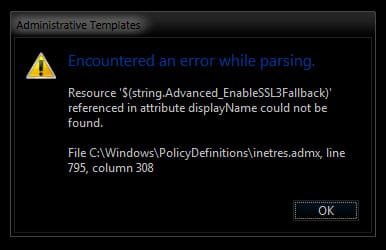
Error Parsing.jpg

this error message comes out twice, always, and after i click on OK (twice) i'm free to go about my business in group policy.

i'm assuming it's IE, tried to find out more at the links below but i'm not using windows server ... ? also i don't remember ever tweaking anything in gpedit to do with IE8 or 11?

https://social.technet.microsoft.co...indows-7-group-policies?forum=w7itprosecurity

https://community.spiceworks.com/topic/421128-encountered-an-error-while-parsing

Windows 7 upgrade produces an error in gpedit.msc - Microsoft Community

http://answers.microsoft.com/en-us/...not-work/7800c63d-a5ba-4db8-a413-33a1c5156e60

how do i resolve this pls? and were any error logs generated on my pc because of this.

thanks
 

My Computer

Computer type
PC/Desktop
OS
Windows 7 Ultimate x64

My Computer

Computer type
PC/Desktop
Computer Manufacturer/Model Number
Self Built
OS
Win 10 Pro x64
CPU
Intel I5-2500K @3.3GHz
Motherboard
Asrock P67 Extreme4
Memory
16GB G.Skill Ripjaws X (4x4GB)
Graphics Card(s)
EVGA GeForce 750 Ti SC 2GB
Sound Card
ASUS Xonar DG 5.1 Channels 24-bit 96KHz PCI Interface Sound
Monitor(s) Displays
auria eq2367
Screen Resolution
1920 x 1080
Hard Drives
250GB Samsung 850 EVO SSD
1TB WD Blue
1TB Hitachi
PSU
SeaSonic X 650W 80 Plus Gold
Case
Corsair Obsidian 750D
Cooling
Corsair H60, Three 140mm case fans
Keyboard
Logitech Wireless Keyboard K520
Mouse
Logitech Wireless Mouse M310
Internet Speed
Wave Broadband ~ 100 dn 5 up
Antivirus
Windows Defender, Malwarebytes Premium
Browser
Edge, IE11, Chrome
Other Info
Laptop specs: HP g7-1365dx /
CPU: AMD A6-3420M APU with Radeon(tm) HD Graphics /
RAM: Crucial 8Gb (2x4Gb) /
SSD: Crucial M4-CT128M4SSD2 ATA Device/ FW 000F /
GFX: AMD Radeon HD 6520G /
OS: Windows 10 Pro x64
Hi,
I don't get any error using gpedit.msc
ie11 version 11.0.9600.18314
Update version 11.0.31 KB3154070
As far as I'm aware of is the most recent version.

I don't load many at all if any Recommended or optional updates though so you might check and see what updates have actually loaded recently.
 

My Computer

Computer type
PC/Desktop
Computer Manufacturer/Model Number
Custom assembled by me :}
OS
Win-7-Pro64bit 7-H-Prem-64bit
CPU
i7-5930K 2nd i9-9940x both water blocked VRM's too
Motherboard
ASUS SABERTOOTH X99 2nd ASUS x299 Apex
Memory
Trident-z 3200C14 2nd Trident-z 3600C16
Graphics Card(s)
EVGA 1080ti ftw3 2nd Titan Xp both water blocked
Sound Card
Built-in Realtek
Monitor(s) Displays
1-AOC G2460PG 24"G-Sync 144Hz/ 2nd 1-ASUS VG248QE 24" 144Hz
Screen Resolution
1920 x 1080 144Hz
Hard Drives
2-Samsung M.2 Evo & Evo Plus
2-Samsung 850 EVO 500GB SSD's/ 3-2.5 W.D. Black 1tb-&3-1tb/3-3.5 WD Black 1tb hdd's
PSU
EVGA SuperNOVA 1000-P2 2nd 1200-P2
Case
2-Corsair Obsidian Series 450D Black ATX Mid Tower
Cooling
Custom water loops
Keyboard
Logitech G710+/ 2nd Logitech G910
Mouse
2-RedDragon M901 Perdition 16400 dpi Gaming mouse = wired
Internet Speed
Comcast Ping 19ms 89.31mbps download speed 6.12mbps upload
Antivirus
Malwarebytes Pro/ Superantispyware Pro
Browser
FireFox & Pale moon
Other Info
2nd ASUS X299 Apex/Intel i9-9940x with Custom water loop/7H-Prem-x64/Corsair 450D case/Ram Trident-z 3600C16 4x8gb / Samsung970Evo plus 500gb SSD/Dual ssd EZ swap evo/PSU EVGA SuperNova 1200w-P2 80+Platinum/GPU Titan Xp /8-ML-140 on push-pull on 2-280GTX rads
hi guys thanks for the replies. if it's any help, this particular pc in question, i have setup strictly with no windows update intended. offline install for 3 weeks (everything disabled) before connecting just for IE11 installation/upgrade, once. Might have connected with Bitdefender active once or twice.

the version is stock 6.1 Build 7601 SP1 x64.

i'm still getting the error messages, everytime i go into gpedit. it appears twice consecutively. could this be because i have 2 scripts active in there- 1 in Computer Configuration, 1 in User. Both are simple Startup/Logon scripts. what does the error do? apart from the error msg everything appears to operate normally, no issue with the gpo.

ps. i'm a bit reluctant to run scannow becos i have executed some drastic mods vs. default system since fresh installation, like completely no library system structure, disabled favorites panel, no taskbar system, hidden entire public folder, disabled win defender/mse, firewall, all forms of updates, many many services at task scheduler. have done everything by the book, no error so far except for this ...
 

My Computer

Computer type
PC/Desktop
OS
Windows 7 Ultimate x64
That error relates to ActiveX.
You could try to reset the defaults
Control panel >> Internet options >> advanced >> restore advanced settings.
note ssl3 is shown in the dropdown 7th from bottom, mine's unchecked.

However as you have made major changes its possible the conflict has arisen due to the changes you made.

Roy
 

My Computer

Computer type
PC/Desktop
Computer Manufacturer/Model Number
medionl/Aspire 6930G/acer x55a
OS
W7 home premium 32bit/W7HP 64bit/w10 tp insider ring
CPU
E5300 dual core
Motherboard
medion MS7366
Memory
3gb
Graphics Card(s)
Nvidia Geforce 7100 Nforce 630i
Monitor(s) Displays
avixc
Internet Speed
n (isp resticted to 72)
Antivirus
mse/pands
Browser
palemoon
Other Info
Belkin Fd7050 n USB using Railink RT2870 drivers, more upto date
thx will reset advanced settings and let u know.

my ssl 3.0 is also unchecked
 

My Computer

Computer type
PC/Desktop
OS
Windows 7 Ultimate x64
Back
Top