
Solved Encountered an error while parsing

upiter77

New member
Member
Local time
5:06 AM
Messages
86
hi

I have a fresh Installation of WIN7 PRO 64-bit SP1 with all Updates on my home PC desktop.
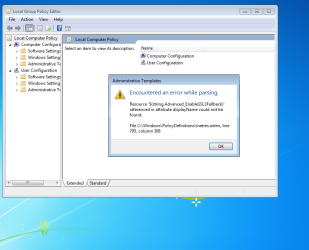
When I start gpedit.msc I get this error message.
Howto solve this problem?
 

Attachments

  • Capture.PNG
    Capture.PNG
    60.4 KB · Views: 3

My Computer

Computer type
PC/Desktop
Computer Manufacturer/Model Number
ThinkCentre Edge 71 (1578E1G)
OS
Windows7 64bit
CPU
Intel(R) Core(TM) i7-2600S CPU @ 2.80GHz
Motherboard
LENOVO To be filled by O.E.M.
Memory
8.00 GB
Graphics Card(s)
Intel HD Graphics 2000 (Sandy Bridge GT1) 2172 MBytes
Sound Card
RealTek ALC662
Monitor(s) Displays
DELL E197FP
Screen Resolution
1280 x 1024 x 32 bits (4294967296 colors) @ 75 Hz
Hard Drives
WDC WD5003ABYX-01WER SCSI Disk Device
PSU
PC9059, 180W
Case
Desktop
Cooling
Noiseblocker BlackSilent XLP Rev. 3.00
Keyboard
DELL SK-8125 Keyboard
Mouse
Logitech USB Optical Mouse
Internet Speed
cable 75Mbps
Antivirus
McAfee VSE 8.8 SP2
Browser
SeaMonkey 2.24

My Computer

Computer type
Laptop
Computer Manufacturer/Model Number
Employer provided Dell Latitude
OS
W7 Pro SP1 64bit
CPU
i7
Memory
8GB
Graphics Card(s)
Intel HD Graphics
Hard Drives
crappy SSD
Antivirus
Employer mandated Symantec Endpoint Protection
Browser
Pale Moon 64bit, IE11 64bit & Chrome 64bit

I have done what you suggested and still the same error.
BTW IE11 with all updates was already installed and it doesn't help.
 

My Computer

Computer type
PC/Desktop
Computer Manufacturer/Model Number
ThinkCentre Edge 71 (1578E1G)
OS
Windows7 64bit
CPU
Intel(R) Core(TM) i7-2600S CPU @ 2.80GHz
Motherboard
LENOVO To be filled by O.E.M.
Memory
8.00 GB
Graphics Card(s)
Intel HD Graphics 2000 (Sandy Bridge GT1) 2172 MBytes
Sound Card
RealTek ALC662
Monitor(s) Displays
DELL E197FP
Screen Resolution
1280 x 1024 x 32 bits (4294967296 colors) @ 75 Hz
Hard Drives
WDC WD5003ABYX-01WER SCSI Disk Device
PSU
PC9059, 180W
Case
Desktop
Cooling
Noiseblocker BlackSilent XLP Rev. 3.00
Keyboard
DELL SK-8125 Keyboard
Mouse
Logitech USB Optical Mouse
Internet Speed
cable 75Mbps
Antivirus
McAfee VSE 8.8 SP2
Browser
SeaMonkey 2.24
Take note of the date/time on that inetres.admx file.

Uninstall IE11. (See this post.)

Restart the computer.

You should now see an older date/time on that inetres.admx file.

Test GPEDIT.

If GPEDIT can correctly parse the older version of that inetres.admx file, then re-install IE11.

You should now see a newer date/time on that inetres.admx file.

Test GPEDIT.
 

My Computer

Computer type
Laptop
Computer Manufacturer/Model Number
Employer provided Dell Latitude
OS
W7 Pro SP1 64bit
CPU
i7
Memory
8GB
Graphics Card(s)
Intel HD Graphics
Hard Drives
crappy SSD
Antivirus
Employer mandated Symantec Endpoint Protection
Browser
Pale Moon 64bit, IE11 64bit & Chrome 64bit
Take note of the date/time on that inetres.admx file.

Uninstall IE11. (See this post.)

Restart the computer.

You should now see an older date/time on that inetres.admx file.

Test GPEDIT.

If GPEDIT can correctly parse the older version of that inetres.admx file, then re-install IE11.

You should now see a newer date/time on that inetres.admx file.

Test GPEDIT.

Really strange, I have IE 11 installed, but cannot find IE 11 under Installed Updates.
 

My Computer

Computer type
PC/Desktop
Computer Manufacturer/Model Number
ThinkCentre Edge 71 (1578E1G)
OS
Windows7 64bit
CPU
Intel(R) Core(TM) i7-2600S CPU @ 2.80GHz
Motherboard
LENOVO To be filled by O.E.M.
Memory
8.00 GB
Graphics Card(s)
Intel HD Graphics 2000 (Sandy Bridge GT1) 2172 MBytes
Sound Card
RealTek ALC662
Monitor(s) Displays
DELL E197FP
Screen Resolution
1280 x 1024 x 32 bits (4294967296 colors) @ 75 Hz
Hard Drives
WDC WD5003ABYX-01WER SCSI Disk Device
PSU
PC9059, 180W
Case
Desktop
Cooling
Noiseblocker BlackSilent XLP Rev. 3.00
Keyboard
DELL SK-8125 Keyboard
Mouse
Logitech USB Optical Mouse
Internet Speed
cable 75Mbps
Antivirus
McAfee VSE 8.8 SP2
Browser
SeaMonkey 2.24
I have removed IE 11 from the command line using:
Code:
FORFILES /P %WINDIR%\servicing\Packages /M Microsoft-Windows-InternetExplorer-*11.*.mum /c "cmd /c echo Uninstalling package @fname && start /w pkgmgr /up:@fname /norestart"
restart, installed IE 10, restart and gpedit.msc starts without error.

Now I have installed IE 11, restart and have the same error again.
 

My Computer

Computer type
PC/Desktop
Computer Manufacturer/Model Number
ThinkCentre Edge 71 (1578E1G)
OS
Windows7 64bit
CPU
Intel(R) Core(TM) i7-2600S CPU @ 2.80GHz
Motherboard
LENOVO To be filled by O.E.M.
Memory
8.00 GB
Graphics Card(s)
Intel HD Graphics 2000 (Sandy Bridge GT1) 2172 MBytes
Sound Card
RealTek ALC662
Monitor(s) Displays
DELL E197FP
Screen Resolution
1280 x 1024 x 32 bits (4294967296 colors) @ 75 Hz
Hard Drives
WDC WD5003ABYX-01WER SCSI Disk Device
PSU
PC9059, 180W
Case
Desktop
Cooling
Noiseblocker BlackSilent XLP Rev. 3.00
Keyboard
DELL SK-8125 Keyboard
Mouse
Logitech USB Optical Mouse
Internet Speed
cable 75Mbps
Antivirus
McAfee VSE 8.8 SP2
Browser
SeaMonkey 2.24
I have deinstalled IE 11 from the "Installed Updates" again, download IE 11 64-bit from the Microsoft Website, restart, installed IE 11, restart, installed an Update for IE 11, restart and now no any error.
 

My Computer

Computer type
PC/Desktop
Computer Manufacturer/Model Number
ThinkCentre Edge 71 (1578E1G)
OS
Windows7 64bit
CPU
Intel(R) Core(TM) i7-2600S CPU @ 2.80GHz
Motherboard
LENOVO To be filled by O.E.M.
Memory
8.00 GB
Graphics Card(s)
Intel HD Graphics 2000 (Sandy Bridge GT1) 2172 MBytes
Sound Card
RealTek ALC662
Monitor(s) Displays
DELL E197FP
Screen Resolution
1280 x 1024 x 32 bits (4294967296 colors) @ 75 Hz
Hard Drives
WDC WD5003ABYX-01WER SCSI Disk Device
PSU
PC9059, 180W
Case
Desktop
Cooling
Noiseblocker BlackSilent XLP Rev. 3.00
Keyboard
DELL SK-8125 Keyboard
Mouse
Logitech USB Optical Mouse
Internet Speed
cable 75Mbps
Antivirus
McAfee VSE 8.8 SP2
Browser
SeaMonkey 2.24
Glad that it is solved.

By the way, was there any anti-virus app installed on this computer during all of this?
 

My Computer

Computer type
Laptop
Computer Manufacturer/Model Number
Employer provided Dell Latitude
OS
W7 Pro SP1 64bit
CPU
i7
Memory
8GB
Graphics Card(s)
Intel HD Graphics
Hard Drives
crappy SSD
Antivirus
Employer mandated Symantec Endpoint Protection
Browser
Pale Moon 64bit, IE11 64bit & Chrome 64bit
Glad that it is solved.

By the way, was there any anti-virus app installed on this computer during all of this?

Yep, there was MSE from Microsoft installed.
Should I next time wait with MSE installation until all Windows Updates are done?
 

My Computer

Computer type
PC/Desktop
Computer Manufacturer/Model Number
ThinkCentre Edge 71 (1578E1G)
OS
Windows7 64bit
CPU
Intel(R) Core(TM) i7-2600S CPU @ 2.80GHz
Motherboard
LENOVO To be filled by O.E.M.
Memory
8.00 GB
Graphics Card(s)
Intel HD Graphics 2000 (Sandy Bridge GT1) 2172 MBytes
Sound Card
RealTek ALC662
Monitor(s) Displays
DELL E197FP
Screen Resolution
1280 x 1024 x 32 bits (4294967296 colors) @ 75 Hz
Hard Drives
WDC WD5003ABYX-01WER SCSI Disk Device
PSU
PC9059, 180W
Case
Desktop
Cooling
Noiseblocker BlackSilent XLP Rev. 3.00
Keyboard
DELL SK-8125 Keyboard
Mouse
Logitech USB Optical Mouse
Internet Speed
cable 75Mbps
Antivirus
McAfee VSE 8.8 SP2
Browser
SeaMonkey 2.24
MSE should have been fine. That should not have interfered with the IE11 updates in any way.

Kaspersky 2016 is causing several problems with IE11; hence, my late question.
 

My Computer

Computer type
Laptop
Computer Manufacturer/Model Number
Employer provided Dell Latitude
OS
W7 Pro SP1 64bit
CPU
i7
Memory
8GB
Graphics Card(s)
Intel HD Graphics
Hard Drives
crappy SSD
Antivirus
Employer mandated Symantec Endpoint Protection
Browser
Pale Moon 64bit, IE11 64bit & Chrome 64bit
Back
Top