- Local time
- 1:47 AM
- Messages
- 50,634
Waiting to read what exactly it says on the Ultimate disks. Have now asked three times.

Waiting to read what exactly it says on the Ultimate disks. Have now asked three times.

Waiting to read what exactly it says on the Ultimate disks. Have now asked three times.
Well it seems my ultimate disk is done, so i've borrowed my brother home premium win 7 64 disk, which does now show up in the boot menu when the disc is in.
Ive created a UEFI USB from it but i cannot get that to show up in the BOOTMENU, Any ideas chaps please? thanks
Use the ISO for your licensed version from Step 1 in Clean Reinstall - Factory OEM Windows 7
Waiting to read what exactly it says on the Ultimate disks. Have now asked three times.
Well it seems my ultimate disk is done, so i've borrowed my brother home premium win 7 64 disk, which does now show up in the boot menu when the disc is in.
Ive created a UEFI USB from it but i cannot get that to show up in the BOOTMENU, Any ideas chaps please? thanks
UEFI Bootable USB Flash Drive - Create in Windows
Did you even read Bypass UEFI to Install WIn7?
There's an entire list of commands to run before you even begin the install, as well as background articles to understand your choices fully.
It's different with all mobos but normally by turning off Secure Boot and enabling Legacy BIOS the choices for EFI in BIOS Boot Priority list disappear. If not look for another HDD choice in that list or the storage options.
If this remains a sticking point then you'll need to query your mobo manufacturer about this, perhaps in their forum. The manual is also on their Support Downloads webpage. Google may yield more about it including specifics for your problem. It may also only yield this thread which means we are pioneering the issue.
Well it seems my ultimate disk is done, so i've borrowed my brother home premium win 7 64 disk, which does now show up in the boot menu when the disc is in.
Ive created a UEFI USB from it but i cannot get that to show up in the BOOTMENU, Any ideas chaps please? thanks
UEFI Bootable USB Flash Drive - Create in Windows
I followed that stepbystep to the exect detail. It does not show up in the boot menu as i have said
I followed that stepbystep to the exect detail. It does not show up in the boot menu as i have said
Did you do step 11.

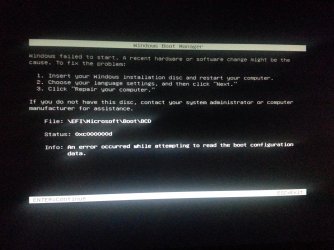
Googling the error text, file name and number I found quite a bit to sort through as will you. This seems to be the most promising place to start: Installing Windows 7 in native EFI mode from USB - bit-tech.net Forums
windows failed to start. a recent hardware or software change might file: \efi\microsoft\boot\bcd 0xc000000d - Google Search

Googling the error text, file name and number I found quite a bit to sort through as will you. This seems to be the most promising place to start: Installing Windows 7 in native EFI mode from USB - bit-tech.net Forums
windows failed to start. a recent hardware or software change might file: \efi\microsoft\boot\bcd 0xc000000d - Google Search
haha thats just greeeeek to me!