
I have two problems.
I have reinstalled 64-bit Windows 7 Ultimate about 5 days ago on my lenovo thinkpad Laptop and updated all the driver (and literally ALL the possible drivers). And now I have problems with games that ran perfectly fine in the past.
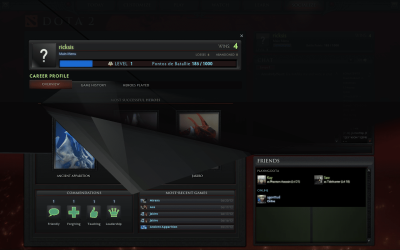
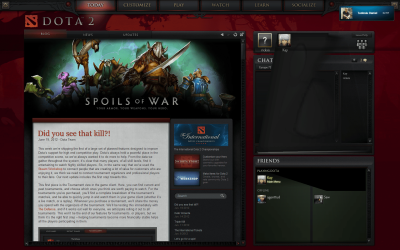
For example, while running Dota 2 Beta black portions of the screen go black in the main menu; as for the game, it is basically unplayable.
Furthermore, Starcraft II run perfectly before, but now, as soon as I enter the game, the CPU sky-rockets to 100% and it remains there, leaving me with 4 fps.
And I'm tired of battling with this by myself. Help please?
Spec:
Windows Windows 7 Ultimate Edition (64-bit) Service Pack 1 (Build 7601)
Memory (RAM) 3993 MB
CPU Info Intel(R) Core(TM)2 Duo CPU P8700 @ 2.53GHz
CPU Speed 2302,8 MHz
Sound Card Speakers (Conexant 20561 SmartA | SPDIF Interface (Conexant 20561 |
Display Adapters Mobile Intel(R) 4 Series Express Chipset Family | Mobile Intel(R) 4 Series Express Chipset Family | ATI Mobility Radeon HD 3650 | ATI Mobility Radeon HD 3650 | RDPDD Chained DD | RDP Encoder Mirror Driver | RDP Reflector Display Driver
Monitors 1x; ThinkPad Display 1680x1050 |
Screen Resolution 1680 X 1050 - 32 bit
Network Network Present
Network Adapters Intel(R) WiFi Link 5300 AGN | Intel(R) 82567LF Gigabit Network Connection
CD / DVD Drives 2x (E: | F: | ) E: Optiarc DVD RW AD-7910S | F:
Ports COM Ports NOT Present. LPT Port NOT Present.
Mouse 5 Button Wheel Mouse Present
Hard Disks C: 49,0GB | D: 98,6GB
Hard Disks - Free C: 10,3GB | D: 72,8GB
USB Controllers 8 host controllers.
Firewire (1394) Not Detected
Manufacturer * LENOVO
Product Make * 20828VG
AC Power Status OnLine
BIOS Info | |
Time Zone GTB Standard Time
Battery Status No Battery
Motherboard * LENOVO 20828VG
IP Address 192.168.1.100 |
MAC Address 00-24-7E-6D-F4-A7
SM BIOS 7VET94WW (3.24 )
I have reinstalled 64-bit Windows 7 Ultimate about 5 days ago on my lenovo thinkpad Laptop and updated all the driver (and literally ALL the possible drivers). And now I have problems with games that ran perfectly fine in the past.
For example, while running Dota 2 Beta black portions of the screen go black in the main menu; as for the game, it is basically unplayable.
Furthermore, Starcraft II run perfectly before, but now, as soon as I enter the game, the CPU sky-rockets to 100% and it remains there, leaving me with 4 fps.
And I'm tired of battling with this by myself. Help please?
Spec:
Windows Windows 7 Ultimate Edition (64-bit) Service Pack 1 (Build 7601)
Memory (RAM) 3993 MB
CPU Info Intel(R) Core(TM)2 Duo CPU P8700 @ 2.53GHz
CPU Speed 2302,8 MHz
Sound Card Speakers (Conexant 20561 SmartA | SPDIF Interface (Conexant 20561 |
Display Adapters Mobile Intel(R) 4 Series Express Chipset Family | Mobile Intel(R) 4 Series Express Chipset Family | ATI Mobility Radeon HD 3650 | ATI Mobility Radeon HD 3650 | RDPDD Chained DD | RDP Encoder Mirror Driver | RDP Reflector Display Driver
Monitors 1x; ThinkPad Display 1680x1050 |
Screen Resolution 1680 X 1050 - 32 bit
Network Network Present
Network Adapters Intel(R) WiFi Link 5300 AGN | Intel(R) 82567LF Gigabit Network Connection
CD / DVD Drives 2x (E: | F: | ) E: Optiarc DVD RW AD-7910S | F:
Ports COM Ports NOT Present. LPT Port NOT Present.
Mouse 5 Button Wheel Mouse Present
Hard Disks C: 49,0GB | D: 98,6GB
Hard Disks - Free C: 10,3GB | D: 72,8GB
USB Controllers 8 host controllers.
Firewire (1394) Not Detected
Manufacturer * LENOVO
Product Make * 20828VG
AC Power Status OnLine
BIOS Info | |
Time Zone GTB Standard Time
Battery Status No Battery
Motherboard * LENOVO 20828VG
IP Address 192.168.1.100 |
MAC Address 00-24-7E-6D-F4-A7
SM BIOS 7VET94WW (3.24 )
Attachments

Last edited:
My Computer
At a glance
Microsoft Windows 7 Ultimate 64-bitIntel(R) Core(TM) i5 CPU 3230M @ 2.53GHz8,00 GB DDR3@1600MhznVidia GT730M
- Computer type
- Laptop
- Computer Manufacturer/Model Number
- Acer
- OS
- Microsoft Windows 7 Ultimate 64-bit
- CPU
- Intel(R) Core(TM) i5 CPU 3230M @ 2.53GHz
- Motherboard
- Sony Corporation Base Board VAIO
- Memory
- 8,00 GB DDR3@1600Mhz
- Graphics Card(s)
- nVidia GT730M
- Screen Resolution
- 1920 x 1080

