GPU blackouts and CPU madness after reinstalling windows

ricksis

New member
Member
Local time
11:41 AM
Messages
84
Location
Leeuwarden, Netherlands
I have two problems.

I have reinstalled 64-bit Windows 7 Ultimate about 5 days ago on my lenovo thinkpad Laptop and updated all the driver (and literally ALL the possible drivers). And now I have problems with games that ran perfectly fine in the past.

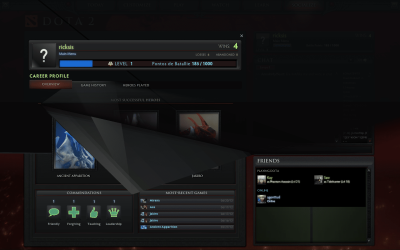
For example, while running Dota 2 Beta black portions of the screen go black in the main menu; as for the game, it is basically unplayable.
Furthermore, Starcraft II run perfectly before, but now, as soon as I enter the game, the CPU sky-rockets to 100% and it remains there, leaving me with 4 fps.

And I'm tired of battling with this by myself. Help please?

Spec:

Windows Windows 7 Ultimate Edition (64-bit) Service Pack 1 (Build 7601)
Memory (RAM) 3993 MB
CPU Info Intel(R) Core(TM)2 Duo CPU P8700 @ 2.53GHz
CPU Speed 2302,8 MHz
Sound Card Speakers (Conexant 20561 SmartA | SPDIF Interface (Conexant 20561 |
Display Adapters Mobile Intel(R) 4 Series Express Chipset Family | Mobile Intel(R) 4 Series Express Chipset Family | ATI Mobility Radeon HD 3650 | ATI Mobility Radeon HD 3650 | RDPDD Chained DD | RDP Encoder Mirror Driver | RDP Reflector Display Driver
Monitors 1x; ThinkPad Display 1680x1050 |
Screen Resolution 1680 X 1050 - 32 bit
Network Network Present
Network Adapters Intel(R) WiFi Link 5300 AGN | Intel(R) 82567LF Gigabit Network Connection
CD / DVD Drives 2x (E: | F: | ) E: Optiarc DVD RW AD-7910S | F:
Ports COM Ports NOT Present. LPT Port NOT Present.
Mouse 5 Button Wheel Mouse Present
Hard Disks C: 49,0GB | D: 98,6GB
Hard Disks - Free C: 10,3GB | D: 72,8GB
USB Controllers 8 host controllers.
Firewire (1394) Not Detected
Manufacturer * LENOVO
Product Make * 20828VG
AC Power Status OnLine
BIOS Info | |
Time Zone GTB Standard Time
Battery Status No Battery
Motherboard * LENOVO 20828VG
IP Address 192.168.1.100 |
MAC Address 00-24-7E-6D-F4-A7
SM BIOS 7VET94WW (3.24 )
 

Attachments

  • 1.png
    1.png
    290.8 KB · Views: 19
  • 2.png
    2.png
    230 KB · Views: 17
  • 3.png
    3.png
    517.5 KB · Views: 13

My Computer My Computer

At a glance

Microsoft Windows 7 Ultimate 64-bitIntel(R) Core(TM) i5 CPU 3230M @ 2.53GHz8,00 GB DDR3@1600MhznVidia GT730M
Computer type
Laptop
Computer Manufacturer/Model Number
Acer
OS
Microsoft Windows 7 Ultimate 64-bit
CPU
Intel(R) Core(TM) i5 CPU 3230M @ 2.53GHz
Motherboard
Sony Corporation Base Board VAIO
Memory
8,00 GB DDR3@1600Mhz
Graphics Card(s)
nVidia GT730M
Screen Resolution
1920 x 1080
Did you install your motherboard drivers?
 

My Computer My Computer

At a glance

Win 7 64Intel Quad Core 2 95504 GB DDR2MSI 275GTX Twin Frozr
Computer Manufacturer/Model Number
Me
OS
Win 7 64
CPU
Intel Quad Core 2 9550
Motherboard
Asus P5KPL-CM
Memory
4 GB DDR2
Graphics Card(s)
MSI 275GTX Twin Frozr
Sound Card
Tascam US-122 MK2
Monitor(s) Displays
Acer X223W
Screen Resolution
1680x1050 (native)
Hard Drives
Western Digital 150GB Sata
Western Digital 75GB IDE
Western Digital 250GB SATA
PSU
Antec 750 Watt
Case
NZXT Full Size Tower
Cooling
Beer
Keyboard
Logitech
Mouse
Logitech MX518
Internet Speed
Cable
Other Info
Fostex Studio Monitors
Epson 5 in 1 Printer

My Computer My Computer

At a glance

Windows 7 Home Premium x64Intel Core i5 2500K8GB DDR3nVidia GeForce GTX650 Ti BOOST
Computer type
Laptop
Computer Manufacturer/Model Number
Custom
OS
Windows 7 Home Premium x64
CPU
Intel Core i5 2500K
Motherboard
MSI MS-7750
Memory
8GB DDR3
Graphics Card(s)
nVidia GeForce GTX650 Ti BOOST
Sound Card
Realtek
Monitor(s) Displays
21' Philips
Screen Resolution
Full HD
Hard Drives
1TB
PSU
500W
Clicked on the link you gave me, began the installation, and then "DirectX setup hsa determined that a newer or equivalent version of DirectX has been installed already. No installation is required".

As for the motherboard drivers, we are talking here about the chipset, right? I downloaded some drivers off of lenovo's website, then a couple more from Windows Update. I went to Device Manager to and searched for newer versions (of anything) and everything is up to date :(
 

My Computer My Computer

At a glance

Microsoft Windows 7 Ultimate 64-bitIntel(R) Core(TM) i5 CPU 3230M @ 2.53GHz8,00 GB DDR3@1600MhznVidia GT730M
Computer type
Laptop
Computer Manufacturer/Model Number
Acer
OS
Microsoft Windows 7 Ultimate 64-bit
CPU
Intel(R) Core(TM) i5 CPU 3230M @ 2.53GHz
Motherboard
Sony Corporation Base Board VAIO
Memory
8,00 GB DDR3@1600Mhz
Graphics Card(s)
nVidia GT730M
Screen Resolution
1920 x 1080
Ah, but you shouldn't actually use any drivers from Windows Update if you have the "legit" drivers from your system manufacturer. The drivers offered through Windows Update are, for most hardware, just generic drivers that let you use the machine long enough to download the manufacturer's drivers.

For example, while installing Windows 7, the system automatically activates generic drivers for your graphics card so that you can run the out-of-box system at the native resolution of your display. The updates offered through Windows Update are just updated versions of those generic drivers, and you can't (as far as I know) play video games or heavy HD-content videos with them, because in the end you need your manufacturer's drivers.

Someone correct me if I'm wrong, my mind is at ten different places today.
 

My Computer My Computer

At a glance

Windows 7 Home Premium x64Intel Core i5 2500K8GB DDR3nVidia GeForce GTX650 Ti BOOST
Computer type
Laptop
Computer Manufacturer/Model Number
Custom
OS
Windows 7 Home Premium x64
CPU
Intel Core i5 2500K
Motherboard
MSI MS-7750
Memory
8GB DDR3
Graphics Card(s)
nVidia GeForce GTX650 Ti BOOST
Sound Card
Realtek
Monitor(s) Displays
21' Philips
Screen Resolution
Full HD
Hard Drives
1TB
PSU
500W
Well then, ok, what should I do? The Windows drivers are installed. Should I roll back all drivers then pursue with installing only the ones provided by ATI/Lenovo?
 

My Computer My Computer

At a glance

Microsoft Windows 7 Ultimate 64-bitIntel(R) Core(TM) i5 CPU 3230M @ 2.53GHz8,00 GB DDR3@1600MhznVidia GT730M
Computer type
Laptop
Computer Manufacturer/Model Number
Acer
OS
Microsoft Windows 7 Ultimate 64-bit
CPU
Intel(R) Core(TM) i5 CPU 3230M @ 2.53GHz
Motherboard
Sony Corporation Base Board VAIO
Memory
8,00 GB DDR3@1600Mhz
Graphics Card(s)
nVidia GT730M
Screen Resolution
1920 x 1080
I'm not exactly sure if rolling back generic drivers would help, so I can't tell. But you definitely do need to update all the drivers from the manufacturer.
 

My Computer My Computer

At a glance

Windows 7 Home Premium x64Intel Core i5 2500K8GB DDR3nVidia GeForce GTX650 Ti BOOST
Computer type
Laptop
Computer Manufacturer/Model Number
Custom
OS
Windows 7 Home Premium x64
CPU
Intel Core i5 2500K
Motherboard
MSI MS-7750
Memory
8GB DDR3
Graphics Card(s)
nVidia GeForce GTX650 Ti BOOST
Sound Card
Realtek
Monitor(s) Displays
21' Philips
Screen Resolution
Full HD
Hard Drives
1TB
PSU
500W
I did, that's what I said. I updated everything. Even Steam downloaded me an update for AMD Graphics Card yesterday, installed it, restarted the computer, and it's still the same.
So you got no solution?
 

My Computer My Computer

At a glance

Microsoft Windows 7 Ultimate 64-bitIntel(R) Core(TM) i5 CPU 3230M @ 2.53GHz8,00 GB DDR3@1600MhznVidia GT730M
Computer type
Laptop
Computer Manufacturer/Model Number
Acer
OS
Microsoft Windows 7 Ultimate 64-bit
CPU
Intel(R) Core(TM) i5 CPU 3230M @ 2.53GHz
Motherboard
Sony Corporation Base Board VAIO
Memory
8,00 GB DDR3@1600Mhz
Graphics Card(s)
nVidia GT730M
Screen Resolution
1920 x 1080
I never used Steam to update anything other than games themselves, so I have no idea what that update was or did to the drivers already installed.

*sigh* At this point, in my experience, I would get so pi***d off I'd just wipe the drive and start all over again. It's only been 5 days since you installed Windows anyway.

Maybe someone can pick up this thread as well...
 

My Computer My Computer

At a glance

Windows 7 Home Premium x64Intel Core i5 2500K8GB DDR3nVidia GeForce GTX650 Ti BOOST
Computer type
Laptop
Computer Manufacturer/Model Number
Custom
OS
Windows 7 Home Premium x64
CPU
Intel Core i5 2500K
Motherboard
MSI MS-7750
Memory
8GB DDR3
Graphics Card(s)
nVidia GeForce GTX650 Ti BOOST
Sound Card
Realtek
Monitor(s) Displays
21' Philips
Screen Resolution
Full HD
Hard Drives
1TB
PSU
500W
It was under Steam>Update AMD Drivers. And it downloaded me a package from AMD.

And with the CPU issue. Same advice?...
 

My Computer My Computer

At a glance

Microsoft Windows 7 Ultimate 64-bitIntel(R) Core(TM) i5 CPU 3230M @ 2.53GHz8,00 GB DDR3@1600MhznVidia GT730M
Computer type
Laptop
Computer Manufacturer/Model Number
Acer
OS
Microsoft Windows 7 Ultimate 64-bit
CPU
Intel(R) Core(TM) i5 CPU 3230M @ 2.53GHz
Motherboard
Sony Corporation Base Board VAIO
Memory
8,00 GB DDR3@1600Mhz
Graphics Card(s)
nVidia GT730M
Screen Resolution
1920 x 1080
If it were an issue on an older Windows installation, I'd recommend using System Restore to try and roll back to a point before the problem started, but if you've been experiencing this problem from the beginning, I don't think system restore would help at all.

Perhaps a clean install would do you justice more.
 

My Computer My Computer

At a glance

Windows 7 Home Premium x64Intel Core i5 2500K8GB DDR3nVidia GeForce GTX650 Ti BOOST
Computer type
Laptop
Computer Manufacturer/Model Number
Custom
OS
Windows 7 Home Premium x64
CPU
Intel Core i5 2500K
Motherboard
MSI MS-7750
Memory
8GB DDR3
Graphics Card(s)
nVidia GeForce GTX650 Ti BOOST
Sound Card
Realtek
Monitor(s) Displays
21' Philips
Screen Resolution
Full HD
Hard Drives
1TB
PSU
500W
CPU issue? Is nobody trying?
 

My Computer My Computer

At a glance

Microsoft Windows 7 Ultimate 64-bitIntel(R) Core(TM) i5 CPU 3230M @ 2.53GHz8,00 GB DDR3@1600MhznVidia GT730M
Computer type
Laptop
Computer Manufacturer/Model Number
Acer
OS
Microsoft Windows 7 Ultimate 64-bit
CPU
Intel(R) Core(TM) i5 CPU 3230M @ 2.53GHz
Motherboard
Sony Corporation Base Board VAIO
Memory
8,00 GB DDR3@1600Mhz
Graphics Card(s)
nVidia GT730M
Screen Resolution
1920 x 1080
Have you checked the temperatures of your CPU and its operating frequencies when you're running the aforementioned games?

The 100% CPU utilization for a game like SC2 sounds suspiciously like some classic downthrottling due to high temperatures... The game overheats your laptop, your CPU downclocks itself to cooldown but the game still pushes it so its stuck at 100% utilization at a lower frequency leading to extreme lag..

Try running the game in windowed mode, with an application like CPUz (www.cpuid.com/softwares/cpu-z.html) to check CPU frequencies, and also Throttlestop (from Downloads | Tech|Inferno ) (very useful for monitoring CPU temperatures and undervolting it too!)

Hope that helps!
 

My Computer My Computer

At a glance

Windows 7 x64 Professional SP1Intel C2D T9550 2.66 GHz @ 2.793 GHz (Thanks ...8 GB DDR3ATI MOBILITY RADEON 4670
Computer Manufacturer/Model Number
DELL SXPS 1640
OS
Windows 7 x64 Professional SP1
CPU
Intel C2D T9550 2.66 GHz @ 2.793 GHz (Thanks ThrottleStop!!)
Motherboard
Intel PM45
Memory
8 GB DDR3
Graphics Card(s)
ATI MOBILITY RADEON 4670
Sound Card
CREATIVE XFI AUDIO NOTEBOOK
Monitor(s) Displays
16.1 WLED
Screen Resolution
1920x1080
Hard Drives
Seagate ST9500420AS 500GB (465GiBi) 7200 RPM Drive

External Drives:-
2 TB WD Essentials x 3
1 TB WD Mybook Gen 1
1 TB WD Mybook Gen 2
1 TB Seagate
1 TB Seagate
320 GB WD Scorpio Black (enclosed)
PSU
90W Dell Power Brick
Case
Dell Chassis
Cooling
Coolermaster Cooling Pad
Keyboard
Built-in backlighted Keyboard
Mouse
Logitech Wireless Mini Mouse
Internet Speed
4/0.5
Yeah, it's pretty hot outside and the laptop has a hard time cooling. The cooling pad isn't making any difference...
 

My Computer My Computer

At a glance

Microsoft Windows 7 Ultimate 64-bitIntel(R) Core(TM) i5 CPU 3230M @ 2.53GHz8,00 GB DDR3@1600MhznVidia GT730M
Computer type
Laptop
Computer Manufacturer/Model Number
Acer
OS
Microsoft Windows 7 Ultimate 64-bit
CPU
Intel(R) Core(TM) i5 CPU 3230M @ 2.53GHz
Motherboard
Sony Corporation Base Board VAIO
Memory
8,00 GB DDR3@1600Mhz
Graphics Card(s)
nVidia GT730M
Screen Resolution
1920 x 1080
When was the last time you had it cleaned?
 

My Computer My Computer

At a glance

Windows 7 Home Premium x64Intel Core i5 2500K8GB DDR3nVidia GeForce GTX650 Ti BOOST
Computer type
Laptop
Computer Manufacturer/Model Number
Custom
OS
Windows 7 Home Premium x64
CPU
Intel Core i5 2500K
Motherboard
MSI MS-7750
Memory
8GB DDR3
Graphics Card(s)
nVidia GeForce GTX650 Ti BOOST
Sound Card
Realtek
Monitor(s) Displays
21' Philips
Screen Resolution
Full HD
Hard Drives
1TB
PSU
500W
The heat sink? I can't really remember, really. The thing is that it used to work properly, and it didn't overheat like this before the windows reinstallation. Now, all of the sudden, it is full of dust? :S Do you mean that the CPU issues are caused by the poor cooling?
I will have it cleaned asap, btw.
 

My Computer My Computer

At a glance

Microsoft Windows 7 Ultimate 64-bitIntel(R) Core(TM) i5 CPU 3230M @ 2.53GHz8,00 GB DDR3@1600MhznVidia GT730M
Computer type
Laptop
Computer Manufacturer/Model Number
Acer
OS
Microsoft Windows 7 Ultimate 64-bit
CPU
Intel(R) Core(TM) i5 CPU 3230M @ 2.53GHz
Motherboard
Sony Corporation Base Board VAIO
Memory
8,00 GB DDR3@1600Mhz
Graphics Card(s)
nVidia GT730M
Screen Resolution
1920 x 1080
Taking care of hardware is just as important as taking care of software.
I'm not saying that it's suddenly full of dust, but if you didn't clean it in a while, it should be done nevertheless.
 

My Computer My Computer

At a glance

Windows 7 Home Premium x64Intel Core i5 2500K8GB DDR3nVidia GeForce GTX650 Ti BOOST
Computer type
Laptop
Computer Manufacturer/Model Number
Custom
OS
Windows 7 Home Premium x64
CPU
Intel Core i5 2500K
Motherboard
MSI MS-7750
Memory
8GB DDR3
Graphics Card(s)
nVidia GeForce GTX650 Ti BOOST
Sound Card
Realtek
Monitor(s) Displays
21' Philips
Screen Resolution
Full HD
Hard Drives
1TB
PSU
500W
Back
Top