
GPU disappeared from device manager after STOP error df

ipprism

New member
Local time
4:26 AM
Messages
5
Hey,

Here is what happened: My laptop was overheating, so I disassembled it and cleaned out the dust buildup in the fan. I did not remove the GPU from its socket, I simply applied new thermal paste and reassembled the laptop. Note that in order to gain access to the fan I had to completely separate the motherboard with the GPU attached from the laptop case.

I turned on the laptop and it ran well. I checked for smoke, etc, and I was monitoring the CPU and GPU temperatures and they were normal. I began doing some internet browsing, and after a few minutes of that there was a BSOD. The STOP error codes are below:

Problem signature:
Problem Event Name: BlueScreen
OS Version: 6.1.7601.2.1.0.768.3
Locale ID: 1033

Additional information about the problem:
BCCode: 9f
BCP1: 0000000000000003
BCP2: FFFFFA8007C7BA10
BCP3: FFFFF80000B9C3D8
BCP4: FFFFFA8018148BF0
OS Version: 6_1_7601
Service Pack: 1_0
Product: 768_1

photostream

photostream


The computer restarted automatically and I tried looking up the code but could not determine the problem. The computer was still running so I thought it might have just been some temporary software issue. I did not realize that the computer didn't see the GPU anymore until I tried playing a video game which the integrated Intel HD Graphics 4000 GPU could not handle. The game shut down, and I noticed that the nVidia notification icon was missing from my task manager. I checked the device manager and the nVidia card is not showing up under any tab. I googled the problem and found someone with a similar problem on this forum.

Link is here: http://www.sevenforums.com/graphic-cards/120209-gpu-not-listed-under-device-manager-2.html

I followed that thread and uninstalled the nVidia driver and tried to reinstall it, but it could not see the GPU so could not fully install. I checked the BIOS version and it's up to date. The user stated that he solved the problem by restoring his BIOS settings to default. I tried doing this and the nVidia card still didn't show up.

I'm guessing it's a hardware problem, but I was really careful when reassembling the laptop. I never removed the GPU from it's socket on the mobo. Does anyone have any other options I could try?

Edit: Added pics of info from dump file.
 

My Computer

Computer type
Laptop
Computer Manufacturer/Model Number
Lenovo/Y480
OS
Windows 7 Home Premium 64-bit
CPU
Intel Core i7-3610QM 2.30 GHz
Graphics Card(s)
Intel HD Graphics 4000, nVidia GT640M LE 2GB
ipprism mate run Speccy and see what the temps are either you have not applied enough compound or tightened down the heat cooler setup and check to see if the fan is spinning mate and just as an afterthought did you clean out the rad when you did the clean up?

Shine a very bright light into the fan intake and then look into the exit vent you should see the light easily if not then it is clogged.

It sounds too simplistic but I had to ask.
 

My Computer

Computer type
PC/Desktop
Computer Manufacturer/Model Number
Own build (new) Desk1 / Asus ROG Win 7 / Desk2 1st build
OS
Desk1 7 Home Prem / Desk2 10 Pro / Main lap Asus ROG 10 Pro 2 laptop Toshiba 7 Pro Asus P2520 7 & 10
CPU
Desk1 i5 3750K / Laptop i7 GTX 860M / Desk2 i5 2500
Motherboard
Desk1 Asus P877-V / Desk2 Gigabyte H67 UD3H / Laptop ?
Memory
Desk1 8GB (1866) / Desk2 16GB (1333) / Laptop 8Gb DDR3
Graphics Card(s)
Desk 1& 2NVidia GTX 650 & Laptops on board Intel
Sound Card
Desk 1 & 2 -XONAR DG Realtek High Def audio Laptop
Monitor(s) Displays
Desk 1 Benq HD 2450 / Desk2 Philips 24" / Laptop 17.5"
Screen Resolution
1920x1080 D1 & D2 & Laptop 1
Hard Drives
Desk1 Samsung 120GB 830 SSD
Asus ROG 256GB 850 Pro SSD
Desk2 Samsung 840 256 SSD
Toshiba 120GB EVO
PSU
Desk 1 Corsair HX 1050/ Laptop ? / Desk 2 Corsair HX 650
Case
Desk 1 Cooler HAF XM ? Toshiba laptop / Desk2 Coolermaster
Cooling
Fans on all Desk1 -2 Desk2 - all Coolermasters 5 Laptop ?
Keyboard
Desk 1 MS Sidewinder X6 Desk 2 MS Sidewinder X 4
Mouse
Desk 1&2 - Gigabyte MS 900 gamer - laptop - Logitec wireless
Internet Speed
ADSL2+
Other Info
One other Desktop (tester) and spare Toshba laptop both with SSD's
Running Kaspersky 2016 ISS on all machines config'd identically
Logitec audio stereo systems on each machine (x3)
Canon MG5250MFC
Router/modem TP-Link running WPA2SK
Hey,

Thanks for replying. I have cleaned a couple of laptops before, and I put plenty of paste on. I did clean out the entire cooling system and I made sure the fan was running. As for the temperatures, Neither GPU-Z nor Speccy are able to detect the GPU. It's a laptop though so I can feel how hot the chip gets through the keyboard. If it was over heating I would be able to tell.

I have an update on the problem. I took apart the laptop again to double check everything, put new paste on again, and still had no luck. I tried re-installing the Intel GPU, because I read it might help, and still nothing. I gave up and shut my laptop off for the night. When I booted it up this morning I checked the device manager and the nVidia GPU showed up! I had already tried a cold restart, of course, so I don't know what changed. I installed the driver through the device manager and restarted the laptop.... and the GPU disappeared from the device manager again. So now I know that the GPU isn't completely fried, but that's about it.

I remember reading about something similar occurring for someone else so I'm looking that up now.
 

My Computer

Computer type
Laptop
Computer Manufacturer/Model Number
Lenovo/Y480
OS
Windows 7 Home Premium 64-bit
CPU
Intel Core i7-3610QM 2.30 GHz
Graphics Card(s)
Intel HD Graphics 4000, nVidia GT640M LE 2GB

Sadly I think you might be right about the GPU and it means a new board atvery least or another machine. You have done all the right things and I reckonthe GPU showing up then disappearing is down to maybe not the GPU being atfault because you say you took the CPU out again and replaced it - there is apossibility of it being the culprit.
I did have a quick look for the replacement boards and they ranged anything form $350 up:(

Could you if you disassemble it again send a pic of the naked board becauseusually GPU's are soldered into the board unlike the CPU which as you know sitsin a socket. A GPU that has got very hot will show up looking like a very darkblue colour as one sees sometimes on exhaust pipes.
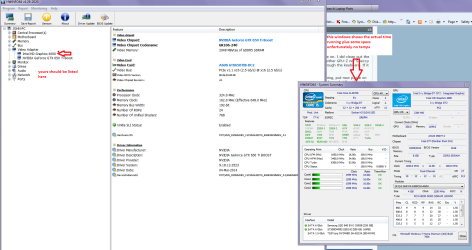
Another system viewer I use a lot is this HWiNFO, HWiNFO32/64 - Download it is much better than Speccy or such for finding the finest details of components but unfortunately no temps see my pic for what I mean.
Now for redoing the compound I always use these
Arctic Silver Incorporated - Arctic Silver 5 < compound and htese for the very best clean up and preparation.
Arctic Silver Incorporated - ArctiClean
 

Attachments

  • HW INFO GPU.PNG
    HW INFO GPU.PNG
    82 KB · Views: 0

My Computer

Computer type
PC/Desktop
Computer Manufacturer/Model Number
Own build (new) Desk1 / Asus ROG Win 7 / Desk2 1st build
OS
Desk1 7 Home Prem / Desk2 10 Pro / Main lap Asus ROG 10 Pro 2 laptop Toshiba 7 Pro Asus P2520 7 & 10
CPU
Desk1 i5 3750K / Laptop i7 GTX 860M / Desk2 i5 2500
Motherboard
Desk1 Asus P877-V / Desk2 Gigabyte H67 UD3H / Laptop ?
Memory
Desk1 8GB (1866) / Desk2 16GB (1333) / Laptop 8Gb DDR3
Graphics Card(s)
Desk 1& 2NVidia GTX 650 & Laptops on board Intel
Sound Card
Desk 1 & 2 -XONAR DG Realtek High Def audio Laptop
Monitor(s) Displays
Desk 1 Benq HD 2450 / Desk2 Philips 24" / Laptop 17.5"
Screen Resolution
1920x1080 D1 & D2 & Laptop 1
Hard Drives
Desk1 Samsung 120GB 830 SSD
Asus ROG 256GB 850 Pro SSD
Desk2 Samsung 840 256 SSD
Toshiba 120GB EVO
PSU
Desk 1 Corsair HX 1050/ Laptop ? / Desk 2 Corsair HX 650
Case
Desk 1 Cooler HAF XM ? Toshiba laptop / Desk2 Coolermaster
Cooling
Fans on all Desk1 -2 Desk2 - all Coolermasters 5 Laptop ?
Keyboard
Desk 1 MS Sidewinder X6 Desk 2 MS Sidewinder X 4
Mouse
Desk 1&2 - Gigabyte MS 900 gamer - laptop - Logitec wireless
Internet Speed
ADSL2+
Other Info
One other Desktop (tester) and spare Toshba laptop both with SSD's
Running Kaspersky 2016 ISS on all machines config'd identically
Logitec audio stereo systems on each machine (x3)
Canon MG5250MFC
Router/modem TP-Link running WPA2SK
Stop error 1033 from personal experience is usually loss of power, the GPU is working as you've got the laptop on and it's showing boot and OS, maybe a loose connection to the GPU from the power supply
 

My Computer

Computer type
PC/Desktop
Computer Manufacturer/Model Number
Custom Build
OS
Windows 7 Ultimate x64 SP1
CPU
Intel Q6600 @ 2.6Ghz
Motherboard
Evga NF78-CK-132-A 3-Way SLI
Memory
4Gb DDR2 Corsair Dominator @ 800Mhz 5-5-5-15
Graphics Card(s)
EVGA 560 GTX SC FTW 1GB
Sound Card
Realtek HD 7.1 Audio, Plantronics GameCom780 7.1 Headset
Monitor(s) Displays
Dell S2409W
Screen Resolution
1920 x 1080
Hard Drives
SanDisk SDSSDHII-120G-G25 120GB SSD
Samsung 7200RPM 750Gb SATA
Samsung 850 EVO 120GB SSD
Western Digital Green 1TB 7200RPM
PSU
Xigmatek 750W Quad sli quad core 80% eff
Case
Antec 900 Gaming Case
Cooling
Zalman CNPS9700-NT NVIDIA Tritium
Keyboard
Logitech generic keyboard, MS wireless keyboard
Mouse
Razor Lachesis Banshee V2 Blue, 4000DPI, MS wireless mouse
Internet Speed
152Mb Virgin Media Fibre Optic
Antivirus
Microsoft Security Essentials
Browser
Google Chrome
Other Info
Wireless Gaming Receiver for Windows, Wireless Xbox 360 Pad
Stop error 1033 from personal experience is usually loss of power, the GPU is working as you've got the laptop on and it's showing boot and OS, maybe a loose connection to the GPU from the power supply
Possible MR Needs but if that is so then it is goodnight nurse as the GPU's are usually soldered into the motherboard on laptops. Could be a faulty adaptor socket that is fairly easy to fix but then one has to question the state of the battery.
 

My Computer

Computer type
PC/Desktop
Computer Manufacturer/Model Number
Own build (new) Desk1 / Asus ROG Win 7 / Desk2 1st build
OS
Desk1 7 Home Prem / Desk2 10 Pro / Main lap Asus ROG 10 Pro 2 laptop Toshiba 7 Pro Asus P2520 7 & 10
CPU
Desk1 i5 3750K / Laptop i7 GTX 860M / Desk2 i5 2500
Motherboard
Desk1 Asus P877-V / Desk2 Gigabyte H67 UD3H / Laptop ?
Memory
Desk1 8GB (1866) / Desk2 16GB (1333) / Laptop 8Gb DDR3
Graphics Card(s)
Desk 1& 2NVidia GTX 650 & Laptops on board Intel
Sound Card
Desk 1 & 2 -XONAR DG Realtek High Def audio Laptop
Monitor(s) Displays
Desk 1 Benq HD 2450 / Desk2 Philips 24" / Laptop 17.5"
Screen Resolution
1920x1080 D1 & D2 & Laptop 1
Hard Drives
Desk1 Samsung 120GB 830 SSD
Asus ROG 256GB 850 Pro SSD
Desk2 Samsung 840 256 SSD
Toshiba 120GB EVO
PSU
Desk 1 Corsair HX 1050/ Laptop ? / Desk 2 Corsair HX 650
Case
Desk 1 Cooler HAF XM ? Toshiba laptop / Desk2 Coolermaster
Cooling
Fans on all Desk1 -2 Desk2 - all Coolermasters 5 Laptop ?
Keyboard
Desk 1 MS Sidewinder X6 Desk 2 MS Sidewinder X 4
Mouse
Desk 1&2 - Gigabyte MS 900 gamer - laptop - Logitec wireless
Internet Speed
ADSL2+
Other Info
One other Desktop (tester) and spare Toshba laptop both with SSD's
Running Kaspersky 2016 ISS on all machines config'd identically
Logitec audio stereo systems on each machine (x3)
Canon MG5250MFC
Router/modem TP-Link running WPA2SK
Hey Guys,

ICit2lol, thanks for the help, man. Like I said, I've taken apart a few laptops and I would have noticed if the heat spreader on the GPU was damaged by overheating. Also, I've only ever used Arctic Silver 5 and the cleaning kit it comes with.

Another update:

I ignored the problem for a while until I started getting a new STOP error 116:

14273581703_35b5315c31_h.jpg


Sorry for the image quality. The BSOD said something like "driver reset timeout". After getting the BSOD the laptop didn't restart by itself, so I shut it down manually and rebooted and it ran fine. I checked the device manager after that and still no GPU. The same STOP error happened again today, and after I booted the pc back up the GPU showed up on the device manager. This time since the driver was already installed, the pc seemed to have no trouble with it. The only thing that changed between the two STOP errors was that I brought my laptop to school. The jostling might have caused something to shift back into place?

I'm going to restart the laptop and see if the GPU holds up. If it does I'll mark this thread solved.
 

My Computer

Computer type
Laptop
Computer Manufacturer/Model Number
Lenovo/Y480
OS
Windows 7 Home Premium 64-bit
CPU
Intel Core i7-3610QM 2.30 GHz
Graphics Card(s)
Intel HD Graphics 4000, nVidia GT640M LE 2GB
GPU disappeared again. Oh well.
 

My Computer

Computer type
Laptop
Computer Manufacturer/Model Number
Lenovo/Y480
OS
Windows 7 Home Premium 64-bit
CPU
Intel Core i7-3610QM 2.30 GHz
Graphics Card(s)
Intel HD Graphics 4000, nVidia GT640M LE 2GB
Hey Guys,

ICit2lol, thanks for the help, man. Like I said, I've taken apart a few laptops and I would have noticed if the heat spreader on the GPU was damaged by overheating. Also, I've only ever used Arctic Silver 5 and the cleaning kit it comes with.

Another update:

I ignored the problem for a while until I started getting a new STOP error 116:

14273581703_35b5315c31_h.jpg


Sorry for the image quality. The BSOD said something like "driver reset timeout". After getting the BSOD the laptop didn't restart by itself, so I shut it down manually and rebooted and it ran fine. I checked the device manager after that and still no GPU. The same STOP error happened again today, and after I booted the pc back up the GPU showed up on the device manager. This time since the driver was already installed, the pc seemed to have no trouble with it. The only thing that changed between the two STOP errors was that I brought my laptop to school. The jostling might have caused something to shift back into place?

I'm going to restart the laptop and see if the GPU holds up. If it does I'll mark this thread solved.
No ipprism I meant the actual GPU chip itself see pic (only an example) as the thermal compound takes up the "slack" with the spreader.
 

Attachments

  • CPU1.PNG
    CPU1.PNG
    244.3 KB · Views: 0

My Computer

Computer type
PC/Desktop
Computer Manufacturer/Model Number
Own build (new) Desk1 / Asus ROG Win 7 / Desk2 1st build
OS
Desk1 7 Home Prem / Desk2 10 Pro / Main lap Asus ROG 10 Pro 2 laptop Toshiba 7 Pro Asus P2520 7 & 10
CPU
Desk1 i5 3750K / Laptop i7 GTX 860M / Desk2 i5 2500
Motherboard
Desk1 Asus P877-V / Desk2 Gigabyte H67 UD3H / Laptop ?
Memory
Desk1 8GB (1866) / Desk2 16GB (1333) / Laptop 8Gb DDR3
Graphics Card(s)
Desk 1& 2NVidia GTX 650 & Laptops on board Intel
Sound Card
Desk 1 & 2 -XONAR DG Realtek High Def audio Laptop
Monitor(s) Displays
Desk 1 Benq HD 2450 / Desk2 Philips 24" / Laptop 17.5"
Screen Resolution
1920x1080 D1 & D2 & Laptop 1
Hard Drives
Desk1 Samsung 120GB 830 SSD
Asus ROG 256GB 850 Pro SSD
Desk2 Samsung 840 256 SSD
Toshiba 120GB EVO
PSU
Desk 1 Corsair HX 1050/ Laptop ? / Desk 2 Corsair HX 650
Case
Desk 1 Cooler HAF XM ? Toshiba laptop / Desk2 Coolermaster
Cooling
Fans on all Desk1 -2 Desk2 - all Coolermasters 5 Laptop ?
Keyboard
Desk 1 MS Sidewinder X6 Desk 2 MS Sidewinder X 4
Mouse
Desk 1&2 - Gigabyte MS 900 gamer - laptop - Logitec wireless
Internet Speed
ADSL2+
Other Info
One other Desktop (tester) and spare Toshba laptop both with SSD's
Running Kaspersky 2016 ISS on all machines config'd identically
Logitec audio stereo systems on each machine (x3)
Canon MG5250MFC
Router/modem TP-Link running WPA2SK
Hey ICit2lol, sorry if my terminology wasn't clear. I call the shiny coating on top of the chip the heat spreader. I understood what you were talking about.
 

My Computer

Computer type
Laptop
Computer Manufacturer/Model Number
Lenovo/Y480
OS
Windows 7 Home Premium 64-bit
CPU
Intel Core i7-3610QM 2.30 GHz
Graphics Card(s)
Intel HD Graphics 4000, nVidia GT640M LE 2GB

Hey ICit2lol, sorry if my terminology wasn't clear. I call the shiny coating on top of the chip the heat spreader. I understood what you were talking about.
No probs mate it is the polished Silicon you can see if that is scratched then chances are it may also be cracked and if that is so then the "layers" contained within are likely to be defunct as they contain the transistors / resistors / diodes build up along with the connecting strata.

PS The heat spreader I usually take as the cooler plate.
 

My Computer

Computer type
PC/Desktop
Computer Manufacturer/Model Number
Own build (new) Desk1 / Asus ROG Win 7 / Desk2 1st build
OS
Desk1 7 Home Prem / Desk2 10 Pro / Main lap Asus ROG 10 Pro 2 laptop Toshiba 7 Pro Asus P2520 7 & 10
CPU
Desk1 i5 3750K / Laptop i7 GTX 860M / Desk2 i5 2500
Motherboard
Desk1 Asus P877-V / Desk2 Gigabyte H67 UD3H / Laptop ?
Memory
Desk1 8GB (1866) / Desk2 16GB (1333) / Laptop 8Gb DDR3
Graphics Card(s)
Desk 1& 2NVidia GTX 650 & Laptops on board Intel
Sound Card
Desk 1 & 2 -XONAR DG Realtek High Def audio Laptop
Monitor(s) Displays
Desk 1 Benq HD 2450 / Desk2 Philips 24" / Laptop 17.5"
Screen Resolution
1920x1080 D1 & D2 & Laptop 1
Hard Drives
Desk1 Samsung 120GB 830 SSD
Asus ROG 256GB 850 Pro SSD
Desk2 Samsung 840 256 SSD
Toshiba 120GB EVO
PSU
Desk 1 Corsair HX 1050/ Laptop ? / Desk 2 Corsair HX 650
Case
Desk 1 Cooler HAF XM ? Toshiba laptop / Desk2 Coolermaster
Cooling
Fans on all Desk1 -2 Desk2 - all Coolermasters 5 Laptop ?
Keyboard
Desk 1 MS Sidewinder X6 Desk 2 MS Sidewinder X 4
Mouse
Desk 1&2 - Gigabyte MS 900 gamer - laptop - Logitec wireless
Internet Speed
ADSL2+
Other Info
One other Desktop (tester) and spare Toshba laptop both with SSD's
Running Kaspersky 2016 ISS on all machines config'd identically
Logitec audio stereo systems on each machine (x3)
Canon MG5250MFC
Router/modem TP-Link running WPA2SK
Back
Top