
IDE ATA/ATAPA controllor error in device manager after fresh install

dinglesniff

New member
Member
Local time
8:41 PM
Messages
37
Hey guys,

Did a fresh install of windows and am noticing a weird error when I go to device manager under my IDE / ATA controllors

ATA Channel 0 and ATA channel 1 have a yellow exclamation mark. When I click it, it says "This device cannot start."

Meanwhile all my Hard Drives can run fine. Any idea how I can determine whats causing the error?
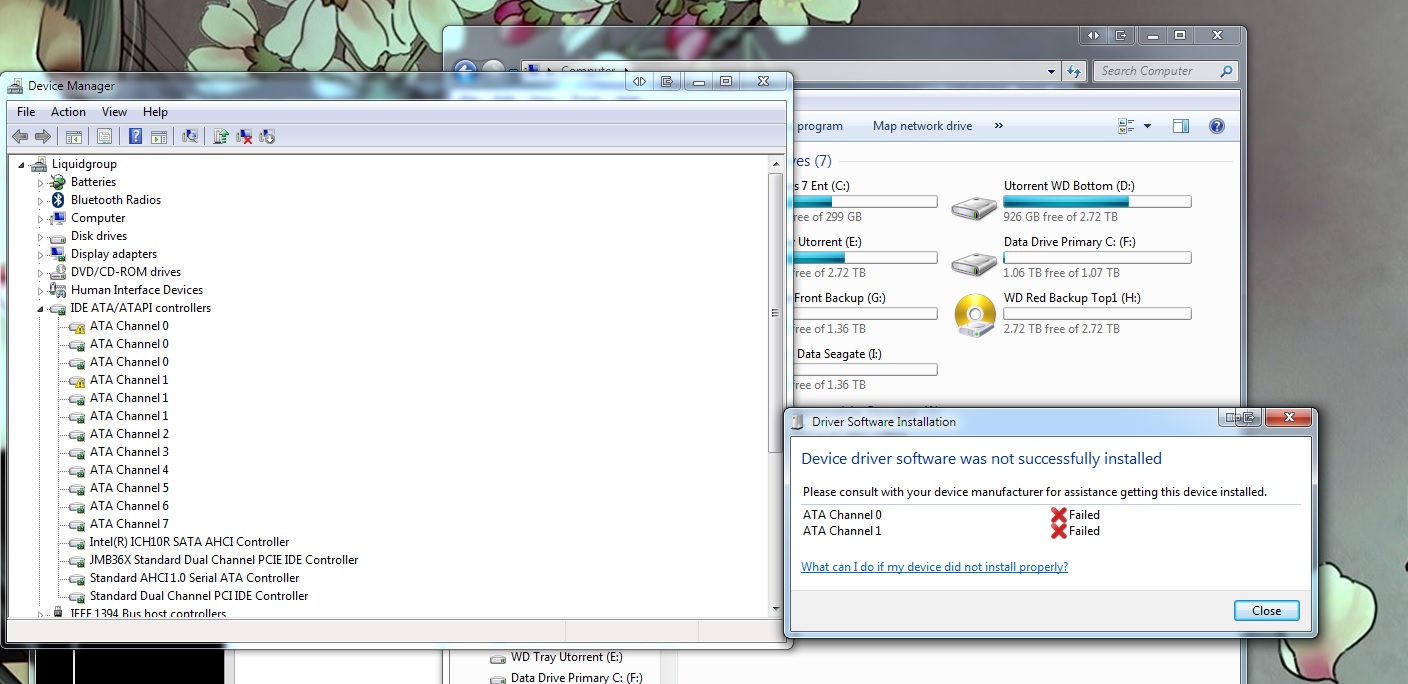

Drive wise on my X58-ud5 Gigabyte I installed the latest chipset drivers and Marvell / Intel
 

My Computer My Computer

At a glance

Windows 7 Ultimatei7-930 @3.99ghzG.Skill 6GBTitan
OS
Windows 7 Ultimate
CPU
i7-930 @3.99ghz
Motherboard
Gigabyte X58-UD5
Memory
G.Skill 6GB
Graphics Card(s)
Titan
Sound Card
onboard
Monitor(s) Displays
Dell 30"
Screen Resolution
2560x1600 surround
Hard Drives
4 1.5 TB seagate HD
PSU
Corsair HX750
Hi there ... Looks like you need a chipset Driver ... You should go to your Motherboards website .. And download it from there ..
 

My Computer My Computer

At a glance

windows 7 home 64bitINTEL-CORE I716GB
Computer Manufacturer/Model Number
W530-3630QM1
OS
windows 7 home 64bit
CPU
INTEL-CORE I7
Memory
16GB
Hard Drives
750GB
Browser
Chrome
  • Like
Reactions: Arc
Did you install the Gigabyte/Jmicron drivers?

I do not believe that board has a Marvell controller unless you have added a third party card.

What is the hardware ID showing in the device manager for the problem ATA channels?
 

My Computer My Computer

At a glance

Windows 10 Pro x64, Windows 8.1 Pro x64, Wind...INTEL i9-7920X LGA 206664 GB (4 X 16 GB) G-Skill V Series DDR4 3200 ...EVGA GTX 1060 SC 3 GB
Computer type
PC/Desktop
Computer Manufacturer/Model Number
Custom Built
OS
Windows 10 Pro x64, Windows 8.1 Pro x64, Windows 7 Ultimate x64 SP1,
CPU
INTEL i9-7920X LGA 2066
Motherboard
Gigabyte X299-WU8 F3
Memory
64 GB (4 X 16 GB) G-Skill V Series DDR4 3200 Quad Channel
Graphics Card(s)
EVGA GTX 1060 SC 3 GB
Sound Card
Realtek Onboard ALC1220
Monitor(s) Displays
2 x Samsung S27E310
Screen Resolution
1920x1080
Hard Drives
Samsung 2 x 970 EVO Plus 500 GB NVMe
1 x 6TB WD 6003FZBX SATA
1 x 6TB WD 60EFRX SATA
12 x 3TB WD 30EFRX SATA
PSU
Seasonic X-1050
Case
Thermaltake Armor+
Cooling
Corsair H80i V2 Liquid AOI Cooler
Keyboard
Logitech G510s
Mouse
Logitech MX Master 2S
Internet Speed
200 Mb/s
Antivirus
ESET NOD32 13.1
Browser
EDGE (Dev, Canary, Beta), Chrome
Other Info
ASUS RT-AC68U router
Malwarebytes 4.0.4
The Marvell controller is for the SATA6.

It says in advanced settings
ATA Channel 0 =Target id-0 Device Type: Atapi cdrom Hardware id = 197b-2363

Ata Channel 0 = Hardware Id 197b-2363

I have my CDROM set to ACHIis that the issue you think?
 

My Computer My Computer

At a glance

Windows 7 Ultimatei7-930 @3.99ghzG.Skill 6GBTitan
OS
Windows 7 Ultimate
CPU
i7-930 @3.99ghz
Motherboard
Gigabyte X58-UD5
Memory
G.Skill 6GB
Graphics Card(s)
Titan
Sound Card
onboard
Monitor(s) Displays
Dell 30"
Screen Resolution
2560x1600 surround
Hard Drives
4 1.5 TB seagate HD
PSU
Corsair HX750
The Marvell controller is for the SATA6.

It says in advanced settings
ATA Channel 0 =Target id-0 Device Type: Atapi cdrom Hardware id = 197b-2363

Ata Channel 0 = Hardware Id 197b-2363

I have my CDROM set to ACHIis that the issue you think?

Could well be the problem .. There are a lot of Sata controllers on your Motherboards website ... Check them out
 

My Computer My Computer

At a glance

windows 7 home 64bitINTEL-CORE I716GB
Computer Manufacturer/Model Number
W530-3630QM1
OS
windows 7 home 64bit
CPU
INTEL-CORE I7
Memory
16GB
Hard Drives
750GB
Browser
Chrome
That hardware ID is for the Gigabyte(JMicron) SATA2 controller. Have you installed the Gigabyte SATA2 ACHI drivers?
 

My Computer My Computer

At a glance

Windows 10 Pro x64, Windows 8.1 Pro x64, Wind...INTEL i9-7920X LGA 206664 GB (4 X 16 GB) G-Skill V Series DDR4 3200 ...EVGA GTX 1060 SC 3 GB
Computer type
PC/Desktop
Computer Manufacturer/Model Number
Custom Built
OS
Windows 10 Pro x64, Windows 8.1 Pro x64, Windows 7 Ultimate x64 SP1,
CPU
INTEL i9-7920X LGA 2066
Motherboard
Gigabyte X299-WU8 F3
Memory
64 GB (4 X 16 GB) G-Skill V Series DDR4 3200 Quad Channel
Graphics Card(s)
EVGA GTX 1060 SC 3 GB
Sound Card
Realtek Onboard ALC1220
Monitor(s) Displays
2 x Samsung S27E310
Screen Resolution
1920x1080
Hard Drives
Samsung 2 x 970 EVO Plus 500 GB NVMe
1 x 6TB WD 6003FZBX SATA
1 x 6TB WD 60EFRX SATA
12 x 3TB WD 30EFRX SATA
PSU
Seasonic X-1050
Case
Thermaltake Armor+
Cooling
Corsair H80i V2 Liquid AOI Cooler
Keyboard
Logitech G510s
Mouse
Logitech MX Master 2S
Internet Speed
200 Mb/s
Antivirus
ESET NOD32 13.1
Browser
EDGE (Dev, Canary, Beta), Chrome
Other Info
ASUS RT-AC68U router
Malwarebytes 4.0.4
I thought I had I can reinstall them
 

My Computer My Computer

At a glance

Windows 7 Ultimatei7-930 @3.99ghzG.Skill 6GBTitan
OS
Windows 7 Ultimate
CPU
i7-930 @3.99ghz
Motherboard
Gigabyte X58-UD5
Memory
G.Skill 6GB
Graphics Card(s)
Titan
Sound Card
onboard
Monitor(s) Displays
Dell 30"
Screen Resolution
2560x1600 surround
Hard Drives
4 1.5 TB seagate HD
PSU
Corsair HX750
Hopefully that will sort the problem
 

My Computer My Computer

At a glance

windows 7 home 64bitINTEL-CORE I716GB
Computer Manufacturer/Model Number
W530-3630QM1
OS
windows 7 home 64bit
CPU
INTEL-CORE I7
Memory
16GB
Hard Drives
750GB
Browser
Chrome
To close this topic I installed the GSATA driver for the motherboard and wallah problem went away now.

Now my hard drives read SCSI is this normal?
 

My Computer My Computer

At a glance

Windows 7 Ultimatei7-930 @3.99ghzG.Skill 6GBTitan
OS
Windows 7 Ultimate
CPU
i7-930 @3.99ghz
Motherboard
Gigabyte X58-UD5
Memory
G.Skill 6GB
Graphics Card(s)
Titan
Sound Card
onboard
Monitor(s) Displays
Dell 30"
Screen Resolution
2560x1600 surround
Hard Drives
4 1.5 TB seagate HD
PSU
Corsair HX750
Hi there ... Glad you got that sorted ... I have read about this happening before .. SCSI and SATA are just connection protocols .. I am sure you have the right Driver .. How is it working
 

My Computer My Computer

At a glance

windows 7 home 64bitINTEL-CORE I716GB
Computer Manufacturer/Model Number
W530-3630QM1
OS
windows 7 home 64bit
CPU
INTEL-CORE I7
Memory
16GB
Hard Drives
750GB
Browser
Chrome
Back
Top