GPU: How hot is too hot?

schwim

New member
Local time
8:30 AM
Messages
26
Hi there everyone,

Alienware Aurora
nVidia 240 GTS in SLI

I know this isn't 7 specific, but was hoping that you might have an answer for me.

Today I was playing the Rift beta and suffered three or four system lockups after playing it for about an hour. Once it happened the first time, the subsequent lockups happened in faster succession, leading me to believe that it was a heat issue.

I looked on-line and found that people were claiming 50-60c at idle and about 80c under load for these cards.

Cranking up SIW, find the following:

At rest:

Sensor Value Min Max
SCHWIM-GAMING
Fintek F71882F
Voltages
+3.3V 3.31 V 3.28 V 3.31 V
CPU VCORE 0.94 V 0.93 V 1.28 V
VIN2 1.52 V 1.44 V 2.16 V
VIN3 0.87 V 0.82 V 1.28 V
+5V 4.96 V 4.92 V 4.96 V
+12V 12.23 V 12.14 V 12.32 V
VIN6 1.81 V 1.76 V 1.81 V
VSB3V 3.30 V 3.28 V 3.31 V
VBAT 3.23 V 3.23 V 3.25 V
Temperatures
TMPIN0 37 °C (98 °F) 37 °C (98 °F) 50 °C (121 °F)
TMPIN1 58 °C (136 °F) 57 °C (134 °F) 63 °C (145 °F)
TMPIN2 48 °C (118 °F) 47 °C (116 °F) 58 °C (136 °F)
Fans
FANIN0 1208 RPM 1183 RPM 1397 RPM
Fans PWM
CPU 100 % 100 % 100 %
System Fan 1 100 % 100 % 100 %
System Fan 2 100 % 100 % 100 %
System Fan 3 100 % 100 % 100 %
Intel Core i7 920
Temperatures
Core #0 53 °C (127 °F) 53 °C (127 °F) 64 °C (147 °F)
Core #1 49 °C (120 °F) 47 °C (116 °F) 61 °C (141 °F)
Core #2 53 °C (127 °F) 52 °C (125 °F) 62 °C (143 °F)
Core #3 51 °C (123 °F) 51 °C (123 °F) 64 °C (147 °F)
Powers
Processor 43.76 W 32.03 W 149.28 W
NVIDIA GeForce GTS 240
Temperatures
GPU Core 86 °C (186 °F) 80 °C (175 °F) 107 °C (224 °F)
NVIDIA GeForce GTS 240
Temperatures
GPU Core 77 °C (170 °F) 73 °C (163 °F) 97 °C (206 °F)
ST350041 8AS
Temperatures
Assembly 30 °C (85 °F) 29 °C (84 °F) 31 °C (87 °F)
Air Flow 30 °C (85 °F) 29 °C (84 °F) 31 °C (87 °F)

During play:

Sensor Value Min Max
SCHWIM-GAMING
Fintek F71882F
Voltages
+3.3V 3.30 V 3.28 V 3.31 V
CPU VCORE 1.26 V 0.93 V 1.28 V
VIN2 2.06 V 1.44 V 2.16 V
VIN3 1.21 V 0.82 V 1.28 V
+5V 4.96 V 4.92 V 4.96 V
+12V 12.14 V 12.14 V 12.32 V
VIN6 1.78 V 1.76 V 1.81 V
VSB3V 3.30 V 3.28 V 3.31 V
VBAT 3.23 V 3.23 V 3.25 V
Temperatures
TMPIN0 46 °C (114 °F) 36 °C (96 °F) 50 °C (121 °F)
TMPIN1 62 °C (143 °F) 57 °C (134 °F) 63 °C (145 °F)
TMPIN2 56 °C (132 °F) 47 °C (116 °F) 58 °C (136 °F)
Fans
FANIN0 1199 RPM 1183 RPM 1397 RPM
Fans PWM
CPU 100 % 100 % 100 %
System Fan 1 100 % 100 % 100 %
System Fan 2 100 % 100 % 100 %
System Fan 3 100 % 100 % 100 %
Intel Core i7 920
Temperatures
Core #0 60 °C (139 °F) 53 °C (127 °F) 64 °C (147 °F)
Core #1 59 °C (138 °F) 47 °C (116 °F) 61 °C (141 °F)
Core #2 58 °C (136 °F) 52 °C (125 °F) 62 °C (143 °F)
Core #3 60 °C (139 °F) 51 °C (123 °F) 64 °C (147 °F)
Powers
Processor 147.34 W 32.03 W 149.28 W
NVIDIA GeForce GTS 240
Temperatures
GPU Core 103 °C (217 °F) 80 °C (175 °F) 107 °C (224 °F)
NVIDIA GeForce GTS 240
Temperatures
GPU Core 93 °C (199 °F) 73 °C (163 °F) 97 °C (206 °F)
ST350041 8AS
Temperatures
Assembly 30 °C (85 °F) 29 °C (84 °F) 31 °C (87 °F)
Air Flow 30 °C (85 °F) 29 °C (84 °F) 31 °C (87 °F)

I've posted the other temps to show that everything else seems to be in the normal range and that would lead me to believe that I'm not dealing with a case flow issue.

Those temps seem crazy hot to me. Is there something that I should look for or try to get these temps down? I took the side of the case off and checked for dust and vacuumed the radiator and didn't see anything obstructing the GPU fans.

Any thoughts are more than welcome.

thanks,
json
 

My Computer

OS
Multiple

My Computer

Computer type
PC/Desktop
Computer Manufacturer/Model Number
Acer M802
OS
Win 7 & 10 x64
CPU
Intel(R) Core(TM)2 Quad CPU Q8400 @ 2.66GHz (4 CPUs), ~2.7GH
Motherboard
MB.SCQ07.002 MB KIT G43 ICH10R HMII EUPLOT6 ECS R
Memory
8GB DDR2
Graphics Card(s)
HD 6970 2 GB
Sound Card
Realtek ALC 888s
Monitor(s) Displays
AOC
Screen Resolution
1920x1080 60hz
Hard Drives
WD Black 1 TB

WD My Book Essential 1 TB external HDD
PSU
Corsair TX650m
Case
CM 690 II Advanced mid tower
Cooling
fan
Those temps seem crazy hot to me. Is there something that I should look for or try to get these temps down? I took the side of the case off and checked for dust and vacuumed the radiator and didn't see anything obstructing the GPU fans.

Any thoughts are more than welcome.

thanks,
json

Due to the length of my post, you might have missed my question.

thanks,
json
 

My Computer

OS
Multiple
Are there other cards around your video cards?

Maybe the fans are not working properly,

Maybe if the fan from the PSU is blowing on them? or other fans?

If you leave the case side off, can you try running an external fan and see if there are changes?

Could be bad cards, bad case design, or something....>>>>>

And then again,, the fact it is "Alienware anything" could be the something,, don't know.
 

My Computer

Computer Manufacturer/Model Number
Self Built
OS
Win 7 Ultimate 32bit
CPU
C2D E6600 2.4Ghz
Motherboard
Intel D965WH
Memory
4G Kingston KHX5400D2
Graphics Card(s)
EVGA GTX 570 HD SC (012-P3-1573-KR)
Sound Card
On-Board
Monitor(s) Displays
Samsung 226BW
Screen Resolution
1680 x 1050
Hard Drives
2 x 250 Seagate Barracuda
2 x 500 Seagate Barracuda (Raid1)
PSU
Corsair TX750W
Case
In-Win C589
Cooling
Stock Intel Cooling
What struck me as odd is that both cards are running uniformly hot. I'll try running it with the case open but I don't think that the design of the internals has anything exhausting onto the cards(cpu is water-cooled)... Also, they are relatively open(not crowded by other cards).

Thanks very much for your time.
 

My Computer

OS
Multiple
Posting your info in the quote boxes isn't really helping us help you. Posting your system specs in the "My System Specs" link does help us help you.

Also you might want to post an image of GPU-Z, Core Temp/Real Temp, and CPU-Z.

Yeah It could be a lot of things, system specs helps with the diagnoses.

Thanks.
 

My Computer

Computer type
PC/Desktop
Computer Manufacturer/Model Number
Custom built by me.
OS
Windows 10 Pro
CPU
Intel Core i7-4770K (3.5Ghz)
Motherboard
Gigabyte G1 Sniper 5 (F10 Bios)
Memory
32 gig Corsair Dominator Platinum (4x8Gig)
Graphics Card(s)
Sapphire Tri-X R9 Fury
Sound Card
Soundblaster ZXR
Monitor(s) Displays
NEC PA242W 24" LCD Monitor
Screen Resolution
1920 x 1200
Hard Drives
Primary - Samsung 850 Pro (512gig), Samsung 840 Pro (256gig), 2TB WD Caviar Black.
PSU
EVGA Supernova 1000 G2
Case
Cooler Master HAF X
Cooling
Corsair H100i with Corsair Air Series SP120 Quiet Fans
Keyboard
Logitech Wireless Wave
Mouse
Logitech Performance MX
Internet Speed
High Speed Cable
Antivirus
Norton Security
Browser
IE11
Other Info
Memory Timings - 1866MHz @ 9-9-9-27-1T @ 1.5 volts
There could be dust bunnies hiding under the shroud - but a uniform heat suggests the cards fans aren't ramping up when they are supposed to. (updated your drivers recently?)

Perhaps try using MSI Afterburner and create a custom fan profile.
 

My Computer

Computer type
PC/Desktop
Computer Manufacturer/Model Number
Systems by SmartEyeball
OS
8 Pro x64
CPU
i7 3770K 4.6GHz
Motherboard
ASUS P8Z77 WS
Memory
16GB G.Skill Trident X 2666mhz
Graphics Card(s)
x2 EVGA 780 Ti Superclocked SLI
Sound Card
SB X-FI Surround 5.1 PRO USB / ATH-AD900 Headphones
Monitor(s) Displays
x3 Dell U2410 / 58" Samsung
Screen Resolution
5760*1200/ 1920*1200
Hard Drives
2x Intel 520 240GB (RAID 0) * 2x WD Caviar Blacks 2TB (RAID 0) * 2TB WD Caviar Black * Sony Optirac DVD
PSU
Silverstone Strider Evolution 1200W
Case
Thermaltake Level 10 GT Snow Edition
Cooling
Noctua NH-D14
Keyboard
Topre Realforce // Ducky Shine MX Black // Filco Ninja TKL
Mouse
Thermaltake Theron (Highly Recommended) + Razer Imperator
Antivirus
MSE
Browser
IE, FF, WaterFox
Other Info
GT Extreme V2 Sim Racing Cockpit + 40" LCD and K/B Mouse stand ▼
Fanatec CSR Elite Wheel + Clubsport V1 Pedals + CSR shifter/7G-H ▼Saitek X52 Pro ▼ TrackIR 5 Pro
Buttkicker v2 Seat Rumbler with Dedicated 5.1 and Sub Woofer attached to frame ▼
=
Bloody Big Grin
There could be dust bunnies hiding under the shroud - but a uniform heat suggests the cards fans aren't ramping up when they are supposed to. (updated your drivers recently?)

Perhaps try using MSI Afterburner and create a custom fan profile.

Thanks very much for your help!

I updated the drivers last week(266.58).

The system has a thermal monitor installed already(Alienware Thermal Controller) but it's very rudimentary, in that it only allows me to alter hard drive fan and a "pci fan", which I assume they are calling the GPU fans. I manually ramped the pci fan up to 100% and now it sounds like a Harrier jet but has brought the idle temps down to 70c/60c.

If I install the MSI app, I assume that I'm going to have to get rid of this one first as it can't be good to have two apps trying to control the fan speeds, no?
 

My Computer

OS
Multiple
If I install the MSI app, I assume that I'm going to have to get rid of this one first as it can't be good to have two apps trying to control the fan speeds, no?

It could cause a conflict with two apps trying to control the same device.

You could always disable the existing app instead of uninstalling it.


That's still a pretty high temp for such high (and noisy) fan speeds.


It might also be worth rolling back to a previous driver version to see if has any impact on temps. That way you'll know if it's due to software rather than something else.
 

My Computer

Computer type
PC/Desktop
Computer Manufacturer/Model Number
Systems by SmartEyeball
OS
8 Pro x64
CPU
i7 3770K 4.6GHz
Motherboard
ASUS P8Z77 WS
Memory
16GB G.Skill Trident X 2666mhz
Graphics Card(s)
x2 EVGA 780 Ti Superclocked SLI
Sound Card
SB X-FI Surround 5.1 PRO USB / ATH-AD900 Headphones
Monitor(s) Displays
x3 Dell U2410 / 58" Samsung
Screen Resolution
5760*1200/ 1920*1200
Hard Drives
2x Intel 520 240GB (RAID 0) * 2x WD Caviar Blacks 2TB (RAID 0) * 2TB WD Caviar Black * Sony Optirac DVD
PSU
Silverstone Strider Evolution 1200W
Case
Thermaltake Level 10 GT Snow Edition
Cooling
Noctua NH-D14
Keyboard
Topre Realforce // Ducky Shine MX Black // Filco Ninja TKL
Mouse
Thermaltake Theron (Highly Recommended) + Razer Imperator
Antivirus
MSE
Browser
IE, FF, WaterFox
Other Info
GT Extreme V2 Sim Racing Cockpit + 40" LCD and K/B Mouse stand ▼
Fanatec CSR Elite Wheel + Clubsport V1 Pedals + CSR shifter/7G-H ▼Saitek X52 Pro ▼ TrackIR 5 Pro
Buttkicker v2 Seat Rumbler with Dedicated 5.1 and Sub Woofer attached to frame ▼
=
Bloody Big Grin
Have you tried stripping the card/s down and replacing all thermal grease and pads and giving everything withing the card/s a good brush and clean?

Lucky
 

My Computer

Computer Manufacturer/Model Number
The HAFmeister (Custom)
OS
Windows 7 Ultimate x64 RTM + SP1
CPU
Intel Core i7 950 3.06GHZ (OC'd to 3.99Ghz)
Motherboard
Asus Rampage III Extreme x58 SATA 6GB & USB 3.0
Memory
6GB OCZ Reaper HPC Edition PC3-16000 (set 1606Mhz 8-8-8-26)
Graphics Card(s)
EVGA Nvidia Geforce GTX 570
Sound Card
Creative SB X-Fi Titanium Fatal1ty Professional Series
Monitor(s) Displays
Samsung SM2433BW 24" Widescreen Monitor
Screen Resolution
1920x1200
Hard Drives
Western Digital Caviar Black 500GB 32Mb Buffer SATA II
Western Digital Caviar Black 750GB 32Mb Buffer SATA II
Western Digital Caviar Blue 500GB 16Mb Buffer SATA II
Western Digital My Book Essential Edition 750GB USB
Samsung Spinpoint 2TB SATA II
PSU
Thermaltake Toughpower 1200w (Modular)
Case
CoolerMaster HAF-932
Cooling
Zalman Reserator XT and ZM-WB5 Plus - GPU uses Stock coolers
Keyboard
Logitech G510
Mouse
Logitech G9 Gaming Mouse
Internet Speed
3MB Profile - 350-400kbs (Real-Speed)
Other Info
IcyBox Hot-Swap Bay,
Logitech G27 Steering Wheel,
Xbox 360 Wirless Elite Controller with Microsoft Reciever and
Play & Charge Kit,
Belkin USB Wireless Adaptor,
GAME Generic Controller (Playstation Looky-Likey),
Epson SX125 All-in-One.
Hi.

The vid card off the bat will run more hard or more heat if using vista or w7- it would run a lil more cool in xp. You can not just run the vid card and drivers only- you need to install either evga precision or msi after burner and adjust the fan speeds.

I do not use profiles- I do not trust them. I manually set my fan for normal use at 50%, gaming and now using w7 I have to set the fan at 82-84%. In xp I run the fan at 44% and 64%.

As for actual damage to pcb or other or even mobos- the temps can go upto say 210f- damage might be from 220f on up. Heat kills performance- can cause blue screens etc if your vid card is over heating- tho not actual damage. Most mobos will auto protect its self and shut down the system if the cpu gets to 180f, video card do not do the same- when they over heat you get poor performance and or crashing.

Taking a vid card apart is ify- you can easy damage a ic. But if you do do so. get some new thermal pads and use maybe ac mx2 or a like- Do not go by ac silver5 fan boy guff. Mx2 is far better - cools better - last for some 8 years and does not transfer electrical currents etc like silver 5 can- and 5 can become brittle and start to go bad in like 2 years. Well I am not sure with that stock cooler if it cools the ic's or not- you might need new term pads might not.

You might not like the noise- but it is the nature of the beast- to game and in vista or w7 you have to crank up the fan- If you are getting cooling adjustments out of the fan- It would be rather stupid to take apart your video card- even using mx2 might only give you a difference of 6 to 9f or so.. You will still have to crank up the fan some. So save your time and troubles and just crank up the fan as much as needed. Also mx2 does not set up or harden or have any cure time. AC5 does set up harden and will become brittle over time and has a 200 hour cure time..

If you thought ahead you bought a vid card with life time warranty anyway. If the fan dies rma and get another card. I do not buy any vid card with out it- and I only buy nv and vid cards that have the coolers that vent the hot air out of the case-

It is rather stupid imo to buy a vid card that circulates the heat in the case- or does not have a lifetime warranty. Many vid cards have big pretty coolers- the inside of your case is basically a space heater if it does not vent the heat out of the case- vid cards that do vent out of the case generally run cooler over all and or temps inside the case is cooler- thus everything else is a lil more cool..

Also- your system and or vid card might not be as good as you think and are running your in game settings to high and for your res of your monitor maybe. Lower in game settings a lil, over all performance might be a lil better- and surely a lil less heat..

Sorry I can not help more- its not rocket science- just takes a lil common sense is all..

See ya..
 
Last edited:

My Computer

OS
w7
For the record, if using 1 vid card and say in games that use physx- 2 like vid cards 1 ati and 1 nv- The nv card will run more hot- it is doing more work- ati can not do physx and thus might get a lil better performance and or less heat- again it is not doing as much either. It would be the same thing pre ati 1800- it was not until like the 1800 ati could or did do sm3- But they would spit out lots of guff how they out performed nv cards- Well they should have - they had less to do. Folks that read and have good common sense catches on to such things..

My last ati card my 9800pro was not a bad card for its day. Facts are, industry standards by which all things are pc- by which all programs etc- or most are written for are intel nvidia and sound blaster- they are the heads at the table period. Ati and or amd or others are generic- that is the facts and its as simple as that. ATI AMD will rock the boat and or wish to be top dogs- but they are what they are- generic..

Do not misunderstand, I have and use amd mobos etc. For a while amd kicked intel butts- c2d on changed that tho. I would buy the best I could afford. The facts remain the same. ATI and AMD are generic.
 

My Computer

OS
w7
Heat issues.

On my i7-920 with Gforce-240.
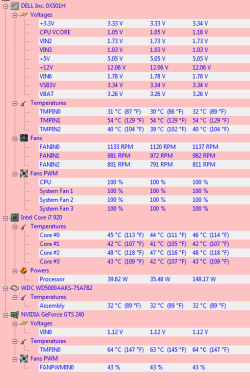
This is the setup that i use to keep the heat down. My Gforce card runs the same all the time.
I hope this will steer you in the right direction with the heat problems.
 

Attachments

  • Capture.PNG
    Capture.PNG
    17.2 KB · Views: 69
  • Arctic cooling freezer 7 Pro Rev.2.92mm Fluid Dynamic CPU Cooler.PNG
    Arctic cooling freezer 7 Pro Rev.2.92mm Fluid Dynamic CPU Cooler.PNG
    61.7 KB · Views: 19

My Computer

Computer Manufacturer/Model Number
Studio XPS 435T
OS
Windows 7 Home Premium
CPU
Dell/435T/9000/ i7
Motherboard
Dell Inc .0x501H
Memory
12gb 1066MHZ DDR3 4DIMM
Graphics Card(s)
ADM Radeon HD 6850 Series
Sound Card
High Definition Audio Device
Monitor(s) Displays
HP w2207h
Screen Resolution
1680-1050
Hard Drives
WD 500gb 7200RPM SERIAL
ST31000528AS ATA Device 1 TB
Case
DELL 9000
Cooling
Freezer 7 Pro Rev.2
Keyboard
Logitech Wireless Illuminated keyboard K800
Mouse
G9
Internet Speed
Cable
First, thanks to all of you for your fantastic assistance. I very much appreciate you taking the time to steer this clueless individual in the right direction!

After playing with it a bit, I've found that MSI Afterburner and the Alienware thermal controller can be run together, since the Alienware app doesn't deal with the GPU fans at all(which I found odd). The Alienware app is used to control the cpu pump, hard drive fan and a pci fan, while MSI is working with my GPU fans. What I've done is set two profiles, both of which push up the fans when playing. Testing it with the same game and at the same graphic settings, I've found that setting the GPU fans at 100% and the PCI fan at 80%, the tempurature is now at 90c, so I'm dealing with a 10-15c drop, which seems adequate. I could set the PCI fan higher, but honestly, the family would need headphones to talk to each other :)

Thanks again to everyone for your assistance. It saved the day.
json
 

My Computer

OS
Multiple
I hate to tell ya but something is very wrong with your system if you have temps of 90c that is 192f- I can not figure out if you are saying the cpu or the gpu is at 90c- either is not good.

192f may not damage the card- but video what ever should be poor and or crashing at them temps. Something is not right- or the info you are posting is not right. Are you sure you see 90c or 90f? 2 very different things..

Also it would help a lot if you post your full system specs in your profile etc. in the my system specs area.

just looking at this in your first post..>

NVIDIA GeForce GTS 240
Temperatures
GPU Core 103 °C (217 °F) 80 °C (175 °F) 107 °C (224 °F)
NVIDIA GeForce GTS 240
Temperatures
GPU Core 93 °C (199 °F) 73 °C (163 °F) 97 °C (206 °F)

The 1 vid card showing 224f should be fried for the most part. Your 240 is basically a 9800gt with a gig of mem and not 512mbs. My 8800 is more powerful has 128 cores but 512mbs- where as the 240 and 9800gt have 112 cores. I game hard most everyday some 17 hours a day. The most hard games on my system that I have are ut3 engine games. My temps never go over 135f and then is when I pause the game and walk away from it for 10 minutes what ever- but 135f is only 57.2c- normally while playing the ut3 games my temps hover around 127f

192f might not damage the card but it should run like crap and or be crashing at them temps.. I say again- something is not right.. Your cards show in none gaming temps of 224 and 206f- that is just wrong period..
 
Last edited:

My Computer

OS
w7
Thanks very much for your concern and don't hate telling me. It's why forums exist, so we can tell each other stuff.

No crashes are occurring, video is fantastic after many hours of play and I've not yet forgotten the difference between Celsius and Fahrenheit, so things seem to be pretty fantastic!

I've no doubt I'll need everyone's assistance again if/when the cards take a dirt nap.

thanks,
json
 

My Computer

OS
Multiple
The point is- things are not fantastic at those temps- wake up man- fix it.. Not saying right this second- get your nap etc- but them temps are not good- you are fooling your self..

Even the most powerful gpus on the planet running the most hard game there is at most high settings they can crysis or gta4 what ever- run nothing near them high temps- not after fan adjustments any way- Do as you like let it go- its not my money. Just saying..

Take care see ya..
 

My Computer

OS
w7
What about how clean things are- dirt dust etc. Do you smoke or in same room with the system- Smoke is worst than dust and dirt it is sticky- tar etc. If you can see a light coat of dust on your vid card etc- it acts like a blanket and temps can run 4 to 9f or so more hot.

The fans can be dirty and will move less air or the cooler its self under the fan etc can be dirty. Remove the cards from the system- use a can of air and blow it out good- always hold the can upright so no fluids come out and maybe 4 to 6 inches or so away- use some qtips and and rubbing alcohol- but only the isopropyl type- 70 or 90% no real matter. Dip the qtip's then roll it/them on a dry paper towel so it is not dripping wet- clean the whole card front and back and the fan and the cooler under it as best you can might help. I guess you understand when 1 qtip gets dirty use another. Never re dip a dirty qtip- use a clean one each time..

You say you know lil about computers etc- you should maybe heed the advice- or unless you have money to burn and do not care.. That extra heat also makes everything else work more hard- your psu too.. Maybe you have a friend that knows more about such things and or is a pc gamer- that can look at it for ya? Call Alienware something- go online and open a support ticket- do what it takes to fix it.

It is not a good thing.
 

My Computer

OS
w7
You say you know lil about computers etc-....

If you can find anywhere in the thread that I claimed to be anything more than an ignorant computer user, I'll insist that someone edited one of my posts. I don't claim to be anything I'm not.

What about how clean things are- dirt dust etc. Do you smoke or in same room with the system- Smoke is worst than dust and dirt it is sticky- tar etc. If you can see a light coat of dust on your vid card etc- it acts like a blanket and temps can run 4 to 9f or so more hot.

The fans can be dirty and will move less air or the cooler its self under the fan etc can be dirty. Remove the cards from the system- use a can of air and blow it out good- always hold the can upright so no fluids come out and maybe 4 to 6 inches or so away- use some qtips and and rubbing alcohol- but only the isopropyl type- 70 or 90% no real matter. Dip the qtip's then roll it/them on a dry paper towel so it is not dripping wet- clean the whole card front and back and the fan and the cooler under it as best you can might help. I guess you understand when 1 qtip gets dirty use another. Never re dip a dirty qtip- use a clean one each time..

It's a no-smoke house, but have cats and a dog, so was expecting a fur coat inside. When I opened it, I was surprised at how clean it was for a system that's almost a year old now. I did have to vacuum the fins of the radiator for the CPU cooler but everything else had a very light dusting. I know better than to try to vacuum the hard parts and I was going to use some compressed air to try to clean it out more but have not done so yet.

As for cleaning the fans, here's my pickle. I have muscle tremors and motor tics, meaning my hands shake a little all the time and jerk drastically every once in a while. The reason my house is full of store-bought computers now is because when I used to work on them, I invariably killed them. I don't have steady enough hands to deal with the intricate parts. I live in a very rural area with two computer stores, both of which I've dealt with and would never trust with something more than a hard drive or PSU install. As for friends, the only people I know are even less electronically inclined than I :)

Which leaves contacting Dell(and why I'm not really over the top worried about this issue). This computer is actually a replacement for another that I bought from them, which had a nasty habit of hard lockups. I managed to record a memory fault during one of the lockups and thought it would be a pretty straight forward deal with them. Three months later, I was still trying to get it resolved. They drove someone out to replace the vid cards, then the CPU, I had reinstalled Windows twice at their insistance(losing tons to gigs of games that I had to re-download). Finally a support operative told me that it had taken so long to resolve the issue that the computer I had purchased was no longer offered, would I like to "upgrade" to the Alienware Aurora? Being happy that I was getting another machine, I agreed.

So I know when I call them with anything other than a completely DOA system, I'm going to be in for a world of heartache. I know the temps are still out of normal boundaries(thanks to you guys on the forum), but I also know that I'll be tasked with doing things for months that have nothing to do with my issue. First, they'll wipe my OS install, again causing me to lose probably 100 gigs of data. After that, they'll get rid of the latest device drivers and put it back to the year old "safe" drivers which are insufficient for any of the latest games. After that, I'll begin the "did anything catastrophic happen? No? Let us know if the problem gets worse" phase of the phone calls.

I've begun to hope is that the cards do completely take a flying jump through a ring of fire and pass away. That way, it's a very clear cut issue. I'm under warranty and I need a system that works. There can be no OS installs, visits from people representing Dell that brought one part with them and are not authorized to touch anything but that one part and very little talking to people that I have trouble understanding over the phone.

I'm very sorry for the long response. I'm very appreciative of your help and just wanted to explain my situation so you didn't think I'm taking the situation lightly or that I didn't believe what you were telling me.
 

My Computer

OS
Multiple
Back
Top