gpu?¿ nvidia drivers?¿ please help!!!!

hello again... i havent decided what to do...
but only today i notice that my power supply is only 300w... and in some "simulators" to see the power you need, with i have on my pc.. the results always come that i should have a power supply over 550W.
could this be another reason?????
i also wanted to ask, since ive seen in some foruns, how to install 2 graphics boards? since i have one 7600gt 512mb, that i m not using at the moment...
could someone give me some insight on this?
thnks
 

My Computer

OS
7
if both cards are PCI-E, then its a matter of just installing the 7600 into the other PCI-E 16/8x slot if one is available.

but only today i notice that my power supply is only 300w... and in some "simulators" to see the power you need, with i have on my pc.. the results always come that i should have a power supply over 550W.

The real important value is the 12v Amps, wattage can be really deceptive.
 

My Computer

OS
Windows 7
CPU
Core i7 920 D0
Motherboard
Rampage II Gene
Memory
Corsair Dominator 1600
Graphics Card(s)
Geforce GTX 275
Sound Card
Auzentech Prelude
Monitor(s) Displays
BenQ G2400WD
Screen Resolution
1920x1200
Hard Drives
WD AAKS 500GB
WD 1TB
Seagate 160GB
PSU
Corsair HX620
Case
NZXT Rogue
Cooling
TRUE Copper
Keyboard
Logitech G15
Internet Speed
Anywhere from 2.5 to 3.5mb
if both cards are PCI-E, then its a matter of just installing the 7600 into the other PCI-E 16/8x slot if one is available.

but only today i notice that my power supply is only 300w... and in some "simulators" to see the power you need, with i have on my pc.. the results always come that i should have a power supply over 550W.

The real important value is the 12v Amps, wattage can be really deceptive.

"The real important value is the 12v Amps, wattage can be really deceptive"
i m sorry squall, i didnt understand...
are u saying that the 300W doesnt have any impact oon this?
no need to get a new power supply?
thnx
 

My Computer

OS
7
Good evening,
I just installed the beta driver 197.57, and i ve been gaming for the last hour, without any crash or blue screen, restart whatsoever, and there are no conflicts within my system.
I will continue to see how it goes… but so far so good….
Ill keep in touch…
 

My Computer

OS
7
"The real important value is the 12v Amps, wattage can be really deceptive"
i m sorry squall, i didnt understand...
are u saying that the 300W doesnt have any impact oon this?
no need to get a new power supply?
thnx

some psu manufacturers have extremely high 5v Amps and low 12v Amps which accounts for the 300w rating, most devices these days require plenty of 12v Amps, so its best to look at the PSU's ratings than just at the Model's wattage.
 

My Computer

OS
Windows 7
CPU
Core i7 920 D0
Motherboard
Rampage II Gene
Memory
Corsair Dominator 1600
Graphics Card(s)
Geforce GTX 275
Sound Card
Auzentech Prelude
Monitor(s) Displays
BenQ G2400WD
Screen Resolution
1920x1200
Hard Drives
WD AAKS 500GB
WD 1TB
Seagate 160GB
PSU
Corsair HX620
Case
NZXT Rogue
Cooling
TRUE Copper
Keyboard
Logitech G15
Internet Speed
Anywhere from 2.5 to 3.5mb
ok... i just purchased an asrock alive xfire-esata2 r3... i think its inferior that the asus m3n78 vm...
but i just wanted to try with an amd chipset... does anyone have anything to say about this board.?
i havent installed it yet, think it might do the trick???
thanks
 

My Computer

OS
7
good evening, i ve just purchased the motherboard metioned above, and i finished to assemble my pc, but it doesnt boot.
already tryed to format to male a clean instalation, booting from the cd, but it gets stuck in the windows logo.
please help!!!!
my old motherboard was an m3n78vm, and everything worked with same configuration

the configuration is in a older post to this thread. so win7 64bits
 

My Computer

OS
7
if it was booting from the DVD, there wouldn't be a windows logo.

make sure your boot order is correct in the bios.
 

My Computer

OS
Windows 7
CPU
Core i7 920 D0
Motherboard
Rampage II Gene
Memory
Corsair Dominator 1600
Graphics Card(s)
Geforce GTX 275
Sound Card
Auzentech Prelude
Monitor(s) Displays
BenQ G2400WD
Screen Resolution
1920x1200
Hard Drives
WD AAKS 500GB
WD 1TB
Seagate 160GB
PSU
Corsair HX620
Case
NZXT Rogue
Cooling
TRUE Copper
Keyboard
Logitech G15
Internet Speed
Anywhere from 2.5 to 3.5mb
if it was booting from the DVD, there wouldn't be a windows logo.

make sure your boot order is correct in the bios.
got it... disks formated... but the instalation failed dont know why...
from asrock they tell me i have to update the bios...
but i already try to start from an usb flash with the bios files, and it doesnt update...gives the notification to remove disks and media and restart...
what should i do?
 

My Computer

OS
7
you'd need to apply a boot sector to the usb stick first.
 

My Computer

OS
Windows 7
CPU
Core i7 920 D0
Motherboard
Rampage II Gene
Memory
Corsair Dominator 1600
Graphics Card(s)
Geforce GTX 275
Sound Card
Auzentech Prelude
Monitor(s) Displays
BenQ G2400WD
Screen Resolution
1920x1200
Hard Drives
WD AAKS 500GB
WD 1TB
Seagate 160GB
PSU
Corsair HX620
Case
NZXT Rogue
Cooling
TRUE Copper
Keyboard
Logitech G15
Internet Speed
Anywhere from 2.5 to 3.5mb
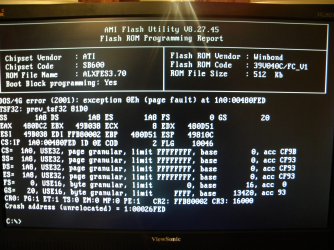
done....
when i try to update... it gives me this error....
 

Attachments

  • DSCN2109.JPG
    DSCN2109.JPG
    891.8 KB · Views: 2

My Computer

OS
7
doesn't the system bios itself have a amiflash embedded?
 

My Computer

OS
Windows 7
CPU
Core i7 920 D0
Motherboard
Rampage II Gene
Memory
Corsair Dominator 1600
Graphics Card(s)
Geforce GTX 275
Sound Card
Auzentech Prelude
Monitor(s) Displays
BenQ G2400WD
Screen Resolution
1920x1200
Hard Drives
WD AAKS 500GB
WD 1TB
Seagate 160GB
PSU
Corsair HX620
Case
NZXT Rogue
Cooling
TRUE Copper
Keyboard
Logitech G15
Internet Speed
Anywhere from 2.5 to 3.5mb
no idea...
anythoughts on how i can solve this?
 

My Computer

OS
7
you may have bios virus protection enabled, can you check that?
 

My Computer

OS
Windows 7
CPU
Core i7 920 D0
Motherboard
Rampage II Gene
Memory
Corsair Dominator 1600
Graphics Card(s)
Geforce GTX 275
Sound Card
Auzentech Prelude
Monitor(s) Displays
BenQ G2400WD
Screen Resolution
1920x1200
Hard Drives
WD AAKS 500GB
WD 1TB
Seagate 160GB
PSU
Corsair HX620
Case
NZXT Rogue
Cooling
TRUE Copper
Keyboard
Logitech G15
Internet Speed
Anywhere from 2.5 to 3.5mb
bios updated with last version available on asrock.com.
i m not beeing able, to install windows 7. it freezes at 49% of expanding files.
i have nthing but the graphic board.
i was able to install windows vista 64bits.
but i want to install win7.
can you give me a hint?
 

My Computer

OS
7
please... a little help... i m stuck on this...
 

My Computer

OS
7

My Computer

Computer type
PC/Desktop
Computer Manufacturer/Model Number
self build
OS
win 7 ultimate32bit, Win8.1pro wmc 32bit
CPU
amd phenom x4 9600
Motherboard
asus m2n32-sli deluxe
Memory
corsair twinxs 2x2gb
Graphics Card(s)
2x nvidia 1gb 8500gt
Sound Card
onboard
Monitor(s) Displays
23" PB Viseo 233d
Screen Resolution
1920x1080
Hard Drives
maxtor sata 500gb
maxtor sata 320gb
fujitsu sata200gb
PSU
oryxx tornado 750w
Case
thermaltake xaser lll
Cooling
artic freezer64 pro + 7 case fans
got it...
thanks...
let me tell what happen...
2 win 7 dvd....
one dvd... error file missing starting expanding files...
the other dvd freezed at 49%... at this point switch the dvds... and the installations unfreezs....
5 days for this simple solution....
 

My Computer

OS
7
ok...
bios updated, win7 installed.
the thing is that when i install nvidia driver 257.21 whql, after the install, pc restarts, but as soon as come out the win logo, display starts to flash, blue screen comes out, with the indication of display driver error.

the configuration i have now is
mobo asrock, alivecfire esata 2 r3.0 amd chipset
cpu amd phenom II 955
graphic gt220 nvidia
6 gb ram

please give a little help, its been days that i m stuck on this.
 

My Computer

OS
7
ok...
bios updated, win7 installed.
the thing is that when i install nvidia driver 257.21 whql, after the install, pc restarts, but as soon as come out the win logo, display starts to flash, blue screen comes out, with the indication of display driver error.

the configuration i have now is
mobo asrock, alivecfire esata 2 r3.0 amd chipset
cpu amd phenom II 955
graphic gt220 nvidia
6 gb ram

please give a little help, its been days that i m stuck on this.

hi riclx, try using the standard vga driver see if the same thing happens , have you tried running in safe mode? ;)
 

My Computer

Computer type
PC/Desktop
Computer Manufacturer/Model Number
self build
OS
win 7 ultimate32bit, Win8.1pro wmc 32bit
CPU
amd phenom x4 9600
Motherboard
asus m2n32-sli deluxe
Memory
corsair twinxs 2x2gb
Graphics Card(s)
2x nvidia 1gb 8500gt
Sound Card
onboard
Monitor(s) Displays
23" PB Viseo 233d
Screen Resolution
1920x1080
Hard Drives
maxtor sata 500gb
maxtor sata 320gb
fujitsu sata200gb
PSU
oryxx tornado 750w
Case
thermaltake xaser lll
Cooling
artic freezer64 pro + 7 case fans
Back
Top