Gpu oc

N00berG00ber

Weekend Warrior
Power User
VIP
Local time
7:23 AM
Messages
1,485
so ive been messing around OCing my 780, and really want to stay on stock voltage for now. currently im at 1202MHz on the core and 3105MHz on the memory. with the core clock, i was playing games at 1252MHz with no issues on stock voltage, but as soon as i loaded bioshock, it crashes. it seems as if only bioshock is having the crashing issues at that speed. is there anyway around having bioshock not crash at that speed? if it weren't to crash, i could go up another 50MHz! BF4 runs great at that speed! what can i do in control panel to stop it from crashing? in game im getting about 140FPS currently with supersampling at 8x. the card is getting up to 72C stock fan profile and im using MSI Afterburner. flashing a custom bios is out of the question, at least until the card gets older.
 

My Computer My Computer

Computer type
PC/Desktop
Computer Manufacturer/Model Number
Weekend Warrior Rig
OS
Windows 10 Pro
CPU
Intel i7-3770K 4.4GHz
Motherboard
ASUS P8Z77-V Pro
Memory
8GB G.SKILL Ripjaws 1866 MHz
Graphics Card(s)
EVGA GTX 980 Classified
Monitor(s) Displays
Asus VH238H 23" 2ms
Screen Resolution
1920x1080
Hard Drives
Intel 330 120GB SSD /
WD Blue 1TB /
WD Black 500GB
PSU
Corsair CX750M
Case
NZXT H440
Cooling
Corsair H80i- CPU / Corsair H90- GPU
Keyboard
Logitech K360 LE
Mouse
Logitech G500
Antivirus
Avast
Browser
Chrome
Other Info
1200W 2.1 Surround Sound Audio
I always have very mixed results with running a GPU overclocked for gaming Noober. To the point where I just stopped doing it. I figured the 780 was powerful enough at stock to run all the games I like on ultra so I only overclock it for benchmarks.
 

My Computer My Computer

OS
Windows 7 Professional 64 bit
I always have very mixed results with running a GPU overclocked for gaming Noober. To the point where I just stopped doing it. I figured the 780 was powerful enough at stock to run all the games I like on ultra so I only overclock it for benchmarks.

yea, i was playing with heavan bench, and at anything higher than 1228MHz, it artifacts, so it makes sense that it will crash. im just going to leave it at 1202MHz. its on stock voltage and gains have been ~20FPS in games with ~4C temp change on stock fan profile. so im just going to leave it there. thanks for the help!
 

My Computer My Computer

Computer type
PC/Desktop
Computer Manufacturer/Model Number
Weekend Warrior Rig
OS
Windows 10 Pro
CPU
Intel i7-3770K 4.4GHz
Motherboard
ASUS P8Z77-V Pro
Memory
8GB G.SKILL Ripjaws 1866 MHz
Graphics Card(s)
EVGA GTX 980 Classified
Monitor(s) Displays
Asus VH238H 23" 2ms
Screen Resolution
1920x1080
Hard Drives
Intel 330 120GB SSD /
WD Blue 1TB /
WD Black 500GB
PSU
Corsair CX750M
Case
NZXT H440
Cooling
Corsair H80i- CPU / Corsair H90- GPU
Keyboard
Logitech K360 LE
Mouse
Logitech G500
Antivirus
Avast
Browser
Chrome
Other Info
1200W 2.1 Surround Sound Audio
No worries, yeah good move. I guess some games are more demanding than others in strange ways. A mild OC should be safe in all games.
 

My Computer My Computer

OS
Windows 7 Professional 64 bit
No worries, yeah good move. I guess some games are more demanding than others in strange ways. A mild OC should be safe in all games.

well any OC that has no voltage adjustments so as long as its stable should be 100% safe. whats weird is i can only go up to maybe 5-60MHz from 1.162V to 1.2V unless i flash a custom bios. which i will not do yet.my AMD card was the same way. i could play bf4 on 1185MHz all day, but mw2 where it was a less demand, i could only play on 1150.
 

My Computer My Computer

Computer type
PC/Desktop
Computer Manufacturer/Model Number
Weekend Warrior Rig
OS
Windows 10 Pro
CPU
Intel i7-3770K 4.4GHz
Motherboard
ASUS P8Z77-V Pro
Memory
8GB G.SKILL Ripjaws 1866 MHz
Graphics Card(s)
EVGA GTX 980 Classified
Monitor(s) Displays
Asus VH238H 23" 2ms
Screen Resolution
1920x1080
Hard Drives
Intel 330 120GB SSD /
WD Blue 1TB /
WD Black 500GB
PSU
Corsair CX750M
Case
NZXT H440
Cooling
Corsair H80i- CPU / Corsair H90- GPU
Keyboard
Logitech K360 LE
Mouse
Logitech G500
Antivirus
Avast
Browser
Chrome
Other Info
1200W 2.1 Surround Sound Audio
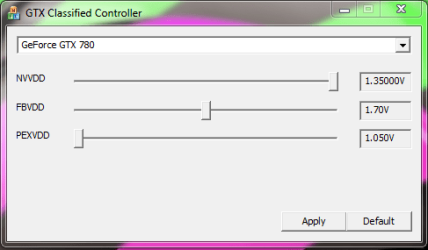
The special bit of software I have allows for 1.35v on a stock bios but only for the EVGA Classified 780. It's pretty cool but I would not like to be running 1.35v for long lol.
 

Attachments

  • classy.PNG
    classy.PNG
    9.6 KB · Views: 16

My Computer My Computer

OS
Windows 7 Professional 64 bit
The special bit of software I have allows for 1.35v on a stock bios but only for the EVGA Classified 780. It's pretty cool but I would not like to be running 1.35v for long lol.

yea ive heard about that controller. my stock bios allows for 1.2 max. custom bios allows for 1.212 and 200% power limit. also can allow you to disable gpu boost 2.0.
 

My Computer My Computer

Computer type
PC/Desktop
Computer Manufacturer/Model Number
Weekend Warrior Rig
OS
Windows 10 Pro
CPU
Intel i7-3770K 4.4GHz
Motherboard
ASUS P8Z77-V Pro
Memory
8GB G.SKILL Ripjaws 1866 MHz
Graphics Card(s)
EVGA GTX 980 Classified
Monitor(s) Displays
Asus VH238H 23" 2ms
Screen Resolution
1920x1080
Hard Drives
Intel 330 120GB SSD /
WD Blue 1TB /
WD Black 500GB
PSU
Corsair CX750M
Case
NZXT H440
Cooling
Corsair H80i- CPU / Corsair H90- GPU
Keyboard
Logitech K360 LE
Mouse
Logitech G500
Antivirus
Avast
Browser
Chrome
Other Info
1200W 2.1 Surround Sound Audio
Back
Top