Graphic card problems

Safwanaba

New member
Local time
8:57 PM
Messages
4
Location
Jerudong
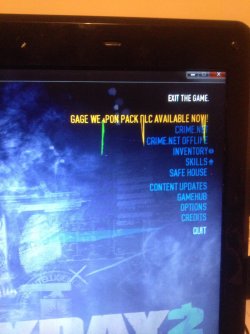
Hi everyone, I'm having problem playing game with my laptop. it was doing good past few days ago. I don't know whats the problem. See the pictures attached, is it graphic card problem or something else? When i started a game, few secs/mins after that, it shows a pink dots scattered around the screen as shown in the picture below. My graphic card is Nvidia Geforce GT 555M 2GB. Any suggestions or advice would be appreciated. Thanks

IMG_7396.jpg

IMG_7395.jpg
 

My Computer

Computer type
Laptop
Computer Manufacturer/Model Number
Medion Erazer X6815
OS
Windows 7 Home Premium 64bit
CPU
i5-2450M CPU @ 2.5GHz
Memory
4 GB
Graphics Card(s)
Nvidia Geforce GT 555M
Screen Resolution
1366 x 768
Antivirus
Microsoft Security Essentials
Browser
Google Chrome
thats called artifacting. it could be possibly due to bad drivers, or an overheating card. download and install updated drivers from the Nvidia website, then download and install MSI After burner to monitor temps. the temp should not exceed 80c,
 

My Computer

Computer type
PC/Desktop
Computer Manufacturer/Model Number
Weekend Warrior Rig
OS
Windows 10 Pro
CPU
Intel i7-3770K 4.4GHz
Motherboard
ASUS P8Z77-V Pro
Memory
8GB G.SKILL Ripjaws 1866 MHz
Graphics Card(s)
EVGA GTX 980 Classified
Monitor(s) Displays
Asus VH238H 23" 2ms
Screen Resolution
1920x1080
Hard Drives
Intel 330 120GB SSD /
WD Blue 1TB /
WD Black 500GB
PSU
Corsair CX750M
Case
NZXT H440
Cooling
Corsair H80i- CPU / Corsair H90- GPU
Keyboard
Logitech K360 LE
Mouse
Logitech G500
Antivirus
Avast
Browser
Chrome
Other Info
1200W 2.1 Surround Sound Audio
thats called artifacting. it could be possibly due to bad drivers, or an overheating card. download and install updated drivers from the Nvidia website, then download and install MSI After burner to monitor temps. the temp should not exceed 80c,

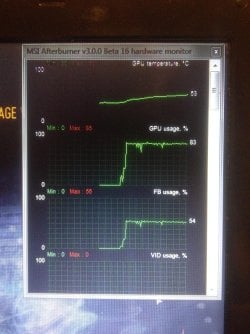
Thanks, i did install and update my drivers, the GPU temp is only less than 50 degree celsius but the GPU usage and FB usage is almost max. core clock, shader clock and memory clock are at max. is it possible the graphic card has damaged? graphic card can be repaired? Thank you
 

My Computer

Computer type
Laptop
Computer Manufacturer/Model Number
Medion Erazer X6815
OS
Windows 7 Home Premium 64bit
CPU
i5-2450M CPU @ 2.5GHz
Memory
4 GB
Graphics Card(s)
Nvidia Geforce GT 555M
Screen Resolution
1366 x 768
Antivirus
Microsoft Security Essentials
Browser
Google Chrome
thats called artifacting. it could be possibly due to bad drivers, or an overheating card. download and install updated drivers from the Nvidia website, then download and install MSI After burner to monitor temps. the temp should not exceed 80c,

Thanks, i did install and update my drivers, the GPU temp is only less than 50 degree celsius but the GPU usage and FB usage is almost max. core clock, shader clock and memory clock are at max. is it possible the graphic card has damaged? graphic card can be repaired? Thank you

thats good if those are at max. u need to get the load temps. so run after burner and play a game where u are getting the artifacting and then tell me the temps.
 

My Computer

Computer type
PC/Desktop
Computer Manufacturer/Model Number
Weekend Warrior Rig
OS
Windows 10 Pro
CPU
Intel i7-3770K 4.4GHz
Motherboard
ASUS P8Z77-V Pro
Memory
8GB G.SKILL Ripjaws 1866 MHz
Graphics Card(s)
EVGA GTX 980 Classified
Monitor(s) Displays
Asus VH238H 23" 2ms
Screen Resolution
1920x1080
Hard Drives
Intel 330 120GB SSD /
WD Blue 1TB /
WD Black 500GB
PSU
Corsair CX750M
Case
NZXT H440
Cooling
Corsair H80i- CPU / Corsair H90- GPU
Keyboard
Logitech K360 LE
Mouse
Logitech G500
Antivirus
Avast
Browser
Chrome
Other Info
1200W 2.1 Surround Sound Audio
thats good if those are at max. u need to get the load temps. so run after burner and play a game where u are getting the artifacting and then tell me the temps.[/QUOTE]

Thanks, youre very helpful.

IMG_7439.jpg
 

My Computer

Computer type
Laptop
Computer Manufacturer/Model Number
Medion Erazer X6815
OS
Windows 7 Home Premium 64bit
CPU
i5-2450M CPU @ 2.5GHz
Memory
4 GB
Graphics Card(s)
Nvidia Geforce GT 555M
Screen Resolution
1366 x 768
Antivirus
Microsoft Security Essentials
Browser
Google Chrome
i find it incredibly hard to believe that you are getting 53c on gaming in a laptop. wattercooled Dekstop gpus hit 50c. but anyway, i will guess that it is starting to go bad. how old is the laptop?

you can use that program to lower your clock speeds maybe 30mhz on the core and 50mhz on the memory and try again.
 

My Computer

Computer type
PC/Desktop
Computer Manufacturer/Model Number
Weekend Warrior Rig
OS
Windows 10 Pro
CPU
Intel i7-3770K 4.4GHz
Motherboard
ASUS P8Z77-V Pro
Memory
8GB G.SKILL Ripjaws 1866 MHz
Graphics Card(s)
EVGA GTX 980 Classified
Monitor(s) Displays
Asus VH238H 23" 2ms
Screen Resolution
1920x1080
Hard Drives
Intel 330 120GB SSD /
WD Blue 1TB /
WD Black 500GB
PSU
Corsair CX750M
Case
NZXT H440
Cooling
Corsair H80i- CPU / Corsair H90- GPU
Keyboard
Logitech K360 LE
Mouse
Logitech G500
Antivirus
Avast
Browser
Chrome
Other Info
1200W 2.1 Surround Sound Audio
i find it incredibly hard to believe that you are getting 53c on gaming in a laptop. wattercooled Dekstop gpus hit 50c. but anyway, i will guess that it is starting to go bad. how old is the laptop?

you can use that program to lower your clock speeds maybe 30mhz on the core and 50mhz on the memory and try again.

yeah, its going bad. about a year and a half. i will try that and will let you know how it goes. Thank you :) is it possible to repair laptop's graphic card?
 

My Computer

Computer type
Laptop
Computer Manufacturer/Model Number
Medion Erazer X6815
OS
Windows 7 Home Premium 64bit
CPU
i5-2450M CPU @ 2.5GHz
Memory
4 GB
Graphics Card(s)
Nvidia Geforce GT 555M
Screen Resolution
1366 x 768
Antivirus
Microsoft Security Essentials
Browser
Google Chrome
is it possible to repair laptop's graphic card?

Unfortunately not by yourself.

Your GPU is integrated into the mainboard which typically means the entire mainboard (motherboard) will have to be replaced. A skilled technician with the right tools 'may' be able to replace the GPU chip, but most PC shops will simply replace the mainboard since it's such a tricky job.
 

My Computer

Computer type
PC/Desktop
Computer Manufacturer/Model Number
Systems by SmartEyeball
OS
8 Pro x64
CPU
i7 3770K 4.6GHz
Motherboard
ASUS P8Z77 WS
Memory
16GB G.Skill Trident X 2666mhz
Graphics Card(s)
x2 EVGA 780 Ti Superclocked SLI
Sound Card
SB X-FI Surround 5.1 PRO USB / ATH-AD900 Headphones
Monitor(s) Displays
x3 Dell U2410 / 58" Samsung
Screen Resolution
5760*1200/ 1920*1200
Hard Drives
2x Intel 520 240GB (RAID 0) * 2x WD Caviar Blacks 2TB (RAID 0) * 2TB WD Caviar Black * Sony Optirac DVD
PSU
Silverstone Strider Evolution 1200W
Case
Thermaltake Level 10 GT Snow Edition
Cooling
Noctua NH-D14
Keyboard
Topre Realforce // Ducky Shine MX Black // Filco Ninja TKL
Mouse
Thermaltake Theron (Highly Recommended) + Razer Imperator
Antivirus
MSE
Browser
IE, FF, WaterFox
Other Info
GT Extreme V2 Sim Racing Cockpit + 40" LCD and K/B Mouse stand ▼
Fanatec CSR Elite Wheel + Clubsport V1 Pedals + CSR shifter/7G-H ▼Saitek X52 Pro ▼ TrackIR 5 Pro
Buttkicker v2 Seat Rumbler with Dedicated 5.1 and Sub Woofer attached to frame ▼
=
Bloody Big Grin
i find it incredibly hard to believe that you are getting 53c on gaming in a laptop. wattercooled Dekstop gpus hit 50c. but anyway, i will guess that it is starting to go bad. how old is the laptop?

you can use that program to lower your clock speeds maybe 30mhz on the core and 50mhz on the memory and try again.

yeah, its going bad. about a year and a half. i will try that and will let you know how it goes. Thank you :) is it possible to repair laptop's graphic card?

nope. you will most likley have to get a new mobo. but they r expansive for laptops and a lot for work to repair. ummmm but at 1.5 years old, it shouldnt be doing that. run after burner in the background and play your game for about 10 mins the mostv intensive one you have. then post your max temp. its incredibly hard to believe you are hitting only 53c

is this happening in all games or just 1?
 

My Computer

Computer type
PC/Desktop
Computer Manufacturer/Model Number
Weekend Warrior Rig
OS
Windows 10 Pro
CPU
Intel i7-3770K 4.4GHz
Motherboard
ASUS P8Z77-V Pro
Memory
8GB G.SKILL Ripjaws 1866 MHz
Graphics Card(s)
EVGA GTX 980 Classified
Monitor(s) Displays
Asus VH238H 23" 2ms
Screen Resolution
1920x1080
Hard Drives
Intel 330 120GB SSD /
WD Blue 1TB /
WD Black 500GB
PSU
Corsair CX750M
Case
NZXT H440
Cooling
Corsair H80i- CPU / Corsair H90- GPU
Keyboard
Logitech K360 LE
Mouse
Logitech G500
Antivirus
Avast
Browser
Chrome
Other Info
1200W 2.1 Surround Sound Audio
Back
Top