
Graphics adapter won't support the Windows Aero.

Ashish470

New member
Local time
11:47 AM
Messages
4
According to Windows 7 Upgrade Advisor Report.
I computer is legging in hardware support.

Error was
Windows Aero support:
Your current graphics adapter won't support the Windows Aero user interface. If you want to experience the benefits of Windows Aero, contact your PC manufacturer or retailer to see if an upgrade is available.

I also having 2 error more of RAM & Hard Disk requirement such error I can able to solve by buying 1Gb RAM & 160 GB Hard Disk. But...

I just wanted to know how can my computer is able get windows aero support.
As i am not aware of using which type of graphics cards is supporting aero.

Plz Suggest me :confused:....
Pasting my graphics confrigration...
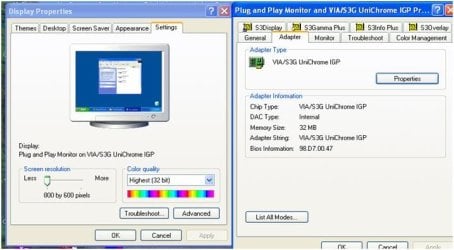
Graphc.JPG

moz-screenshot.jpg
 

My Computer My Computer

OS
Windows XP Professional
Anything HD by ATI or anything 6xxx and above NVIDIA.

You'll have to check your psu to see if it's strong enough for any card you get. And also, you'll have to check which kind of video card slot you have. Probably AGP but if not, then you'll need to get a PCI card.

IMHO, don't upgrade that machine. Get a new one ready for Windows 7 out of the box.
 

My Computer My Computer

Computer Manufacturer/Model Number
self built
OS
7600.20510 x86
CPU
P4 550 3.4 GHz HT running at 3.5 GHz
Motherboard
MSI PM8M3-V (MS-7211 v1.x) Micro-ATX mainboard
Memory
OCZ 2 GB(2x1GB) DDR400mHz running @ 414 mHz
Graphics Card(s)
HIS Radeon HD 3850 IceQ 3 Turbo HDMI Dual DL-DVI AGP
Sound Card
MOTU Traveler firewire studio interface 192 kHz 24 bit
Monitor(s) Displays
22" widescreen Acer X223W LCD, 17" Compaq P75 CRT
Screen Resolution
1680x1050 and 1280x1024
Hard Drives
SATA I x2 WD, 400 GB and 120 GB, SATA 2 WD Caviar Black 1 TB
PSU
350W generic
Case
Cybertronpc, it glows blue
Cooling
stock cpu fan, Ice-Q 3 gpu and system, many case fans
Keyboard
Logitch Classical Keyboard 200
Mouse
Logitech Mediaplay cordless
Internet Speed
1792/448 kbits/sec
Other Info
SATA II PCI fake RAID adapter, 1 GB Readyboost, original ATI Remote Wonder (even works with WMC perfectly), Logitech Rumblepad 2 game controller x2
Anything HD by ATI or anything 6xxx and above NVIDIA.

You'll have to check your psu to see if it's strong enough for any card you get. And also, you'll have to check which kind of video card slot you have. Probably AGP but if not, then you'll need to get a PCI card.

IMHO, don't upgrade that machine. Get a new one ready for Windows 7 out of the box.

Yes, My motherboard have Expansion slots consisting
One AGP
One CNR
Three 32 bit PCI Slots
But how will i find out the PSU details...
My Motherboard details are.....
P4VM800M7.jpg
 

My Computer My Computer

OS
Windows XP Professional
Which motherboard is that? Yes - psu details very important - also to see if it has the right power connector for any new card. If it doesn't, you'll also have to consider only a card that doesn't require extra power.
 

My Computer My Computer

Computer Manufacturer/Model Number
self built
OS
7600.20510 x86
CPU
P4 550 3.4 GHz HT running at 3.5 GHz
Motherboard
MSI PM8M3-V (MS-7211 v1.x) Micro-ATX mainboard
Memory
OCZ 2 GB(2x1GB) DDR400mHz running @ 414 mHz
Graphics Card(s)
HIS Radeon HD 3850 IceQ 3 Turbo HDMI Dual DL-DVI AGP
Sound Card
MOTU Traveler firewire studio interface 192 kHz 24 bit
Monitor(s) Displays
22" widescreen Acer X223W LCD, 17" Compaq P75 CRT
Screen Resolution
1680x1050 and 1280x1024
Hard Drives
SATA I x2 WD, 400 GB and 120 GB, SATA 2 WD Caviar Black 1 TB
PSU
350W generic
Case
Cybertronpc, it glows blue
Cooling
stock cpu fan, Ice-Q 3 gpu and system, many case fans
Keyboard
Logitch Classical Keyboard 200
Mouse
Logitech Mediaplay cordless
Internet Speed
1792/448 kbits/sec
Other Info
SATA II PCI fake RAID adapter, 1 GB Readyboost, original ATI Remote Wonder (even works with WMC perfectly), Logitech Rumblepad 2 game controller x2
If you go to Start > Search Programs and files an type in fix. Select find and fix problems with transparency and visual effects.

This will bring up the Aero trouble shooter to see of your card passes the test.
 

My Computer My Computer

Computer Manufacturer/Model Number
Cheap $399.00 E-Machine
OS
Windows 7 Pro & Vista Home Premium
CPU
Athlon 64 3800+ (Orleans) 2.40GHz
Motherboard
Winfast
Memory
2GB DDR2 RAM DIMM
Graphics Card(s)
NVIDIA GeForce 8500 GT 512 MB memory HDMI out
Sound Card
creative X-Fi Exteme 7..1 channel
Monitor(s) Displays
Acer V223W 22" widescreen DVI
Screen Resolution
1680x1050
Hard Drives
WDC WD5 500GB
WDC WD25 250GB
PSU
OCZ 550 watt
Case
Gateway
Cooling
2 fans
Keyboard
Dell
Mouse
Sony Vaio
Internet Speed
18MB/s down - .72MB /s up
If you go to Start > Search Programs and files an type in fix. Select find and fix problems with transparency and visual effects.

This will bring up the Aero trouble shooter to see of your card passes the test.

Did you even notice his screenshot at all? No way. It's a UniChrome.

No offense, but geez.
 

My Computer My Computer

Computer Manufacturer/Model Number
self built
OS
7600.20510 x86
CPU
P4 550 3.4 GHz HT running at 3.5 GHz
Motherboard
MSI PM8M3-V (MS-7211 v1.x) Micro-ATX mainboard
Memory
OCZ 2 GB(2x1GB) DDR400mHz running @ 414 mHz
Graphics Card(s)
HIS Radeon HD 3850 IceQ 3 Turbo HDMI Dual DL-DVI AGP
Sound Card
MOTU Traveler firewire studio interface 192 kHz 24 bit
Monitor(s) Displays
22" widescreen Acer X223W LCD, 17" Compaq P75 CRT
Screen Resolution
1680x1050 and 1280x1024
Hard Drives
SATA I x2 WD, 400 GB and 120 GB, SATA 2 WD Caviar Black 1 TB
PSU
350W generic
Case
Cybertronpc, it glows blue
Cooling
stock cpu fan, Ice-Q 3 gpu and system, many case fans
Keyboard
Logitch Classical Keyboard 200
Mouse
Logitech Mediaplay cordless
Internet Speed
1792/448 kbits/sec
Other Info
SATA II PCI fake RAID adapter, 1 GB Readyboost, original ATI Remote Wonder (even works with WMC perfectly), Logitech Rumblepad 2 game controller x2
Also, looking at your first post it is quite clear as to the problem with having no Aero, you are showing only 32 Mb of video ram. This should be at least and no less then 128 Mb of video ram, and if possible use a video card that will give you at least 512 Mbs video ram.

If you can afford it get a new MB that supports PCI Express, DDR2 or DDR3 ram the other specs are up to you, though a good Duo Core 32 or 64 bit CPU would be an excellent choice.

Doc Brown might take that old one off your hands. . .:thumbsup:
 

My Computer My Computer

Computer Manufacturer/Model Number
HP Pavilion a4302f
OS
Win 7 Pro x64, VM Win XP, Win7 Pro Sandbox, Kubuntu 11
CPU
AMD Athlon(tm) II X4 640 @ 3.0 Gbz
Memory
12GB 1066MHz DDR3 SDRAM - 2x4GB, 2x2GB
Graphics Card(s)
ATI Radeon HD 4350 HD Graphics/Audio with 512MB
Sound Card
Realtek High Definition Audio
Monitor(s) Displays
1. Dell 23" SP2307, 2. Mitsublishi 40" HDTV, Hannspree 25"
Screen Resolution
1. 2048x1152, 2. 1920-1080, 3. 1920x1200
Hard Drives
Int: 1 120 Gig SSD i
1 - 2.5" 500 USB External HDD
1 -1 Tb USB External HDD
Case
Mid Tower
Cooling
Standard Fans - 5 fans (very quiet)
Keyboard
Microsoft Wireless 2000
Mouse
Microsoft Wireless Mouse 5000
Internet Speed
10 Mbit (realistically 500 Kbit - 1.2 Mbit)
Other Info
Speakers - Bose Desktop (Excellent Sound)
1 external CD|DVD\Blue-ray Recorders/Players (Sony)
Which motherboard is that? Yes - psu details very important - also to see if it has the right power connector for any new card. If it doesn't, you'll also have to consider only a card that doesn't require extra power.

My Motherboard is

Mercury P4VM800M7 Via Socket 775 MicroATX Motherboard / Audio / 64MB Shared Video / AGP 8x / 10/100 Ethernet LAN / USB 2.0 / Serial ATA / CNR

Where will i check the PSU details...
Is it not possible to use graphic card which will inserted in PCI Slot.

Plz tell me about brand & its Configuration of graphic card.
I am able to Buy.
 

My Computer My Computer

OS
Windows XP Professional
Anything AGP that is compatible with your psu as I explained above.
 

My Computer My Computer

Computer Manufacturer/Model Number
self built
OS
7600.20510 x86
CPU
P4 550 3.4 GHz HT running at 3.5 GHz
Motherboard
MSI PM8M3-V (MS-7211 v1.x) Micro-ATX mainboard
Memory
OCZ 2 GB(2x1GB) DDR400mHz running @ 414 mHz
Graphics Card(s)
HIS Radeon HD 3850 IceQ 3 Turbo HDMI Dual DL-DVI AGP
Sound Card
MOTU Traveler firewire studio interface 192 kHz 24 bit
Monitor(s) Displays
22" widescreen Acer X223W LCD, 17" Compaq P75 CRT
Screen Resolution
1680x1050 and 1280x1024
Hard Drives
SATA I x2 WD, 400 GB and 120 GB, SATA 2 WD Caviar Black 1 TB
PSU
350W generic
Case
Cybertronpc, it glows blue
Cooling
stock cpu fan, Ice-Q 3 gpu and system, many case fans
Keyboard
Logitch Classical Keyboard 200
Mouse
Logitech Mediaplay cordless
Internet Speed
1792/448 kbits/sec
Other Info
SATA II PCI fake RAID adapter, 1 GB Readyboost, original ATI Remote Wonder (even works with WMC perfectly), Logitech Rumblepad 2 game controller x2
Also, looking at your first post it is quite clear as to the problem with having no Aero, you are showing only 32 Mb of video ram. This should be at least and no less then 128 Mb of video ram, and if possible use a video card that will give you at least 512 Mbs video ram.

If you can afford it get a new MB that supports PCI Express, DDR2 or DDR3 ram the other specs are up to you, though a good Duo Core 32 or 64 bit CPU would be an excellent choice.

Doc Brown might take that old one off your hands. . .:thumbsup:
Should I go For Video Card or Graphic Card.
which one i brought...:confused:
 

My Computer My Computer

OS
Windows XP Professional
Back
Top