
Graphics Card - Overclock

How to Overclock a Graphics Card

   Warning
OVERCLOCKING CAN AND WILL DESTROY YOUR VIDEO CARD IF DONE INCORRECTLY!
Overclocking also voids the warranty on most graphics cards.


   Information
Overclocking requires a large time commitment, but can also be done in stages. Make sure you have the time to sit uninterrupted at your computer for around 2 or 3 hours to fully overclock your Card. An addition 2 hours will be needed to finish the final stress tests.


Overclocking (OCing, or OC) is a process by which you increase the clock speed of your GPU and VRAM to increase the performance of your graphics card. This will also heat up the card, and so requires a good cooling system.

If done incorrectly, overclocking WILL DESTROY YOUR CARD! Overclocking also voids the warranty on most graphics cards.

You will need a few programs to overclock. I chose these programs for their ease of use, accuracy, and multiple features. I have also used them to overclock my own cards (a GeForce 9500GT, ATI HD5770, and GeForce 260).

MSI Afterburner:
This is the actual overclocking utility that will let you increase the Voltage, Core/shader/memory clock, and fan speed. It will also show you the temperature of your card in a handy graph.

GPU-Z:
This utility monitors clock speed, temps, and fan speed. I use this as a secondary check on MSI Afterburner.

TechPower-up GPUTool:
This has a similar monitor to GPU-Z, but I used it for stability testing through its Fur Ring feature. It will also allow you to overclock, but I do not like how it works.

FurMark:
This is the ultimate stability and benchmarking test (also my favourite).

Steps:
First thing you need to do is install MSI Afterburner and open it up. Take note of all the default settings, and make sure "Apply settings at Startup" is UNCHECKED. This way if the computer crashes, it will keep your OLD settings (which work).

Secondly, install GPUTool (this is not installed, but you will need to download and install the stability part for some reason) and open it. Run GPU-Z as well.

Third: Make sure all the settings and temperatures are accurate. If one of them shows a radically different setting, take note. (The only one that will be wrong is GPUTools clocks. These will not change, and should not change. Ignore them, and use it only for Stability tests)

Make sure you have adequate cooling, and make sure to know the limits of your card. Do some research and see what other people have overclocked too, what the idle temperature is, the load temperature, and the safe temperature range for your card. You will need to know all this in case you get close to these limits.

When you test for stability, you will need to watch for artifacts (GPUTool will let you know, even if you miss it). Artifacts are small errors in the image, and they look like this:
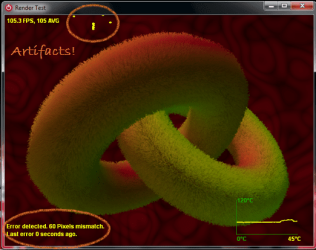
Capture.PNG

If you would like, you can run a pre-oc benchmark test to see how you will compare after you have overclocked your card. Open up FurMark, and select your settings. Run the Benchmark test, and write down your result to compare later.
You can also run a stability test first (through GPUTool or Furmark) just for reference.

Now you are ready to start overclocking.
All overclocking will be done through MSI Afterburner and checked with everything else.

Core Clock
We will start with the Core clock (which will stay attached to the shader clock if you have one).
1) Move the clock slider up about 5-10 points. Check MSI Afterburner to make sure it moved (the graph should jump), then check GPU-Z as well. Take note of the temperature, and the fan speed.
2) Check for stability by hitting the test button on GPUTool, and let it run for about 1 minute. Make sure there are nor artifacts, and watch the temperature (on any of the 3 tools).
3) Should the card pass stability and heat, go ahead and turn the clock up again. Then repeat these steps.
4) ARTIFACT!!!!!! Now that you have seen an artifact (this WILL happen), don't panic. This is normal, and it means that your card has reached its limit.
Take note of the core clock, and move it back 10 or 15 points. This is to make sure that you are truly stable. Now, run the stability test. This time you will need to let it run for about 1 HOUR. If you get even 1 artifact, back it off another 5 or 10 points, until there are no errors.
This step is extremely important! Moving it back may reduce your graphics power, but it will keep your card safe. I cannot stress this enough. Move a good 10 -15 points down from where you first got an artifact.
5) Now that you have completed this stability test, take note of the core clock, and temperatures. This is your stable Core overclock.
6) Turn your core clock back to defaults in preparation for finding the memory clock.

Memory Clock
These steps will overclock the video card memory (not amount, but speed of it).
1) Move the clock slider up about 5-10 points. Check MSI Afterburner to make sure it moved (the graph should jump), then check GPU-Z as well. Take note of the temperature, and the fan speed.
2) Check for stability by hitting the test button on GPUTool, and let it run for about 1 minute. Make sure there are nor artifacts, and watch the temperature (on any of the 3 tools).
3) Should the card pass stability and heat, go ahead and turn the clock up again. Then repeat these steps.
4) ARTIFACT!!!!!! Now that you have seen an artifact (this WILL happen), don't panic. This is normal, and it means that your card has reached its limit.
Take note of the memory clock, and move it back 10 or 15 points. This is to make sure that you are truly stable. Now, run the stability test. This time you will need to let it run for about 1 HOUR. If you get even 1 artifact, back it off another 5 or 10 points, until there are no errors.
This step is extremely important! Moving it back may reduce your graphics power, but it will keep your card safe. I cannot stress this enough. Move a good 10 -15 points down from where you first got an artifact.
5) Now that you have completed this stability test, take note of the core clock, and temperatures. This is your stable memory overclock.

Overclocking the whole thing:
At this point, you have found your separate overclocks, and it is time to combine them.
1) Move the Core clock and Memory clock up to their respective stable speeds.
2) Check to make sure that they new speeds are set in, and stability test. This time you will want to run it for a minimum of 1 hour, more if you can.
3) This time it is extremely important to keep track of temperatures and artifacts. Take note of when the card starts to level out on temperature. This will be its new full load temperature, and will be much higher than your normal before.
4) Should you encounter an Artifact, move both the Core and Memory clock back 10 points, and test again. If you get even 1 artifact, back it off another 5 or 10 points, until there are no errors.
This step is extremely important! Moving it back may reduce your graphics power, but it will keep your card safe. I cannot stress this enough.

Now you can run a benchmark test with FurMark again, and compare your score. It should be significantly higher, depending on the card.
When I OCed my 9500, the score was 300 pre-OC, 450 post-OC. Not much of a difference. Newer cards (such as the HD 5770 and GeForce 260) will have a MUCH higher starting score, in the 3000 range, and will be even higher after overclocking.

That is the basics to overclocking your Graphics card.

   Information
Neither I (Lorbob75), nor Seven Forums (Windows 7 Forums) take responsibility should your card be damaged or destroyed if you follow this advice. We do not advise overclocking your video card unless you know what you are doing, and are willing to risk your video card.


The following section is not necessary to overclock your card, and is here merely to inform. Feel free to skip the section if you have successfully OCed your card and don't care how it works.
Overclocking Theory and Information:
Basic Overclocking Information:
Overclocking is the practice of changing a computer components clock rate (clock cycles per second) to increase performance of that part. Overclocking will increase the heat generated by the component, and generally reduces the lifespan significantly.
The most common overclocked components are: CPUs, GPUs, RAM, VRAM, and motherboard chipsets.
In order to do this, the CPU multiplier, motherboard Front Side Bus clock rate, and other settings must be changed. Due to subtle variations in electrical and physical characteristics in the components, each and every component overclocks uniquely. No two setups (even exactly similar) will overclock the same.

EDIT: I have yet to finish the theory section. I need some time to research, and finish my other tutorials, as this section is not actually necessary to OCing a card.
Thank you for your patience.


Graphics Card series:
1. How a Graphics Card Works
2. AGP vs PCI
3. How to Install a New GPU
4. How to Overclock Your Card
5. How to Test NVIDIA/AMD Performance with OCCT

--------------------
I hope this Tutorial helped a whole bunch of you!
Please vote if you liked it.
~Lordbob
 
Last edited by a moderator:
Though it's not finished yet, glad to see this one (with the many questions about this subject as of late).
 

My Computer

Computer Manufacturer/Model Number
Rig 1
OS
Windows 7 Ultimate x64
CPU
AMD Phenom II X4 940 Black Edition @ 3.4GHz (AM2+)
Motherboard
Gigabyte GA-MA790X-UD4P (AM2+)
Memory
Corsair CM2X4096-8500C5 (4 X 2GB)
Graphics Card(s)
XFX Radeon HD 5770 / Diamond Radeon HD 5770 CrossFireX
Sound Card
Asus Xonar DS (PCI)
Monitor(s) Displays
Samsung SyncMaster 932bw+ (3)
Screen Resolution
4320x900
Hard Drives
OCZ Vertex 2 80 GB - Windows 7 System --
WD Caviar Black 1TB - Music, Movies, Vids, Pics --
WD Caviar Black 640GB - User Profiles & Games --
WD My Book 320GB external
PSU
Corsair CMPSU-750TX
Case
Cooler Master HAF 932
Cooling
Corsair Hydro Series H50
Keyboard
Logitech Desktop Wave
Mouse
Logitech LX8 Laser
Internet Speed
20 down / 2 up
Other Info
LG GGC-H20L Blu-Ray / HDDVD combo --
Hauppauge HVR-1250 --
Silverstone MFP-51 --
Logitech Webcam C600
So far it is looking really good. I have never done any overclocking and I have been able to follow it and understand it so far. Avery good job.
 

My Computer

Computer Manufacturer/Model Number
Home built
OS
Windows 7 Ultimate 32 bit
CPU
Intel(R) Pentium(R) 4 CPU 3.00GHz
Motherboard
ASUS P4P800-VM Motherboard Chipset: Intel 865G + ICH5
Memory
2.50 GB RAM
Graphics Card(s)
NVIDIA GeForce 7600 GS
Sound Card
SoundMax Integrated Digital Audio (Chip)
Monitor(s) Displays
ViewSonic VX 1962 wm
Screen Resolution
1680 X 1050
Hard Drives
Seagate Barracuda 7200.10 80 GB
ST380215A ATA Device 18.6 GB
Western Digital "My Book" external hard drive 750 GB
Cooling
Fan based
Keyboard
Microsoft Comfort Curve Keyboard 2000 v10 USB
Mouse
Logitec optic USB
Internet Speed
3.01 Mb/s download 0.64 Mb/s upload
Thanks for the input guys, it is good to know that it is easy to follow and makes sense. I will finish it now, and get it cleaned up.

If you would like, I can research a bit and add a "theory" section (if you will) about how overclocking actually works, and how to optimize it, etc.

~Lordbob
 

My Computer

Computer Manufacturer/Model Number
Hera
OS
Windows 7 Ultimate x64, Mint 9
CPU
Intel i5-2500k
Motherboard
ASUS P8P67 Pro
Memory
2x 4Gb Corsair VENGEANCE DDR3-1600
Graphics Card(s)
NVidia GeForce N260GTX Twin Frozr
Sound Card
Realtek HD OnBoard Audio
Monitor(s) Displays
ASUS 24" Monitor
Screen Resolution
1920x1080
Hard Drives
G.SKILL Phoenix Series 60GB SATA II MLC Internal Solid State Drive (SSD)
SAMSUNG Spinpoint F3R 1TB 7200 RPM 32MB Cache SATA II
PSU
Cooler Master Real Power Pro 750W
Case
Cooler Master Haf 932
Cooling
Fans
Keyboard
Razer Tarantula
Mouse
Razer Lachesis
Internet Speed
not fast enough
Thanks for the input guys, it is good to know that it is easy to follow and makes sense. I will finish it now, and get it cleaned up.

If you would like, I can research a bit and add a "theory" section (if you will) about how overclocking actually works, and how to optimize it, etc.

~Lordbob

Thatt would help a novice like me! :D
 

My Computer

Computer Manufacturer/Model Number
Home built
OS
Windows 7 Ultimate 32 bit
CPU
Intel(R) Pentium(R) 4 CPU 3.00GHz
Motherboard
ASUS P4P800-VM Motherboard Chipset: Intel 865G + ICH5
Memory
2.50 GB RAM
Graphics Card(s)
NVIDIA GeForce 7600 GS
Sound Card
SoundMax Integrated Digital Audio (Chip)
Monitor(s) Displays
ViewSonic VX 1962 wm
Screen Resolution
1680 X 1050
Hard Drives
Seagate Barracuda 7200.10 80 GB
ST380215A ATA Device 18.6 GB
Western Digital "My Book" external hard drive 750 GB
Cooling
Fan based
Keyboard
Microsoft Comfort Curve Keyboard 2000 v10 USB
Mouse
Logitec optic USB
Internet Speed
3.01 Mb/s download 0.64 Mb/s upload
Thanks for the input guys, it is good to know that it is easy to follow and makes sense. I will finish it now, and get it cleaned up.

If you would like, I can research a bit and add a "theory" section (if you will) about how overclocking actually works, and how to optimize it, etc.

~Lordbob

Thatt would help a novice like me! :D
I will have to take some time to research some of it, my own knowledge is a little lacking (so far, not so much after college :D).

~Lordbob
 

My Computer

Computer Manufacturer/Model Number
Hera
OS
Windows 7 Ultimate x64, Mint 9
CPU
Intel i5-2500k
Motherboard
ASUS P8P67 Pro
Memory
2x 4Gb Corsair VENGEANCE DDR3-1600
Graphics Card(s)
NVidia GeForce N260GTX Twin Frozr
Sound Card
Realtek HD OnBoard Audio
Monitor(s) Displays
ASUS 24" Monitor
Screen Resolution
1920x1080
Hard Drives
G.SKILL Phoenix Series 60GB SATA II MLC Internal Solid State Drive (SSD)
SAMSUNG Spinpoint F3R 1TB 7200 RPM 32MB Cache SATA II
PSU
Cooler Master Real Power Pro 750W
Case
Cooler Master Haf 932
Cooling
Fans
Keyboard
Razer Tarantula
Mouse
Razer Lachesis
Internet Speed
not fast enough
There is certainly no hurry on my part. I would not attempt to mess with my old card. Now when I build my new box...
 

My Computer

Computer Manufacturer/Model Number
Home built
OS
Windows 7 Ultimate 32 bit
CPU
Intel(R) Pentium(R) 4 CPU 3.00GHz
Motherboard
ASUS P4P800-VM Motherboard Chipset: Intel 865G + ICH5
Memory
2.50 GB RAM
Graphics Card(s)
NVIDIA GeForce 7600 GS
Sound Card
SoundMax Integrated Digital Audio (Chip)
Monitor(s) Displays
ViewSonic VX 1962 wm
Screen Resolution
1680 X 1050
Hard Drives
Seagate Barracuda 7200.10 80 GB
ST380215A ATA Device 18.6 GB
Western Digital "My Book" external hard drive 750 GB
Cooling
Fan based
Keyboard
Microsoft Comfort Curve Keyboard 2000 v10 USB
Mouse
Logitec optic USB
Internet Speed
3.01 Mb/s download 0.64 Mb/s upload
Looks good :)

Will re-read when your finished ;)

Easy to follow, well done, so far....
 

My Computer

Computer type
PC/Desktop
Computer Manufacturer/Model Number
76~2.0
OS
Windows 7 Ult x64 - SP1/ Windows 8 Pro x64
CPU
Intel Core i5-3570K 4.6GHz
Motherboard
Gigabyte GA-Z77X UD3H, f18
Memory
8GB (2X4GB) DDR3 1600 Corsair Vengeance CL8 1.5v
Graphics Card(s)
Sapphire HD 7770 Vapor-X OC 1GB DDR5
Sound Card
Onboard VIA VT2021
Monitor(s) Displays
22" LCD Dell
Screen Resolution
1680x1050
Hard Drives
Samsung 840Pro 128GB SSD,
Seagate Barracuda 500GB SATA2 7200rpm 32MB cache, Seagate Barracuda 1TB SATA2 7200rpm 32MB cache,
PSU
Corsair HX650W
Case
Cooler Master Storm Scout
Cooling
Corsair H80 2x12cm Noctua NF P12 , 2x14cm case fans
Keyboard
Logitech Wave
Mouse
CM Sentinel
Internet Speed
Dismal
Antivirus
Avast
Browser
Opera Next
Other Info
Haswell laptop: HP Envy 17t-j, i7-4700MQ, GeForce 740M 2GB DDR3, 17.3" Full HD 1920x1080, 16GB RAM, Samsung 840 Pro 128GB, 1TB Hitachi 7200 HDD,
Desktop: eSATA ports,
External eSATA Seagate 500GB SATA2 7200rpm,
External WD USB 500GB
Alright, all done for now.

I will work on the theory section later, need to finish homework.

~Lordbob
 

My Computer

Computer Manufacturer/Model Number
Hera
OS
Windows 7 Ultimate x64, Mint 9
CPU
Intel i5-2500k
Motherboard
ASUS P8P67 Pro
Memory
2x 4Gb Corsair VENGEANCE DDR3-1600
Graphics Card(s)
NVidia GeForce N260GTX Twin Frozr
Sound Card
Realtek HD OnBoard Audio
Monitor(s) Displays
ASUS 24" Monitor
Screen Resolution
1920x1080
Hard Drives
G.SKILL Phoenix Series 60GB SATA II MLC Internal Solid State Drive (SSD)
SAMSUNG Spinpoint F3R 1TB 7200 RPM 32MB Cache SATA II
PSU
Cooler Master Real Power Pro 750W
Case
Cooler Master Haf 932
Cooling
Fans
Keyboard
Razer Tarantula
Mouse
Razer Lachesis
Internet Speed
not fast enough
Very well done. Great job!
 

My Computer

Computer Manufacturer/Model Number
Home built
OS
Windows 7 Ultimate 32 bit
CPU
Intel(R) Pentium(R) 4 CPU 3.00GHz
Motherboard
ASUS P4P800-VM Motherboard Chipset: Intel 865G + ICH5
Memory
2.50 GB RAM
Graphics Card(s)
NVIDIA GeForce 7600 GS
Sound Card
SoundMax Integrated Digital Audio (Chip)
Monitor(s) Displays
ViewSonic VX 1962 wm
Screen Resolution
1680 X 1050
Hard Drives
Seagate Barracuda 7200.10 80 GB
ST380215A ATA Device 18.6 GB
Western Digital "My Book" external hard drive 750 GB
Cooling
Fan based
Keyboard
Microsoft Comfort Curve Keyboard 2000 v10 USB
Mouse
Logitec optic USB
Internet Speed
3.01 Mb/s download 0.64 Mb/s upload
I see I also have a shiny new graphic, thanks to Shawn.

Looks good.

~Lordbob
 

My Computer

Computer Manufacturer/Model Number
Hera
OS
Windows 7 Ultimate x64, Mint 9
CPU
Intel i5-2500k
Motherboard
ASUS P8P67 Pro
Memory
2x 4Gb Corsair VENGEANCE DDR3-1600
Graphics Card(s)
NVidia GeForce N260GTX Twin Frozr
Sound Card
Realtek HD OnBoard Audio
Monitor(s) Displays
ASUS 24" Monitor
Screen Resolution
1920x1080
Hard Drives
G.SKILL Phoenix Series 60GB SATA II MLC Internal Solid State Drive (SSD)
SAMSUNG Spinpoint F3R 1TB 7200 RPM 32MB Cache SATA II
PSU
Cooler Master Real Power Pro 750W
Case
Cooler Master Haf 932
Cooling
Fans
Keyboard
Razer Tarantula
Mouse
Razer Lachesis
Internet Speed
not fast enough
I noticed that. It looks good.
 

My Computer

Computer Manufacturer/Model Number
Home built
OS
Windows 7 Ultimate 32 bit
CPU
Intel(R) Pentium(R) 4 CPU 3.00GHz
Motherboard
ASUS P4P800-VM Motherboard Chipset: Intel 865G + ICH5
Memory
2.50 GB RAM
Graphics Card(s)
NVIDIA GeForce 7600 GS
Sound Card
SoundMax Integrated Digital Audio (Chip)
Monitor(s) Displays
ViewSonic VX 1962 wm
Screen Resolution
1680 X 1050
Hard Drives
Seagate Barracuda 7200.10 80 GB
ST380215A ATA Device 18.6 GB
Western Digital "My Book" external hard drive 750 GB
Cooling
Fan based
Keyboard
Microsoft Comfort Curve Keyboard 2000 v10 USB
Mouse
Logitec optic USB
Internet Speed
3.01 Mb/s download 0.64 Mb/s upload
I tried overclocking my video card, and my fps for all the testing is below 5fps, i tried lowering the clock numbers and raising them, with it still a very low fps, can anybody help me?
 

My Computer

Computer Manufacturer/Model Number
Dell
OS
Windows 7 Professional
Motherboard
Intel Pentium D Core 2 Duo
Memory
3gbs
Graphics Card(s)
Nvidia e-Geforce 7300 gs
Sound Card
Sound blaster Audigy 2
Monitor(s) Displays
Dell 1703fp
Screen Resolution
1280x1024
Hard Drives
Maxtor 250gbs
PSU
Basic Dell SFF PSU
Case
Small Form Factor (SFF)
Cooling
Basic Intel CPU Fan, nothing else. :(
Keyboard
Basic Dell keyboard.
Mouse
Basic Dell Mouse
Internet Speed
around 20kb\s at daytime, and 125kb\s at night. Long story.
Other Info
I wish that i could get a better pc, so i can pwn people :D
I tried overclocking my video card, and my fps for all the testing is below 5fps, i tried lowering the clock numbers and raising them, with it still a very low fps, can anybody help me?
With your graphics card, that is the best you are going to get.

If you want better FPS, you will need a better card...

~Lordbob
 

My Computer

Computer Manufacturer/Model Number
Hera
OS
Windows 7 Ultimate x64, Mint 9
CPU
Intel i5-2500k
Motherboard
ASUS P8P67 Pro
Memory
2x 4Gb Corsair VENGEANCE DDR3-1600
Graphics Card(s)
NVidia GeForce N260GTX Twin Frozr
Sound Card
Realtek HD OnBoard Audio
Monitor(s) Displays
ASUS 24" Monitor
Screen Resolution
1920x1080
Hard Drives
G.SKILL Phoenix Series 60GB SATA II MLC Internal Solid State Drive (SSD)
SAMSUNG Spinpoint F3R 1TB 7200 RPM 32MB Cache SATA II
PSU
Cooler Master Real Power Pro 750W
Case
Cooler Master Haf 932
Cooling
Fans
Keyboard
Razer Tarantula
Mouse
Razer Lachesis
Internet Speed
not fast enough
Thanks, my card is 2 years old xD
 

My Computer

Computer Manufacturer/Model Number
Dell
OS
Windows 7 Professional
Motherboard
Intel Pentium D Core 2 Duo
Memory
3gbs
Graphics Card(s)
Nvidia e-Geforce 7300 gs
Sound Card
Sound blaster Audigy 2
Monitor(s) Displays
Dell 1703fp
Screen Resolution
1280x1024
Hard Drives
Maxtor 250gbs
PSU
Basic Dell SFF PSU
Case
Small Form Factor (SFF)
Cooling
Basic Intel CPU Fan, nothing else. :(
Keyboard
Basic Dell keyboard.
Mouse
Basic Dell Mouse
Internet Speed
around 20kb\s at daytime, and 125kb\s at night. Long story.
Other Info
I wish that i could get a better pc, so i can pwn people :D
I think it's worth adding that with GTX400 cards, you overclock the GPU by increasing the shader core now, such as if you open EVGA Precision, the GPU core speed is blacked out. The shader speed is more or less double the GPU speed, so overclocking is quite simple still.
 

My Computer

Computer type
PC/Desktop
Computer Manufacturer/Model Number
Custom Built
OS
Windows 8.1 Pro x64
CPU
Intel Core i7 4790k
Motherboard
MSI Z97S Krait Edition
Memory
8GB Corsair Dominator 1600MHz
Graphics Card(s)
MSI TwinFrozr GeForce GTX770
Sound Card
ASUS Xonar DX/XD 7.1
Monitor(s) Displays
Dell 24" S2409W + Dell 20" E207WFP
Screen Resolution
1920x1080 + 1680x1050
Hard Drives
1x 120GB OCZ Agility 3, 1x 750GB Western Digital Caviar Black, 1x 1TB Western Digital Caviar Blue
PSU
Corsair HX850 modular
Case
Fractal Design Define R4
Cooling
Corsair H60 w/ twin Corsair SP120 fans
Keyboard
Logitech G510S Keyboard
Mouse
Logitech G500S Laser Mouse
Internet Speed
40Mbps
Antivirus
Microsoft Security Essentials
Browser
Google Chrome
Other Info
LG Blu-Ray player
I think it's worth adding that with GTX400 cards, you overclock the GPU by increasing the shader core now, such as if you open EVGA Precision, the GPU core speed is blacked out. The shader speed is more or less double the GPU speed, so overclocking is quite simple still.
Interesting tidbit. Any clue why it is that they did this?

~Lordbob
 

My Computer

Computer Manufacturer/Model Number
Hera
OS
Windows 7 Ultimate x64, Mint 9
CPU
Intel i5-2500k
Motherboard
ASUS P8P67 Pro
Memory
2x 4Gb Corsair VENGEANCE DDR3-1600
Graphics Card(s)
NVidia GeForce N260GTX Twin Frozr
Sound Card
Realtek HD OnBoard Audio
Monitor(s) Displays
ASUS 24" Monitor
Screen Resolution
1920x1080
Hard Drives
G.SKILL Phoenix Series 60GB SATA II MLC Internal Solid State Drive (SSD)
SAMSUNG Spinpoint F3R 1TB 7200 RPM 32MB Cache SATA II
PSU
Cooler Master Real Power Pro 750W
Case
Cooler Master Haf 932
Cooling
Fans
Keyboard
Razer Tarantula
Mouse
Razer Lachesis
Internet Speed
not fast enough
If I were to overclock my card would it make a big difference in its performance. What about overcloaking any of my components? Will any of them make my computer better? When I say better. I mean I will notice a good increase in performance.
 

My Computer

Computer Manufacturer/Model Number
HP Pavilion p6000 series/Model p6654y
OS
Windows 7 Ultimate x64
CPU
AMD Athlon(tm) II X4 630
Motherboard
Socket AM3 (938)
Memory
DDR3 2048 MB's/ PC3-10600 (1,333 MHz) (2 Cards)
Graphics Card(s)
ATI Radeon HD 4200
Sound Card
Realtek High definition Audio
Monitor(s) Displays
PnP-Monitor (Standard) (I am using my Emerson TV)
Screen Resolution
1024 x 768 pixels at 75 Hz in true colors (32-bit)
Hard Drives
750.05 Gigabytes Usable Hard Drive Capacity
692.61 Gigabytes Hard Drive Free Space

hp DVD-RAM GH60L SATA CdRom Device [Optical drive]
YMAX magicJack USB Device [Optical drive]

Generic- Compact Flash USB Device [Hard drive] -- drive 2
Generic
PSU
250 Watts
Case
HP
Cooling
Fan
Keyboard
Logitech wireless wave combo MK550 (Came with mouse)
Mouse
Logitech wireless wave combo MK550 (Came with keyboard)
Internet Speed
DSL Download speed 15.06-mb/s Upload .49-mb/s ping 45ms
Other Info
HP Wireless 802.11 b/g/n PCIe Card
Not a huge different with those components. You might get a few FPS increase.

~Lordbob
 

My Computer

Computer Manufacturer/Model Number
Hera
OS
Windows 7 Ultimate x64, Mint 9
CPU
Intel i5-2500k
Motherboard
ASUS P8P67 Pro
Memory
2x 4Gb Corsair VENGEANCE DDR3-1600
Graphics Card(s)
NVidia GeForce N260GTX Twin Frozr
Sound Card
Realtek HD OnBoard Audio
Monitor(s) Displays
ASUS 24" Monitor
Screen Resolution
1920x1080
Hard Drives
G.SKILL Phoenix Series 60GB SATA II MLC Internal Solid State Drive (SSD)
SAMSUNG Spinpoint F3R 1TB 7200 RPM 32MB Cache SATA II
PSU
Cooler Master Real Power Pro 750W
Case
Cooler Master Haf 932
Cooling
Fans
Keyboard
Razer Tarantula
Mouse
Razer Lachesis
Internet Speed
not fast enough
how high did you get your 5770?
 

My Computer

OS
Windows 7 Ultimate x64
CPU
Intel Core 2 Duo E8400
Motherboard
GIGABYTE GA-EX38-DS4
Memory
Mushkin DDR2 4096MB (2048MBx2) 800Mhz CL 5-5-5-18 SP
Graphics Card(s)
Club3D ATI Radeon HD4850 512MB PCIe
Monitor(s) Displays
Asus 22" VK222U 2ms LCD
Screen Resolution
1680x1050
Hard Drives
Seagate ST3500320AS 500GB SATA2 32MB
PSU
Enermax Pro82+ 525W
Case
NZXT Trinity
Cooling
Arctic Cooling Case Fan AF12025 120mm
Keyboard
Logitech Media Keyboard
Mouse
Logitech RX700 Cordless
Back
Top