Graphics card PCIe x8 running at x1

BlueStreak

New member
Local time
10:35 AM
Messages
30
Location
Northampton, UK
As the title (sort of) states, I have a problem whereby my nVidia graphics card is being forced to run at a PCIe speed of x1 even though it's a x8 card.

It's a Dell Optiplex 755 Mini Tower (specs should be here somewhere). The PCIe slot on my PC should be a PCIe 2.0 slot from what I could find out on the internet.

I've run various pieces of software, including CPU-Z, GPU-Z, Speccy and AIDA64. They all report the PCI Express slot as a 1.1 slot. However, nVidia Inspector reports the slot as a 2.0 slot. Not sure why.

On top of that, the software (not nVidia Inspector) all report the card to be running at x1, though the card is a x8.

I'll attach a screenie of GPU-Z, and you can see what it says about the PCIe status.


yH9hXYs.png


The PCI Express slot should be 2.0 as far as I can tell, and according to nVidia Inspector. But I have no clue as to why all other software seem to say it's only 1.1. I assume this is why it's running at x1 and not x8 as it should be, and the slot is x16.

The BIOS revision on the PC is up to date as well, and there are no BIOS options to alter the way the PCI Express works.

Um... any ideas anyone?
 

My Computer My Computer

At a glance

Windows 7 Ultimate x64Intel Core 2 Duo 3.00GHz E84004GbEVGA nVidia GeForce GT 730 2Gb GDDR5
Computer type
PC/Desktop
Computer Manufacturer/Model Number
Dell Optiplex 755
OS
Windows 7 Ultimate x64
CPU
Intel Core 2 Duo 3.00GHz E8400
Motherboard
Unknown
Memory
4Gb
Graphics Card(s)
EVGA nVidia GeForce GT 730 2Gb GDDR5
Sound Card
SoundMAX HD
Monitor(s) Displays
Acer S220HQL
Screen Resolution
1920x1080
Hard Drives
1x 1Tb 5400rpm
1x 500Gb 7200rpm
PSU
Corsair CX430
Case
n/a
Cooling
n/a
Keyboard
Rapoo Wireless Keyboard
Mouse
Rapoo Wireless Mouse
Internet Speed
100Mbit
Antivirus
AVG Free
Browser
Mozilla FireFox
Why not use the PCI-E x16 slot?
 

My Computer My Computer

At a glance

Windows 7 Home Premium 64-BITAMD A8 7200P8GB 1600mhzRadeon R5 (APU) + Radeon R5 M230 2GB Dual Gra...
Computer type
PC/Desktop
Computer Manufacturer/Model Number
ASUS X550ZE
OS
Windows 7 Home Premium 64-BIT
CPU
AMD A8 7200P
Motherboard
N/A
Memory
8GB 1600mhz
Graphics Card(s)
Radeon R5 (APU) + Radeon R5 M230 2GB Dual Graphics
Sound Card
Realtek ALC269 with SonicMaster
Monitor(s) Displays
Laptop Display
Screen Resolution
1920 x 1080 @60hz
Hard Drives
WDC WD50 00LPVX-80V0TT0 (500GB)
PSU
Laptop Charger
Mouse
ARMAGGEDON TEXTRON SCORPION 7
Internet Speed
100 mbps DOWN / 50 mbps UP
Antivirus
Windows Defender
Browser
Mozzila FireFox, Valve Steam in-game internet browser
Did you run the fullscreen render test ?
 

My Computer My Computer

At a glance

Windows 10 Pro x64Intel Core i7 6700KGSkill TridentZ RGB 16GB 3600 16-16-16-36EVGA GTX 980 Ti SC x2
Computer type
PC/Desktop
Computer Manufacturer/Model Number
Skylake Special #666
OS
Windows 10 Pro x64
CPU
Intel Core i7 6700K
Motherboard
Asus Sabertooth Z170 Mark 1
Memory
GSkill TridentZ RGB 16GB 3600 16-16-16-36
Graphics Card(s)
EVGA GTX 980 Ti SC x2
Sound Card
Realtek High Definition
Monitor(s) Displays
AOC G2460PG
Screen Resolution
1920 x 1080 144Hz
Hard Drives
Samsung 860 Pro 256GB, Seagate Barracuda 4TB x2
PSU
EVGA 1000 P2, EVGA White Custom Braided Cables
Case
Corsair Vengeance C70 Gunmetal Black
Cooling
Corsair H100i v2, Corsair ML120 x2, Thermal Grizzly Kryonaut
Keyboard
Logitech G910 Orion Spectrum
Mouse
Logitech G700s
Internet Speed
Verizon Fios Quantum Gateway 75/75
Antivirus
Windows Defender, Malwarebytes Free 3.8.3
Browser
Chrome
Other Info
Corsair SP120 x4, LG Blu-ray Drive, Durabrand HT-395 100 Watt Dolby Digital Amp, Corsair H2100 Wireless 7.1 Headset
Hi,
There should be 2 slots
1- pci
1-pcie
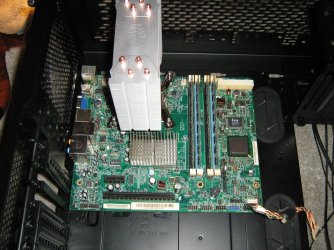
So I'd guess you were in the wrong slot.
I'd also guess the pcie slot was on the bottom of the board ?

I guess I was lucky on my old dog it only had one to choose :)
acer mobo 1.JPG
 

My Computer My Computer

At a glance

Win-7-Pro64bit 7-H-Prem-64biti7-5930K 2nd i9-9940x both water blocked VRM'...Trident-z 3200C14 2nd Trident-z 3600C16EVGA 1080ti ftw3 2nd Titan Xp both water blocked
Computer type
PC/Desktop
Computer Manufacturer/Model Number
Custom assembled by me :}
OS
Win-7-Pro64bit 7-H-Prem-64bit
CPU
i7-5930K 2nd i9-9940x both water blocked VRM's too
Motherboard
ASUS SABERTOOTH X99 2nd ASUS x299 Apex
Memory
Trident-z 3200C14 2nd Trident-z 3600C16
Graphics Card(s)
EVGA 1080ti ftw3 2nd Titan Xp both water blocked
Sound Card
Built-in Realtek
Monitor(s) Displays
1-AOC G2460PG 24"G-Sync 144Hz/ 2nd 1-ASUS VG248QE 24" 144Hz
Screen Resolution
1920 x 1080 144Hz
Hard Drives
2-Samsung M.2 Evo & Evo Plus
2-Samsung 850 EVO 500GB SSD's/ 3-2.5 W.D. Black 1tb-&3-1tb/3-3.5 WD Black 1tb hdd's
PSU
EVGA SuperNOVA 1000-P2 2nd 1200-P2
Case
2-Corsair Obsidian Series 450D Black ATX Mid Tower
Cooling
Custom water loops
Keyboard
Logitech G710+/ 2nd Logitech G910
Mouse
2-RedDragon M901 Perdition 16400 dpi Gaming mouse = wired
Internet Speed
Comcast Ping 19ms 89.31mbps download speed 6.12mbps upload
Antivirus
Malwarebytes Pro/ Superantispyware Pro
Browser
FireFox & Pale moon
Other Info
2nd ASUS X299 Apex/Intel i9-9940x with Custom water loop/7H-Prem-x64/Corsair 450D case/Ram Trident-z 3600C16 4x8gb / Samsung970Evo plus 500gb SSD/Dual ssd EZ swap evo/PSU EVGA SuperNova 1200w-P2 80+Platinum/GPU Titan Xp /8-ML-140 on push-pull on 2-280GTX rads
Please post a picture of the motherboard and card installed.

As long as you have the card in the PCI-Express x 16 slot closest to the cpu you should be in the right slot.


You can not go by programs telling you if a particular slot is 1.1, 2.0. 3.0 etc...... we need the specs from the Dell motherboard period. That is the only thing that will tell you what each slot is.

Please post the Dell Link to the PC with your particular board installed, all Dell`s are different and the same exact model can have 2 different motherboards installed, trust me I have worked on hundreds of Dell`s and seen the same exact Model come with an Intel cpu while another will come with an AMD

Yes your board use an Intel cpu, but we need the exact motherboard model, open the case and the model will written right on the board,, or even use system information from windows to find out what the motherboard model is, but even that is not a reliable way to determine the info we need.
 
Last edited:

My Computer My Computer

At a glance

Windows 10 Pro x64Intel Core i7 6700KGSkill TridentZ RGB 16GB 3600 16-16-16-36EVGA GTX 980 Ti SC x2
Computer type
PC/Desktop
Computer Manufacturer/Model Number
Skylake Special #666
OS
Windows 10 Pro x64
CPU
Intel Core i7 6700K
Motherboard
Asus Sabertooth Z170 Mark 1
Memory
GSkill TridentZ RGB 16GB 3600 16-16-16-36
Graphics Card(s)
EVGA GTX 980 Ti SC x2
Sound Card
Realtek High Definition
Monitor(s) Displays
AOC G2460PG
Screen Resolution
1920 x 1080 144Hz
Hard Drives
Samsung 860 Pro 256GB, Seagate Barracuda 4TB x2
PSU
EVGA 1000 P2, EVGA White Custom Braided Cables
Case
Corsair Vengeance C70 Gunmetal Black
Cooling
Corsair H100i v2, Corsair ML120 x2, Thermal Grizzly Kryonaut
Keyboard
Logitech G910 Orion Spectrum
Mouse
Logitech G700s
Internet Speed
Verizon Fios Quantum Gateway 75/75
Antivirus
Windows Defender, Malwarebytes Free 3.8.3
Browser
Chrome
Other Info
Corsair SP120 x4, LG Blu-ray Drive, Durabrand HT-395 100 Watt Dolby Digital Amp, Corsair H2100 Wireless 7.1 Headset
@RoasterMan - I am using the x16 slot. It's the only PCIe slot on the board, other than the PCIe x1 slot.

@AddRAM - I didn't run it fullscreen, no. I assume you mean the render test in GPU-Z? I only ran it in the small window it starts in.

@ThrashZone - I only have the one full size PCIe slot on this motherboard, two normal PCI slots and a small PCIe x1 slot. The slot is also at the top of the top of board, as these Dells have their motherboards upside down and back to front. In other words, it's in the only slot it will fit in :)

@AddRAM - I can't take a photo at this moment, but I can at least link you to the exact motherboard my Optiplex has: Dell Optiplex 755 "GM819"

Apparently it's a GM819. That's all I can locate on the board, and that it's manufactured by Foxconn. It's definitely inserted into the x16 slot as it's the only slot there. I've been unable to find any solid information from Dell regarding the actual speed of these PCIe slots.
 

My Computer My Computer

At a glance

Windows 7 Ultimate x64Intel Core 2 Duo 3.00GHz E84004GbEVGA nVidia GeForce GT 730 2Gb GDDR5
Computer type
PC/Desktop
Computer Manufacturer/Model Number
Dell Optiplex 755
OS
Windows 7 Ultimate x64
CPU
Intel Core 2 Duo 3.00GHz E8400
Motherboard
Unknown
Memory
4Gb
Graphics Card(s)
EVGA nVidia GeForce GT 730 2Gb GDDR5
Sound Card
SoundMAX HD
Monitor(s) Displays
Acer S220HQL
Screen Resolution
1920x1080
Hard Drives
1x 1Tb 5400rpm
1x 500Gb 7200rpm
PSU
Corsair CX430
Case
n/a
Cooling
n/a
Keyboard
Rapoo Wireless Keyboard
Mouse
Rapoo Wireless Mouse
Internet Speed
100Mbit
Antivirus
AVG Free
Browser
Mozilla FireFox
Hi,
Yep bottom is the top on a mini case :)
Very weird could be a defective pcie slot :/
 

My Computer My Computer

At a glance

Win-7-Pro64bit 7-H-Prem-64biti7-5930K 2nd i9-9940x both water blocked VRM'...Trident-z 3200C14 2nd Trident-z 3600C16EVGA 1080ti ftw3 2nd Titan Xp both water blocked
Computer type
PC/Desktop
Computer Manufacturer/Model Number
Custom assembled by me :}
OS
Win-7-Pro64bit 7-H-Prem-64bit
CPU
i7-5930K 2nd i9-9940x both water blocked VRM's too
Motherboard
ASUS SABERTOOTH X99 2nd ASUS x299 Apex
Memory
Trident-z 3200C14 2nd Trident-z 3600C16
Graphics Card(s)
EVGA 1080ti ftw3 2nd Titan Xp both water blocked
Sound Card
Built-in Realtek
Monitor(s) Displays
1-AOC G2460PG 24"G-Sync 144Hz/ 2nd 1-ASUS VG248QE 24" 144Hz
Screen Resolution
1920 x 1080 144Hz
Hard Drives
2-Samsung M.2 Evo & Evo Plus
2-Samsung 850 EVO 500GB SSD's/ 3-2.5 W.D. Black 1tb-&3-1tb/3-3.5 WD Black 1tb hdd's
PSU
EVGA SuperNOVA 1000-P2 2nd 1200-P2
Case
2-Corsair Obsidian Series 450D Black ATX Mid Tower
Cooling
Custom water loops
Keyboard
Logitech G710+/ 2nd Logitech G910
Mouse
2-RedDragon M901 Perdition 16400 dpi Gaming mouse = wired
Internet Speed
Comcast Ping 19ms 89.31mbps download speed 6.12mbps upload
Antivirus
Malwarebytes Pro/ Superantispyware Pro
Browser
FireFox & Pale moon
Other Info
2nd ASUS X299 Apex/Intel i9-9940x with Custom water loop/7H-Prem-x64/Corsair 450D case/Ram Trident-z 3600C16 4x8gb / Samsung970Evo plus 500gb SSD/Dual ssd EZ swap evo/PSU EVGA SuperNova 1200w-P2 80+Platinum/GPU Titan Xp /8-ML-140 on push-pull on 2-280GTX rads
Try reseating the card. I have seen cards not running properly (x8 vs x16, etc.) be corrected by reseating. Might be dirty contact or slight misalignment.
 

My Computer My Computer

At a glance

Windows 10 Pro x64, Windows 8.1 Pro x64, Wind...INTEL i9-7920X LGA 206664 GB (4 X 16 GB) G-Skill V Series DDR4 3200 ...EVGA GTX 1060 SC 3 GB
Computer type
PC/Desktop
Computer Manufacturer/Model Number
Custom Built
OS
Windows 10 Pro x64, Windows 8.1 Pro x64, Windows 7 Ultimate x64 SP1,
CPU
INTEL i9-7920X LGA 2066
Motherboard
Gigabyte X299-WU8 F3
Memory
64 GB (4 X 16 GB) G-Skill V Series DDR4 3200 Quad Channel
Graphics Card(s)
EVGA GTX 1060 SC 3 GB
Sound Card
Realtek Onboard ALC1220
Monitor(s) Displays
2 x Samsung S27E310
Screen Resolution
1920x1080
Hard Drives
Samsung 2 x 970 EVO Plus 500 GB NVMe
1 x 6TB WD 6003FZBX SATA
1 x 6TB WD 60EFRX SATA
12 x 3TB WD 30EFRX SATA
PSU
Seasonic X-1050
Case
Thermaltake Armor+
Cooling
Corsair H80i V2 Liquid AOI Cooler
Keyboard
Logitech G510s
Mouse
Logitech MX Master 2S
Internet Speed
200 Mb/s
Antivirus
ESET NOD32 13.1
Browser
EDGE (Dev, Canary, Beta), Chrome
Other Info
ASUS RT-AC68U router
Malwarebytes 4.0.4

My Computer My Computer

At a glance

Windows 10 Pro x64Intel Core i7 6700KGSkill TridentZ RGB 16GB 3600 16-16-16-36EVGA GTX 980 Ti SC x2
Computer type
PC/Desktop
Computer Manufacturer/Model Number
Skylake Special #666
OS
Windows 10 Pro x64
CPU
Intel Core i7 6700K
Motherboard
Asus Sabertooth Z170 Mark 1
Memory
GSkill TridentZ RGB 16GB 3600 16-16-16-36
Graphics Card(s)
EVGA GTX 980 Ti SC x2
Sound Card
Realtek High Definition
Monitor(s) Displays
AOC G2460PG
Screen Resolution
1920 x 1080 144Hz
Hard Drives
Samsung 860 Pro 256GB, Seagate Barracuda 4TB x2
PSU
EVGA 1000 P2, EVGA White Custom Braided Cables
Case
Corsair Vengeance C70 Gunmetal Black
Cooling
Corsair H100i v2, Corsair ML120 x2, Thermal Grizzly Kryonaut
Keyboard
Logitech G910 Orion Spectrum
Mouse
Logitech G700s
Internet Speed
Verizon Fios Quantum Gateway 75/75
Antivirus
Windows Defender, Malwarebytes Free 3.8.3
Browser
Chrome
Other Info
Corsair SP120 x4, LG Blu-ray Drive, Durabrand HT-395 100 Watt Dolby Digital Amp, Corsair H2100 Wireless 7.1 Headset
Well I did get a pop up mentioning a full screen render test, but it said it was used for such things as SLi / multi GPU setups.
 

My Computer My Computer

At a glance

Windows 7 Ultimate x64Intel Core 2 Duo 3.00GHz E84004GbEVGA nVidia GeForce GT 730 2Gb GDDR5
Computer type
PC/Desktop
Computer Manufacturer/Model Number
Dell Optiplex 755
OS
Windows 7 Ultimate x64
CPU
Intel Core 2 Duo 3.00GHz E8400
Motherboard
Unknown
Memory
4Gb
Graphics Card(s)
EVGA nVidia GeForce GT 730 2Gb GDDR5
Sound Card
SoundMAX HD
Monitor(s) Displays
Acer S220HQL
Screen Resolution
1920x1080
Hard Drives
1x 1Tb 5400rpm
1x 500Gb 7200rpm
PSU
Corsair CX430
Case
n/a
Cooling
n/a
Keyboard
Rapoo Wireless Keyboard
Mouse
Rapoo Wireless Mouse
Internet Speed
100Mbit
Antivirus
AVG Free
Browser
Mozilla FireFox
Did you try to run the test on fullscreen though? I was able to do it with my GeForce 210
 

My Computer My Computer

At a glance

Windows 7 Home Premium 64-BITAMD A8 7200P8GB 1600mhzRadeon R5 (APU) + Radeon R5 M230 2GB Dual Gra...
Computer type
PC/Desktop
Computer Manufacturer/Model Number
ASUS X550ZE
OS
Windows 7 Home Premium 64-BIT
CPU
AMD A8 7200P
Motherboard
N/A
Memory
8GB 1600mhz
Graphics Card(s)
Radeon R5 (APU) + Radeon R5 M230 2GB Dual Graphics
Sound Card
Realtek ALC269 with SonicMaster
Monitor(s) Displays
Laptop Display
Screen Resolution
1920 x 1080 @60hz
Hard Drives
WDC WD50 00LPVX-80V0TT0 (500GB)
PSU
Laptop Charger
Mouse
ARMAGGEDON TEXTRON SCORPION 7
Internet Speed
100 mbps DOWN / 50 mbps UP
Antivirus
Windows Defender
Browser
Mozzila FireFox, Valve Steam in-game internet browser
I`ll ask again, did you run it in full screen render mode ?

Just Ignore the message it gives you about SLI, don`t worry about it.

It will only maximize your cards efforts if you run it in full screen mode.

You will then see it run at 2.0 speed x8, please do as we ask. :banghead:

And I pulled this tidbit out of 1 of the links I posted for you to read.

There are 1 PCIe x16 slots on this motherboard. This means it is perfectly capable of accommodating the latest graphics cards, although it is important to try and use a graphics card with the same graphics card interface of PCIe v2.x, as anything below will not reach the motherboard's potential, and anything above will have its performance slashed to the bandwidth maximum of the Dell GM819's PCIe v2.x.

And please post a manufacturers link to your exact video card. There are soo many versions of a gt 730
 

My Computer My Computer

At a glance

Windows 10 Pro x64Intel Core i7 6700KGSkill TridentZ RGB 16GB 3600 16-16-16-36EVGA GTX 980 Ti SC x2
Computer type
PC/Desktop
Computer Manufacturer/Model Number
Skylake Special #666
OS
Windows 10 Pro x64
CPU
Intel Core i7 6700K
Motherboard
Asus Sabertooth Z170 Mark 1
Memory
GSkill TridentZ RGB 16GB 3600 16-16-16-36
Graphics Card(s)
EVGA GTX 980 Ti SC x2
Sound Card
Realtek High Definition
Monitor(s) Displays
AOC G2460PG
Screen Resolution
1920 x 1080 144Hz
Hard Drives
Samsung 860 Pro 256GB, Seagate Barracuda 4TB x2
PSU
EVGA 1000 P2, EVGA White Custom Braided Cables
Case
Corsair Vengeance C70 Gunmetal Black
Cooling
Corsair H100i v2, Corsair ML120 x2, Thermal Grizzly Kryonaut
Keyboard
Logitech G910 Orion Spectrum
Mouse
Logitech G700s
Internet Speed
Verizon Fios Quantum Gateway 75/75
Antivirus
Windows Defender, Malwarebytes Free 3.8.3
Browser
Chrome
Other Info
Corsair SP120 x4, LG Blu-ray Drive, Durabrand HT-395 100 Watt Dolby Digital Amp, Corsair H2100 Wireless 7.1 Headset
Ah sorry.. yes, I did run the test on full-screen but it made no difference to the PCIe speed. It remained at x1 1.1 for the length I ran the test for. I left it going for a few minutes but it didn't change anything.

Here's the link to the exact model of graphics card I have. It's a PCIe 2.0 card at x8 (see Details tab) and was released in 2014, so it's kind of one of the "latest" graphics cards available.

Linky: EVGA - Products - EVGA GeForce GT 730 2GB (Low Profile) - 02G-P3-3733-KR
 

My Computer My Computer

At a glance

Windows 7 Ultimate x64Intel Core 2 Duo 3.00GHz E84004GbEVGA nVidia GeForce GT 730 2Gb GDDR5
Computer type
PC/Desktop
Computer Manufacturer/Model Number
Dell Optiplex 755
OS
Windows 7 Ultimate x64
CPU
Intel Core 2 Duo 3.00GHz E8400
Motherboard
Unknown
Memory
4Gb
Graphics Card(s)
EVGA nVidia GeForce GT 730 2Gb GDDR5
Sound Card
SoundMAX HD
Monitor(s) Displays
Acer S220HQL
Screen Resolution
1920x1080
Hard Drives
1x 1Tb 5400rpm
1x 500Gb 7200rpm
PSU
Corsair CX430
Case
n/a
Cooling
n/a
Keyboard
Rapoo Wireless Keyboard
Mouse
Rapoo Wireless Mouse
Internet Speed
100Mbit
Antivirus
AVG Free
Browser
Mozilla FireFox
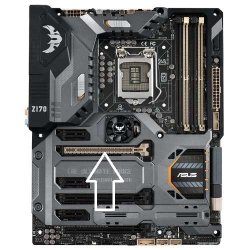
OK so the card is good, now let`s get back to the motherboard, are you absolutely positive you have the card installed in the PCI-Express x16 slot (the long black slot) you said it only has one, and the specs say it has 1 PCI-Express x 16 slot.

In this example of my board it`s a creme colored slot.

The only other suggestion I can make is to go into the bios and make sure the PCI-Express speed setting is correct.
 

Attachments

  • Sabertooth Z170 Mark 1.jpg
    Sabertooth Z170 Mark 1.jpg
    41.2 KB · Views: 14

My Computer My Computer

At a glance

Windows 10 Pro x64Intel Core i7 6700KGSkill TridentZ RGB 16GB 3600 16-16-16-36EVGA GTX 980 Ti SC x2
Computer type
PC/Desktop
Computer Manufacturer/Model Number
Skylake Special #666
OS
Windows 10 Pro x64
CPU
Intel Core i7 6700K
Motherboard
Asus Sabertooth Z170 Mark 1
Memory
GSkill TridentZ RGB 16GB 3600 16-16-16-36
Graphics Card(s)
EVGA GTX 980 Ti SC x2
Sound Card
Realtek High Definition
Monitor(s) Displays
AOC G2460PG
Screen Resolution
1920 x 1080 144Hz
Hard Drives
Samsung 860 Pro 256GB, Seagate Barracuda 4TB x2
PSU
EVGA 1000 P2, EVGA White Custom Braided Cables
Case
Corsair Vengeance C70 Gunmetal Black
Cooling
Corsair H100i v2, Corsair ML120 x2, Thermal Grizzly Kryonaut
Keyboard
Logitech G910 Orion Spectrum
Mouse
Logitech G700s
Internet Speed
Verizon Fios Quantum Gateway 75/75
Antivirus
Windows Defender, Malwarebytes Free 3.8.3
Browser
Chrome
Other Info
Corsair SP120 x4, LG Blu-ray Drive, Durabrand HT-395 100 Watt Dolby Digital Amp, Corsair H2100 Wireless 7.1 Headset
Even my 2nd GTX 980 Ti powers down to 1.1 after a few seconds because it`s not using it`s full power state during the render test, it just doesn`t have to :)
 

My Computer My Computer

At a glance

Windows 10 Pro x64Intel Core i7 6700KGSkill TridentZ RGB 16GB 3600 16-16-16-36EVGA GTX 980 Ti SC x2
Computer type
PC/Desktop
Computer Manufacturer/Model Number
Skylake Special #666
OS
Windows 10 Pro x64
CPU
Intel Core i7 6700K
Motherboard
Asus Sabertooth Z170 Mark 1
Memory
GSkill TridentZ RGB 16GB 3600 16-16-16-36
Graphics Card(s)
EVGA GTX 980 Ti SC x2
Sound Card
Realtek High Definition
Monitor(s) Displays
AOC G2460PG
Screen Resolution
1920 x 1080 144Hz
Hard Drives
Samsung 860 Pro 256GB, Seagate Barracuda 4TB x2
PSU
EVGA 1000 P2, EVGA White Custom Braided Cables
Case
Corsair Vengeance C70 Gunmetal Black
Cooling
Corsair H100i v2, Corsair ML120 x2, Thermal Grizzly Kryonaut
Keyboard
Logitech G910 Orion Spectrum
Mouse
Logitech G700s
Internet Speed
Verizon Fios Quantum Gateway 75/75
Antivirus
Windows Defender, Malwarebytes Free 3.8.3
Browser
Chrome
Other Info
Corsair SP120 x4, LG Blu-ray Drive, Durabrand HT-395 100 Watt Dolby Digital Amp, Corsair H2100 Wireless 7.1 Headset
I am absolutely positive it's in the correct PICe slot. There is only one full size x16 slot on the board, plus two PCI slots and a x1 PCIe small size slot, so definitely in the correct one.

And unfortunately, these Dell BIOSes.. BIOS's... the Dell PCs don't have much in toe way of settings in the BIOS. I've looked and looked but there no options for PCIe speed, only the ability to turn them on or off.
 

My Computer My Computer

At a glance

Windows 7 Ultimate x64Intel Core 2 Duo 3.00GHz E84004GbEVGA nVidia GeForce GT 730 2Gb GDDR5
Computer type
PC/Desktop
Computer Manufacturer/Model Number
Dell Optiplex 755
OS
Windows 7 Ultimate x64
CPU
Intel Core 2 Duo 3.00GHz E8400
Motherboard
Unknown
Memory
4Gb
Graphics Card(s)
EVGA nVidia GeForce GT 730 2Gb GDDR5
Sound Card
SoundMAX HD
Monitor(s) Displays
Acer S220HQL
Screen Resolution
1920x1080
Hard Drives
1x 1Tb 5400rpm
1x 500Gb 7200rpm
PSU
Corsair CX430
Case
n/a
Cooling
n/a
Keyboard
Rapoo Wireless Keyboard
Mouse
Rapoo Wireless Mouse
Internet Speed
100Mbit
Antivirus
AVG Free
Browser
Mozilla FireFox
Hi,
Yep you either have a defective card or a defective slot.
 

My Computer My Computer

At a glance

Win-7-Pro64bit 7-H-Prem-64biti7-5930K 2nd i9-9940x both water blocked VRM'...Trident-z 3200C14 2nd Trident-z 3600C16EVGA 1080ti ftw3 2nd Titan Xp both water blocked
Computer type
PC/Desktop
Computer Manufacturer/Model Number
Custom assembled by me :}
OS
Win-7-Pro64bit 7-H-Prem-64bit
CPU
i7-5930K 2nd i9-9940x both water blocked VRM's too
Motherboard
ASUS SABERTOOTH X99 2nd ASUS x299 Apex
Memory
Trident-z 3200C14 2nd Trident-z 3600C16
Graphics Card(s)
EVGA 1080ti ftw3 2nd Titan Xp both water blocked
Sound Card
Built-in Realtek
Monitor(s) Displays
1-AOC G2460PG 24"G-Sync 144Hz/ 2nd 1-ASUS VG248QE 24" 144Hz
Screen Resolution
1920 x 1080 144Hz
Hard Drives
2-Samsung M.2 Evo & Evo Plus
2-Samsung 850 EVO 500GB SSD's/ 3-2.5 W.D. Black 1tb-&3-1tb/3-3.5 WD Black 1tb hdd's
PSU
EVGA SuperNOVA 1000-P2 2nd 1200-P2
Case
2-Corsair Obsidian Series 450D Black ATX Mid Tower
Cooling
Custom water loops
Keyboard
Logitech G710+/ 2nd Logitech G910
Mouse
2-RedDragon M901 Perdition 16400 dpi Gaming mouse = wired
Internet Speed
Comcast Ping 19ms 89.31mbps download speed 6.12mbps upload
Antivirus
Malwarebytes Pro/ Superantispyware Pro
Browser
FireFox & Pale moon
Other Info
2nd ASUS X299 Apex/Intel i9-9940x with Custom water loop/7H-Prem-x64/Corsair 450D case/Ram Trident-z 3600C16 4x8gb / Samsung970Evo plus 500gb SSD/Dual ssd EZ swap evo/PSU EVGA SuperNova 1200w-P2 80+Platinum/GPU Titan Xp /8-ML-140 on push-pull on 2-280GTX rads
Yes, I can`t come up with any more thoughts on what`s going on, it`s certainly not the E8400, I ran a E8200 and a E8600 and both worked great.

I am out of ideas, and tending to agree with Mike :)
 

My Computer My Computer

At a glance

Windows 10 Pro x64Intel Core i7 6700KGSkill TridentZ RGB 16GB 3600 16-16-16-36EVGA GTX 980 Ti SC x2
Computer type
PC/Desktop
Computer Manufacturer/Model Number
Skylake Special #666
OS
Windows 10 Pro x64
CPU
Intel Core i7 6700K
Motherboard
Asus Sabertooth Z170 Mark 1
Memory
GSkill TridentZ RGB 16GB 3600 16-16-16-36
Graphics Card(s)
EVGA GTX 980 Ti SC x2
Sound Card
Realtek High Definition
Monitor(s) Displays
AOC G2460PG
Screen Resolution
1920 x 1080 144Hz
Hard Drives
Samsung 860 Pro 256GB, Seagate Barracuda 4TB x2
PSU
EVGA 1000 P2, EVGA White Custom Braided Cables
Case
Corsair Vengeance C70 Gunmetal Black
Cooling
Corsair H100i v2, Corsair ML120 x2, Thermal Grizzly Kryonaut
Keyboard
Logitech G910 Orion Spectrum
Mouse
Logitech G700s
Internet Speed
Verizon Fios Quantum Gateway 75/75
Antivirus
Windows Defender, Malwarebytes Free 3.8.3
Browser
Chrome
Other Info
Corsair SP120 x4, LG Blu-ray Drive, Durabrand HT-395 100 Watt Dolby Digital Amp, Corsair H2100 Wireless 7.1 Headset
Back
Top