Grey Lines on Desktop

Mkoll

New member
Local time
2:26 PM
Messages
10
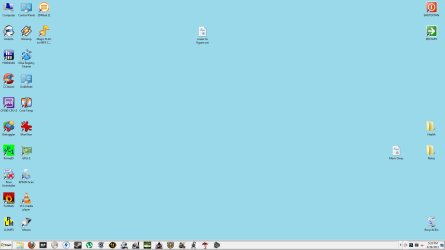
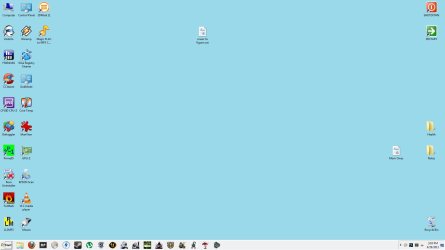
Whenever I exit from a full screen application like a game, I come back to the desktop and there are grey lines on the taskbar. There is no difference in functionality. Any ideas on what the issue is?

The first picture is my normal desktop, the second shows the grey lines.
 

Attachments
  • normal desktop.jpg
    normal desktop.jpg
    58.1 KB · Views: 50
  • grey lines desktop 1.jpg
    grey lines desktop 1.jpg
    60.1 KB · Views: 64

My Computer My Computer

At a glance

Windows 7 Home Premium 64 bitIntel i-2500k8 GB Corsair Vengeance2 Radeon HD 6950 in CrossfireX
OS
Windows 7 Home Premium 64 bit
CPU
Intel i-2500k
Motherboard
ASUS P67 Sabertooth
Memory
8 GB Corsair Vengeance
Graphics Card(s)
2 Radeon HD 6950 in CrossfireX
Sound Card
ASUS Xonar DX
Monitor(s) Displays
ASUS GD235HZ
Hard Drives
Crucial M4 128GB
2 Western Digital Caviar Black 1TB
PSU
Corsair TX850
Case
NZXT Tempest Evo
Any updates for the graphics card? Do the lines go away on their own or do you need to reboot?
 

My Computer My Computer

At a glance

Win7 Ultimate X64AMD Phenom II x6 1100T16GB G.Skill DDR3 1333Radeon HD 4850
OS
Win7 Ultimate X64
CPU
AMD Phenom II x6 1100T
Motherboard
ASUS M4A87TD-EVO
Memory
16GB G.Skill DDR3 1333
Graphics Card(s)
Radeon HD 4850
Monitor(s) Displays
2 19"
Hard Drives
2 WD Caviar Black 1TB in RAID 0
Case
Antec 600
I'm fully updated with ATI Catalyst. I have to reboot for the lines to go away.
 

My Computer My Computer

At a glance

Windows 7 Home Premium 64 bitIntel i-2500k8 GB Corsair Vengeance2 Radeon HD 6950 in CrossfireX
OS
Windows 7 Home Premium 64 bit
CPU
Intel i-2500k
Motherboard
ASUS P67 Sabertooth
Memory
8 GB Corsair Vengeance
Graphics Card(s)
2 Radeon HD 6950 in CrossfireX
Sound Card
ASUS Xonar DX
Monitor(s) Displays
ASUS GD235HZ
Hard Drives
Crucial M4 128GB
2 Western Digital Caviar Black 1TB
PSU
Corsair TX850
Case
NZXT Tempest Evo
When did you start noticing the lines? Did they come shortly after a driver update?
 

My Computer My Computer

At a glance

Win7 Ultimate X64AMD Phenom II x6 1100T16GB G.Skill DDR3 1333Radeon HD 4850
OS
Win7 Ultimate X64
CPU
AMD Phenom II x6 1100T
Motherboard
ASUS M4A87TD-EVO
Memory
16GB G.Skill DDR3 1333
Graphics Card(s)
Radeon HD 4850
Monitor(s) Displays
2 19"
Hard Drives
2 WD Caviar Black 1TB in RAID 0
Case
Antec 600
I just built this PC and the lines have been there since I can remember. But that is probably what it is: a driver issue. It's not that big a deal so I'll just live with it rather than uninstall and reinstall all my drivers.
 

My Computer My Computer

At a glance

Windows 7 Home Premium 64 bitIntel i-2500k8 GB Corsair Vengeance2 Radeon HD 6950 in CrossfireX
OS
Windows 7 Home Premium 64 bit
CPU
Intel i-2500k
Motherboard
ASUS P67 Sabertooth
Memory
8 GB Corsair Vengeance
Graphics Card(s)
2 Radeon HD 6950 in CrossfireX
Sound Card
ASUS Xonar DX
Monitor(s) Displays
ASUS GD235HZ
Hard Drives
Crucial M4 128GB
2 Western Digital Caviar Black 1TB
PSU
Corsair TX850
Case
NZXT Tempest Evo
Try enabling Aero. See if it goes away. If not, try a different graphics card as your current one could be defective.
 

My Computer My Computer

At a glance

Win7 Ultimate X64AMD Phenom II x6 1100T16GB G.Skill DDR3 1333Radeon HD 4850
OS
Win7 Ultimate X64
CPU
AMD Phenom II x6 1100T
Motherboard
ASUS M4A87TD-EVO
Memory
16GB G.Skill DDR3 1333
Graphics Card(s)
Radeon HD 4850
Monitor(s) Displays
2 19"
Hard Drives
2 WD Caviar Black 1TB in RAID 0
Case
Antec 600
What makes you think the graphics card could be defective? Everything else runs great graphically...
 

My Computer My Computer

At a glance

Windows 7 Home Premium 64 bitIntel i-2500k8 GB Corsair Vengeance2 Radeon HD 6950 in CrossfireX
OS
Windows 7 Home Premium 64 bit
CPU
Intel i-2500k
Motherboard
ASUS P67 Sabertooth
Memory
8 GB Corsair Vengeance
Graphics Card(s)
2 Radeon HD 6950 in CrossfireX
Sound Card
ASUS Xonar DX
Monitor(s) Displays
ASUS GD235HZ
Hard Drives
Crucial M4 128GB
2 Western Digital Caviar Black 1TB
PSU
Corsair TX850
Case
NZXT Tempest Evo
It is unlikely that it is a defective card if the only way you can get this to happen is after exiting a 3d app and it appears only the taskbar. The only things I can think of are Direct X and ATI Catalyst updates or changing your theme temporarily to Aero.
 

My Computer My Computer

At a glance

7 ultimate x64i7 920 @ 3.5ghz6gb corsair dominatorGigabyte Geforce GTX 460 1GB SLI
Computer Manufacturer/Model Number
Custom
OS
7 ultimate x64
CPU
i7 920 @ 3.5ghz
Motherboard
P6t Deluxe
Memory
6gb corsair dominator
Graphics Card(s)
Gigabyte Geforce GTX 460 1GB SLI
Sound Card
onboard
Monitor(s) Displays
samsung BX2450
Screen Resolution
1920x1080
Hard Drives
Seagate 7200.11 1Tb; WD green EADS 1TB
PSU
corsair tx750
Case
CM HAF 922
Cooling
coolermaster V8 + standard case fans
Keyboard
Logitech Classic Keyboard
Mouse
Logitech G500
Internet Speed
256k :P
Try killing and restarting the explorer.exe process - if that gets you rid of the lines, at least you won't have to reboot just to get rid of them.
 

My Computer My Computer

At a glance

Windows 7 Professional SP1 32-bitIntel Core 2 Duo E6600 2.4GHz4GB DDR2-667 (4x1GB in dual-channel config)nVidia GeForce 9800 GT
Computer type
PC/Desktop
Computer Manufacturer/Model Number
Custom-built
OS
Windows 7 Professional SP1 32-bit
CPU
Intel Core 2 Duo E6600 2.4GHz
Motherboard
Asus PL5D2
Memory
4GB DDR2-667 (4x1GB in dual-channel config)
Graphics Card(s)
nVidia GeForce 9800 GT
Sound Card
Creative X-Fi XtremeMusic
Monitor(s) Displays
Acer P236H
Screen Resolution
1920x1200 (DVI)
Hard Drives
OCZ SSD Vertex Plus 60GB SATA (Firmware 3.55), 64MB cache
Hitachi HD321KJ SATA, 320GB, 7200rpm, 16MB cache
PSU
Antec TruePower 2.0
Case
Cooler Master Centurion
Cooling
Too many fans
Keyboard
Standard
Mouse
Microsoft wireless optical mouse
Internet Speed
AT&T U-verse (18mbit/sec)
Antivirus
Microsoft Security Essentials
Browser
Firefox
Other Info
Other devices:
Compaq CQ-60 laptop
Google Nexus 7 (2012) tablet
Nvidia SHIELD tablet (US/LTE)
Hardkernel ODROID-XU single-board computer (Samsung Exynos 5420)
Changing the theme to Aero has worked. I guess my setup just has problems with the classic theme.
:doh:
 

My Computer My Computer

At a glance

Windows 7 Home Premium 64 bitIntel i-2500k8 GB Corsair Vengeance2 Radeon HD 6950 in CrossfireX
OS
Windows 7 Home Premium 64 bit
CPU
Intel i-2500k
Motherboard
ASUS P67 Sabertooth
Memory
8 GB Corsair Vengeance
Graphics Card(s)
2 Radeon HD 6950 in CrossfireX
Sound Card
ASUS Xonar DX
Monitor(s) Displays
ASUS GD235HZ
Hard Drives
Crucial M4 128GB
2 Western Digital Caviar Black 1TB
PSU
Corsair TX850
Case
NZXT Tempest Evo
There was another thread about a crossfire user having strange artifacts in windows like yours ... the problem went away after a few days ... strange .. must be some bug in the newer Catalysts.
 

My Computer My Computer

At a glance

7 ultimate x64i7 920 @ 3.5ghz6gb corsair dominatorGigabyte Geforce GTX 460 1GB SLI
Computer Manufacturer/Model Number
Custom
OS
7 ultimate x64
CPU
i7 920 @ 3.5ghz
Motherboard
P6t Deluxe
Memory
6gb corsair dominator
Graphics Card(s)
Gigabyte Geforce GTX 460 1GB SLI
Sound Card
onboard
Monitor(s) Displays
samsung BX2450
Screen Resolution
1920x1080
Hard Drives
Seagate 7200.11 1Tb; WD green EADS 1TB
PSU
corsair tx750
Case
CM HAF 922
Cooling
coolermaster V8 + standard case fans
Keyboard
Logitech Classic Keyboard
Mouse
Logitech G500
Internet Speed
256k :P
I've seen some pretty weird stuff happen with graphics cards.
 

My Computer My Computer

At a glance

Win7 Ultimate X64AMD Phenom II x6 1100T16GB G.Skill DDR3 1333Radeon HD 4850
OS
Win7 Ultimate X64
CPU
AMD Phenom II x6 1100T
Motherboard
ASUS M4A87TD-EVO
Memory
16GB G.Skill DDR3 1333
Graphics Card(s)
Radeon HD 4850
Monitor(s) Displays
2 19"
Hard Drives
2 WD Caviar Black 1TB in RAID 0
Case
Antec 600
Back
Top